Excel loading and unloading data using OpenXML
I decided to write an article on how to upload data to an Excel file according to a template and read data from Excel.
It all started with the fact that at work, they instructed to leave MS Office for free analogues.
We already had an unloading system based on the Microsoft.Office library. Interop.Excel ”and many ready-made templates for uploading certain reports.
Therefore, it was necessary to find a free library that works with the office. And to make the unloading work according to the same system as before. Because I did not want to redo all the templates and structure.
So I came across OpenXML. And I thought, now I’ll quickly find a solution on the Internet and everything is ready (because little time was allocated for this). But I did not find a suitable solution, so I decided to write this article, for those who will have the same problem.
The library itself can be downloaded for free from the Micrisoft website (I used the OpenXML sdk 2.5 “OpenXMLSDKV25.msi” project)
here .
After downloading “OpenXMLSDKV25.msi”, install and go to the folder
“C: \ Program Files \ Open XML SDK \ V2.5 \ lib” there is a library that we need, we will connect it to the project (below we will describe how) .
The project was written in Visual Studio 2010 (Framework 4.0).
Below is an example of a template (made for the test) “C: \ Templates \ template.xlsx”.
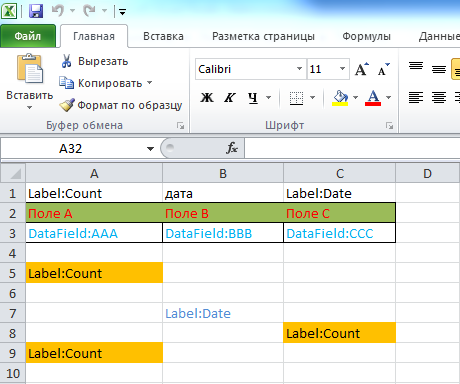
And an example of the downloaded data (how it will look in the end, after unloading).

Keywords:
DataField: - Means that at this point our baths will be displayed from the DataTable.
DataField: [name of the displayed field]
Label: - Means that at this point data will be displayed that must be inserted once from the
Label dictionary : [name of the key in the dictionary]
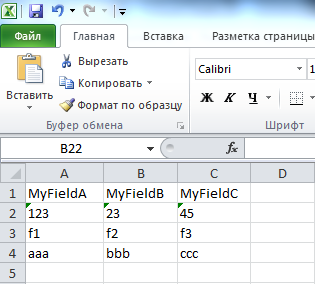
And this is the file from which we will read the data “C: \ Loading \ ReadMePlease .xlsx ”.
Now let's create in VS2010, the Solution in which there will be 4 projects:
1) OpenXmlPrj is a console project to run the test.
2) Interfaces is a project like “Class Library”, it will store our data interfaces for uploading.
3) Framework is a project of the type “Class Library”, here all work with Excel will take place.
4) Converter is a project of the type “Class Library”, for converting our data into DataTable (because work is done with DataTable).
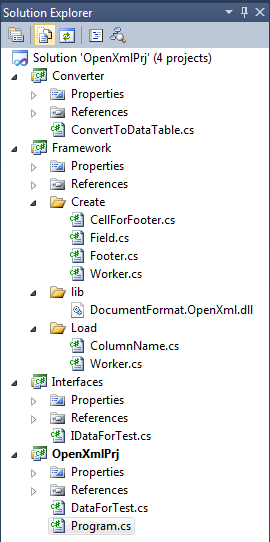
Now in the “Framework” project we create two folders and connect the link to the OpenXML and WindowsBase library:
“Create” - for working with data uploading .
“Load” - for working with data loading.
“Lib” - in the folder, add the OpenXML library.
In the “Create” folder we create 4 classes.
1) Worker - this will be our main handler.
2) Footer - will contain lines and their cells coming after our data.
3) CellForFooter - contains the coordinates of the cell and its value, it is used in the Footer.
4) Field - will contain the index of the row where the DataField is located, the coordinates of the cells with the DataField and the name of the field whose value should be displayed.
In the “Load” folder we create 2 classes.
1) Worker - this will be our main handler.
2) ColumnName - will be the name of the column for the loaded data.
In the “Interfaces” project, we will create the IDataForTest interface for our data.
In the “Converter” project, create the
ConvertToDataTable class - to convert our data to DataTable.
In the project “OpenXmlPrj”
There will be a class for executing the program “Program”.
And the class for our data is “DataForTest”.
And the project “OpenXmlPrj” needs to connect links to the following projects: Interfaces, Framework, Converter
Conditions for creating the template:
1. Excel sheet, be sure to be called “Sheet1” (well, or if you want to rename, you will need to change the name in the code too).
2. Names after the DataField: Must strictly match the column names in the DataTable.
3. The template should be saved in the “.xlsx” format.
Conditions for the file from which we will read the data:
1. Excel sheet, must be called “Sheet1” (well, or if you want to rename, then the code will need to change the name too).
2. The first line should contain the names of the columns by which we will then parse the data.
Link to the source, in GitHub.
It all started with the fact that at work, they instructed to leave MS Office for free analogues.
We already had an unloading system based on the Microsoft.Office library. Interop.Excel ”and many ready-made templates for uploading certain reports.
Therefore, it was necessary to find a free library that works with the office. And to make the unloading work according to the same system as before. Because I did not want to redo all the templates and structure.
So I came across OpenXML. And I thought, now I’ll quickly find a solution on the Internet and everything is ready (because little time was allocated for this). But I did not find a suitable solution, so I decided to write this article, for those who will have the same problem.
The library itself can be downloaded for free from the Micrisoft website (I used the OpenXML sdk 2.5 “OpenXMLSDKV25.msi” project)
here .
After downloading “OpenXMLSDKV25.msi”, install and go to the folder
“C: \ Program Files \ Open XML SDK \ V2.5 \ lib” there is a library that we need, we will connect it to the project (below we will describe how) .
The project was written in Visual Studio 2010 (Framework 4.0).
Below is an example of a template (made for the test) “C: \ Templates \ template.xlsx”.
And an example of the downloaded data (how it will look in the end, after unloading).
Keywords:
DataField: - Means that at this point our baths will be displayed from the DataTable.
DataField: [name of the displayed field]
Label: - Means that at this point data will be displayed that must be inserted once from the
Label dictionary : [name of the key in the dictionary]
And this is the file from which we will read the data “C: \ Loading \ ReadMePlease .xlsx ”.
Now let's create in VS2010, the Solution in which there will be 4 projects:
1) OpenXmlPrj is a console project to run the test.
2) Interfaces is a project like “Class Library”, it will store our data interfaces for uploading.
3) Framework is a project of the type “Class Library”, here all work with Excel will take place.
4) Converter is a project of the type “Class Library”, for converting our data into DataTable (because work is done with DataTable).
Now in the “Framework” project we create two folders and connect the link to the OpenXML and WindowsBase library:
“Create” - for working with data uploading .
“Load” - for working with data loading.
“Lib” - in the folder, add the OpenXML library.
In the “Create” folder we create 4 classes.
1) Worker - this will be our main handler.
class Create.Worker
using System;
using System.Collections.Generic;
using System.Diagnostics;
using System.Globalization;
using System.IO;
using System.Linq;
using System.Text.RegularExpressions;
using DocumentFormat.OpenXml;
using DocumentFormat.OpenXml.Packaging;
using DocumentFormat.OpenXml.Spreadsheet;
namespace Framework.Create
{
///
/// Создание Excel файла
///
public class Worker
{
///
/// путь к папке с шаблонами
///
private const String TemplateFolder = "C:\\Templates\\";
///
/// имя листа шаблона (с которым мы будем работать)
///
private const String SheetName = "Лист1";
///
/// тип документа
///
private const String FileType = ".xlsx";
///
/// Папка, для хранения выгруженных файлов
///
public static String Directory
{
get
{
const string excelFilesPath = @"C:\xlsx_repository\";
if (System.IO.Directory.Exists(excelFilesPath) == false)
{
System.IO.Directory.CreateDirectory(excelFilesPath);
}
return excelFilesPath;
}
}
public void Export(System.Data.DataTable dataTable, System.Collections.Hashtable hashtable, String templateName)
{
var filePath = CreateFile(templateName);
OpenForRewriteFile(filePath, dataTable, hashtable);
OpenFile(filePath);
}
private String CreateFile(String templateName)
{
var templateFelePath = String.Format("{0}{1}{2}", TemplateFolder, templateName, FileType);
var templateFolderPath = String.Format("{0}{1}", Directory, templateName);
if (!File.Exists(String.Format("{0}{1}{2}", TemplateFolder, templateName, FileType)))
{
throw new Exception(String.Format("Не удалось найти шаблон документа \n\"{0}{1}{2}\"!", TemplateFolder, templateName, FileType));
}
//Если в пути шаблона (в templateName) присутствуют папки, то при выгрузке, тоже создаём папки
var index = (templateFolderPath).LastIndexOf("\\", System.StringComparison.Ordinal);
if (index > 0)
{
var directoryTest = (templateFolderPath).Remove(index, (templateFolderPath).Length - index);
if (System.IO.Directory.Exists(directoryTest) == false)
{
System.IO.Directory.CreateDirectory(directoryTest);
}
}
var newFilePath = String.Format("{0}_{1}{2}", templateFolderPath, Regex.Replace((DateTime.Now.ToString(CultureInfo.InvariantCulture)), @"[^a-z0-9]+", ""), FileType);
File.Copy(templateFelePath, newFilePath, true);
return newFilePath;
}
private void OpenForRewriteFile(String filePath, System.Data.DataTable dataTable, System.Collections.Hashtable hashtable)
{
Row rowTemplate = null;
var footer = new List2) Footer - will contain lines and their cells coming after our data.
footer class
using System;
using System.Collections.Generic;
using DocumentFormat.OpenXml.Spreadsheet;
namespace Framework.Create
{
    public class Footer
    {
        ///
        /// строка
        ///
        public Row _Row { get; private set; }
        ///
        /// ячейки данной строки
        ///
        public List Cells { get; private set; }
        public Footer(Row row, Cell cell, String cellValue)
        {
            _Row = new Row((Row)row.Clone()) { RowIndex = row.RowIndex };
            var _Cell = (Cell)cell.Clone();
            _Cell.CellReference = cell.CellReference;
            Cells = new List { new CellForFooter(_Cell, cellValue) };
        }
        public void AddMoreCell(Cell cell, String cellValue)
        {
            var _Cell = (Cell)cell.Clone();
            _Cell.CellReference = cell.CellReference;
            Cells.Add(new CellForFooter(_Cell, cellValue));
        }
    }
}
3) CellForFooter - contains the coordinates of the cell and its value, it is used in the Footer.
class CellForFooter
using System;
using DocumentFormat.OpenXml.Spreadsheet;
namespace Framework.Create
{
    public class CellForFooter
    {
        ///
        /// ячейка
        ///
        public Cell _Cell { get; private set; }
        ///
        /// значение
        ///
        public String Value { get; private set; }
        public CellForFooter(Cell cell, String value)
        {
            _Cell = cell;
            Value = value;
        }
    }
}
4) Field - will contain the index of the row where the DataField is located, the coordinates of the cells with the DataField and the name of the field whose value should be displayed.
class Field
using System;
namespace Framework.Create
{
    public class Field
    {
        ///
        /// Индекс строки
        ///
        public uint Row { get; private set; }
        ///
        /// координаты колонки
        ///
        public String Column { get; private set; }
        ///
        /// название колонки, выводимых данных
        ///
        public String _Field { get; private set; }
        public Field(uint row, String column, String field)
        {
            Row = row;
            Column = column;
            _Field = field;
        }
    }
}
In the “Load” folder we create 2 classes.
1) Worker - this will be our main handler.
class Load.Worker
using System;
using System.Collections.Generic;
using System.IO;
using System.Linq;
using System.Text.RegularExpressions;
using DocumentFormat.OpenXml.Packaging;
using DocumentFormat.OpenXml.Spreadsheet;
namespace Framework.Load
{
///
/// Загрузка данных из Excel
///
public class Worker
{
///
/// имя листа (откуда будем читать данные)
///
private const String SheetName = "Лист1";
///
/// Подавать только файлы в формате .xlsx
///
///
/// ().Elements().SingleOrDefault(s => s.Name == SheetName);
}
catch (Exception ex)
{
throw new Exception(String.Format("Возможно в документе существует два листа с названием \"{0}\"!\n", SheetName), ex);
}
if (sheet == null)
{
throw new Exception(String.Format("В файле не найден \"{0}\"!\n", SheetName));
}
var relationshipId = sheet.Id.Value;
var worksheetPart = (WorksheetPart)document.WorkbookPart.GetPartById(relationshipId);
var sheetData = worksheetPart.Worksheet.GetFirstChild();
var firstRow = true;
var columsNames = new List();
foreach (Row row in sheetData.Elements())
{
if (firstRow)
{
columsNames.AddRange(GetNames(row, document.WorkbookPart));
data = GetTable(columsNames);
firstRow = false;
continue;
}
var item = data.NewRow();
foreach (var line in columsNames)
{
var coordinates = String.Format("{0}{1}", line.Liter, row.RowIndex);
var cc = row.Elements().SingleOrDefault(p => p.CellReference == coordinates);
if (cc == null)
{
throw new Exception(String.Format("Не удалось найти ячейку \"{0}\"!", coordinates));
}
item[line.Name.Trim()] = GetVal(cc, document.WorkbookPart);
}
data.Rows.Add(item);
}
}
return data;
}
private System.Data.DataTable GetTable(IEnumerable columsNames)
{
var teb = new System.Data.DataTable("ExelTable");
foreach (var col in columsNames.Select(columnName => new System.Data.DataColumn { DataType = typeof(String), ColumnName = columnName.Name.Trim() }))
{
teb.Columns.Add(col);
}
return teb;
}
private IEnumerable GetNames(Row row, WorkbookPart wbPart)
{
return (from cell in row.Elements()
where cell != null
let
text = GetVal(cell, wbPart)
where !String.IsNullOrWhiteSpace(text)
select
new ColumnName(text, Regex.Replace(cell.CellReference.Value, @"[\0-9]", ""))).ToList();
}
private string GetVal(Cell cell, WorkbookPart wbPart)
{
string value = cell.InnerText;
if (cell.DataType == null)
{
return value;
}
switch (cell.DataType.Value)
{
case CellValues.SharedString:
var stringTable =
wbPart.GetPartsOfType()
.FirstOrDefault();
if (stringTable != null)
{
value =
stringTable.SharedStringTable
.ElementAt(int.Parse(value)).InnerText;
}
break;
}
return value;
}
private void CheckFile(String path)
{
if (String.IsNullOrWhiteSpace(path) || !File.Exists(path))
{
throw new Exception(String.Format("Такого файла \"{0}\", не существует!", path));
}
}
}
}
| |
2) ColumnName - will be the name of the column for the loaded data.
class ColumnName
using System;
namespace Framework.Load
{
    public class ColumnName
    {
        ///
        /// название колонки, для загружаемых данных
        ///
        public String Name { get; private set; }
        ///
        /// буква колонки
        ///
        public String Liter { get; private set; }
        public ColumnName(string name, string liter)
        {
            Name = name;
            Liter = liter;
        }
    }
}
In the “Interfaces” project, we will create the IDataForTest interface for our data.
IDataForTest interface
using System;
namespace Interfaces
{
    public interface IDataForTest
    {
        String A { get; }
        String B { get; }
        String C { get; }
    }
}
In the “Converter” project, create the
ConvertToDataTable class - to convert our data to DataTable.
class ConvertToDataTable
using System;
using System.Collections;
using System.Collections.Generic;
using System.Data;
using Interfaces;
namespace Converter
{
    public class ConvertToDataTable
    {
        public DataTable ExcelTableLines(IEnumerable lines)
        {
            var dt = CreateTable();
            foreach (var line in lines)
            {
                var row = dt.NewRow();
                row["AAA"] = line.A;
                row["BBB"] = line.B;
                row["CCC"] = line.C;
                dt.Rows.Add(row);
            }
            return dt;
        }
        public Hashtable ExcelTableHeader(Int32 count)
        {
            var head = new Dictionary { { "Date", DateTime.Today.Date.ToShortDateString() }, { "Count", count.ToString() } };
            return new Hashtable(head);
        }
        private DataTable CreateTable()
        {
            var dt = new DataTable("ExelTable");
            var col = new DataColumn { DataType = typeof(String), ColumnName = "AAA" };
            dt.Columns.Add(col);
            col = new DataColumn { DataType = typeof(String), ColumnName = "BBB" };
            dt.Columns.Add(col);
            col = new DataColumn { DataType = typeof(String), ColumnName = "CCC" };
            dt.Columns.Add(col);
            return dt;
        }
    }
}
In the project “OpenXmlPrj”
There will be a class for executing the program “Program”.
class Program
using System;
using System.Collections.Generic;
using System.Data;
namespace OpenXmlPrj
{
    class Program
    {
        static void Main(string[] args)
        {
            //заполняем тестовыми данными
            var myData = new List
            {
                new DataForTest("a1","b1","c1"),
                new DataForTest("a2","b2","c2"),
                new DataForTest("a3","b3","c3"),
                new DataForTest("a4","b4","c4"),
                new DataForTest("a5","b5","c5")
            };
            var ex = new Converter.ConvertToDataTable();
            //ex.ExcelTableLines(myData) - конвертируем наши данные в DataTable
            //ex.ExcelTableHeader(myData.Count) - формируем данные для Label
            //template - указываем название нашего файла  - шаблона
            new Framework.Create.Worker().Export(ex.ExcelTableLines(myData), ex.ExcelTableHeader(myData.Count), "template");
            Console.WriteLine("Excel File Has Created!\nFor Read Data From Excel, press any key!");
            Console.ReadKey();
            //"C:\\Loading\\ReadMePlease.xlsx" - путь к файлу, с которого будем считывать данные (возвращяет нам DataTable)
            var dt = new Framework.Load.Worker().ReadFile("C:\\Loading\\ReadMePlease.xlsx");
            var myDataFromExcel = new List();
            //Заполняем наш объект, считанными данными из DataTable
            foreach (DataRow item in dt.Rows)
            {
                myDataFromExcel.Add(new DataForTest(item));
            }
            Console.WriteLine("---------- Data ---------------------");
            //Выводим считанные данные
            foreach (var line in myDataFromExcel)
            {
                Console.WriteLine("{0} | {1} | {2}", line.A, line.B, line.C);
            }
            Console.WriteLine("Done. Press any key, for exit!");
            Console.ReadKey();
        }
    }
}
And the class for our data is “DataForTest”.
class DataForTest
using System;
using System.Data;
using Interfaces;
namespace OpenXmlPrj
{
    public class DataForTest : IDataForTest
    {
        public String A { get; private set; }
        public String B { get; private set; }
        public String C { get; private set; }
        public DataForTest(String a, String b, String c)
        {
            A = a;
            B = b;
            C = c;
        }
        public DataForTest(DataRow item)
        {
            A = item["MyFieldA"].ToString();
            B = item["MyFieldB"].ToString();
            C = item["MyFieldC"].ToString();
        }
    }
}
And the project “OpenXmlPrj” needs to connect links to the following projects: Interfaces, Framework, Converter
Conditions for creating the template:
1. Excel sheet, be sure to be called “Sheet1” (well, or if you want to rename, you will need to change the name in the code too).
2. Names after the DataField: Must strictly match the column names in the DataTable.
3. The template should be saved in the “.xlsx” format.
Conditions for the file from which we will read the data:
1. Excel sheet, must be called “Sheet1” (well, or if you want to rename, then the code will need to change the name too).
2. The first line should contain the names of the columns by which we will then parse the data.
Link to the source, in GitHub.