November 25, 2013 at 12:39
ABCat: New version of the application for downloading and cataloging audio books

A month has passed since the publication of the first article .
On November 20, ABCat v2.1.1a was released , which included quite a few changes:
- SQL CE + EF 6.0.1 replaced by SQLite.Net-PCL
- Application logic is untied from data storage features
- Significantly redesigned configuration system
- Audiobook download plugin improved
- AutoCorrect list editing plugin improved
- Added error logging
- Simplify application deployment
- Many changes under the hood
Installation and Startup Procedure
- Download archive with release
- Unzip the archive
- Run ABCat.exe
- At the first start, a configuration window will appear - configure everything you need, click "save" in the configuration window
- Use
Change DB and ORM
According to the results of the operation of version 2.0.1a, it turned out that most of the problems for users arise with SQL Compact Edition. Despite the fact that portable versions of the DLL were included in the application release, most users still needed to install the SQL CE engine in the system. Someone even had to remove SQL CE 4.0 from the system and install SQL CE 4.0 to start the application.

Some failed to start at all and no manipulations with SQL CE helped.
Given all this, as well as the fact that SQL CE itself can in fact be considered dead, it was decided to replace it with another embedded database - SQLite. Looking for ways to get Entity Framework 6.0.1 on SQLite, I came across a SQLite.Net-PCL project. This is quite primitive in terms of ORM functionality, but its capabilities for ABCat turned out to be quite enough. The performance tests (without numbers - by eye) were more than impressive. Even on primitive operations such as adding objects to the database, a speed increase was obtained, which was measured not in percent, but in times. I don’t know what exactly caused such an increase - by replacing SQL CE with SQLite or EF with SQLite.Net-PCL. Most likely both.
The big surprise was the reduction of the database file. The cached page file, which, according to SQL CE, weighed 200+ MB, lost almost 60 megabytes.
SQLite.Net-PCL has no tracking of object changes, support for bulk operations, selective bulk removal of objects, multi-threaded access to the database file, etc. These things had to be implemented independently.
Of the negative consequences of the transition is the loss of database compatibility with the previous release of ABCat. There are no tools to import old AutoCorrect settings. If someone has a lot of settings left in the first version - let me know - you can write a utility for conversion. The brave ones can try to transfer data from the old database to the new one manually - the logical structure of the bases has not changed.
Moving DAL to the plugin, decoupling the main logic from the features of data storage
In the process of moving to a new ORM, I rethought the architecture of the application. In order not to tie the main logic of the application to the features of one particular database, I put the entire DAL into a separate plugin. From this point on, you can add plugins to support other databases without changing the logic of other plugins.
Configuration
The next major change was the application configuration system. Before the release of the previous version, I thought that the Habrachians, although technically savvy people, would still make people picking XML files to configure the application would be inhumane. Therefore, I spent a couple of hours then and blinded the system settings window. It worked according to logic that was not understandable to anyone (even to me), it possessed the rudiments of intelligence and free will. Many complained that such a window is not the best way to meet a new user of the system. In the new version, I decided to completely redo the configuration system.
ABCat is built on plugins, so with the settings, everything is quite difficult. Plugins can disappear and appear, each of them has its own specific settings for customization, so you can’t do with one configuration file. In the new version, plugins received individual settings. A single window is still responsible for configuring the application, but now it contains several sections, for each plugin separately. The system for checking the correctness of settings has also undergone changes and now correctly processes various situations, such as the absence of files and folders.
New configuration window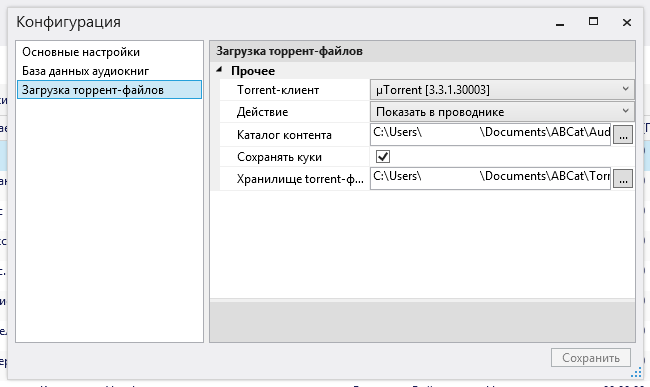
Download audiobooks
The plugin for loading audiobooks has become smarter. Previously, you had to specify the path to uTorrent in order to be able to start the download.
Now in the settings you can select the action that will be performed on the downloaded torrent file:
- Just show in explorer. For those who feed NAS torrent files, and do not use clients on the PC.
- Perform a system action. After downloading, the torrent file will simply be launched for execution and the OS will automatically perform the action associated with this file type
- Start the download in the torrent client. This is exactly the action that was the only possible in the first version. The torrent client will be launched with command line parameters and download will start automatically. You no longer need to specify the path to the torrent client - ABCat loads the list of installed torrent clients from the registry and you just need to select your preferred client from the combobox in the settings window. Added support for BitTorrent.
Reauthorization to rutracker takes place using stored cookies.
Other changes in brief
To log errors, NLog was screwed.
The next change was the abandonment of MahApps.Metro. This library provided styling for the look of the application. Perhaps the developer will at some point finalize it to its normal state, but at the moment I have encountered many inexplicable problems, starting from the inability to change the color of the window title (no matter how I tried to follow the instructions, it ended up with black rectangles instead of pop-ups hints. By and large, I only needed to stylize the application title (which by default for WPF is for some reason styled as a Windows 7 window), and this task was solved in a different way, without using third-party components.
In addition, the editing control of AutoCorrect lists was revised. The viewer and editor were combined in one window, buttons appeared for deleting elements.
Quickly delete items in the AutoCorrect editor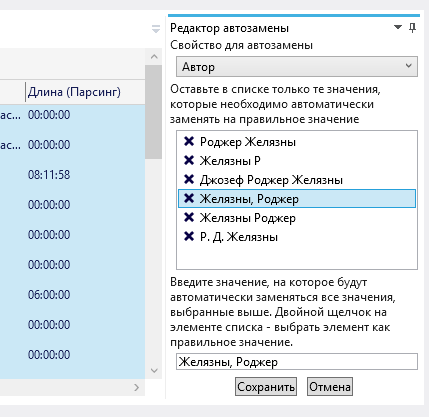
Quickly delete items in the AutoCorrect list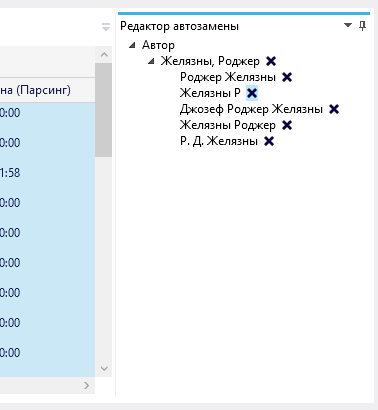
A conditional coloring of the lines appeared in the list of entries. Entries added to the list in the last 24 hours are colored green, last week yellow. Entries not updated for more than 30 days are colored in red.
Added 2 more options for the logic of grouping records.
Many small changes occurred under the hood, so I will not dwell on them in detail.
To run the application, you no longer need to download any additional files - the release already has start databases.
References
Project page on codeplex Report
all problems here
Sources I
thank everyone who reported errors, made suggestions for improvements and tested the intermediate versions.
Special thanks to romantk , SlavasssR and ItGold .
The application still does not ask for money, donates, does not show ads and does not offer to install a panel for the browser or the “defender” of the system. Please understand the possible errors and shortcomings.
Before downloading a book, make sure that the author of the release has taken care of the copyright to it.
And do not leave the distribution.