 December 3, 2013 at 03:55
How I made the perfect media player from Apple TV
I want to tell how I made a media player for myself based on the old first-generation Apple TV. It turned out the device is fully suitable for my requirements.
Description of the standard set-top box configuration:
Processor: 1 GHz Intel “Crofton” Pentium M
Memory: 256 MB 400 MHz DDR2 SDRAM
Storage: 40 or 160 GB hard disk
Graphics: Nvidia GeForce Go 7300 with 64 MB VRAM
Communication: Wi-Fi (802.11b / g and draft-n), 10/100 Ethernet
A modified OS X v10.4 build with Front Row pulled over it was installed as the operating system.
This configuration was not enough to play small 720p videos, most video files of even this format were impossible to watch. Ordinary films of size 1.4 - 3 Gb and a little more were played with a bang. For 2007, it was cool, but now it’s not at all the case. The system is very weak.
And all that could be done with the console itself was to buy / rent movies, watch trailers, and later, the function of viewing content from Youtube in low quality was added. It was possible to synchronize content with iTunes, data was stored on the hard drive.
To stream content from devices via AirPlay, if I am not mistaken, it was impossible for the first Apple TVs. I don’t remember exactly.
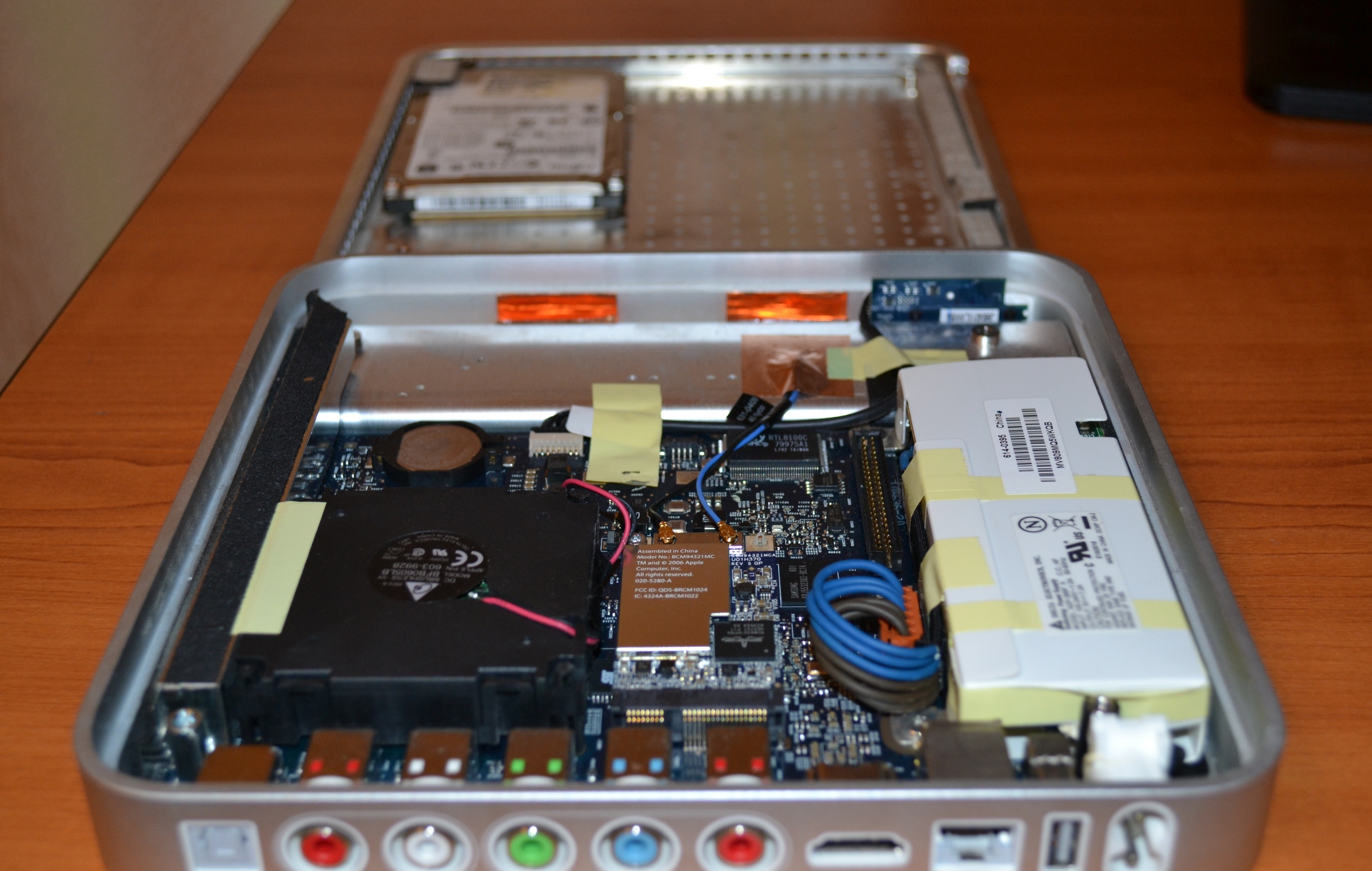
Inside there is a cooler and a hard drive, so the console made quite a noticeable noise, it was heard very well at night. Sometimes I had to turn off the console before going to bed.
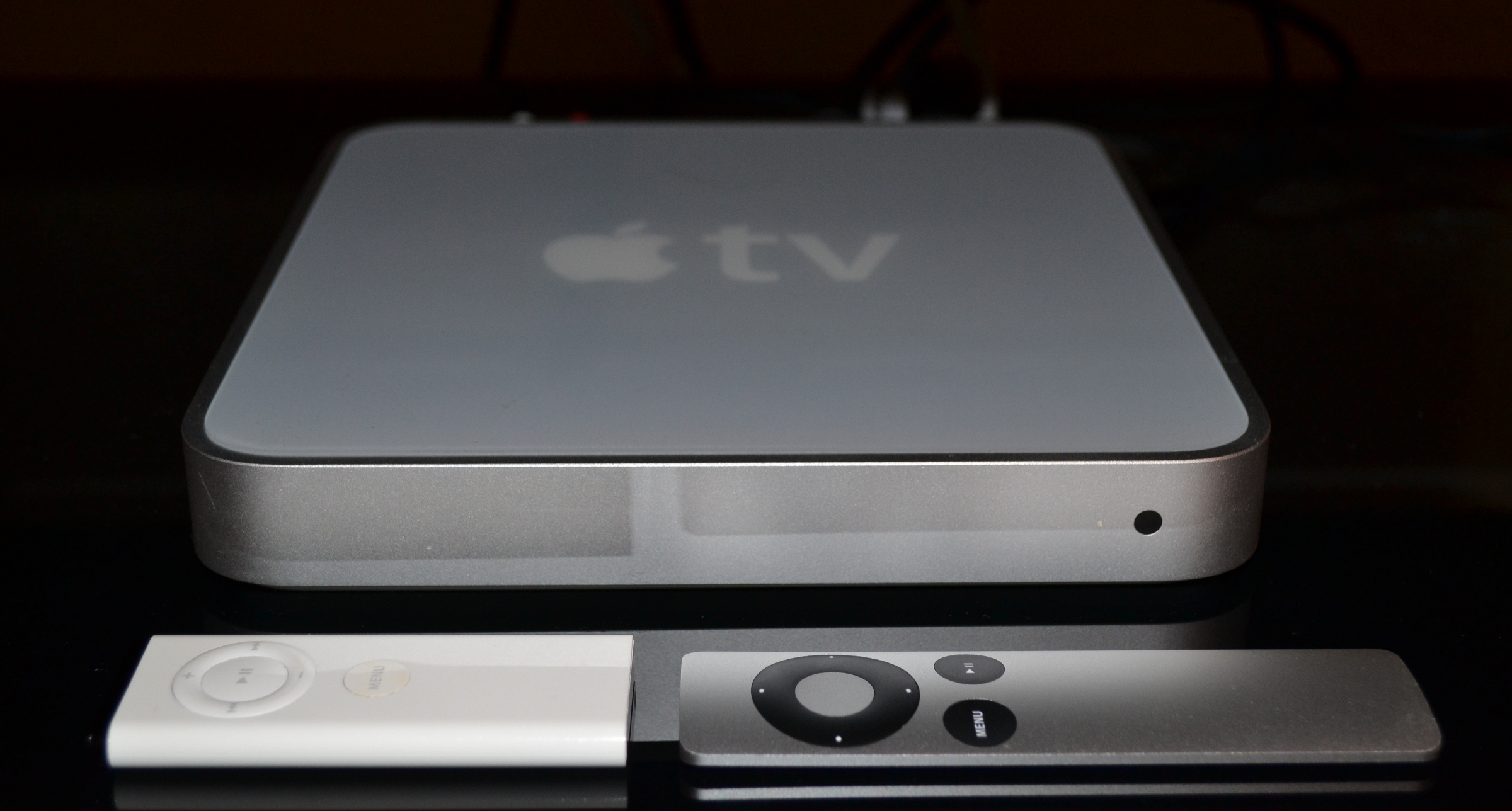
The device itself is quite beautiful and ergonomic, convenient remote control, there are all the necessary outputs - RCA (sound and video), HDMI, SPDIF, USB (only for service use, it was impossible to connect drives).

This is what the device looks like before the intervention:
What was done:
1) The operating system was replaced. Once upon a time, brave guys made atv-bootloader, which allowed you to boot Linux on this console, and then a young guy Sam Nazarko made a ready-made Ubuntu-based operating system with XBMC, which was easily installed on Apple TV. This miracle is called Crystalbuntu . The project has a website and a large forum where problems and wishes are discussed. Here are the source files.
The same person makes the finished assembly of Raspbmc for Raspberry.
The first version was on Ubuntu 8.04 and the 2.6 kernel . About a year ago, test builds appeared on 12.04 and the 3.2.27 kernel , and then a full version of Crystalbuntu 2 came out. Installation is reduced to connecting a flash drive with an image and rebooting. You can install the system on the same flash drive without touching the internal hard drive, but you can install it on the internal hard drive. The second way is better, the system will work faster.
The installer labels the disks itself, configures the system, downloads the latest version of XBMC and the necessary libraries.
After installing Linux, the prefix became much faster, 720p videos began to play better, but still in most cases the power was not enough to play more or less decent content. Now you can watch videos from network drives, connect external drives, watch videos from the Internet directly.
XBMCopened many new features for the console, a huge number of plug-ins are available, convenient to use, it looks more beautiful.
2) Removed all noisy elements - cooler and hard drive, boot from a flash drive was used, the console was not heard, absolutely. It is not worth worrying about cooling; the regular cooler did not do much. Over the years, nothing bad has happened.
3) Added hardware video decoder . Broadcom has an amazing BCM970015 Crystal HD card . The decoder can easily decode huge 1080p video files. This board replaces the BCM970012 and can hardware-process video H.264 / AVC, MPEG-2, VC-1, WMV9, MPEG-4, DivX®, Xvid, AVS and also Flash.
With it it became possible to watch videos of any quality, the console plays 30-gigabyte movies without problems. Now you can watch content directly online - there are a lot of plug-ins for this in XBMC. YouTube videos play in any quality.
The card is inserted instead of a Wi-Fi card (of the same manufacturer - Broadcom :)) in the mini-PCI slot. This deprives ourselves of wireless communication, if necessary, you can use an external card via usb.
4) Installed SSD . With the USB flash drive, the console works fine, but still not as fast as it could. After replacing with an SSD, the difference is very noticeable, it loads and works very quickly, all menu transitions are very smooth, there are no more delays associated with the file system.
The console has only an IDE connector (44-pin), so finding the right drive was more difficult. On eBay you can find a 2 "5 IDE SSD drive that would replace the old one, but the choice has become even better - the DOM drive. This is a board with soldered memory modules that plugs directly into the IDE slot. Such boards are used in all kinds of embedded solutions - cash registers, machine tools, etc.
We need about 2Gb of memory for a ready-made operating system, that's why the Kingspec 8Gb drive was enough for us. I still had to connect via the cable, and not directly to the board, because the lock on the IDE connector was not turned in the direction I needed and the board did not fit against the power supply. It was necessary to check right away, but the connection through the loop was fine with me.
5) Purchased a new remote. The first consoles had an old plastic remote control. The new consoles are solid aluminum, very beautiful, look more suitable for the console. Although, as it turned out over time, it’s more convenient to use old plastic.
This is what the device looks like after the intervention:
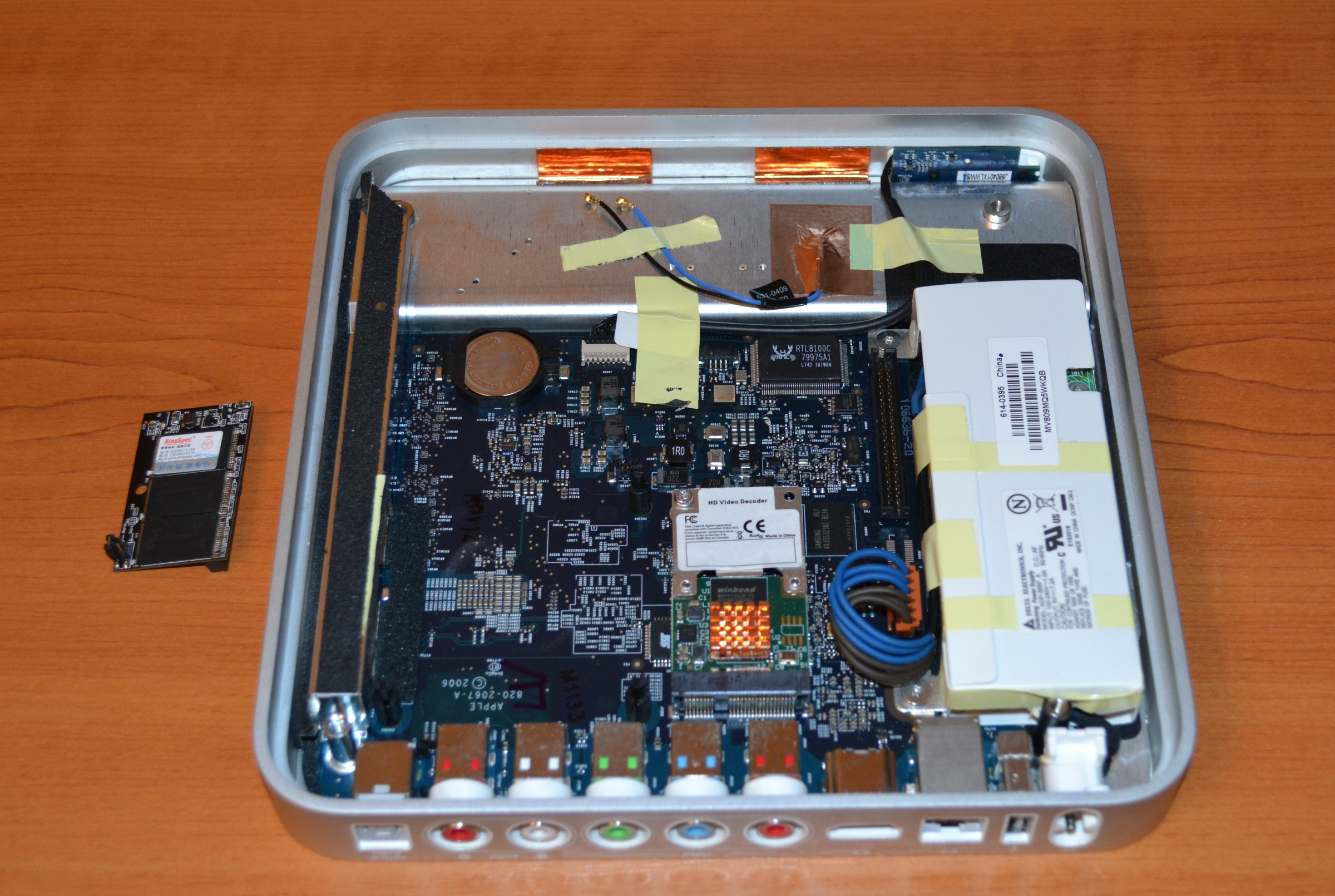
(on the left - this is the SSD)
My entire media connection is stored on the NAS, which, like the set-top box, is connected to the gigabit switch via ethernet, the network speed is enough to write to the NAS and read from it with the HD prefix Films, never had a problem. XBMC can read from any sources - NFS, SMB, FTP, UPnP, you can pick up content from several sources.
It was a very pleasant opportunity to watch content directly from the Internet. We have ex.ua and fs.ua sites in Ukraine for which there are XBMC plugins. For a long time I haven’t downloaded series and many films, everything can be found there, Internet speed is enough to watch movies in HD quality without downloading. Links to your favorite TV shows are easily added to your Favorites directly from the plugin, then they are easily selected before viewing from the XBMC menu.
More goodies: AirPlay
works , there are a bunch of applications for controlling XBMC using a smartphone. There is also a very nice thing - a browser plugin that allows you to send video from YouTube directly to the console. There are plugins for IPTV. A repository of plugins for the Russian-speaking population of seppius-xbmc-repo has been added , it has a huge variety of plug-ins - online TV shows (sites with thousands of TV shows), online television, radio, video jokes, training sites ...
Yes, and in the standard list of XBMC there are plugins for every taste - TED Talks, game channels, VimCasts (Vim lessons), Mosfilm archive ...
MPD is installed . The Apple TV has a music ball mounted directly from the NAS and is added to the MPD. Now all home computers can play music over the network. The sound system is connected to the console, so now you do not need to bother with the choice of the sound source on the speakers, all the music is collected in one place.
As for the overall system load. The processor frequency is automatically adjusted from 600 to 1000 MHz, when watching most films, the frequency does not rise above 600 MHz , while the processor is only half loaded on average.

Here is the system load when viewing a file of size 9Gb, 720p, average CPU load ~ 45%

When viewing a file with a size of 15Gb, 1080p, the average CPU load is ~ 70%. The processor frequency is still 600 MHz.
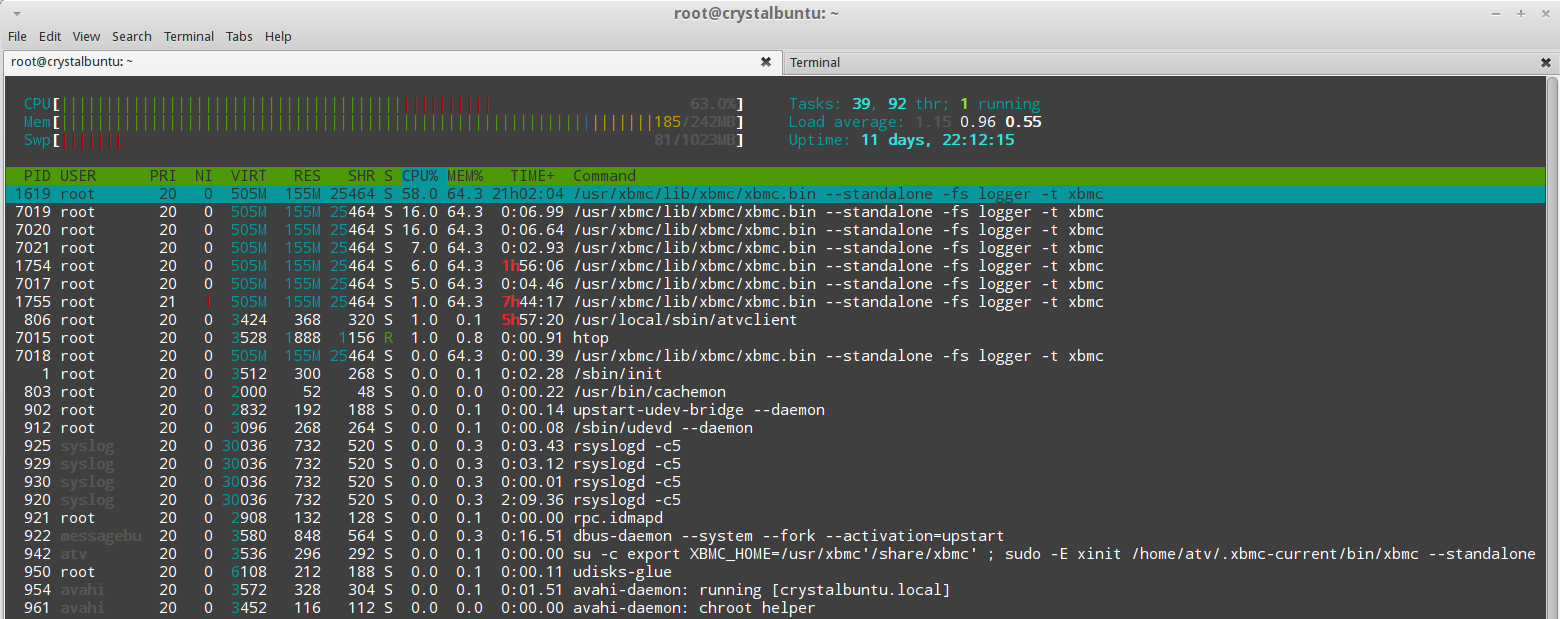
There is not much memory in the system, therefore, just in case, 1Gb of memory with SSD for swap is allocated.
Also, a good USB sound card was connected to the system, but I did not particularly notice the difference in sound and the card was returned back to the desktop computer for use with headphones. Probably you need a more expensive audio system and better hearing to hear the difference.
Cons : there is no hardware button to turn off the console. You can buy a socket with a switch, but your hands do not reach, there is no special need, the prefix is always on.
Also there is no Russian layout in the search menu, but on the hub there is a person with an article who made patches. Russian search is not often needed, but still needed, it will also need to take time and do it.
Description of the standard set-top box configuration:
Processor: 1 GHz Intel “Crofton” Pentium M
Memory: 256 MB 400 MHz DDR2 SDRAM
Storage: 40 or 160 GB hard disk
Graphics: Nvidia GeForce Go 7300 with 64 MB VRAM
Communication: Wi-Fi (802.11b / g and draft-n), 10/100 Ethernet
A modified OS X v10.4 build with Front Row pulled over it was installed as the operating system.
This configuration was not enough to play small 720p videos, most video files of even this format were impossible to watch. Ordinary films of size 1.4 - 3 Gb and a little more were played with a bang. For 2007, it was cool, but now it’s not at all the case. The system is very weak.
And all that could be done with the console itself was to buy / rent movies, watch trailers, and later, the function of viewing content from Youtube in low quality was added. It was possible to synchronize content with iTunes, data was stored on the hard drive.
To stream content from devices via AirPlay, if I am not mistaken, it was impossible for the first Apple TVs. I don’t remember exactly.
Inside there is a cooler and a hard drive, so the console made quite a noticeable noise, it was heard very well at night. Sometimes I had to turn off the console before going to bed.
The device itself is quite beautiful and ergonomic, convenient remote control, there are all the necessary outputs - RCA (sound and video), HDMI, SPDIF, USB (only for service use, it was impossible to connect drives).
This is what the device looks like before the intervention:
What was done:
1) The operating system was replaced. Once upon a time, brave guys made atv-bootloader, which allowed you to boot Linux on this console, and then a young guy Sam Nazarko made a ready-made Ubuntu-based operating system with XBMC, which was easily installed on Apple TV. This miracle is called Crystalbuntu . The project has a website and a large forum where problems and wishes are discussed. Here are the source files.
The same person makes the finished assembly of Raspbmc for Raspberry.
The first version was on Ubuntu 8.04 and the 2.6 kernel . About a year ago, test builds appeared on 12.04 and the 3.2.27 kernel , and then a full version of Crystalbuntu 2 came out. Installation is reduced to connecting a flash drive with an image and rebooting. You can install the system on the same flash drive without touching the internal hard drive, but you can install it on the internal hard drive. The second way is better, the system will work faster.
The installer labels the disks itself, configures the system, downloads the latest version of XBMC and the necessary libraries.
After installing Linux, the prefix became much faster, 720p videos began to play better, but still in most cases the power was not enough to play more or less decent content. Now you can watch videos from network drives, connect external drives, watch videos from the Internet directly.
XBMCopened many new features for the console, a huge number of plug-ins are available, convenient to use, it looks more beautiful.
2) Removed all noisy elements - cooler and hard drive, boot from a flash drive was used, the console was not heard, absolutely. It is not worth worrying about cooling; the regular cooler did not do much. Over the years, nothing bad has happened.
3) Added hardware video decoder . Broadcom has an amazing BCM970015 Crystal HD card . The decoder can easily decode huge 1080p video files. This board replaces the BCM970012 and can hardware-process video H.264 / AVC, MPEG-2, VC-1, WMV9, MPEG-4, DivX®, Xvid, AVS and also Flash.
With it it became possible to watch videos of any quality, the console plays 30-gigabyte movies without problems. Now you can watch content directly online - there are a lot of plug-ins for this in XBMC. YouTube videos play in any quality.
The card is inserted instead of a Wi-Fi card (of the same manufacturer - Broadcom :)) in the mini-PCI slot. This deprives ourselves of wireless communication, if necessary, you can use an external card via usb.
4) Installed SSD . With the USB flash drive, the console works fine, but still not as fast as it could. After replacing with an SSD, the difference is very noticeable, it loads and works very quickly, all menu transitions are very smooth, there are no more delays associated with the file system.
The console has only an IDE connector (44-pin), so finding the right drive was more difficult. On eBay you can find a 2 "5 IDE SSD drive that would replace the old one, but the choice has become even better - the DOM drive. This is a board with soldered memory modules that plugs directly into the IDE slot. Such boards are used in all kinds of embedded solutions - cash registers, machine tools, etc.
We need about 2Gb of memory for a ready-made operating system, that's why the Kingspec 8Gb drive was enough for us. I still had to connect via the cable, and not directly to the board, because the lock on the IDE connector was not turned in the direction I needed and the board did not fit against the power supply. It was necessary to check right away, but the connection through the loop was fine with me.
5) Purchased a new remote. The first consoles had an old plastic remote control. The new consoles are solid aluminum, very beautiful, look more suitable for the console. Although, as it turned out over time, it’s more convenient to use old plastic.
This is what the device looks like after the intervention:
(on the left - this is the SSD)
My entire media connection is stored on the NAS, which, like the set-top box, is connected to the gigabit switch via ethernet, the network speed is enough to write to the NAS and read from it with the HD prefix Films, never had a problem. XBMC can read from any sources - NFS, SMB, FTP, UPnP, you can pick up content from several sources.
It was a very pleasant opportunity to watch content directly from the Internet. We have ex.ua and fs.ua sites in Ukraine for which there are XBMC plugins. For a long time I haven’t downloaded series and many films, everything can be found there, Internet speed is enough to watch movies in HD quality without downloading. Links to your favorite TV shows are easily added to your Favorites directly from the plugin, then they are easily selected before viewing from the XBMC menu.
More goodies: AirPlay
works , there are a bunch of applications for controlling XBMC using a smartphone. There is also a very nice thing - a browser plugin that allows you to send video from YouTube directly to the console. There are plugins for IPTV. A repository of plugins for the Russian-speaking population of seppius-xbmc-repo has been added , it has a huge variety of plug-ins - online TV shows (sites with thousands of TV shows), online television, radio, video jokes, training sites ...
Yes, and in the standard list of XBMC there are plugins for every taste - TED Talks, game channels, VimCasts (Vim lessons), Mosfilm archive ...
MPD is installed . The Apple TV has a music ball mounted directly from the NAS and is added to the MPD. Now all home computers can play music over the network. The sound system is connected to the console, so now you do not need to bother with the choice of the sound source on the speakers, all the music is collected in one place.
As for the overall system load. The processor frequency is automatically adjusted from 600 to 1000 MHz, when watching most films, the frequency does not rise above 600 MHz , while the processor is only half loaded on average.
Here is the system load when viewing a file of size 9Gb, 720p, average CPU load ~ 45%
When viewing a file with a size of 15Gb, 1080p, the average CPU load is ~ 70%. The processor frequency is still 600 MHz.
There is not much memory in the system, therefore, just in case, 1Gb of memory with SSD for swap is allocated.
Also, a good USB sound card was connected to the system, but I did not particularly notice the difference in sound and the card was returned back to the desktop computer for use with headphones. Probably you need a more expensive audio system and better hearing to hear the difference.
Cons : there is no hardware button to turn off the console. You can buy a socket with a switch, but your hands do not reach, there is no special need, the prefix is always on.
Also there is no Russian layout in the search menu, but on the hub there is a person with an article who made patches. Russian search is not often needed, but still needed, it will also need to take time and do it.









