The history of the creation of cross-platform mobile application
Fierce competition in the mobile platform market no longer allows the release of applications focused on one operating system, which puts developers with a difficult choice. They should choose between developing native applications for each OS (in their native programming languages for each of them), developing as a website for mobile devices using HTML5, or creating applications using frameworks for cross-platform development.
In this article we want to tell the story of creating a cross-platform mobile solution for airports, as well as provide interesting statistics.
Our first client was the Kiev Boryspil International Airport. The peculiarity of the developed product was that it was adapted to the corporate style of the customer and successfully published in stores. It is interesting that Kiev Boryspil Airport became the first owner of a modern mobile application in Ukraine. Nevertheless, it is worth starting from the very beginning.
The industry of passenger air transportation is constantly evolving, thanks to which the latest technologies are introduced to increase passenger comfort. All over the world, the availability of a mobile application at airports has already become a matter of course, but, oddly enough, this practice is not common in Ukraine. That is why we had the idea to create a boxed solution that can easily interact with airport information systems and adapt to customer requirements.
The main functionality of the system should include: an online flight display, push notifications of the user when changes are made in the flights he is interested in, as well as the popularization of other airport services (conference rooms, VIP services, taxis, hotels, shops and more).
Considering the great experience of our employees in creating applications in C #, we chose the approach of developing the client part of the application using the Xamarin framework . All work was done in Visual Studio. And if for Windows phone and Windows 8 development in Visual Studio is the default tool, then for Android and iOS this feature became available thanks to Xamarin (this requires a business license).
One of the main tasks set for the system was to create a user experience of working online. The user must fully trust the displayed data without thinking that they are periodically updated. In addition, when designing the system, it was decided to create a single client-side kernel for all operating systems, in which all business logic will be implemented.
Unlike a single implementation of client business logic, for each platform it was necessary to create its own graphical interface (code), which would be responsible for the appearance of the application. We created such an interface separately for each platform in order to use graphic effects native to each OS.
Xamarin allows you to use standard development tools for the user interface and its elements for iOS and Android.
It is worth noting that in order to develop a solution for iOS, you need a Mac anyway. In our case, the Mac was required for two reasons: firstly, to debug applications, you need an iPhone / iPad emulator, which is available only on Mac; secondly, this operating system was necessary for the auto-assembly of the project.
Given the need to universalize the application, when designing, we came to the conclusion that the optimal solution would be to place the server part in the cloud. As a cloud platform, a solution from Microsoft was chosen - Windows Azure.
Working with him was very convenient and quite easy. Among the positive aspects of working with Azure, we want to highlight the following:
1) Convenient deployment of the system in the cloud There
are two ways to deploy applications in Windows Azure - using the Windows Azure portal or the Service Management API (SMAPI).
2) Convenient mechanism for test deployment
There are two deployment cells - test (staging) and combat (production). Test deployment allows you to test your application in a Windows Azure environment before deploying it to a production environment. In turn, switching between staging and production is done in one click.
Since in Windows Azure the amount of payment depends on the spent processor time, it is necessary to remove staging deployments to optimize costs. If you just click the “Stop” button in the portal, the service will become unavailable, but at the same time the processor time will be consumed.
It is worth noting that in our case, the savings amounted to more than $ 100 per month.
As a fly in the ointment, Microsoft says that in Windows Azure it is inconvenient to work with logs. Of course, paid solutions can be used for logs, since working with their Table Storage is very inconvenient.
To transfer data from the airport system to our application, we have chosen, perhaps, not the most convenient and safe method, but, in turn, the fastest and less costly for the customer - transfer of xml-files via ftp-server. For example, the airport generates an xml file with the specified frequency with information about all flights associated with passenger air transportation and uploads it to the ftp server.
Pros:
Minuses:
It is also worth paying attention to sending push notifications to users. Among the features you need to name the following:
Kiev Boryspil Airport wanted to get an application available on all popular smartphones (iOS, Android, Windows phone), as well as tablets running Windows 8.
We previously had no experience publishing applications in Microsoft stores, however, the publication was successful. After only a few days, the application was already available in the store.
Publishing to the AppStore also went smoothly, but going through all the steps took a week.
Publishing on GooglePlay was the easiest and fastest. After filling in all descriptive attributes and attaching the package (apk-file), the application was assigned the status of “Published”. In the "New" section and in the search for a store, it became available within a few hours. Most likely, the delay is due to updating the data of the store itself.
Inspired by the simplicity of publishing in the Windows phone store, we expected the same in working with Windows 8. However, when publishing, there were some difficulties.
The first system failure we received with the wording:
As it turned out, a prerequisite for any application with Internet access is the existence of a privacy policy not only in the store, but also in the application settings.
Such a message was unexpected, since screenshots were taken in all necessary languages. Nevertheless, we assume that during the calculation one of the screenshots turned out to be 1 pixel smaller than necessary and as a result was changed in the graphics editor. When republishing, the error was fixed.
The second rejection was received with the wording:
This result greatly surprised us, since the application was completely free of ads. Without any changes, we sent it for re-certification. As a result, its application has passed.
The approach chosen, like everything else in this world, has both advantages and disadvantages. Among the advantages I would especially like to highlight the following:
The disadvantages of the chosen approach are as follows:
For comparison, the application size is as follows:
The Kiev Borispol application is a niche application. Its target audience is airport passengers, as well as people meeting and escorting them.
Please note that the advertising promotion of the application was not performed. The airport marketing department has only published two review articles in the media. At the time of this writing, there was no advertisement at the airport or even a running line on the screens.
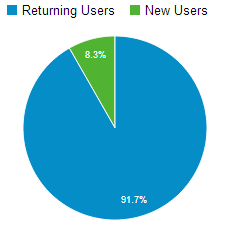
On average, daily among all users:
Of course, we are a little surprised by such a tightness on all OSs, since the published data of the analytical company Strategy Analytics indicate that there are several times fewer devices running Windows.
The graph clearly shows that publication in the media affects the downloading of the application for about a month. At the peak, there were about 1,000 installations per day for iOS only.
The statistics on these indicators came as a complete surprise to us:
We know that all developers are interested in how many man-hours were spent on the project. However, this data is almost never shared publicly.
Some may say that the costs were too high and could be reduced, but the apparent ease of the application is actually misleading. A very complicated but thoughtful work was done. In particular, during this time a lot of functionality was implemented, such as, for example: offline work, data caching, a system for managing content (all data that is displayed in the application is downloaded from the server and cached on the client) and more. In addition, a lot of functionality was implemented, which is critical for the system, although at first glance it may not be noticeable.
The result of large-scale work was the creation of a unique high-quality solution, which is also easy to adapt to all requirements and wishes of the customer. But the most important thing is that it has become possible to quickly expand the system (both its functionality and user load).
PS We will be grateful for the answers to such questions:
In this article we want to tell the story of creating a cross-platform mobile solution for airports, as well as provide interesting statistics.
Our first client was the Kiev Boryspil International Airport. The peculiarity of the developed product was that it was adapted to the corporate style of the customer and successfully published in stores. It is interesting that Kiev Boryspil Airport became the first owner of a modern mobile application in Ukraine. Nevertheless, it is worth starting from the very beginning.
The industry of passenger air transportation is constantly evolving, thanks to which the latest technologies are introduced to increase passenger comfort. All over the world, the availability of a mobile application at airports has already become a matter of course, but, oddly enough, this practice is not common in Ukraine. That is why we had the idea to create a boxed solution that can easily interact with airport information systems and adapt to customer requirements.
The main functionality of the system should include: an online flight display, push notifications of the user when changes are made in the flights he is interested in, as well as the popularization of other airport services (conference rooms, VIP services, taxis, hotels, shops and more).
Development of the client part of the solution
Considering the great experience of our employees in creating applications in C #, we chose the approach of developing the client part of the application using the Xamarin framework . All work was done in Visual Studio. And if for Windows phone and Windows 8 development in Visual Studio is the default tool, then for Android and iOS this feature became available thanks to Xamarin (this requires a business license).
One of the main tasks set for the system was to create a user experience of working online. The user must fully trust the displayed data without thinking that they are periodically updated. In addition, when designing the system, it was decided to create a single client-side kernel for all operating systems, in which all business logic will be implemented.
Unlike a single implementation of client business logic, for each platform it was necessary to create its own graphical interface (code), which would be responsible for the appearance of the application. We created such an interface separately for each platform in order to use graphic effects native to each OS.
Xamarin allows you to use standard development tools for the user interface and its elements for iOS and Android.
It is worth noting that in order to develop a solution for iOS, you need a Mac anyway. In our case, the Mac was required for two reasons: firstly, to debug applications, you need an iPhone / iPad emulator, which is available only on Mac; secondly, this operating system was necessary for the auto-assembly of the project.
Development of the server side of the solution
Given the need to universalize the application, when designing, we came to the conclusion that the optimal solution would be to place the server part in the cloud. As a cloud platform, a solution from Microsoft was chosen - Windows Azure.
Working with him was very convenient and quite easy. Among the positive aspects of working with Azure, we want to highlight the following:
1) Convenient deployment of the system in the cloud There
are two ways to deploy applications in Windows Azure - using the Windows Azure portal or the Service Management API (SMAPI).
2) Convenient mechanism for test deployment
There are two deployment cells - test (staging) and combat (production). Test deployment allows you to test your application in a Windows Azure environment before deploying it to a production environment. In turn, switching between staging and production is done in one click.
Since in Windows Azure the amount of payment depends on the spent processor time, it is necessary to remove staging deployments to optimize costs. If you just click the “Stop” button in the portal, the service will become unavailable, but at the same time the processor time will be consumed.
It is worth noting that in our case, the savings amounted to more than $ 100 per month.
As a fly in the ointment, Microsoft says that in Windows Azure it is inconvenient to work with logs. Of course, paid solutions can be used for logs, since working with their Table Storage is very inconvenient.
Features of the server system functionality
To transfer data from the airport system to our application, we have chosen, perhaps, not the most convenient and safe method, but, in turn, the fastest and less costly for the customer - transfer of xml-files via ftp-server. For example, the airport generates an xml file with the specified frequency with information about all flights associated with passenger air transportation and uploads it to the ftp server.
Pros:
- simplicity and speed of implementation
- reducing the amount of logic from the airport, which reduces the likelihood of data errors
- reduction in the number and duration of approvals.
Minuses:
- the inability to prevent all disruptions from the airport
- FTP security
- since Windows Azure does not have a service such as FTP, the ftp server must be deployed at the customer’s
- a system that receives data from FTP has a dynamic IP address, so access to information should be limited by the address pool of the Azure cloud or the domain name of the service.
It is also worth paying attention to sending push notifications to users. Among the features you need to name the following:
- push-notification services do not guarantee delivery to the client, and therefore, with a bad Internet channel, there is a possibility of message loss
- the order of delivery of notifications does not depend on the order of sending
- on a Wi-Fi network, you must open special ports for the delivery of push notifications (in the event that the security policy is based on the principle of "prohibit everything and allow only the right one").
Publication Features
Kiev Boryspil Airport wanted to get an application available on all popular smartphones (iOS, Android, Windows phone), as well as tablets running Windows 8.
Windows phone
We previously had no experience publishing applications in Microsoft stores, however, the publication was successful. After only a few days, the application was already available in the store.
iOS
Publishing to the AppStore also went smoothly, but going through all the steps took a week.
Android
Publishing on GooglePlay was the easiest and fastest. After filling in all descriptive attributes and attaching the package (apk-file), the application was assigned the status of “Published”. In the "New" section and in the search for a store, it became available within a few hours. Most likely, the delay is due to updating the data of the store itself.
Windows 8
Inspired by the simplicity of publishing in the Windows phone store, we expected the same in working with Windows 8. However, when publishing, there were some difficulties.
The first system failure we received with the wording:
- Your application does not meet the requirement 4.1. (If the application has network capabilities, it should contain a privacy statement). More details
As it turned out, a prerequisite for any application with Internet access is the existence of a privacy policy not only in the store, but also in the application settings.
- Your application does not meet the requirement of 6.8. (You must provide localized application screenshots for each supported language). More details
Such a message was unexpected, since screenshots were taken in all necessary languages. Nevertheless, we assume that during the calculation one of the screenshots turned out to be 1 pixel smaller than necessary and as a result was changed in the graphics editor. When republishing, the error was fixed.
The second rejection was received with the wording:
- Your application does not meet the requirement 2.3 (The application should not display ads using its own description, tiles, notifications, application panel, or after a quick swipe of the finger from the edge). More details
This result greatly surprised us, since the application was completely free of ads. Without any changes, we sent it for re-certification. As a result, its application has passed.
Pros and cons of selected approaches
The approach chosen, like everything else in this world, has both advantages and disadvantages. Among the advantages I would especially like to highlight the following:
- the decision to implement a cross-platform kernel on Xamarin significantly reduced the time for developing and testing the business logic of the application
- The decision to deploy the server part in the Windows Azure cloud made it possible:
- simplify the administration task
- easily scale a solution (manage the number of processor cores, RAM and virtual machines)
- Quickly start development using available services.
The disadvantages of the chosen approach are as follows:
- the application turned out to be quite heavy (about 19 MB), because Xamarin increased its size (iOS and Android) - this caused negative feedback from Android users
- Xamarin has some bugs that need to be reported (they will fix them, but not instantly).
For comparison, the application size is as follows:
- Android - 19 Mb
- iOS - 19 Mb
- Windows phone - 2 Mb
- Windows 8 - 4.5 MB.
First introduction statistics
The Kiev Borispol application is a niche application. Its target audience is airport passengers, as well as people meeting and escorting them.
Please note that the advertising promotion of the application was not performed. The airport marketing department has only published two review articles in the media. At the time of this writing, there was no advertisement at the airport or even a running line on the screens.
User loyalty
On average, daily among all users:
- 8.3% - new users
- 91.7% are users who have previously launched the system.
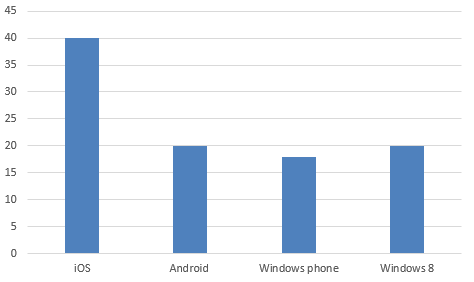
Average installs per day
- iOS - 40 / day
- Android - 20 / day
- Windows phone - 18 / day
- Windows 8 - 20 / day.
Of course, we are a little surprised by such a tightness on all OSs, since the published data of the analytical company Strategy Analytics indicate that there are several times fewer devices running Windows.
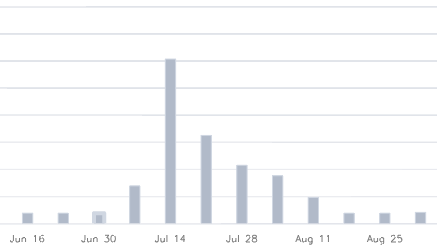
Number of installations during marketing exposure
The graph clearly shows that publication in the media affects the downloading of the application for about a month. At the peak, there were about 1,000 installations per day for iOS only.
Ratings and reviews
The statistics on these indicators came as a complete surprise to us:
- iOS - for all the time about 20 comments and ratings were left (basically all 5 star ratings)
- Android - users of this operating system were the most picky. Some of the negative reviews we received as a result of the lack of support for tablets, and some because of the size of the application. Note that iOS users were absolutely not worried about the size of the application.
- Windows phone - total 20 reviews with an average rating of 4+
- Windows 8 - 80 ratings were given with reviews and all with 5 stars. And despite the fact that the application has been published in the store for only two months, and iOS for more than six months.
Labor costs for the implementation of the system and customization for the customer
We know that all developers are interested in how many man-hours were spent on the project. However, this data is almost never shared publicly.
| Task | Labor costs (hours) | Completed work |
|---|---|---|
| Server side | 420 | Design and development |
| Customer core | 300 | Design and development |
| GUI | ||
| Android | 200 | UI development |
| iOS | 140 | UI development |
| Windows 8 | 160 | UI development |
| Windows phone | 180 | UI development |
| Design creation | 100 | Layout Creation |
| Administration | 150 | Configure infrastructure, auto assembly, and cloud deployment |
| Analytics | 350 | Designing the usability of the system and UI, writing specifications, communication with the customer and customer IT specialists |
| Testing | 300 | Testing the application at all stages of development |
Some may say that the costs were too high and could be reduced, but the apparent ease of the application is actually misleading. A very complicated but thoughtful work was done. In particular, during this time a lot of functionality was implemented, such as, for example: offline work, data caching, a system for managing content (all data that is displayed in the application is downloaded from the server and cached on the client) and more. In addition, a lot of functionality was implemented, which is critical for the system, although at first glance it may not be noticeable.
The result of large-scale work was the creation of a unique high-quality solution, which is also easy to adapt to all requirements and wishes of the customer. But the most important thing is that it has become possible to quickly expand the system (both its functionality and user load).
PS We will be grateful for the answers to such questions:
- What motivates Windows 8 users to leave so many good reviews and ratings?
- Why, despite the difference in the number of devices for different OSs, the daily number of installations on average is almost the same for all platforms?









