September 26, 2013 at 11:50 pm
Change caller ID in 3CX Phone System 12
The new version of 3CX Phone System now has the ability to change the incoming caller ID for each port / trunk / PSTN of the gateway or VoIP operator. This also applies to outgoing calls.
Below we list the basic terms and commands that are important for setting caller ID:
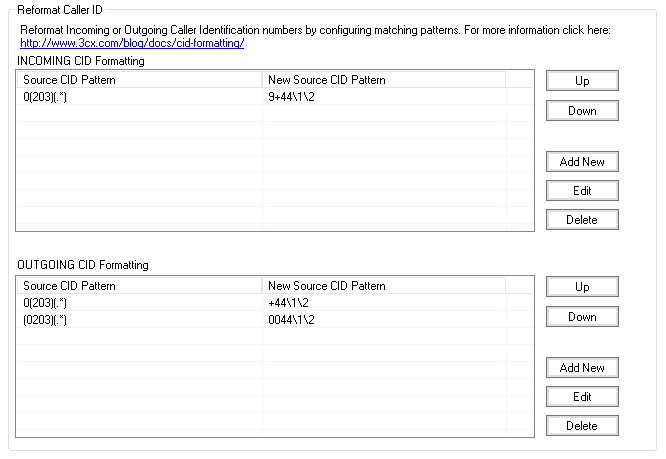
Read more about setting up Caller ID on Ice Partners website .
Below we list the basic terms and commands that are important for setting caller ID:
- () - Brackets are used to encapsulate variables and numbers. Each pair of brackets must contain a variable.
- (. *) - This means any character in the string. Always indicate at the end. Any variables specified after will be ignored.
- 0-9, + - Digits 0-9 and '+' are used to indicate specific digits in the CID
- (xxx) x can be any digit 0-9. For example, if the number is 0203123456 and you specify (0203), the PBX will look for an exact match with 0203.
- \ 1, \ 2 - \ 9 - to replace the numbers 1, 2, ..9.
- (.) A dot replaces any character. For example, (...) means 3 any digits. If it is known that the area code starts with 3 and contains 3 digits, you can enter the notation (3 ..)
Read more about setting up Caller ID on Ice Partners website .