Correct handling of AJAX request authentication problems for ASP.NET MVC applications
For modern web applications, it has become the norm to use AJAX when creating user interfaces. However, because of this, sometimes, additional difficulties arise. Often these difficulties are associated with authentication and the process of processing such requests on the client.
Suppose that our web application using jQuery accesses the server and receives data in the form of JSON from there.
Server:
Customer:
The logic is extremely simple and straightforward. Now we will add authentication mechanisms to our application. With this, again, everything is quite simple - we use the good old FormsAuthentication mechanism and the Authorize attribute in ASP.NET MVC. The code of our controller will change as follows:
Again - there are no problems with this code. After authentication, the user sees the page and can receive data as before. However, the problem is that if the authentication time expires (due to user inactivity) or the user logs out (for example, in another browser tab), the server will return ... HTTP 302 Found in response to a call to the controller .

Obviously, the client code in our case did not expect such a turn of events and further the application will not work correctly.
Before solving the problem, let's look at the reasons - where did HTTP 302 come from ? It would seem - where does 302 come from? It would be logical to assume that there should be HTTP 401. The fact is that when we use FormsAuthentication, the FormsAuthenticationModule acts behind the scene (which is added to the list of HTTP modules in the global configuration file). Looking under the hood of this module, you can easily understand that if the current code for HTTP is 401, then it performs a redirect, i.e. replaces it with 302:
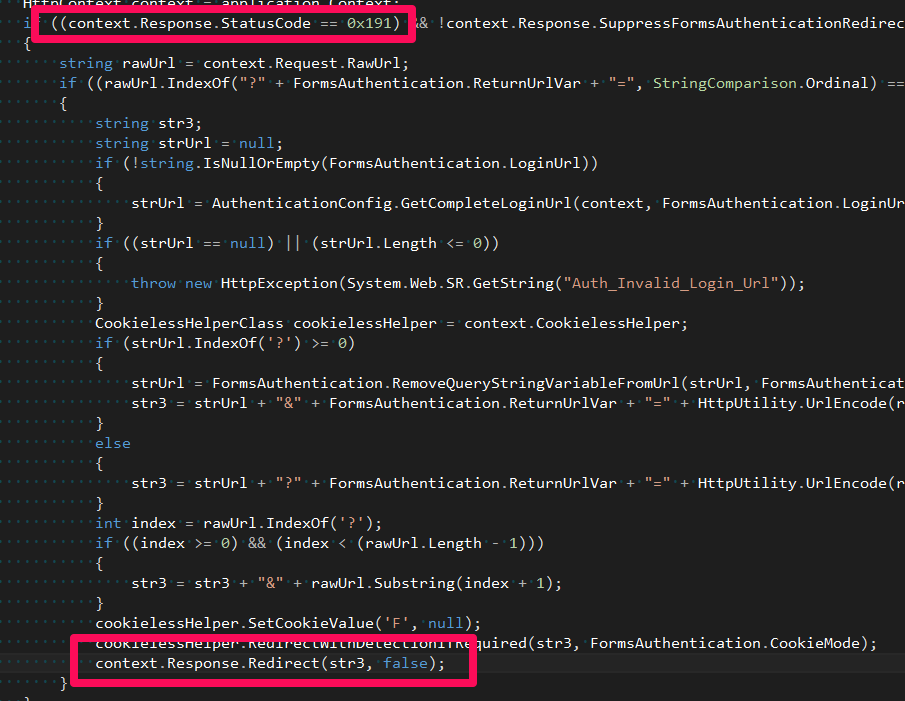
It is easy to guess that this was done in order to redirect the user to the password entry page if the request has not been processed successfully and the password is required (return code - 401). In this case, the user will see a friendly password entry form, and not an IIS page with an error code. It makes sense, doesn't it?
From the point of view of our ASP.NET MVC application, the chain is as follows:
As a result, when accessing a password-protected page, we see a password entry form ( which is good ), but when accessing similar resources through AJAX, this answer is not informative ( which is bad ).
So what you need to solve the problem -
Honestly, FormsAuthenticationModule can be forced not to replace requests with 401. For this, there is a special property in HttpResponse - SuppressFormsAuthenticationRedirect : The
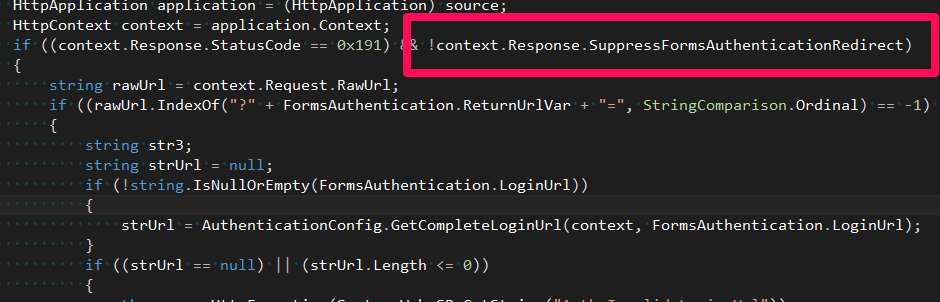
only question is in what cases change this property and, no less important, who will do it?
Before answering this question, let's pay attention to how the client should respond when it receives an HTTP response with an error in response to an AJAX request. There can be two scenarios:
Thus, we need to handle two situations differently. Take a look at the AuthorizeAttribute again with a reflector.
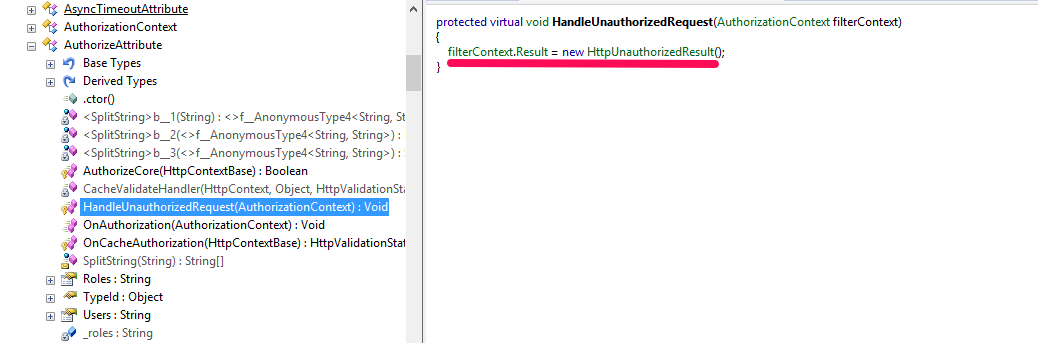
…those. he always returns 401.
Not good. Therefore, you will have to slightly correct the standard behavior. So, let's begin.
First , we determine whether the current request is an AJAX request and, if so, disable the redirect to the password entry page:
Second - add the condition: if the user is authenticated, then give 403, if not, then 401:
The new filter is ready. Now we should use the filter we just created in our application, instead of the standard AuthorizeAttribute. This may seem like a huge flaw to aesthetes, but I see no other way. If there is a solution, then I will be glad to see it in the comments.
Well, the last thing to do is add 401/403 processing on the client. To avoid doing this, for each request, you can use the ajaxError handler in jQuery:
Eventually -
Of the minuses - you must use the new ApplicationAuthorizeAttribute filter, instead of the standard one. Accordingly, if the standard code was already used in the code, then this code will have to be changed in all places.
The source code of the application is on github .
Problem
Suppose that our web application using jQuery accesses the server and receives data in the form of JSON from there.
Server:
[HttpPost]
public ActionResult GetData ()
{
	return Json (new
	{
		Items = new []
		{
			"Li Chen",
			"Abdullah Khamir",
			"Mark Schrenberg",
			"Katy Sullivan",
			"Erico Gantomaro",
		}
	});
}
Customer:
var $ list = $ ("# list");
var $ status = $ ("# status");
$ list.empty ();
$ status.text ("Loading ...");
$ .post ("/ home / getdata")
	.always (function () {
		$ status.empty ();
	})
	.success (function (data) {
		for (var i = 0; i <data.Items.length; i ++) {
			$ list.append ($ ("<li />"). text (data.Items [i]));
		}
	});
The logic is extremely simple and straightforward. Now we will add authentication mechanisms to our application. With this, again, everything is quite simple - we use the good old FormsAuthentication mechanism and the Authorize attribute in ASP.NET MVC. The code of our controller will change as follows:
[HttpPost]
[Authorize]
public ActionResult GetData ()
{
	return Json (new
	{
		Items = new []
		{
			"Li Chen",
			"Abdullah Khamir",
			"Mark Schrenberg",
			"Katy Sullivan",
			"Erico Gantomaro",
		}
	});
}
Again - there are no problems with this code. After authentication, the user sees the page and can receive data as before. However, the problem is that if the authentication time expires (due to user inactivity) or the user logs out (for example, in another browser tab), the server will return ... HTTP 302 Found in response to a call to the controller .
Obviously, the client code in our case did not expect such a turn of events and further the application will not work correctly.
The reasons
Before solving the problem, let's look at the reasons - where did HTTP 302 come from ? It would seem - where does 302 come from? It would be logical to assume that there should be HTTP 401. The fact is that when we use FormsAuthentication, the FormsAuthenticationModule acts behind the scene (which is added to the list of HTTP modules in the global configuration file). Looking under the hood of this module, you can easily understand that if the current code for HTTP is 401, then it performs a redirect, i.e. replaces it with 302:
It is easy to guess that this was done in order to redirect the user to the password entry page if the request has not been processed successfully and the password is required (return code - 401). In this case, the user will see a friendly password entry form, and not an IIS page with an error code. It makes sense, doesn't it?
From the point of view of our ASP.NET MVC application, the chain is as follows:
- The request comes to the application, where it stumbles upon an AuthorizeAttribute filter .
- Since the user is not authenticated, this filter will return HTTP 401, which is logical (you can verify this fairly easily by looking at the implementation of this filter with a reflector).
- Well, then our FormsAuthenticationModule works, which replaces 401 with a redirect.
As a result, when accessing a password-protected page, we see a password entry form ( which is good ), but when accessing similar resources through AJAX, this answer is not informative ( which is bad ).
Decision
So what you need to solve the problem -
- That the server gave 401/403 for AJAX requests, and 302 for normal requests.
- Process on client 401/403.
Honestly, FormsAuthenticationModule can be forced not to replace requests with 401. For this, there is a special property in HttpResponse - SuppressFormsAuthenticationRedirect : The
only question is in what cases change this property and, no less important, who will do it?
Before answering this question, let's pay attention to how the client should respond when it receives an HTTP response with an error in response to an AJAX request. There can be two scenarios:
- The user is not authenticated at all in the system ( 401 ) and must be sent to the page with the password login.
- The user is authenticated, but this action is still not available to him ( 403 ). For example, we can allow some action for certain roles that the user is not a member of. Then sending it to the password entry page is perhaps stupid - in this case it will be sufficient to simply inform him that he does not have enough authority.
Thus, we need to handle two situations differently. Take a look at the AuthorizeAttribute again with a reflector.
…those. he always returns 401.
Not good. Therefore, you will have to slightly correct the standard behavior. So, let's begin.
First , we determine whether the current request is an AJAX request and, if so, disable the redirect to the password entry page:
public class ApplicationAuthorizeAttribute: AuthorizeAttribute
{
	protected override void HandleUnauthorizedRequest (AuthorizationContext filterContext)
	{
		var httpContext = filterContext.HttpContext;
		var request = httpContext.Request;
		var response = httpContext.Response;
		if (request.IsAjaxRequest ())
			response.SuppressFormsAuthenticationRedirect = true;
		base.HandleUnauthorizedRequest (filterContext);
	}
}
Second - add the condition: if the user is authenticated, then give 403, if not, then 401:
public class ApplicationAuthorizeAttribute: AuthorizeAttribute
{
	protected override void HandleUnauthorizedRequest (AuthorizationContext filterContext)
	{
		var httpContext = filterContext.HttpContext;
		var request = httpContext.Request;
		var response = httpContext.Response;
		var user = httpContext.User;
		if (request.IsAjaxRequest ())
		{
			if (user.Identity.IsAuthenticated == false)
				response.StatusCode = (int) HttpStatusCode.Unauthorized;
			else
				response.StatusCode = (int) HttpStatusCode.Forbidden;
			response.SuppressFormsAuthenticationRedirect = true;
			response.End ();
		}
		base.HandleUnauthorizedRequest (filterContext);
	}
}
The new filter is ready. Now we should use the filter we just created in our application, instead of the standard AuthorizeAttribute. This may seem like a huge flaw to aesthetes, but I see no other way. If there is a solution, then I will be glad to see it in the comments.
Well, the last thing to do is add 401/403 processing on the client. To avoid doing this, for each request, you can use the ajaxError handler in jQuery:
$ (document) .ajaxError (function (e, xhr) {
	if (xhr.status == 401)
		window.location = "/ Account / Login";
	else if (xhr.status == 403)
		alert ("You have no enough permissions to request this resource.");
});
Eventually -
- If the user is not authenticated (the timeout has expired, for example), then after any AJAX request, he will be sent to the password entry page.
- If the user is authenticated, but does not have the authority to perform the action, then he will see the corresponding error message.
- If the user is authenticated and there are enough rights, the action will be performed.
Of the minuses - you must use the new ApplicationAuthorizeAttribute filter, instead of the standard one. Accordingly, if the standard code was already used in the code, then this code will have to be changed in all places.
The source code of the application is on github .









