
 August 30, 2013 at 12:21
How to stop dragging floppies onto a machine under DOS
- From the sandbox
- Tutorial
Good afternoon! Today I will tell you one case from the practice of system administration.
The topic will be of interest to those who still have to face the network setup for DOS for the first time. I hope the presentation will be useful enough for those who have to connect the machines to the network, and interesting enough for those who do not have difficulty working with this OS to read.
UPD: He wrote a story about creating wireless networks in the same production.
I myself did not happen to be an active user of DOS. I started working with computers not so long ago.
When I met DOS, I was surprised that it is still used despite its age. In particular, in production, where there are many machines from the last century. Why not replace them with modern ones?
Firstly, this usually requires a large investment. While they work, they bring profit to the enterprise; changing them is unprofitable.
Secondly, often machines with modern operating systems on the control computer are less stable. This is due to the human factor: people who are used to the Windows user interface easily use the machine computer for other purposes. DOS also lacks many problems with software and their updates, uses devices directly and is easy to configure.
At the factory, one of the machines uses DOS. The operating system does a great job. The machine allows the operator to perform tasks both from a file and manually. These files are created by a special program that simplifies, speeds up the work of machine operators and reduces the number of their errors.
So, the beginning of 2013 - the files in the workshop are on floppy disks. Such a storage medium is unreliable and is becoming more expensive. Often you have to record tasks again if the floppy disk fails. Yes, and drives do not provide high fault tolerance. But most importantly - the speed of work is determined by the speed of the person who goes for floppy disks.
If you connect the machine to a corporate data network, you can exclude disks from the business process.
It is necessary that the machine has access to job files over the network. To ensure the safety of data, it will use the remote server folder as a network drive. I connect this disk to the operator who creates the task files in the office, with write permissions. For the machine, I create a separate account on the server for reading. This DOS account will use when connecting a network drive.
The connection speed is determined by the WIFI-bridge channel. In my case, speeds of about 10 Mbps are more than enough.
The machine is located in a production room 60 meters from the nearest network node (in a straight line). Installation work is complicated by many objects and the inability to stop the production process. To ensure communication, I will use a wireless bridge from a regular WIFI router and an access point, which I fix higher and connect to a DOS machine. The router is in direct line of sight and is connected to the corporate data network.
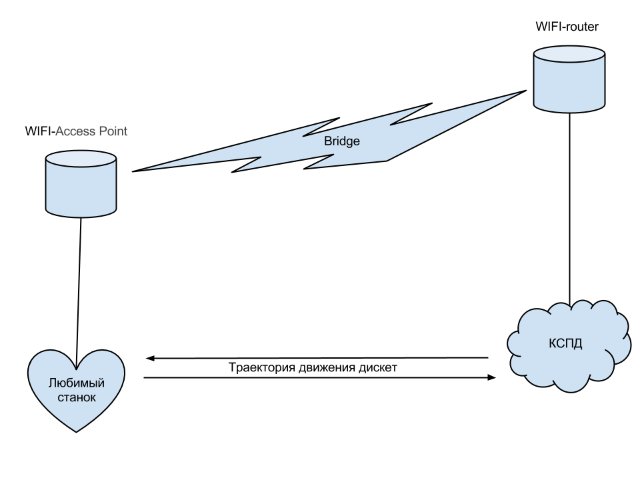
It is worth noting that there is no network in bare MS DOS. You will have to install Microsoft Network Client v3.0. Why him? About him on the Internet is full of information, and it is easy to configure. Other clients can be used, if there are preferences.
With the WIFI-bridge setup, everything is more or less clear. There are a lot of equipment available.
But with a network card of the machine there can be great difficulties. The computer may be old and not have a network interface or free PCI slots (maybe even ISA). To the network card, you need to find the NDIS 2 driver.
The machine cannot be disabled. They work on it around the clock, you can’t borrow it for a long time.
To make all the transformations at my workplace, I’m taking a hard drive image.
I boot from a clone of the DOS machine. The machine program starts on the computer automatically when it is turned on, and you cannot close it. To make the DOS machine available for work, I boot from the same Live USB drive from which I made copies. You can use any media with DOS. In the Volkov Commander that opens, you need to open the C: drive, highlight autoexec.bat, press F4 to edit.
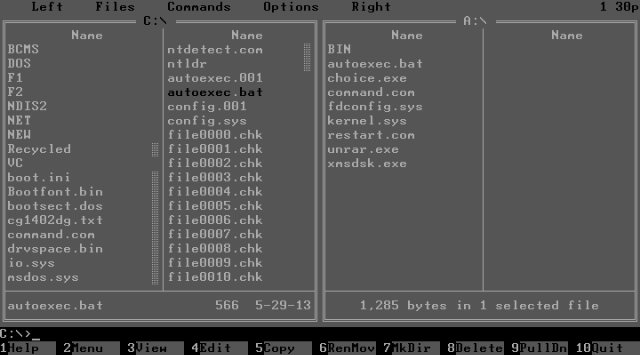
The software was not installed by me, so I only correct the last line to exclude the machine program from startup.
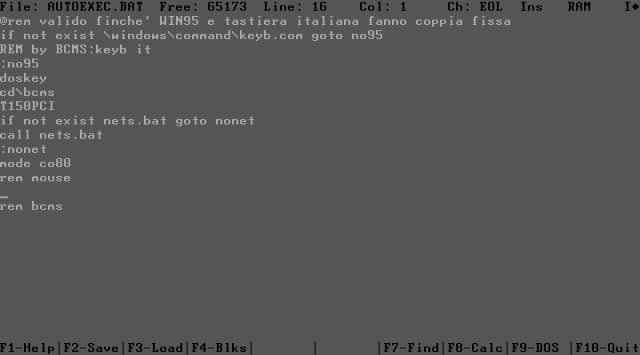
I press F2 to save and restart the computer. We boot from the DOS machine.
After the restart, a miracle does not occur, the network does not work, because the driver is installed for the machine, and not for the computer on which the configuration is performed. Now it’s important to edit the hosts and lmhosts files. In them I add the ip-address and network name of the server on which the desired network drive is stored. I add several lines to the autoexec.bat file so that when loading it is not required to enter a name and password, as well as to connect a network drive. The disk is named A: so that the machine program thinks it is a diskette (otherwise nothing).

After such a simple setup, I remove the new version of the image from the computer and record it on the machine.
I turn off the floppy disks in the machine BIOS to replace them with a network drive.
In the event of a configuration error, there is a backup to restore. In this case, it is important to fix the error messages.
The machine continues to work in the same mode, remains familiar to users. Only floppy disks are not required. In addition to floppy disks, workers’ mileage is saved - you don’t need to go for files anywhere.
I invite you to comment on my experience in DOS, ask a question or point out a mistake in the comments.
The topic will be of interest to those who still have to face the network setup for DOS for the first time. I hope the presentation will be useful enough for those who have to connect the machines to the network, and interesting enough for those who do not have difficulty working with this OS to read.
UPD: He wrote a story about creating wireless networks in the same production.
I myself did not happen to be an active user of DOS. I started working with computers not so long ago.
When I met DOS, I was surprised that it is still used despite its age. In particular, in production, where there are many machines from the last century. Why not replace them with modern ones?
Firstly, this usually requires a large investment. While they work, they bring profit to the enterprise; changing them is unprofitable.
Secondly, often machines with modern operating systems on the control computer are less stable. This is due to the human factor: people who are used to the Windows user interface easily use the machine computer for other purposes. DOS also lacks many problems with software and their updates, uses devices directly and is easy to configure.
What was required
At the factory, one of the machines uses DOS. The operating system does a great job. The machine allows the operator to perform tasks both from a file and manually. These files are created by a special program that simplifies, speeds up the work of machine operators and reduces the number of their errors.
So, the beginning of 2013 - the files in the workshop are on floppy disks. Such a storage medium is unreliable and is becoming more expensive. Often you have to record tasks again if the floppy disk fails. Yes, and drives do not provide high fault tolerance. But most importantly - the speed of work is determined by the speed of the person who goes for floppy disks.
If you connect the machine to a corporate data network, you can exclude disks from the business process.
How to solve
It is necessary that the machine has access to job files over the network. To ensure the safety of data, it will use the remote server folder as a network drive. I connect this disk to the operator who creates the task files in the office, with write permissions. For the machine, I create a separate account on the server for reading. This DOS account will use when connecting a network drive.
The connection speed is determined by the WIFI-bridge channel. In my case, speeds of about 10 Mbps are more than enough.
The machine is located in a production room 60 meters from the nearest network node (in a straight line). Installation work is complicated by many objects and the inability to stop the production process. To ensure communication, I will use a wireless bridge from a regular WIFI router and an access point, which I fix higher and connect to a DOS machine. The router is in direct line of sight and is connected to the corporate data network.
It is worth noting that there is no network in bare MS DOS. You will have to install Microsoft Network Client v3.0. Why him? About him on the Internet is full of information, and it is easy to configure. Other clients can be used, if there are preferences.
What did you do
With the WIFI-bridge setup, everything is more or less clear. There are a lot of equipment available.
But with a network card of the machine there can be great difficulties. The computer may be old and not have a network interface or free PCI slots (maybe even ISA). To the network card, you need to find the NDIS 2 driver.
Cloned machine disk
The machine cannot be disabled. They work on it around the clock, you can’t borrow it for a long time.
To make all the transformations at my workplace, I’m taking a hard drive image.
How to make a clone of a disk using Ghost, read under the spoiler
This is what it looks like when booting from USB.

The interface is understandable even for those who are not very friendly with English. I choose to make an image from the section (Partition - To Image).
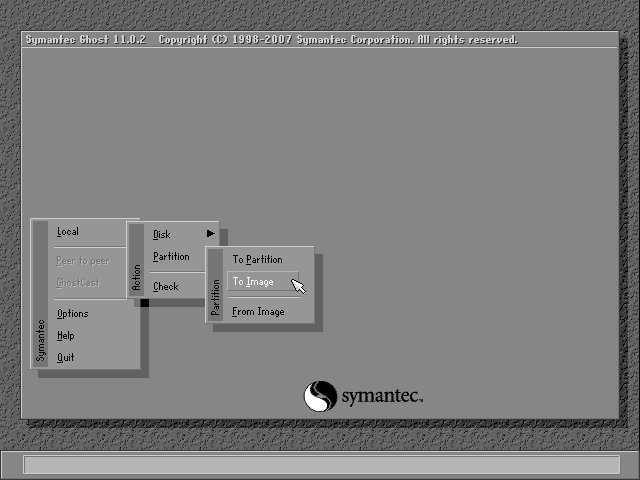
Then you need to select the media containing the partition from which we will shoot the image.
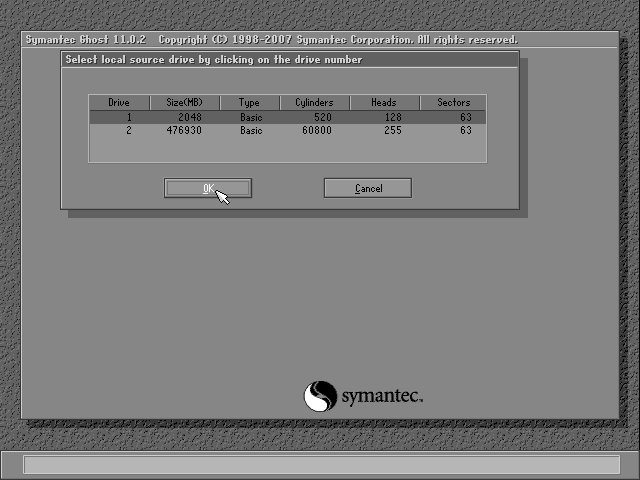
In this window, select the partition on the disk, but in this example it is one.

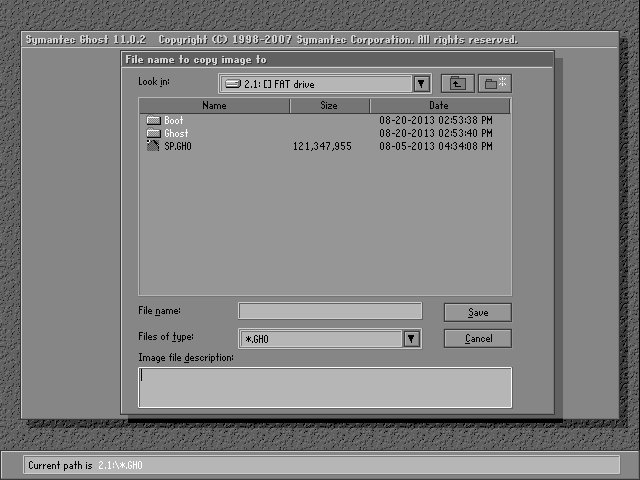
Next, specify the folder where the disk image will be saved, and also specify the file name.
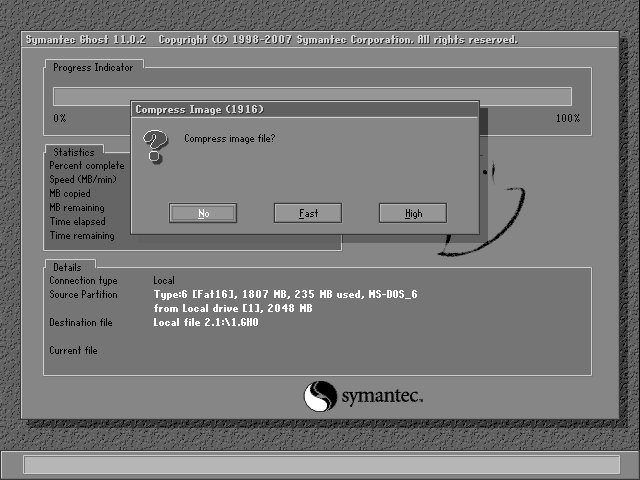
Ghost suggests using compression when creating an image. You can opt out, choose fast compression or maximum. The section is small, so I used Fast.
I agree to continue and the process of removing the image begins.
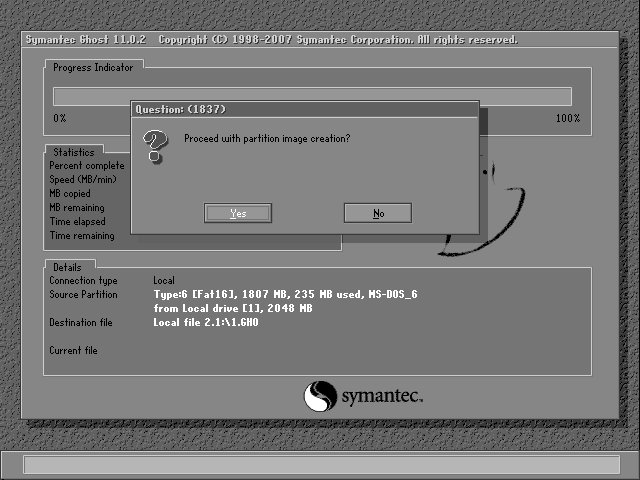
The disk is small, so the process took about 5 minutes.
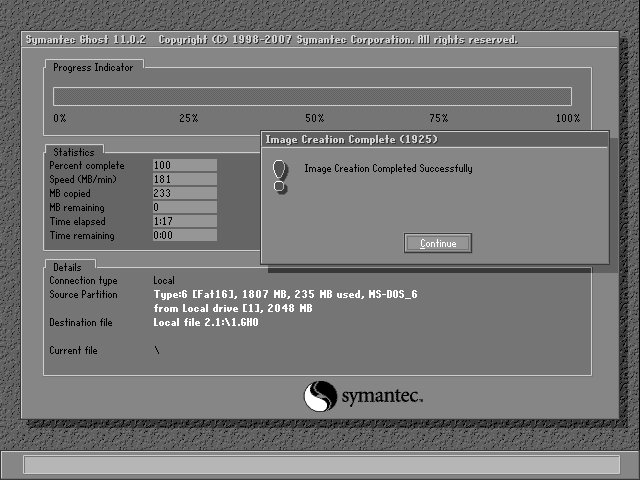
The image is received, I reboot the machine, check the operability and leave it to work.
The resulting image can be written to a free computer (which I did) or a virtual machine.
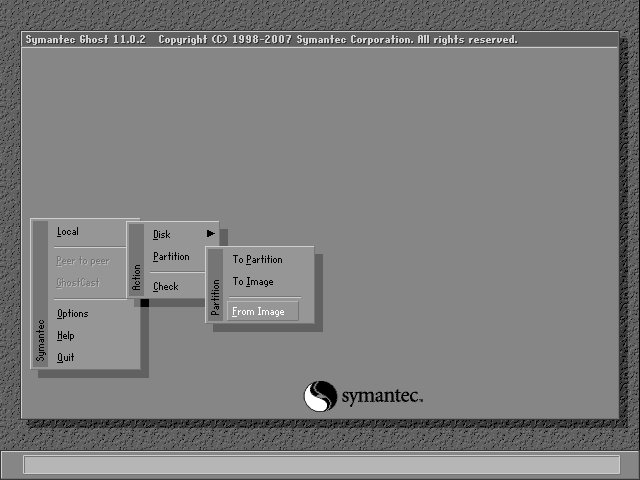
In the start menu of Ghost, I choose to create a section from an image (Partition - From Image).
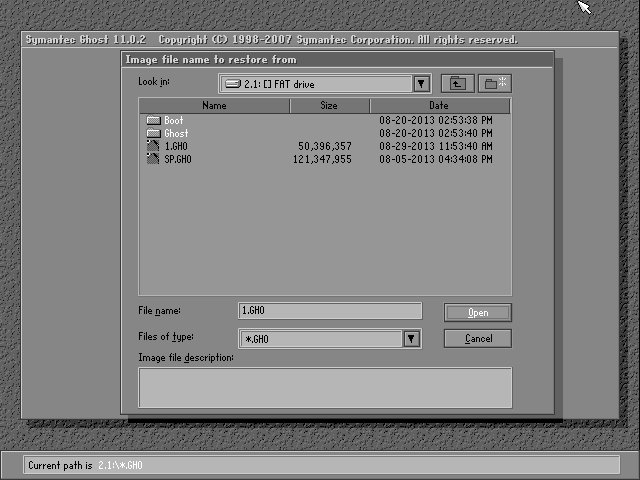
I select the desired image file.
I select the image section. In our case, he is alone - there is no choice.

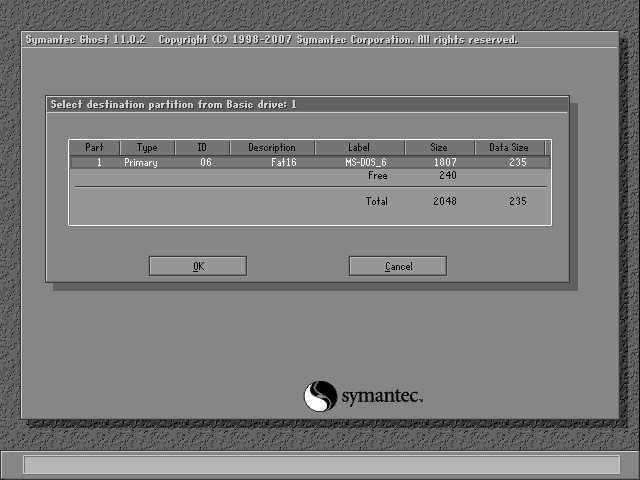
Now you need to select the disk where the image will be recorded.
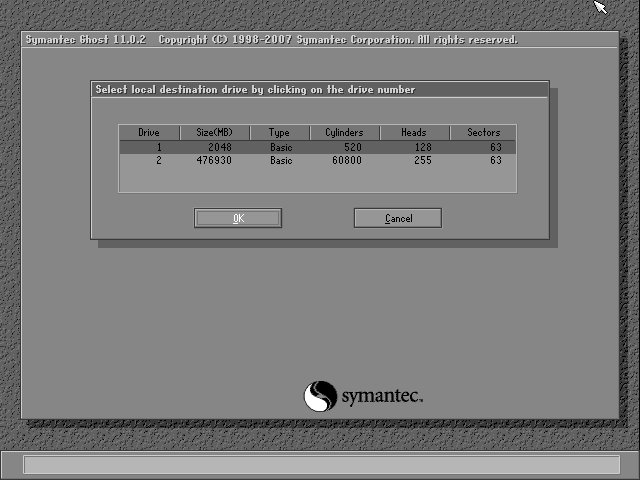
Here you select a section if there are several. And you can specify the size - indicate the size of the source image.
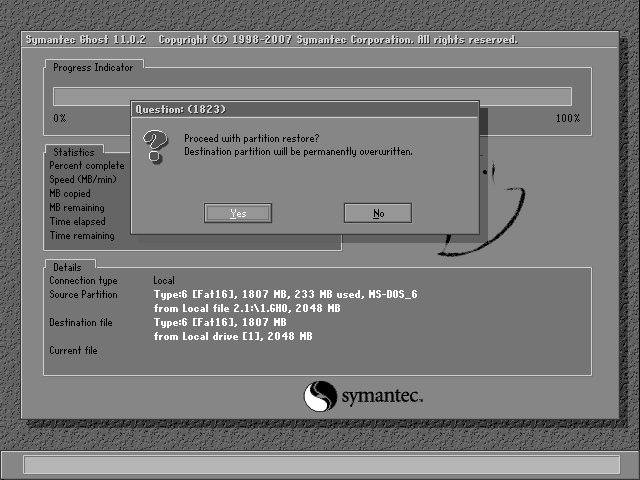
I confirm the rewriting of the section from the image.
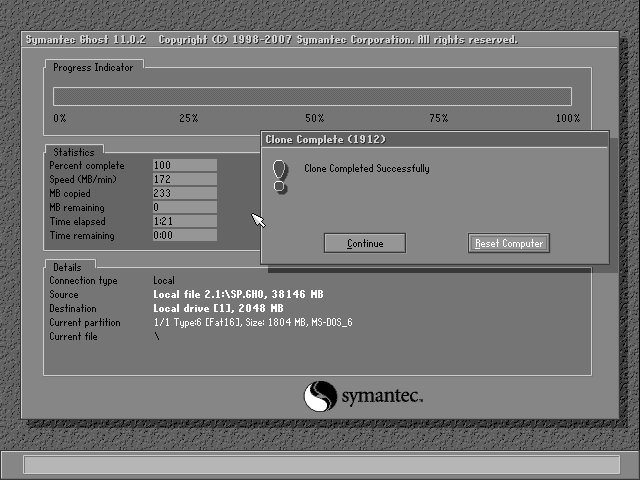
After the successful completion of the cloning, I reboot the computer and proceed to install MS NC.
The interface is understandable even for those who are not very friendly with English. I choose to make an image from the section (Partition - To Image).
Then you need to select the media containing the partition from which we will shoot the image.
In this window, select the partition on the disk, but in this example it is one.
Next, specify the folder where the disk image will be saved, and also specify the file name.
Ghost suggests using compression when creating an image. You can opt out, choose fast compression or maximum. The section is small, so I used Fast.
I agree to continue and the process of removing the image begins.
The disk is small, so the process took about 5 minutes.
The image is received, I reboot the machine, check the operability and leave it to work.
The resulting image can be written to a free computer (which I did) or a virtual machine.
In the start menu of Ghost, I choose to create a section from an image (Partition - From Image).
I select the desired image file.
I select the image section. In our case, he is alone - there is no choice.
Now you need to select the disk where the image will be recorded.
Here you select a section if there are several. And you can specify the size - indicate the size of the source image.
I confirm the rewriting of the section from the image.
After the successful completion of the cloning, I reboot the computer and proceed to install MS NC.
Prepared to work a copy of the disk
I boot from a clone of the DOS machine. The machine program starts on the computer automatically when it is turned on, and you cannot close it. To make the DOS machine available for work, I boot from the same Live USB drive from which I made copies. You can use any media with DOS. In the Volkov Commander that opens, you need to open the C: drive, highlight autoexec.bat, press F4 to edit.
The software was not installed by me, so I only correct the last line to exclude the machine program from startup.
I press F2 to save and restart the computer. We boot from the DOS machine.
Installed MS Network Client
Simple installation of MS NC under the spoiler
To install Microsoft Network Client on a computer, you need to prepare the NDIS2 driver for the network card that is installed on the machine. The network will not work on my computer. I put the driver in the folder C: \ ndis2.
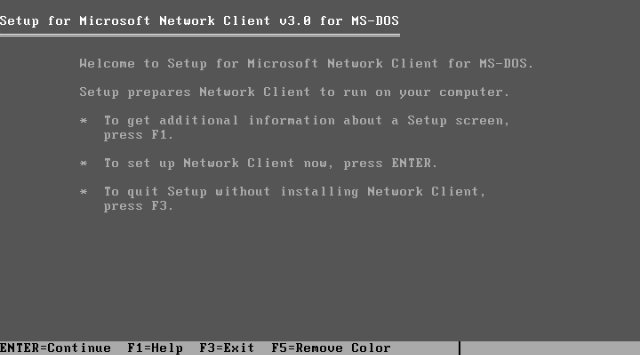
The MS NC distribution is easy to download as two floppy disks. I start the installation from the first by typing A: \ setup. I get to the welcome window with simple instructions in English. Press Enter to continue the installation.
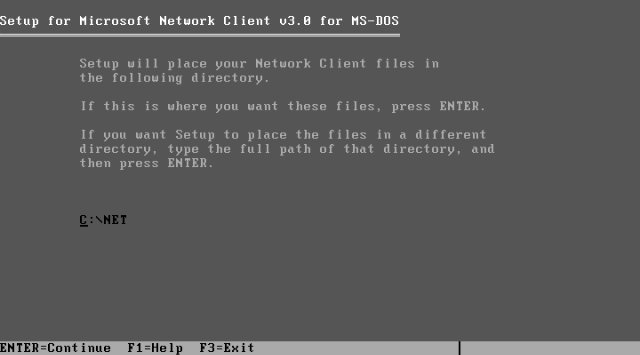
The installer prompts you to specify a folder. Leave the path unchanged.
To install the driver from the folder, you need to select the second line.

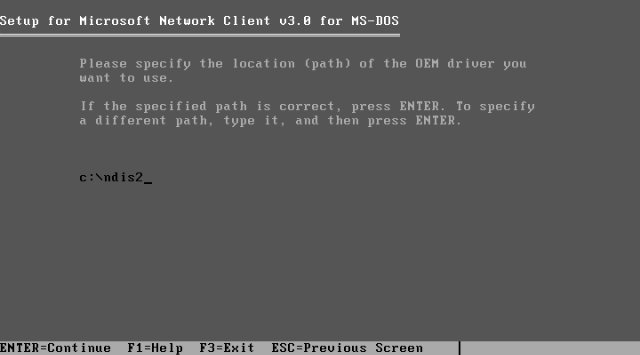
And indicate the path to the driver.
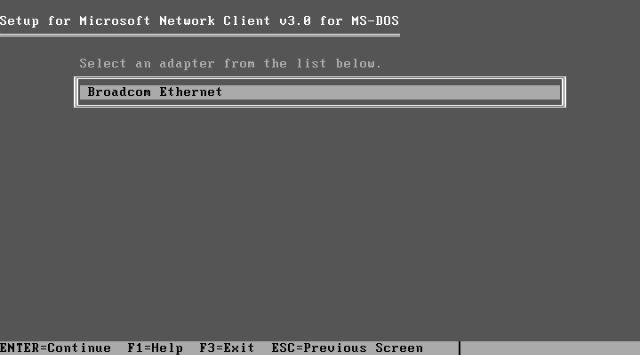
The installation program determined which drivers are in the folder and offers to select.
It is proposed to use the best performance mode or refuse. I press Enter.

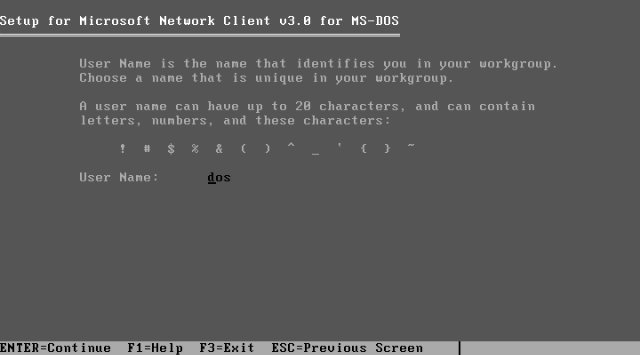
After a short pause, you are prompted to enter a username. I introduce dos, although this is of little importance. Authorization will occur every time you turn it on.
It remains to change the remaining installation parameters. I go to Change Setup Options.
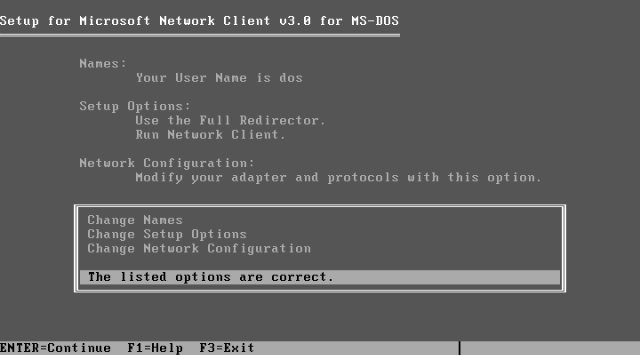
I change the Redir Options parameter.
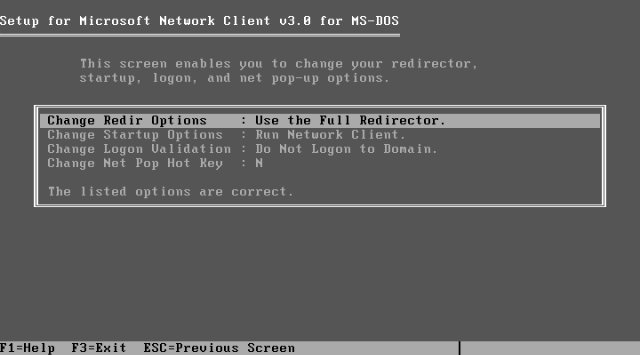
It determines the memory consumption when starting a network service. Full Redirector is used to connect to a domain or run programs over a network. It is not necessary. It is important that the main memory is enough to run the machine program, so I indicate the basic Basic Redirector.
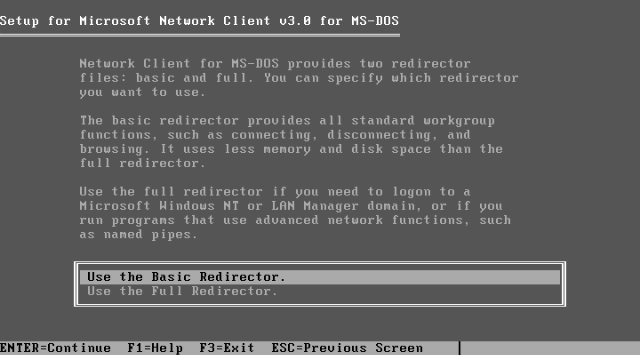
I confirm the settings and go to the Network Configuration section, where I change the network protocol to TCP \ IP.
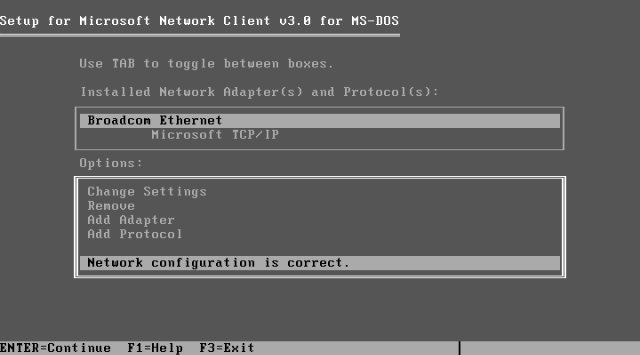
Setup is complete. The installation program offers to insert a second diskette or indicate the path to the installation files.
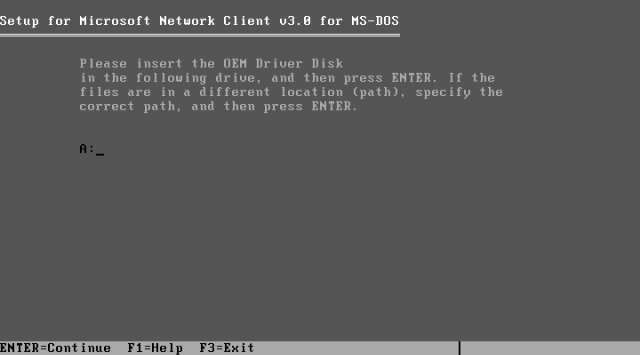
I insert the diskette, press Enter. Installation is complete. It remains only to restart the computer.
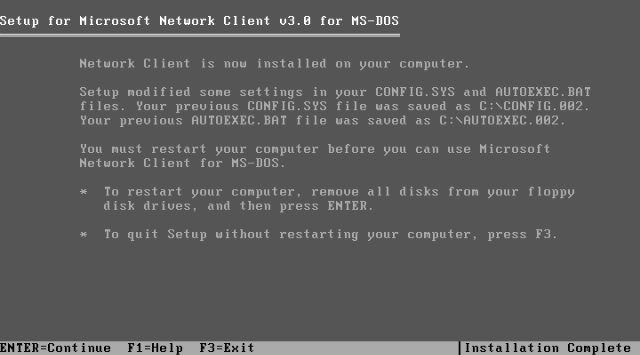
The MS NC distribution is easy to download as two floppy disks. I start the installation from the first by typing A: \ setup. I get to the welcome window with simple instructions in English. Press Enter to continue the installation.
The installer prompts you to specify a folder. Leave the path unchanged.
To install the driver from the folder, you need to select the second line.
And indicate the path to the driver.
The installation program determined which drivers are in the folder and offers to select.
It is proposed to use the best performance mode or refuse. I press Enter.
After a short pause, you are prompted to enter a username. I introduce dos, although this is of little importance. Authorization will occur every time you turn it on.
It remains to change the remaining installation parameters. I go to Change Setup Options.
I change the Redir Options parameter.
It determines the memory consumption when starting a network service. Full Redirector is used to connect to a domain or run programs over a network. It is not necessary. It is important that the main memory is enough to run the machine program, so I indicate the basic Basic Redirector.
I confirm the settings and go to the Network Configuration section, where I change the network protocol to TCP \ IP.
Setup is complete. The installation program offers to insert a second diskette or indicate the path to the installation files.
I insert the diskette, press Enter. Installation is complete. It remains only to restart the computer.
Made network settings
After the restart, a miracle does not occur, the network does not work, because the driver is installed for the machine, and not for the computer on which the configuration is performed. Now it’s important to edit the hosts and lmhosts files. In them I add the ip-address and network name of the server on which the desired network drive is stored. I add several lines to the autoexec.bat file so that when loading it is not required to enter a name and password, as well as to connect a network drive. The disk is named A: so that the machine program thinks it is a diskette (otherwise nothing).
After such a simple setup, I remove the new version of the image from the computer and record it on the machine.
I turn off the floppy disks in the machine BIOS to replace them with a network drive.
In the event of a configuration error, there is a backup to restore. In this case, it is important to fix the error messages.
What happened
The machine continues to work in the same mode, remains familiar to users. Only floppy disks are not required. In addition to floppy disks, workers’ mileage is saved - you don’t need to go for files anywhere.
I invite you to comment on my experience in DOS, ask a question or point out a mistake in the comments.