August 8, 2013 at 17:32
Single sign-on on omniauth and rails
- From the sandbox
- Tutorial

User authentication in ecosystems like Google or Envato is implemented as separate services ( accounts.google.com , account.envato.com ) that provide the necessary data and tokens to client sites. During the development of some projects on Ruby on Rails, I had to deal with a similar problem. Scientifically - single sign-on or single sign-on technology .
What was needed was (1) a common service for all ecosystem sites, with (2) predominantly social authorization, in order to please login using the “login + password” link.
A service that (3) accumulates data from those social services with which the user logs in, and (4) provides this data to client sites.
The task turned out to be as interesting as non-standard. It all started with a useful, but slightly outdated article - the author suggested using the omniauth gem and custom strategy on client sites, and on the provider site, using the same omniauth in conjunction with devise for authentication through social services. Services.
Devise in my case didn’t fit well (tie in with username + password), so omniauth was completely preferred. This is where my little adventure began, about the course of which I suggest you familiarize yourself with this article.
General scheme
Three projects will be considered: the client site , the site provider, and the omniauth custom strategy . The links are all available on github and ready to use. Only key points will be raised in the article.
Client site
We will run on localhost: 4000 .
The structure is standard for any sites using omniauth:
- In the Gemfile we connect omniauth and our omniauth-accounts strategy:
gem 'omniauth'
gem 'omniauth-accounts'
- bundle install
- In config / initializers / omniauth.rb, insert the initialization code:
Rails.application.config.middleware.use OmniAuth::Builder do
	provider :accounts, ENV['ACCOUNTS_API_ID'], ENV['ACCOUNTS_API_SECRET'],
		client_options: {
			site: ENV['ACCOUNTS_API_SITE']
		}
end
- In router.rb, add the route for the callback method:
match '/auth/:provider/callback', :to => 'auth#callback'
- We create a controller and a callback method in it, in which we get through request.env ['omniauth.auth'] the final hash with data and tokens
rails g controller auth --skip-assets
# auth_controller.rb
class AuthController < ApplicationController
	def callback
		auth_hash = request.env['omniauth.auth']
		render json: auth_hash
	end
end
That's all, minimally.
Strategy
Derived from the standard oauth 2.0 strategy, the omniauth-oauth2 dependency is specified in Gemspec. There is very little code, besides, it does not make sense to adjust it for yourself, all the necessary strategies, the data is transmitted in the initialization parameters (in the example, in the form of environment variables). It:
- The credentials keys (ACCOUNTS_API_ID and ACCOUNTS_API_SECRET) to connect to the site provider of the client site
- Provider site address ACCOUNTS_API_SITE
- The authentication address on the provider site (default: / authorize) ..
- ... and to get a token (/ token)
Having received this data, the strategy takes on all further work. Because of this, however, unpleasant cases can occur during development when, in a certain situation, the strategy is “lost” - it cannot continue its implementation further as planned. I had to face such problems, and a solution to each was found - it will be discussed later in the article.
Website Provider
We will run on localhost: 3000 .
Combines two halves:
- One is for communicating with a client site
- Another is for communicating with social services.
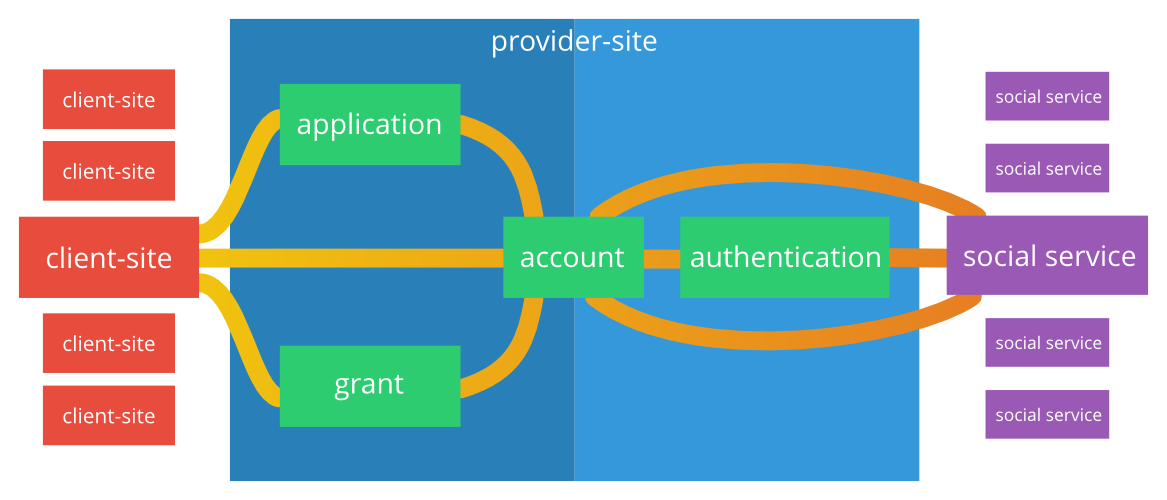
Authentication on the provider site is done using standard omniauth strategies.
Authentication on a client site - using a custom strategy.
Shared link - account:
- Entrance methods on the provider website are tied to it (like a housekeeper on a hub)
- Applications and grants for client sites are also tied to it.
Provider site authentication and account management
When registering on a client site, it is pleasant to fill out most of the required fields automatically, from your profile on Facebook or Twitter. Our website provider will play the role of an aggregator - let it aggregate all the data from social networks. services in a single questionnaire, which can be supplemented manually, and client sites will take information from there.
This topic already slipped on the pages of the Habr. Unfortunately, I just can’t find this article, but there, in particular, the question was raised about typical problems with social authentication on the site:
- Account merge option
- Updating account data when updating it in services
- Ability to bind different services to one account
All these are typical requirements for a system of this type, as well as validation with sending emails by email - a traditional requirement that has developed in authentication by login + password. Let's briefly consider these requirements.
Account Merge
We went into the system through a gmail-box - the system created one account, with data from gmail. The next time they logged in via Facebook, and the system again created a new account. We look and understand that the last time we created an account for ourselves through ... remember ... gmail! We click on the button, this time we go through gmail and our accounts merge into one - just like two pennies! .. or not - there is one problem. Data merge.
In gmail we are Alexander Polovin, and on Facebook we are Alex Polovin. And what data should I leave in my account?
Immediately during the merger, ask the user what to leave out of this? No, this is a very unsuccessful undertaking in terms of usability - the user after all merges the accounts in order to quickly log in again with the account to the site he visited before, he does not have time to get distracted by the dialogs of the “Replace” and “Replace Everything” type.
My decision was to add new data “in reserve” as additional values for the account fields. In fact, all the account data is stored in a hash, and this hash can take the following form after merging (add the data from the conditional twitter - Half Alex):
{
	name: ['Александр Половин', 'Alex Polovin', 'Половин Алекс'],
	first_name: ['Александр', 'Alex', 'Алекс'],
	sir_name: ['Половин', 'Polovin'],
	...
}
As you can see, the values are simply added to the array for each field. However, they are not duplicated - “Half” from Twitter was not saved as a duplicate in the “last name”.
Client sites will always receive the very first value from the arrays, if desired, the user can put any of the values in the first place.
Update Account Information
Among all the data available omniauth from the social. services, the user's avatar is most often updated. Slightly less often - links to pages (urls parameter), nickname and description on Twitter. In any case, there is a desire to update them in your account with one click ... or leave the old ones - the situations are different. Our algorithm is perfect for this - it writes new values to the end of arrays without saving duplicates.
Linking different services to one account
An analogue of a housekeeper on a hub - in the system, an entry is created in the authentication table and is attached to the current account. It is used in the future as a key and as a data source.
Manual editing of account fields
Not all fields are filled out from social. services. The user should be able to fill in the missing data on their own, on the page of the provider's website. And also - to interchange the values in the arrays, which was mentioned a couple of paragraphs above.
Implementation
Models
- Account - stores a data hash (info)
- Authentication - authentication performed through omniauth on Facebook, Twitter, or another service; stores the name of the provider and user uid;
In order for Rails to understand info as a hash: the type of the text field is specified in the migration, and the code is added to the model:
serialize :info, Hash
Between models - one-to-many relationship:
# /app/models/account.rb
has_many :authentications
# /app/models/authentication.rb
belongs_to :account
Controllers
AuthenticationsController covers all authentication needs, includes the following actions:
- auth (/ auth) - page for choosing a service to log in or update profile data
- logout (/ logout) - logout
- callback (/ auth /: provider / callback) - in this method, the main work is done on entering, updating data, binding authentication, and so on.
- failure (/ auth / failure) - is executed if an error occurred at the “other end” when entering
- detach (/ auth / detach) - disconnects authentication from the current account
When you select one of the authentication services, operations that are standard for omniauth are performed - the crown of which, in case of successful authentication, is the callback method call. Depending on the situation, it performs the following actions:
- Updates profile data
- Merges two different accounts together
- Binds a new service to the current account
- Re-login or primary login
The data hash is formed in a separate private method get_data_hash (), depending on the selected social. service.
To add data to the end of arrays without duplicates, use the add_info model method (based on the operation of combining arrays):
def add_info(info)
    self.info.merge!(info){|key, oldval, newval| [*oldval].to_a | [*newval].to_a}
  end
And to bind authentications add_authentications:
def add_authentications(authentications)
    self.authentications << authentications
  end
As a result, the session id is stored for the account for which the login was made - session [: account_id].
AccountsController at this stage contains the following actions:
- index - display the user profile in the form
- edit - edit account profile data
- update - update the profile (POST request from edit)
And also a filter - a mandatory check for the presence of a user on the network (with a redirect to the login login page).
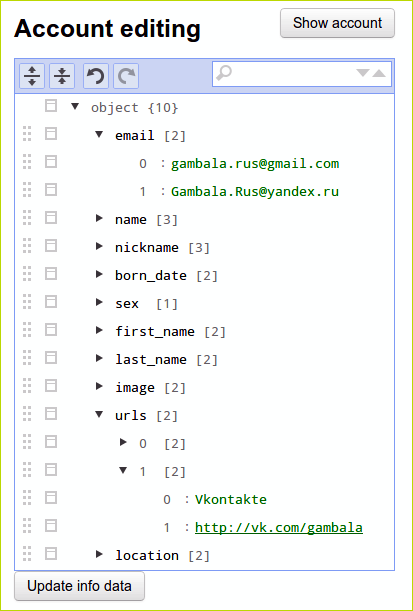
I really wanted to achieve the possibility of really convenient and flexible data changes. And such a task still stands and will be worked out in the future. So far - editing occurs in two ways:
- If js is disabled - there is a text area with a YAML-formatted hash
- If enabled, the visual editor of json structures jsoneditor is loaded
Creating a link between a client site and a provider site
In this case, the standard practice is to create an “application” on a provider site. We indicate the name and address of the client site (or rather, the address for the callback redirect) - and we get two keys - id and secret. We indicate them in the parameters of the social authentication system - whether it be some kind of cms plugin, or gems for Rails. In our case, the keys are used by omniauth - ACCOUNTS_API_ID and ACCOUNTS_API_SECRET.
Implementing application support in your site provider is easy:
rails g scaffold Application name:string uid:string secret:string redirect_uri:string account_id:integer
rake db:migrate
# account.rb
has_many :applications
When creating a new record, the model must generate keys for it:
before_create :default_values
def default_values
	self.uid = SecureRandom.hex(16)
	self.secret = SecureRandom.hex(16)
end
And - in all actions on the application should be filtered by the current user. For example, instead of:
@applications = Application.all
used by:
@applications = Account.find(session[:account_id]).applications
Moreover - it is imperative to ensure that the user is online - put a filter:
before_filter :check_authentication
def check_authentication
	if !session[:account_id]
		redirect_to auth_path, notice: 'Вам необходимо войти в систему, используя один из вариантов.'
	end
end
Process diagram
Authentication is built on oauth 2.0 - you can learn about the principles of this protocol in this article on the hub, or clearly here.
The starting point is the address client-site.com/auth/accounts. Omniauth picks it up and, using the omniauth-accounts strategy, sends a request to the server of the provider's site.
At the same time, omniauth generates the state parameter, which helps the provider not to confuse the request from one client site and the user with other requests.
The website provider accepts the request (by standard, at provider-site.com/authorize), and performs certain actions. The goal of the provider at this stage is to authorize the user and give him a grant for authentication on the client’s site.
If the goal is achieved, a redirect is sent to the callback method of the client site from the site provider, in which through request.env ['omniauth.auth'] we get a hash with tokens and data from the site provider.
Login
The authorize method is the darkest place in the process scheme - there are so many nuances to consider before issuing a grant to the user.
Ideally (with repeated authorization) - the following conditions are met:
- User has already logged in to the provider site
- The user has already been given a grant for this application earlier
- This grant has not expired
In this case, the user logs in immediately, and a redirect to the callback method of the client site is performed. The parameters send the grant code and state.
If at least one of these conditions is not met, you must first resolve the problems:
- Если пользователь не выполнил вход на сайте провайдере — позволить ему сделать это
- Если грант не выдан — создать его
- Если у гранта истек срок годности — пересоздать грант
These actions involve navigating the site provider and even social sites. services (if the user needs to log in). The last reason turned out to be highlighted - in this place omniauth shows its unpleasant sides.
The fact is that omniauth, when switching to authorize, passes several parameters to the url, and also prescribes several parameters in the session of the provider site. This is necessary for him to correctly redirect to the callback method. But if we suddenly want to use omniauth on a provider site (for example, when trying to log in through a social service), omniauth will erase its data from the session. And the redirect will fail with the error OmniAuth :: Strategies :: OAuth2 :: CallbackError - invalid_credentials.
Therefore, in order to avoid such situations, all omniauth parameters are clearly fixed in the session and restored right before the redirect.

orders # register
If all parameters are transmitted correctly (that is, the request came from omniauth) - create a record in the current session - “grant order” and save all parameters in it:
session[:grants_orders] = Hash.new if !session[:grants_orders]
session[:grants_orders].merge!(
	params[:client_id] => {
		redirect_uri: params[:redirect_uri],
		state: params[:state],
		response_type: params[:response_type],
		'omniauth.params' => session['omniauth.params'],
		'omniauth.origin' => session['omniauth.origin'],
		'omniauth.state' => session['omniauth.state']
	}
)
orders # show
We carry out all the checks here. Is the user online, is there an application registered on the site from which the request came, is there an old grant, is it expired.
- If everything is in order, we immediately call the grant method
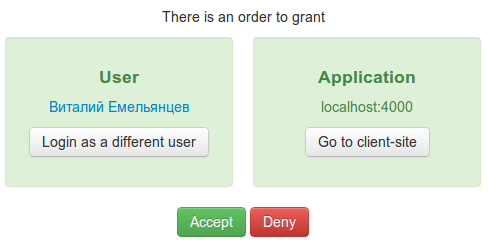
- If something is wrong, we show the page typical for such authentications (“The application is requesting access to the account”, “Allow”, “Deny”)
orders # accept
It is executed if the grant was immediately available and matched the requirements, or by clicking on the “Allow” button on the grant order page.
- We restore all omniauth parameters saved in the session so that they are adequately processed by omniauth when redirecting to the callback method
- Create a grant and redirect
orders # deny
We cancel the application, just delete it from the session.
grants # token
According to the parameters passed, we find the application and the grant. If everything is in order, we issue grant tokens in json format.
accounts # get_info
We return the hash in json format, as agreed - only the first parameter values, if they are represented by an array.
data_hash = grant.account.info
hash = Hash.new
hash['id'] = grant.account.id
data_hash.each do |key, value|
	if value.kind_of?(Array)
		hash[key] = value[0]
	else
		hash[key] = value
	end
end
render :json => hash.to_json
Conclusion
The solution turned out to be simple - and in it, for sure, much can be improved and optimized. The following tasks are currently outlined:
- Дать возможность при создании приложения указывать, какие именно параметры оно будет требовать — обязательно и необязательно. И, если необходимых параметров нет в анкете пользователя — давать ему возможность ввести их прямо на странице получения гранта
- Обеспечить вход по связке логин+пароль — с помощью стратегии omniauth-identity
- Добавить в сайт-клиент действие logout, выходящее из системы не только на сайте-клиенте, но и на сайте-провайдере
- Решить проблему с пропадающей сессией при json-запросах token и get_info (это, судя по всему, как-то связано с системой безопасности Rails, protect_from_forgery и verify_authenticity_token)
Not every day you have to write such a system - because, in fact, there are not so many ecosystems on the Internet. Google, Envato, Yandex, Yahoo - and who else? Perhaps your project? And this is not the only way to implement authentication in related projects - there is CAS technology (a couple of useful links), there is OpenID (and, as an option, the same Loginza). On our own habr and other TM projects - in general, there is a separate authentication system on each site, plus the proprietary "Keymaster".
Why did my choice fall on SSO? Perhaps the key “for” is the atmosphere. These are the feelings that the user experiences when he logs in not to the site, but to the System - with a capital “C”. Into a powerful, advanced, developed System - this is truly an amazing feeling, colleagues.