August 1, 2013 at 12:47
As I wrote a fix for widescreen permissions for FlatOut
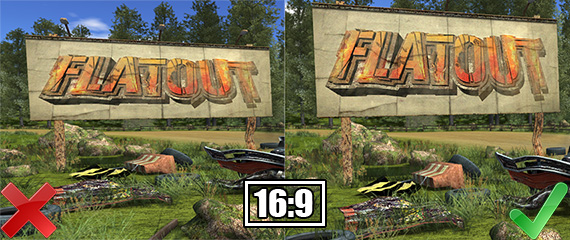
Not so long ago, I was writing fixes for several old games to fix image and interface distortion on widescreen monitors. They asked to take a look at FlatOut , and the idea came to write about it at the same time.
What is needed
To create a full-fledged fix that is easy to install and does not require replacing game files, I used: IDA , Cheat Engine , Visual Studio , universal ASI Loader (more on this below), and to launch the game in the window - D3DWindower .
Resource parsing
Let's look in the folder with the installed game to find out what you have to work with. In this case, only one file is of interest - “flatout.exe”. In some games, additional DLLs may be present, for example, in Max Payne, to correct image proportions, I injected into e2mfc.dll, and not into the executable file. Flatout.exe is patched to v1.1, but the official patch from the Russian distributor, the company BUKA, contains three different EXEs:
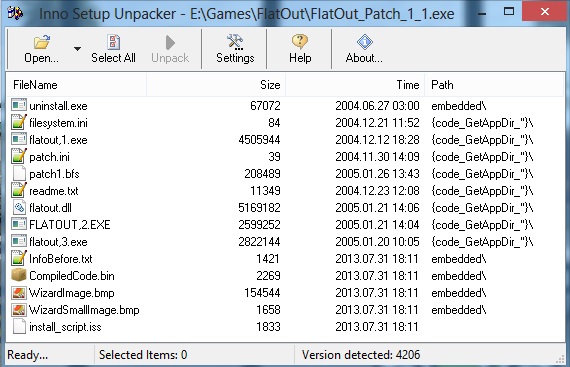
I chose flatout, 3.exe (2 822 144 bytes) for research, since the IDA disassembles it into a completely readable view.
Experiences
Having opened flatout, 3.exe in IDA, the first thing I start to look for constants. Judging by my previous experience, most old games use one of these to display the interface and 3D images: 640.0, 480.0, 1.3333, 0.0015625 = 1.0 / 640.0, 0.00208333333 = 1.0 / 480.0 , etc. The first thing I drive into the search is 0.0015625 , since the second most popular constants 640.0 and 480.0 are usually nearby. The IDA finds what it is looking for at 0x667CE4 :

Now you can start the game and try changing the value at this memory address. This is what the FlatOut interface looks like in the resolution of 1280x720:

I run in parallel the Cheat Engine, I join the process. Using the "Add address manually" button, I add the address 0x667CE4 to the table :

I change its current value to 0.0010, just see what happens. The result shows that half the work has been done: Now it remains to find how to fix the stretching of the 3D image. I did not find the so-called aspect ratio , 4: 3 or 1.3333 constant , so I decided to try changing all the numbers 480 to 360 . I used this method earlier in Max Payne, I thought that it can help in the search here too. In the Cheat Engine, I set the following settings and click “First Scan”:


Among the addresses found, I add to the table only those marked in green. Green color means that these addresses belong to the range flatout.exe, and the rest we simply do not need.
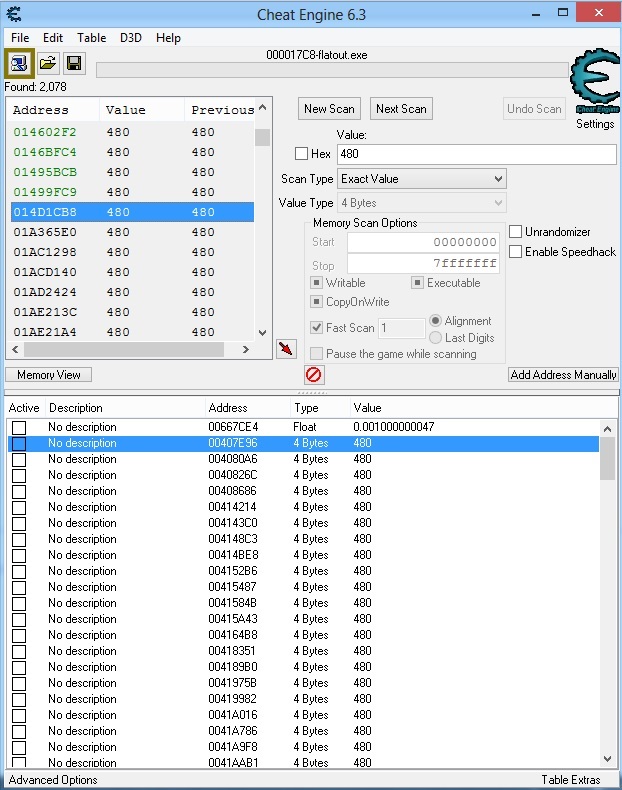
I change all found values to 360 :

The image of the game disappears, then an error appears. Empirically, I find out that the departure is due to a change in two addresses - FlatOut.exe + 1069C3 (0x5069C3) and FlatOut.exe + 107CCB (0x507CCB) . I go to the address 0x5069C3 in the IDA and see why it crashes:
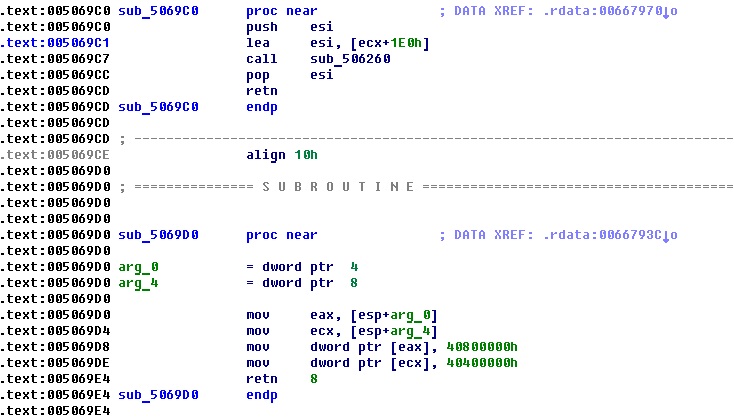
480 is an offset here, not a constant, so this function is not of interest, but the function below attracts attention, at 0x5069D0, which gets this look with a little conversion:

I try to change the constants 4.0 and 3.0 to 16.0 and 9.0 respectively:

I am surprised to find that this is the same aspect ratio, at a resolution of 1280x720 the picture immediately found the correct proportions (as it was / as it became): Now it remains to write a plug-in that will calculate the above constants in according to the current resolution and will make the image of the game correct with any settings.


C ++
I open Visual Studio, create a new Win32 project, the application type is the DLL. In the project properties, I set the following options:
- Configuration - Release
- Character Set - Use Multibyte Encoding
- Runtime Library - Multithreaded (/ MT)
- Warning Level - Level1 (/ W1)
- The final extension is .asi
- Output Directory - E: \ Games \ FlatOut \ FlatOut
To work with memory, I use a special class called CPatch.
Dllmain:
#include "stdafx.h"
#include "CPatch.h"
HANDLE HndThread;
int* g_Width = (int *)0x6B0D88;
int* g_Height = (int *)0x6B0D8C;
int g_CameraAspectRatio_x = 0x5069DA;
int g_CameraAspectRatio_y = 0x5069E0;
int g_hud_stretch_x = 0x667CE4;
#define screen_width (float)*g_Width
#define screen_height (float)*g_Height
float hud_stretch_new = 0.0;
int Thread()
{
	while (!screen_width)
	{
		Sleep(0);
	}
	hud_stretch_new = 1.0/(480.0*(screen_width/screen_height));
	CPatch::SetFloat(g_CameraAspectRatio_x, screen_width);
	CPatch::SetFloat(g_CameraAspectRatio_y, screen_height);
	CPatch::SetFloat(g_hud_stretch_x, hud_stretch_new);
	return 0;
}
BOOL APIENTRY DllMain(HMODULE hModule, DWORD reason, LPVOID lpReserved)
{
    if(reason==DLL_PROCESS_ATTACH)
    {
		HndThread = CreateThread(0,0,(LPTHREAD_START_ROUTINE)&Thread,NULL,0,NULL);
    }
    return TRUE;
}
In order for my ASI library to load with the game, I need to install the universal ASI Loader by copying dsound.dll from the archive to the game folder. ASI is just a renamed DLL, and dsound.dll loads ASI into the process of any game that uses DirectSound. It is possible to load scripts from a subfolder.
Result
This is only the first version of the plugin, and most likely it will be updated more than once. There are certain flaws, for example, the main menu. Also, in case of incompatibility, you can add support for other EXEs, for example, the steam version. You can download the plugin from github . Installation is simple - unzip the archive into the folder with the game.


Update from 08/02/2013
Released an updated version, with support for the steam version and the steam demo version of the game.