New Nekaka features, hacks and bonuses
For a long time we did not write anything about the project, we were waiting for the completion of new functionality. As usual it became more interesting, in addition, a freebie was added. But first things first.
We believe that it is convenient to store files in one place, but duplicating them in several repositories, while having a single interface for accessing files, is even better. Therefore, we have added a completely new feature - synchronization with folders from other file storages and social networks. Of course, someone will say that this was already with Dropbox, but we also redid it, improving and adding to it (there are no more restrictions on file size). So, meet the synchronization with:
* A small remark, the API of both social networks does not allow you to delete photos, and Facebook also changes the description for them.
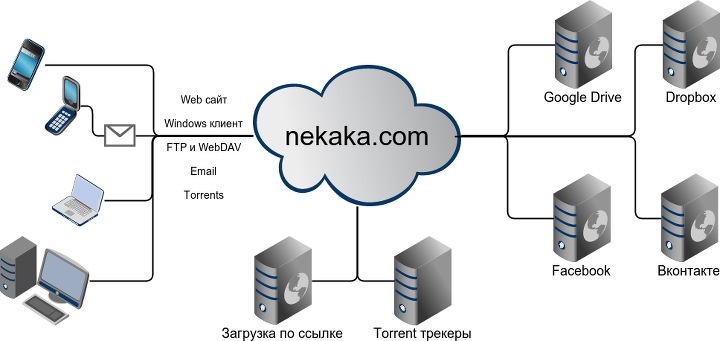
I hope you know that you can download and download files from nekaka.com not only through the website, but also through the Windows client , as well as using any WebDAV or FTP client. You can also upload files by sending them by e-mail to an email address. In addition, you can download something through the built-in torrent client at speeds up to 1GB / s.
And this, for example, gives you the opportunity to upload photos to Facebook and Vkontakte through the Windows Nekaki client or download all photos and videos from social networks via FTP or WebDAV .
There was no client for Google Drive, Dropbox or Facebook on your phone, but would you like to upload new holiday photos right now? It doesn’t matter, send them to a pre- generated email address, and in the subject line the name of the folder associated with one of your social networks and photos will soon be uploaded to your photo album. This album can be shared not only with friends, but also with anyone, by sharing the folder and sharing a link with it.
I think you will find many more options for how to upload, store and share files with friends. In the near future we want to add more social networks and expand the possibilities of interaction with them. Perhaps you already have ideas? Write in the comments or at [email protected] and we will certainly consider, and perhaps encourage a good idea.

And now for a free place to store your files. We have created a simple invitation system that will double (and possibly more) increase the amount of storage. At the same time, you get not a fixed increase, but 5% of the account size. Here is an example to make it clearer: you recently purchased a premium account and got 100GB of space, invited your friends who, after registration, received 5% of their free account (about 500MB), and you get 5% of your 100GB, that is + 5GB. Not bad, right? Just do not try to register non-real accounts, most likely such a wrapping will lead to blocking or mutual reduction of available space.
To get an increase right now, you can easily register by clicking here .
And we are still without boring advertising.
Sync with ...
We believe that it is convenient to store files in one place, but duplicating them in several repositories, while having a single interface for accessing files, is even better. Therefore, we have added a completely new feature - synchronization with folders from other file storages and social networks. Of course, someone will say that this was already with Dropbox, but we also redid it, improving and adding to it (there are no more restrictions on file size). So, meet the synchronization with:
- Google Drive - full 2-way synchronization of files and folders, as well as the export of Google documents
- Dropbox - full synchronization, as it was, but we fixed a lot and removed the size limit for synchronized files
- Facebook - now you can download and upload photos and videos to this social network *
- Vkontakte - the ability to synchronize photos and documents *
* A small remark, the API of both social networks does not allow you to delete photos, and Facebook also changes the description for them.
Interesting features
I hope you know that you can download and download files from nekaka.com not only through the website, but also through the Windows client , as well as using any WebDAV or FTP client. You can also upload files by sending them by e-mail to an email address. In addition, you can download something through the built-in torrent client at speeds up to 1GB / s.
And what can this give us?
And this, for example, gives you the opportunity to upload photos to Facebook and Vkontakte through the Windows Nekaki client or download all photos and videos from social networks via FTP or WebDAV .
There was no client for Google Drive, Dropbox or Facebook on your phone, but would you like to upload new holiday photos right now? It doesn’t matter, send them to a pre- generated email address, and in the subject line the name of the folder associated with one of your social networks and photos will soon be uploaded to your photo album. This album can be shared not only with friends, but also with anyone, by sharing the folder and sharing a link with it.
I think you will find many more options for how to upload, store and share files with friends. In the near future we want to add more social networks and expand the possibilities of interaction with them. Perhaps you already have ideas? Write in the comments or at [email protected] and we will certainly consider, and perhaps encourage a good idea.
Freebie
And now for a free place to store your files. We have created a simple invitation system that will double (and possibly more) increase the amount of storage. At the same time, you get not a fixed increase, but 5% of the account size. Here is an example to make it clearer: you recently purchased a premium account and got 100GB of space, invited your friends who, after registration, received 5% of their free account (about 500MB), and you get 5% of your 100GB, that is + 5GB. Not bad, right? Just do not try to register non-real accounts, most likely such a wrapping will lead to blocking or mutual reduction of available space.
To get an increase right now, you can easily register by clicking here .
And we are still without boring advertising.
Only registered users can participate in the survey. Please come in.
We have an API ...
- 65.4% Worth open to all. 53
- 7.4% What is it? 6
- 27.1% I don’t care. Give more options and freebies. 22