July 10, 2013 at 15:11
IKEv2 and Flex VPN using Cisco IOS. Syntax and logic of work
In this article, I tried to describe in the most accessible and concise way what IKEv2, FlexVPN is and how it is implemented in Cisco IOS routers. For a better understanding of the content, it is necessary that the reader, at the time of familiarization with the text below, not be afraid of such words as VPN, IPSec, ISAKMP, ISAKMP Profile, etc. In addition, it is advisable to have a good understanding of how various types of VPNs are configured using VTI interfaces (or GRE over IPSec) on Cisco equipment, since the article relies heavily on knowledge of these issues.
Immediately you need to emphasize that you do not need to think that IKEv2 is something completely new, difficult to understand and completely changes the whole concept of building VPN networks. IKE (both 1 and 2) are designed only to provide ESP (well, or AH, if anyone needs it) with the necessary key information needed by the specified protocols for direct data protection. ESP itself, its operating modes (tunnel / transport) and all related concepts do not change.
I will summarize the most significant things in my opinion:
1. Both protocols work on UDP / 500 (4500 in the case of NAT-T), but are incompatible with each other, that is, it doesn’t work out that IKEv1 is on one end of the tunnel and IKEv2 is on the other. At the same time, the same router can terminate both IKEv2 and IKEv1 tunnels simultaneously. There are enough differences in the IKEv1 and 2 headers so that the router can determine what it is dealing with, despite the same ports.
2. IKEv2 no longer has such concepts as aggressive / main mode, which is one of the aspects that make the protocol easier to understand.
3. In IKEv2, the term phase1 is replaced by IKE_SA_INIT (two messages exchanging encryption / hashing protocols and generating DH keys), and phase2 is replaced by IKE_AUTH (also two messages that directly implement peer authentication and key generation for ESP). The communication in IKE_AUTH is always encrypted using the SAs generated by IKE_SA_INIT. Isakmp SA is now called ikev2 sa, and ipsec sa is called Child SA.
4. in IKEv2, the authentication method between peers is no longer automatically negotiated and is not tied to any IKEv2 policies. Those. if earlier in IKEv1 each isakmp policy had an authentication line, which indicated what type of authentication would be, if this policy was selected, now the authentication method is set manually and it is clearly determined that authentication will be performed with this peer, but with this is by pre-shared key. In addition, asymmetric authentication has become possible in IKEv2. Those. you can make endpoint A authenticate endpoint B with certificates, while B will authenticate A with a pre-shared key. Or, A authenticates B using pre-shared key1, while B authenticates A using pre-shared key2. Other options are possible, including
5. Mode Config (what ikev1 called phase 1.5 and is used to configure remote RAVPN / EasyVPN connections), NAT-T and keepalives are now directly described in the protocol specification and are an integral part of it. Previously, these things were implemented by vendors as needed.
6. IKEv2 added an additional mechanism for protecting the control-plane (services plane) from DoS attacks. Its essence is that before responding to each request to establish a secure connection (IKE_SA_INIT), the IKEv2 VPN gateway sends a cookie to the source of the request request and waits for it to respond in the same way. If the source replied - excellent, you can start DH generation with it. If the source does not respond (in the case of the DoS attack this happens - this is essentially comparable to the TCP SYN flood attack), the VPN gateway just forgets about it. Without this mechanism, with every IKE_SA_INIT IKEv2 request from anyone, the VPN gateway would try to generate a DH key (which, as you know, is a very resource-intensive process) and would soon be left with a killed (albeit temporarily) control-plane.
FlexVPN is a framework that implements IKEv2 on Cisco IOS routers. Those. this is IKEv2 + IPSec in the IOS command syntax. No more.
The main feature, FlexVPN (the Flex keyword is Flexible), which Cisco positions as a distinctive feature of FlexVPN, is that the same VPN gateway configuration allows different types of tunnels to chain to it - Remote Access, Site-to-Site, etc . Although, in my opinion, the same (well, or almost the same) flexibility can be achieved in the traditional IKEv1 configuration, if you use VTI interfaces. Well, okay, this is all my IMHO.
Next, we’ll analyze now what the FlexVPN syntax looks like, which commands it uses, what they mean, what they are for, how they relate to similar commands in IKEv1.
So, the main (and, IMHO, all) components of IKEv2 in Cisco IOS are:
1. Proposal
2. Policy
3. Keyring
4. Profile
Next, each in order.
The Proposal
IKEv2 proposal limits which algorithms will be used to establish / protect the IKE_SA_INIT phase. At its core, it is an analogue of crypto isakmp policy in IKEv1, although not fully.
Looks like that:
The first difference from isakmp policy is that you can put several algorithms / encryption key lengths / DH / hashes into one proposal at once. The second difference that was mentioned earlier is that there is no authentication line, since now authentication is a separate issue. The third difference is that the proposal is not an independent part of the config and should be placed in policy.
Policy
IKEv2 Policy is a container for proposal, and not only. Here is an example first, and then I will explain:
As you can see, policy refers to the proposal. But, besides this, it adds the ability to choose one or another proposal depending on 1) in which VRF the interface is located, to which the remote peer is connected; 2) to which local address the remote peer is connected. If you compare this crypto isakmp policy in IKEv1, then there crypto isakmp policy were global for all connections. In principle, there was no way to make it so that for part of the peers, only policy 1,2,3 can be used, and for the other part 4.5.6. There is such an opportunity, although I’m not sure that there is great practical benefit in this. But, nevertheless ...
Thus, I emphasize once again:
Crypto ikev2 policy + crypto ikev2 proposal in IKEv2 fulfill the same role as crypto isakmp policy in IKEv1.
Keyring
IKEv2 Keyring is a repository that stores pre-shared keys. Obviously, keyring is used and only makes sense if the authentication method for pre-shared keys is selected. If PKI is used for authentication, you need to configure not keyring, but Trustpoint. If we draw an analogy with IKEv1, in the simplest case there the following construction was used to specify pre-shared keys:
Those. pre-shared keys were separate configuration items, each on its own. In IKEv2, a kind of container appeared, keyring, due to which the config looks more structured, + some additional features are added.
An example of how a keyring of a VPN gateway installed in HQ might look like for interacting with two remote sites (in the absence of deep skills in drawing tables in html, I inserted it as a picture):

Profile
IKEv2 profile is the cornerstone of FlexVPN and is its main component. It defines the “policy” for remote access to the VPN gateway. By its purpose, the IKEv2 profile is completely analogous to the IKEv1 isakmp profile in Cisco IOS or tunnel-group (connection profile) if you recall the ASA, but it has more features and is more flexible in configuration. This is a kind of repository of parameters that are not automatically negotiated by the participants of the VPN interaction, but are determined statically. What functions does he perform? In the process of establishing a VPN connection, and in particular IKE_INIT_SA, the VPN gateway needs to know (the numbers in brackets are not links to the list of used literature, but links to the config lines shown below):
1. How to authenticate a connecting peer (PKI? Pre-shared keys?). In IKEv2, the authentication type, as I mentioned earlier, is not negotiated, and must be explicitly defined. FlexVPN uses the ikev2 profile (1) for this .
2. What should be the dead-peer detection (DPD) parameters. In IKEv2, DPD timers are also not automatically negotiated, but are manually set in the ikev2 profile (2) settings (although they can be defined globally).
3. Which keyring should be used to authenticate a remote peer in the case of authentication using pre-shared keys is also an ikev2 profile (3) parameter .
4. Which trustpoint to use for remote peer authentication, in the case of PKI authentication - also ikev2 profile parameter(4) .
5. How to introduce yourself to a remote feast, what to choose as your own IKEv2_ID is also an ikev2 profile (5) parameter .
6. In which iVRF - put the traffic, after it is decrypted (VRF-aware IPSec) - the ikev2 profile (6) parameter .
IKEv2 profile example:
crypto ikev2 profile profile_name
match local_address | certificate map | FVRF | IKEv2_ID of remote peer
authentication {local | remote {rsa-sig | pre-share | ecdsa-sig}} (1)
dpd interval retry-interval {on- demand | periodic} (2)
identity local {address | dn | email | fqdn | key-id} (5)
keyring name (3)
ivrf name(6)
pki trustpoint label [sign | verify] (4)
virtual-template number
ie An IKEv2 profile defines many VPN connection settings. And there can be many such profiles in the configuration, and each can define a different set of parameters, depending on who / what is connected to the gateway (or who the gateway is connected to). And this “depending” is determined by the match directive (match directives in one profile can be several).
For example, we have two profiles:
With this setting, when a remote peer with Src IP = 1.1.1.1 connects to the local gateway, the parameters described in PROFILE1 will be applied to it (peer). When a peer with fqdn = remotepeer2.someorg.com is connected to the local gateway, the parameters described in PROFILE2 will be applied to it.
Here it is necessary to draw an invisible line, it is imperative to say that at this point everything that is called IKEv2 in the context of setting up the protocol with IOS means ends and there will be nothing new. And, you can make the line visible. Here she is:
So, these four constructions demonstrated above (policy, proposal, keyring, profile) determine the configuration of what phase1 was called in IKEv1. In IKEv2, this is IKE_SA_INIT, but the essence is exactly the same.
What to do after IKE_SA_INIT is configured? Right. You need to configure the IPSec profile, determine what traffic will go through the tunnel (proxy-ACL or tunnel interface - VTI, where routing is responsible for this), i.e. Perform what IKEv1 called the second phase settings. This part of the settings in IKEv1 and in IKEv2 is absolutely identical. What the entire config looks like, I will give it below with a simple example.
It should be mentioned that FlexVPN in IOS was defaulted in such a way that it requires a minimum of actions on the part of the administrator to quickly configure the VPN, if the administrator does not really want / too lazy to understand how it all works and perform some kind of smart settings. For this, the so-called smart-defaults are intended. Smart-defaults are preconfigured default ikev2 proposal / policy / profile, ipsec profile, etc. Objectively, smart-defaults can be very useful and have a right to exist. Why constantly drive the same settings if they are already in the config? You can look at them by running the sh run all | s crypto. The output of the command will be something like this (part of the output is omitted as unnecessary):
Those. it can be seen that in the config by default both IKEv2 proposal and IKEv2 policy, and IPSec transform-set and IPSec profile are configured. Moreover, they are configured so that the most serious algorithms have the highest priority, which suits us perfectly. Naturally, the highest predictability of the VPN will be provided only by manual configuration of all parameters, but as the last resort, default ones can be used.
Next, consider a fairly simple example of Site-to-Site VPN with pre-shared authentication. The topology looks like this:

You need to configure an IPSec / IKEv2 tunnel between Site1Router and Site2Router routers and ensure the mutual access of loopbacks of each of the routers through the tunnel using the dynamic routing protocol.
The config of each of the routers in this case will be like this:
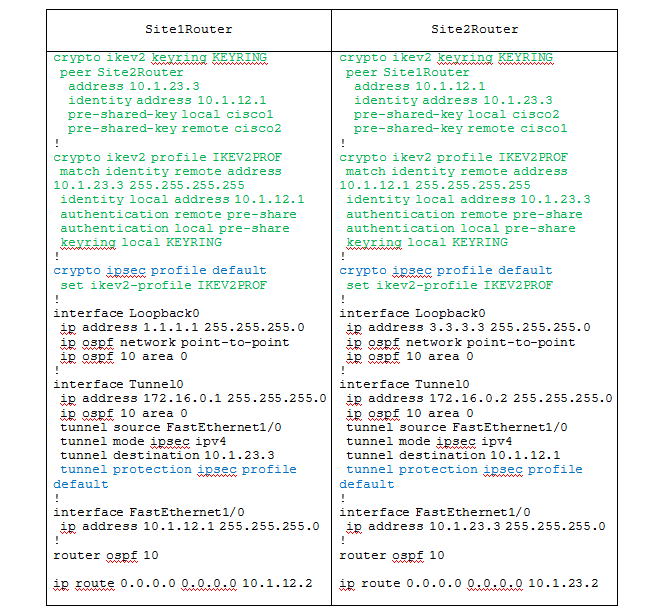
In this example, the config related to configuring IKEv2 and IPSec is highlighted. The example uses the same smart-defaults (see the sh run all output above - that is, you can just take and mentally add these settings to the config of each router), which set the default parameters for IKEv2 policy / proposal, IPSec transform-set . IPSec profile is also used default. In the config, it refers to the ikev2 profile and hangs on the tunnel interface to protect it. As a result, the config is quite compact and easy to read. As you can see from the example, the configuration of everything that in IKEv1 was related to phase 2 is similar to that in IKEv1. Those. the same crypto ipsec transform set is created (the default one is taken here), this transform-set together with the ikev2 profile is attached to the ipsec profile, the ipsec profile is hung on the interface,
After the tunnel has been successfully installed, let's see the output of some commands:
Site1Router # sh crypto ipsec sa
The output of sh crypto ipsec sa is the same as if we were setting up traditional Ikev1, because ESP doesn't care who prepares key information for it - IKEv2 or IKEv1. Next:
Site1Router # sh crypto ikev2 sa detailed
Here we already see the information specific to IKEv2 - the used encryption / hashing algorithms / DH groups. It can also be seen that the IKEv2 profile was not tied to specific VRFs (since smart-default was used). It can be seen that the initiator of the connection was Site2Router.
Next:
Site1Router # sh crypto engine connections active
Here again, nothing new. We have two unidirectional IPSec SAs (lines starting with 11 and 12) and one bidirectional IKEv2 SA.
The output of sh crypto isakmp sa, as expected, shows nothing:
Site1Router # sh crypto isakmp sa
Something like that. I hope this whole text is not too confusing or too superficial, and will be useful to someone.
Foreword
Immediately you need to emphasize that you do not need to think that IKEv2 is something completely new, difficult to understand and completely changes the whole concept of building VPN networks. IKE (both 1 and 2) are designed only to provide ESP (well, or AH, if anyone needs it) with the necessary key information needed by the specified protocols for direct data protection. ESP itself, its operating modes (tunnel / transport) and all related concepts do not change.
Briefly about the main features and differences of IKEv2 from its predecessor
I will summarize the most significant things in my opinion:
1. Both protocols work on UDP / 500 (4500 in the case of NAT-T), but are incompatible with each other, that is, it doesn’t work out that IKEv1 is on one end of the tunnel and IKEv2 is on the other. At the same time, the same router can terminate both IKEv2 and IKEv1 tunnels simultaneously. There are enough differences in the IKEv1 and 2 headers so that the router can determine what it is dealing with, despite the same ports.
2. IKEv2 no longer has such concepts as aggressive / main mode, which is one of the aspects that make the protocol easier to understand.
3. In IKEv2, the term phase1 is replaced by IKE_SA_INIT (two messages exchanging encryption / hashing protocols and generating DH keys), and phase2 is replaced by IKE_AUTH (also two messages that directly implement peer authentication and key generation for ESP). The communication in IKE_AUTH is always encrypted using the SAs generated by IKE_SA_INIT. Isakmp SA is now called ikev2 sa, and ipsec sa is called Child SA.
4. in IKEv2, the authentication method between peers is no longer automatically negotiated and is not tied to any IKEv2 policies. Those. if earlier in IKEv1 each isakmp policy had an authentication line, which indicated what type of authentication would be, if this policy was selected, now the authentication method is set manually and it is clearly determined that authentication will be performed with this peer, but with this is by pre-shared key. In addition, asymmetric authentication has become possible in IKEv2. Those. you can make endpoint A authenticate endpoint B with certificates, while B will authenticate A with a pre-shared key. Or, A authenticates B using pre-shared key1, while B authenticates A using pre-shared key2. Other options are possible, including
5. Mode Config (what ikev1 called phase 1.5 and is used to configure remote RAVPN / EasyVPN connections), NAT-T and keepalives are now directly described in the protocol specification and are an integral part of it. Previously, these things were implemented by vendors as needed.
6. IKEv2 added an additional mechanism for protecting the control-plane (services plane) from DoS attacks. Its essence is that before responding to each request to establish a secure connection (IKE_SA_INIT), the IKEv2 VPN gateway sends a cookie to the source of the request request and waits for it to respond in the same way. If the source replied - excellent, you can start DH generation with it. If the source does not respond (in the case of the DoS attack this happens - this is essentially comparable to the TCP SYN flood attack), the VPN gateway just forgets about it. Without this mechanism, with every IKE_SA_INIT IKEv2 request from anyone, the VPN gateway would try to generate a DH key (which, as you know, is a very resource-intensive process) and would soon be left with a killed (albeit temporarily) control-plane.
What is FlexVPN?
FlexVPN is a framework that implements IKEv2 on Cisco IOS routers. Those. this is IKEv2 + IPSec in the IOS command syntax. No more.
The main feature, FlexVPN (the Flex keyword is Flexible), which Cisco positions as a distinctive feature of FlexVPN, is that the same VPN gateway configuration allows different types of tunnels to chain to it - Remote Access, Site-to-Site, etc . Although, in my opinion, the same (well, or almost the same) flexibility can be achieved in the traditional IKEv1 configuration, if you use VTI interfaces. Well, okay, this is all my IMHO.
Next, we’ll analyze now what the FlexVPN syntax looks like, which commands it uses, what they mean, what they are for, how they relate to similar commands in IKEv1.
FlexVPN Syntax for IKEv2 Configuration
So, the main (and, IMHO, all) components of IKEv2 in Cisco IOS are:
1. Proposal
2. Policy
3. Keyring
4. Profile
Next, each in order.
The Proposal
IKEv2 proposal limits which algorithms will be used to establish / protect the IKE_SA_INIT phase. At its core, it is an analogue of crypto isakmp policy in IKEv1, although not fully.
Looks like that:
crypto ikev2 proposal PROP_1
	encryption aes-cbc-256 aes-cbc-128 3des
	group 14 5 2
	integrity sha 256 sha1 md5
The first difference from isakmp policy is that you can put several algorithms / encryption key lengths / DH / hashes into one proposal at once. The second difference that was mentioned earlier is that there is no authentication line, since now authentication is a separate issue. The third difference is that the proposal is not an independent part of the config and should be placed in policy.
Policy
IKEv2 Policy is a container for proposal, and not only. Here is an example first, and then I will explain:
crypto ikev2 policy POLICY_1
	match vrf VRF1
	match address local 203.0.113.10
	proposal PROP_1
As you can see, policy refers to the proposal. But, besides this, it adds the ability to choose one or another proposal depending on 1) in which VRF the interface is located, to which the remote peer is connected; 2) to which local address the remote peer is connected. If you compare this crypto isakmp policy in IKEv1, then there crypto isakmp policy were global for all connections. In principle, there was no way to make it so that for part of the peers, only policy 1,2,3 can be used, and for the other part 4.5.6. There is such an opportunity, although I’m not sure that there is great practical benefit in this. But, nevertheless ...
Thus, I emphasize once again:
Crypto ikev2 policy + crypto ikev2 proposal in IKEv2 fulfill the same role as crypto isakmp policy in IKEv1.
Keyring
IKEv2 Keyring is a repository that stores pre-shared keys. Obviously, keyring is used and only makes sense if the authentication method for pre-shared keys is selected. If PKI is used for authentication, you need to configure not keyring, but Trustpoint. If we draw an analogy with IKEv1, in the simplest case there the following construction was used to specify pre-shared keys:
crypto isakmp key cisco address xxxx 255.255.255.0
Those. pre-shared keys were separate configuration items, each on its own. In IKEv2, a kind of container appeared, keyring, due to which the config looks more structured, + some additional features are added.
An example of how a keyring of a VPN gateway installed in HQ might look like for interacting with two remote sites (in the absence of deep skills in drawing tables in html, I inserted it as a picture):
Profile
IKEv2 profile is the cornerstone of FlexVPN and is its main component. It defines the “policy” for remote access to the VPN gateway. By its purpose, the IKEv2 profile is completely analogous to the IKEv1 isakmp profile in Cisco IOS or tunnel-group (connection profile) if you recall the ASA, but it has more features and is more flexible in configuration. This is a kind of repository of parameters that are not automatically negotiated by the participants of the VPN interaction, but are determined statically. What functions does he perform? In the process of establishing a VPN connection, and in particular IKE_INIT_SA, the VPN gateway needs to know (the numbers in brackets are not links to the list of used literature, but links to the config lines shown below):
1. How to authenticate a connecting peer (PKI? Pre-shared keys?). In IKEv2, the authentication type, as I mentioned earlier, is not negotiated, and must be explicitly defined. FlexVPN uses the ikev2 profile (1) for this .
2. What should be the dead-peer detection (DPD) parameters. In IKEv2, DPD timers are also not automatically negotiated, but are manually set in the ikev2 profile (2) settings (although they can be defined globally).
3. Which keyring should be used to authenticate a remote peer in the case of authentication using pre-shared keys is also an ikev2 profile (3) parameter .
4. Which trustpoint to use for remote peer authentication, in the case of PKI authentication - also ikev2 profile parameter(4) .
5. How to introduce yourself to a remote feast, what to choose as your own IKEv2_ID is also an ikev2 profile (5) parameter .
6. In which iVRF - put the traffic, after it is decrypted (VRF-aware IPSec) - the ikev2 profile (6) parameter .
IKEv2 profile example:
crypto ikev2 profile profile_name
match local_address | certificate map | FVRF | IKEv2_ID of remote peer
authentication {local | remote {rsa-sig | pre-share | ecdsa-sig}} (1)
dpd interval retry-interval {on- demand | periodic} (2)
identity local {address | dn | email | fqdn | key-id} (5)
keyring name (3)
ivrf name(6)
pki trustpoint label [sign | verify] (4)
virtual-template number
ie An IKEv2 profile defines many VPN connection settings. And there can be many such profiles in the configuration, and each can define a different set of parameters, depending on who / what is connected to the gateway (or who the gateway is connected to). And this “depending” is determined by the match directive (match directives in one profile can be several).
For example, we have two profiles:
crypto ikev2 profile PROFILE1
	match identity remote address 1.1.1.1
	the following is a set of PROFILE1 profile parameters
crypto ikev2 profile PROFILE2
	match identity remote fqdn remotepeer2.someorg.com
	the following is a set of PROFILE2 profile parameters
With this setting, when a remote peer with Src IP = 1.1.1.1 connects to the local gateway, the parameters described in PROFILE1 will be applied to it (peer). When a peer with fqdn = remotepeer2.someorg.com is connected to the local gateway, the parameters described in PROFILE2 will be applied to it.
Here it is necessary to draw an invisible line, it is imperative to say that at this point everything that is called IKEv2 in the context of setting up the protocol with IOS means ends and there will be nothing new. And, you can make the line visible. Here she is:
What's next?
So, these four constructions demonstrated above (policy, proposal, keyring, profile) determine the configuration of what phase1 was called in IKEv1. In IKEv2, this is IKE_SA_INIT, but the essence is exactly the same.
What to do after IKE_SA_INIT is configured? Right. You need to configure the IPSec profile, determine what traffic will go through the tunnel (proxy-ACL or tunnel interface - VTI, where routing is responsible for this), i.e. Perform what IKEv1 called the second phase settings. This part of the settings in IKEv1 and in IKEv2 is absolutely identical. What the entire config looks like, I will give it below with a simple example.
To not think at all
It should be mentioned that FlexVPN in IOS was defaulted in such a way that it requires a minimum of actions on the part of the administrator to quickly configure the VPN, if the administrator does not really want / too lazy to understand how it all works and perform some kind of smart settings. For this, the so-called smart-defaults are intended. Smart-defaults are preconfigured default ikev2 proposal / policy / profile, ipsec profile, etc. Objectively, smart-defaults can be very useful and have a right to exist. Why constantly drive the same settings if they are already in the config? You can look at them by running the sh run all | s crypto. The output of the command will be something like this (part of the output is omitted as unnecessary):
crypto ikev2 proposal default
encryption aes-cbc-256 aes-cbc-192 aes-cbc-128
integrity sha512 sha384 sha256 sha1 md5
group 5 2
crypto ikev2 policy default
matchfvrf any
proposal default
crypto ikev2 natkeepalive 0
crypto ikev2 diagnose error 50
crypto ikev2 dpd 0 0 periodic
crypto ikev2 limit max-in-negotation-sa 40
crypto ikev2 limit max-sa 0
crypto ikev2 window 5
crypto ikev2 fragmentation mtu 576
crypto ipsec transform-set default esp-aes esp-sha-hmac
 mode transport
crypto ipsec profile default
 set security-association lifetime kilobytes 4608000
 set security-association lifetime seconds 3600
 no set security-association idle-time
 no set security-association replay window-size
Those. it can be seen that in the config by default both IKEv2 proposal and IKEv2 policy, and IPSec transform-set and IPSec profile are configured. Moreover, they are configured so that the most serious algorithms have the highest priority, which suits us perfectly. Naturally, the highest predictability of the VPN will be provided only by manual configuration of all parameters, but as the last resort, default ones can be used.
Example
Next, consider a fairly simple example of Site-to-Site VPN with pre-shared authentication. The topology looks like this:
You need to configure an IPSec / IKEv2 tunnel between Site1Router and Site2Router routers and ensure the mutual access of loopbacks of each of the routers through the tunnel using the dynamic routing protocol.
The config of each of the routers in this case will be like this:
In this example, the config related to configuring IKEv2 and IPSec is highlighted. The example uses the same smart-defaults (see the sh run all output above - that is, you can just take and mentally add these settings to the config of each router), which set the default parameters for IKEv2 policy / proposal, IPSec transform-set . IPSec profile is also used default. In the config, it refers to the ikev2 profile and hangs on the tunnel interface to protect it. As a result, the config is quite compact and easy to read. As you can see from the example, the configuration of everything that in IKEv1 was related to phase 2 is similar to that in IKEv1. Those. the same crypto ipsec transform set is created (the default one is taken here), this transform-set together with the ikev2 profile is attached to the ipsec profile, the ipsec profile is hung on the interface,
Some show commands
After the tunnel has been successfully installed, let's see the output of some commands:
Site1Router # sh crypto ipsec sa
interface: Tunnel0
    Crypto map tag: Tunnel0-head-0, local addr 10.1.12.1
   protected vrf: (none)
   local ident (addr / mask / prot / port): (0.0.0.0/0.0.0.0/0/0)
   remote ident (addr / mask / prot / port): (0.0.0.0/0.0.0.0/0/0)
   current_peer 10.1.23.3 port 500
     PERMIT, flags = {origin_is_acl,}
    #pkts encaps: 1680, #pkts encrypt: 1680, #pkts digest: 1680
    #pkts decaps: 1678, #pkts decrypt: 1678, #pkts verify: 1678
    #pkts compressed: 0, #pkts decompressed: 0
    #pkts not compressed: 0, #pkts compr. failed: 0
    #pkts not decompressed: 0, #pkts decompress failed: 0
    #send errors 0, #recv errors 0
     local crypto endpt .: 10.1.12.1, remote crypto endpt .: 10.1.23.3
     path mtu 1500, ip mtu 1500, ip mtu idb FastEthernet1 / 0
     current outbound spi: 0x31A6B95A (833010010)
     PFS (Y / N): N, DH group: none
     inbound esp sas:
      spi: 0xE6E9033F (3874030399)
        transform: esp-aes esp-sha-hmac,
        in use settings = {Tunnel,}
        conn id: 11, flow_id: 11, sibling_flags 80000040, crypto map: Tunnel0-head-0
        sa timing: remaining key lifetime (k / sec): (4268866/1723)
        IV size: 16 bytes
        replay detection support: Y
        Status: ACTIVE (ACTIVE)
     inbound ah sas:
     inbound pcp sas:
     outbound esp sas:
      spi: 0x31A6B95A (833010010)
        transform: esp-aes esp-sha-hmac,
        in use settings = {Tunnel,}
        conn id: 12, flow_id: 12, sibling_flags 80000040, crypto map: Tunnel0-head-0
        sa timing: remaining key lifetime (k / sec): (4268866/1723)
        IV size: 16 bytes
        replay detection support: Y
        Status: ACTIVE (ACTIVE)
The output of sh crypto ipsec sa is the same as if we were setting up traditional Ikev1, because ESP doesn't care who prepares key information for it - IKEv2 or IKEv1. Next:
Site1Router # sh crypto ikev2 sa detailed
IPv4 Crypto IKEv2 SA
Tunnel-id Local Remote fvrf / ivrf Status
1 10.1.12.1/500 10.1.23.3/500 none / none READY
      Encr: AES-CBC, keysize: 256, Hash: SHA512, DH Grp: 5, Auth sign: PSK, Auth verify: PSK
      Life / Active Time: 86400/12375 sec
      CE id: 1003, Session-id: 2
      Status Description: Negotiation done
      Local spi: 1625F2D9751CC54F Remote spi: B9C9990767BC0006
      Local id: 10.1.12.1
      Remote id: 10.1.23.3
      Local req msg id: 2 Remote req msg id: 6
      Local next msg id: 2 Remote next msg id: 6
      Local req queued: 2 Remote req queued: 6
      Local window: 5 Remote window: 5
      DPD configured for 0 seconds, retry 0
      NAT-T is not detected
      Cisco Trust Security SGT is disabled
      Initiator of SA: No
Here we already see the information specific to IKEv2 - the used encryption / hashing algorithms / DH groups. It can also be seen that the IKEv2 profile was not tied to specific VRFs (since smart-default was used). It can be seen that the initiator of the connection was Site2Router.
Next:
Site1Router # sh crypto engine connections active
Crypto engine connections
   ID Type Algorithm Encrypt Decrypt LastSeqN IP-Address
   11 IPsec AES + SHA 0 223 223 10.1.12.1
   12 IPsec AES + SHA 222 0 0 10.1.12.1
 1003 IKEv2 SHA512 + AES256 0 0 0 10.1.12.1
Here again, nothing new. We have two unidirectional IPSec SAs (lines starting with 11 and 12) and one bidirectional IKEv2 SA.
The output of sh crypto isakmp sa, as expected, shows nothing:
Site1Router # sh crypto isakmp sa
IPv4 Crypto ISAKMP SA
dst src state conn-id status
Something like that. I hope this whole text is not too confusing or too superficial, and will be useful to someone.