
 July 9, 2013 at 13:31
Grandstream GXW 4216 Gateway Review + Maximum Load Test
In February 2013, Grandstream announced the release of a new line of analog gateways: GXW 4216/4224/4232/4248, designed to connect 16.24.32 or 48 subscribers, respectively. The youngest gateway from this line, Grandstream GXW 4216 came to us for a test.
Packaging and appearance
The gateway is delivered in a simple box of white color, without any bright identification signs:

The package includes: external power supply, cable for connecting to the Ethernet network and “ears” for mounting in a standard 19-inch rack.
On the front panel, in its left part, there are RJ-11 connectors for connecting subscribers; the space on the right is reserved for port status indicators:
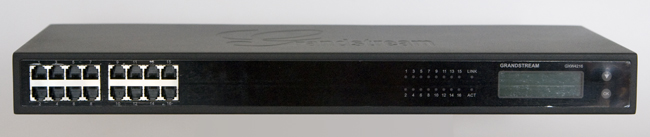
In addition, there is also a two-line backlit LCD display designed to display all kinds of service information: device IP address, mac address, firmware version, critical events, etc. Navigation through the menu items is carried out using the two buttons "Down" and "Ok":
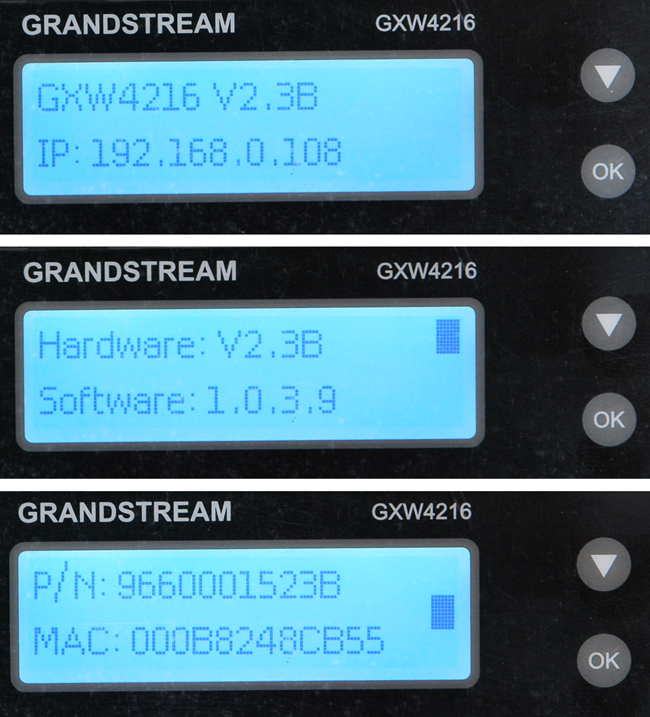
In our opinion, the manufacturer was stingy, because it was possible to add one more “Up” button, for more convenient navigation through the menu. But given the fact that most likely you look at this screen only once, during the initial setup to find out the IP address of the device, you can close your eyes to such a trifle.
On the back of the device there is a LAN port, a power connector, a “Reset” reset button and a redundant Telco50 connector, where you can connect subscribers if you have a multi-pair cable ending in the Telco50 male connector. The solution is quite practical, especially if you plan to use 32 or 48-port gateways - it is much easier to connect two Telco50 cables than crimp 32 or 48 connectors.

Ventilation holes are located on the side walls of the gateway:
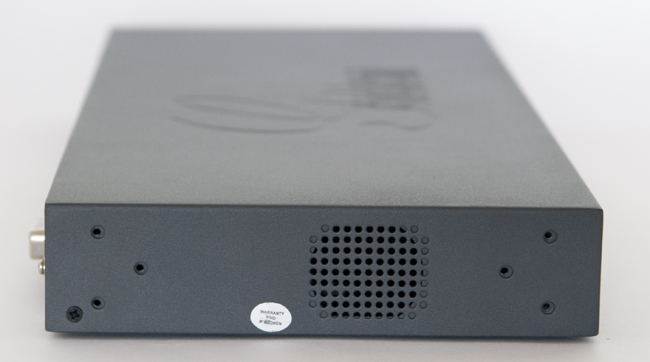
Moreover, the operation mode of the cooling system fans (“Auto” or “Permanently On”) can be selected from the menu on the front panel of the gateway, Factory Settings -> Fan Mode:

Perhaps this is one of the few parameters available for editing from the menu, everything else is available read only. It should be noted that the gateway is quite quiet in operation, the noise of the fans is almost inaudible.
Brief Specifications
—1 Gigabit Ethernet port —
128x32 graphic LCD display with backlight
—4 SIP profiles for each system and separate SIP accounts for each port;
—Supported voice codecs: G.711, G.723.1, G.726, G.729A / B, iLBC;
- Surge and
overcurrent protection - DTMF transmission methods: In Audio, RFC2833, SIP INFO -
Fax T.38 The
web interface of the gateway is practically no different from the already familiar Grandstream GXW40xx line.
Load test
We decided to conduct a load test - to check how long the gateway can withstand 16 simultaneous calls. To do this, we connected 16 Panasonic KX 2365 analog devices directly to the gateway itself, registered 3 IP Grandstream GXP 2120, Yealink SIP T28P and Yealink SIP T32G phones supporting 6, 6 and 3 lines at the PBX, respectively:
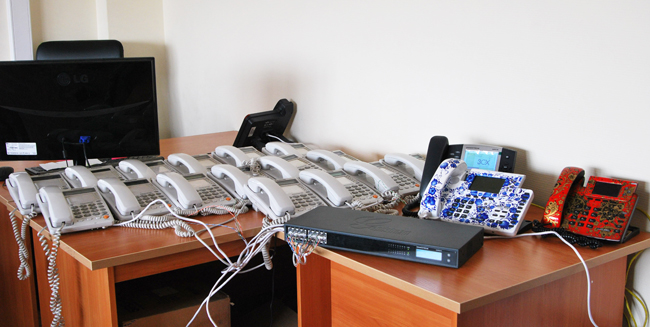
After which they initiated calls from ip phones to analog devices. Screenshot from the station at the time of maximum load:
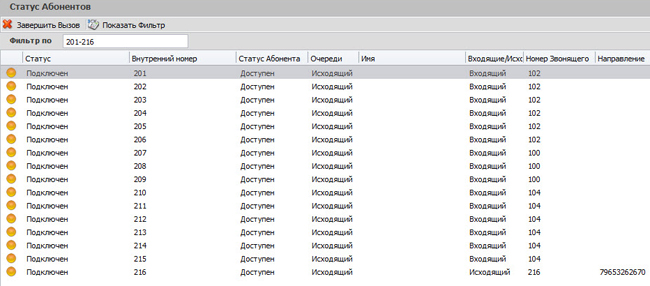
Here numbers 201 to 216 are subscribers of the Grandstream GXW4216 gateway, 100,102 and 104 are the numbers of ip-phones. “Status” tab on the GXW4216 gateway at the time of maximum load:

The duration of each of the sixteen conversations during the test was a little more than an hour, after which the test was discontinued. No degradation of voice quality or other denial of service was detected.
Thus, the following can be attributed to the advantages of the Grandstream GXW4216 gateway:
—A fairly low price for the device with a high port density;
—Availability of an LCD screen displaying the status of the device;
—Low noise level during the work;
—Reliability in maximum load operation mode;
There were no negative sides at the gateway. The only thing there is a claim to the build quality - after 2 weeks the lock was in laboratory tests, it began to peel off the plastic front panel. But most likely this is a problem of a specific instance, after a thorough examination of other gateways, such a defect was not found.
Packaging and appearance
The gateway is delivered in a simple box of white color, without any bright identification signs:
The package includes: external power supply, cable for connecting to the Ethernet network and “ears” for mounting in a standard 19-inch rack.
On the front panel, in its left part, there are RJ-11 connectors for connecting subscribers; the space on the right is reserved for port status indicators:
In addition, there is also a two-line backlit LCD display designed to display all kinds of service information: device IP address, mac address, firmware version, critical events, etc. Navigation through the menu items is carried out using the two buttons "Down" and "Ok":
In our opinion, the manufacturer was stingy, because it was possible to add one more “Up” button, for more convenient navigation through the menu. But given the fact that most likely you look at this screen only once, during the initial setup to find out the IP address of the device, you can close your eyes to such a trifle.
On the back of the device there is a LAN port, a power connector, a “Reset” reset button and a redundant Telco50 connector, where you can connect subscribers if you have a multi-pair cable ending in the Telco50 male connector. The solution is quite practical, especially if you plan to use 32 or 48-port gateways - it is much easier to connect two Telco50 cables than crimp 32 or 48 connectors.
Ventilation holes are located on the side walls of the gateway:
Moreover, the operation mode of the cooling system fans (“Auto” or “Permanently On”) can be selected from the menu on the front panel of the gateway, Factory Settings -> Fan Mode:
Perhaps this is one of the few parameters available for editing from the menu, everything else is available read only. It should be noted that the gateway is quite quiet in operation, the noise of the fans is almost inaudible.
Brief Specifications
—1 Gigabit Ethernet port —
128x32 graphic LCD display with backlight
—4 SIP profiles for each system and separate SIP accounts for each port;
—Supported voice codecs: G.711, G.723.1, G.726, G.729A / B, iLBC;
- Surge and
overcurrent protection - DTMF transmission methods: In Audio, RFC2833, SIP INFO -
Fax T.38 The
web interface of the gateway is practically no different from the already familiar Grandstream GXW40xx line.
Load test
We decided to conduct a load test - to check how long the gateway can withstand 16 simultaneous calls. To do this, we connected 16 Panasonic KX 2365 analog devices directly to the gateway itself, registered 3 IP Grandstream GXP 2120, Yealink SIP T28P and Yealink SIP T32G phones supporting 6, 6 and 3 lines at the PBX, respectively:
After which they initiated calls from ip phones to analog devices. Screenshot from the station at the time of maximum load:
Here numbers 201 to 216 are subscribers of the Grandstream GXW4216 gateway, 100,102 and 104 are the numbers of ip-phones. “Status” tab on the GXW4216 gateway at the time of maximum load:
The duration of each of the sixteen conversations during the test was a little more than an hour, after which the test was discontinued. No degradation of voice quality or other denial of service was detected.
Thus, the following can be attributed to the advantages of the Grandstream GXW4216 gateway:
—A fairly low price for the device with a high port density;
—Availability of an LCD screen displaying the status of the device;
—Low noise level during the work;
—Reliability in maximum load operation mode;
There were no negative sides at the gateway. The only thing there is a claim to the build quality - after 2 weeks the lock was in laboratory tests, it began to peel off the plastic front panel. But most likely this is a problem of a specific instance, after a thorough examination of other gateways, such a defect was not found.