July 2, 2013 at 15:41
Astra: where to apply?
Good afternoon.
Everyone connected with IPTV must have heard about programs such as Astra (getstream), tsplay , VLC , created for broadcasting to the network from various sources. They are alternative solutions to such hardware platforms as Harmonic, PBI and others.
Let's see how Astra manifests itself.
And my favorite Bridgetech VB220 analyzer will judge.

It’s faster and easier to start a movie using tsplay, this is done with one simple command:
The program doesn’t eat system resources and shows good data on the analyzer:

The graph shows that it is jitter-stable, there are no TS packet losses (not counting the moment when the movie ends and starts again).
It’s a bit harder to start broadcasting through the VLC from the console than using tsplay, but we still fit on one line:
On my machine, the process eats 1-3% of the processor (as if it decodes as well) and displays such data on the analyzer:
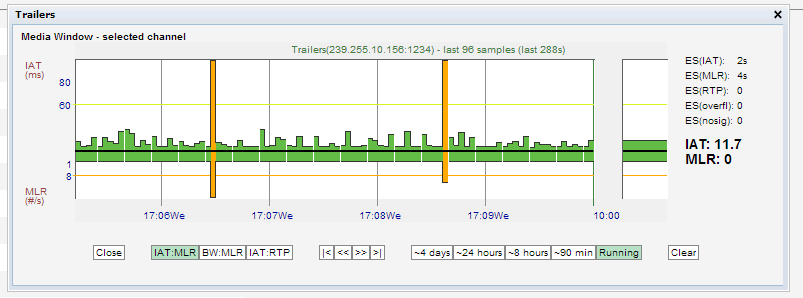
As we see from the graph, the jitter jumps, but within normal limits, there is no TS packet loss like tsplay, but a longer break between the end and the beginning of the clip.
To start Astra, you will have to create a small configuration file on lua:
And then run:
Or right away:
I don’t notice the load on the system, I look at the analyzer:
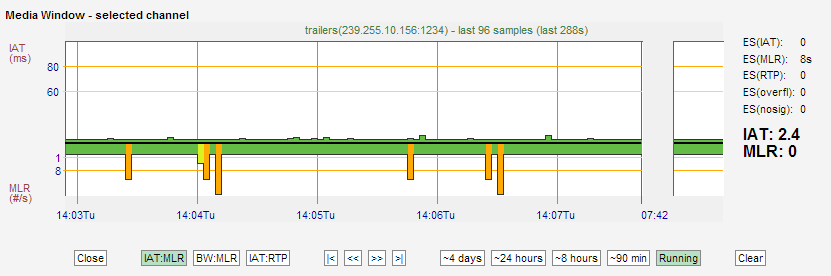
Almost perfect jitter, but there are TS packet losses even in the middle of the video.
On the subscriber side, the difference between VLC, tsplay, Astra is not noticeable.
On the analyzer it is more pleasant to look at tsplay.
Like Astra's lua configs.
Conveniently automate on bash'e tsplay.
VLC out of the box supports playlists and random broadcasts from the list, which can be done on bash using tsplay or on lua for Astra.
My choice for broadcasting from files: tsplay .
From the Harmonic ProView 29xx satellite receiver, we send the MPTS stream over IP to the Harmonic ProStream 1000 and a server with Astra .
Task: get two multicast groups with SPTS streams.
The streamer is configured through the web admin panel, which cannot boast of an intuitive and fast interface, but is quite suitable. We’ll omit this moment, I am a supporter of scripts and config files.
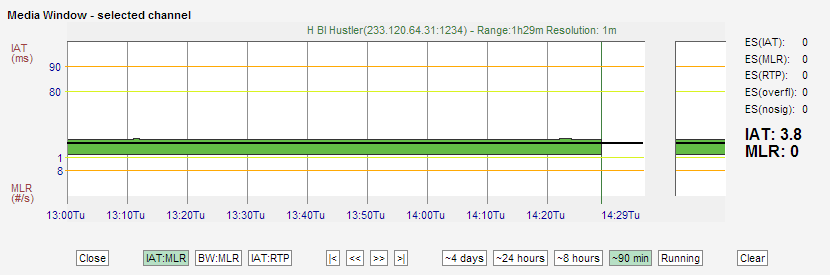
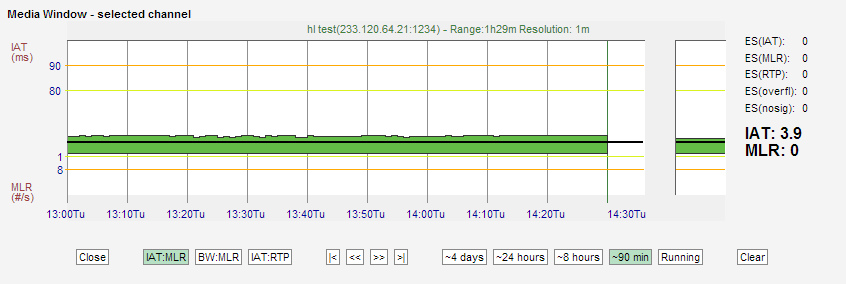
As a result, we get two perfect TS streams, which is not surprising for equipment with a high price tag:
As I said above, I like Astra configs. Everything looks beautiful and clear:
Astra also pleases us with good graphs on the analyzer:

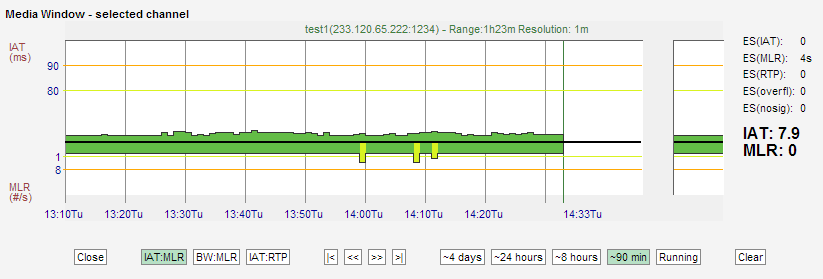
Yes, the results are not perfect, but only 3 small failures were recorded in 90 minutes, which the real client will never notice.
Astra has everything you need to work as an IP streamer (backup, filtering, changing PID tracks).
If you do not have professionally certified equipment, tools or the main streamer has failed, then Astra will be your salvation.
VLC is not considered in this test because of the complexity of the settings, the low quality of the generated threads and the high CPU consumption.
Astra and Harmonic ProStream show excellent streams.
Unfortunately, Astra is not able to generate streams with constant bitrate (CBR), which is useful in some cases.
I am very interested in comparing Astra's work with such processor receivers as the Harmonic ProView 7000 or PBI DHC-4000P, but, unfortunately, I do not have a DVB-S2 PCI-E board.
Our analyzer does not support the HTTP protocol, so we won’t be able to analyze the operation of Astra or VLC in this direction. Feeling they both do a great job with this task. Just who needs to broadcast in HTTP? It would be great to be able to reserve DVB / UDP sources with HTTP streams from the Internet, but so far no software (and hardware) can do this without crutches. Correct me if I'm wrong.
Astra is an interesting alternative to expensive equipment, I will definitely follow the development, but for now we are not ready to risk entrusting it with the generation of all flows, we will leave it for tests and in case of failure of the backup streamer.
Tell us about your experience with Astra and other software solutions for DVB / IPTV.
UPDATE: and_cesbo in the comments said that the new version has redesigned broadcasting from a file.
Screenshot from the analyzer:
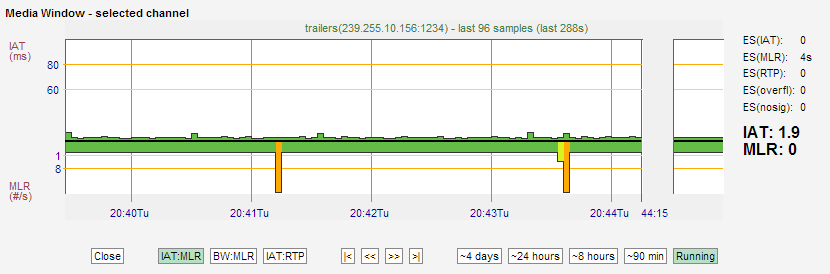
It became really good. Failures on the chart due to rewinding to the beginning of the file.
Everyone connected with IPTV must have heard about programs such as Astra (getstream), tsplay , VLC , created for broadcasting to the network from various sources. They are alternative solutions to such hardware platforms as Harmonic, PBI and others.
Let's see how Astra manifests itself.
And my favorite Bridgetech VB220 analyzer will judge.
From file to multicast
tsplay
It’s faster and easier to start a movie using tsplay, this is done with one simple command:
tsplay filename.ts 239.255.10.156:1234 -loopThe program doesn’t eat system resources and shows good data on the analyzer:
The graph shows that it is jitter-stable, there are no TS packet losses (not counting the moment when the movie ends and starts again).
VLC
It’s a bit harder to start broadcasting through the VLC from the console than using tsplay, but we still fit on one line:
сvlc -v /content/filename.ts --sout '#standard{access=udp{ttl=15},mux=ts{tsid=22,pid-video=23,pid-audio=24,pid-pmt=25,use-key-frames},dst=[239.255.10.156:1234]}' --loopOn my machine, the process eats 1-3% of the processor (as if it decodes as well) and displays such data on the analyzer:
As we see from the graph, the jitter jumps, but within normal limits, there is no TS packet loss like tsplay, but a longer break between the end and the beginning of the clip.
Astra
To start Astra, you will have to create a small configuration file on lua:
#!/usr/bin/astra
require("base")
make_stream({
    name = "Stream 1",
    file = {
        filename = "/content/filename.ts",
    }
}, {
    {
    name = "Movie",
    analyze = false,
    output = {
        "udp://239.255.10.156:1234",
        }
   },
})
And then run:
astra movie.luaOr right away:
./movie.luaI don’t notice the load on the system, I look at the analyzer:
Almost perfect jitter, but there are TS packet losses even in the middle of the video.
Conclusion
On the subscriber side, the difference between VLC, tsplay, Astra is not noticeable.
On the analyzer it is more pleasant to look at tsplay.
Like Astra's lua configs.
Conveniently automate on bash'e tsplay.
VLC out of the box supports playlists and random broadcasts from the list, which can be done on bash using tsplay or on lua for Astra.
My choice for broadcasting from files: tsplay .
From unicast / multicast (MPTS) to Multicast (SPTS)
From the Harmonic ProView 29xx satellite receiver, we send the MPTS stream over IP to the Harmonic ProStream 1000 and a server with Astra .
Task: get two multicast groups with SPTS streams.
Harmonic ProStream 1000
The streamer is configured through the web admin panel, which cannot boast of an intuitive and fast interface, but is quite suitable. We’ll omit this moment, I am a supporter of scripts and config files.
As a result, we get two perfect TS streams, which is not surprising for equipment with a high price tag:
Astra
As I said above, I like Astra configs. Everything looks beautiful and clear:
#!/usr/bin/astra
require("base")
make_stream({
    name = "ProView IRD",
    demux = true,
    udp = {
        addr = "10.10.10.10", port = 2008
    }
}, {
    {
        name = "Hustler TV",
        analyze = false,
        pnr = 9,
        output = {
            "udp://233.120.65.222:1234",
        }
    },
    {
        name = "Blue Hustler",
        analyze = false,
        pnr = 10,
        output = {
            "udp://233.120.65.223:1234",
        }
    },
})
Astra also pleases us with good graphs on the analyzer:
Yes, the results are not perfect, but only 3 small failures were recorded in 90 minutes, which the real client will never notice.
Conclusion
Astra has everything you need to work as an IP streamer (backup, filtering, changing PID tracks).
If you do not have professionally certified equipment, tools or the main streamer has failed, then Astra will be your salvation.
VLC is not considered in this test because of the complexity of the settings, the low quality of the generated threads and the high CPU consumption.
Multicast (SPTS) to Multicast (SPTS)
Astra and Harmonic ProStream show excellent streams.
Unfortunately, Astra is not able to generate streams with constant bitrate (CBR), which is useful in some cases.
DVB-S / S2 to Multicast
I am very interested in comparing Astra's work with such processor receivers as the Harmonic ProView 7000 or PBI DHC-4000P, but, unfortunately, I do not have a DVB-S2 PCI-E board.
About HTTP
Our analyzer does not support the HTTP protocol, so we won’t be able to analyze the operation of Astra or VLC in this direction. Feeling they both do a great job with this task. Just who needs to broadcast in HTTP? It would be great to be able to reserve DVB / UDP sources with HTTP streams from the Internet, but so far no software (and hardware) can do this without crutches. Correct me if I'm wrong.
General conclusion
Astra is an interesting alternative to expensive equipment, I will definitely follow the development, but for now we are not ready to risk entrusting it with the generation of all flows, we will leave it for tests and in case of failure of the backup streamer.
Tell us about your experience with Astra and other software solutions for DVB / IPTV.
UPDATE: and_cesbo in the comments said that the new version has redesigned broadcasting from a file.
Screenshot from the analyzer:
It became really good. Failures on the chart due to rewinding to the beginning of the file.
Only registered users can participate in the survey. Please come in.
What equipment do you use on your network? (mainly)
- 38.2% Server with a set of software. 75
- 20.4% Ready Enterprise Solutions. 40
- 41.3% We do not have our IPTV station. 81