What is Jelastic's Wildcard SSL and how can it save money?
Not so long ago, REG.RU introduced cloud services to users based on the Jelastic hosting platform. Despite the fact that it is quite simple to use, REG.RU technical support specialists often turn up with clarifying questions about working with the Jelastic PaaS platform. There are currently very few detailed instructions on the web in Russian, so sometimes we will talk on the REG.RU blog about what our customers are most interested in.
Now go directly to the topic of the post.
What is Wildcard SSL?
Wildcard SSL is a universal SSL certificate that allows you to send multiple hosts from one domain name to one server at once. This eliminates the need to buy individual SSL certificates for each of its subdomains. That is why Wildcard SSL is an ideal solution for the sites of large organizations and commercial Internet projects.
Benefits of Wildcard SSL
• Cost . Buying a Wildcard SSL-certificate will allow the user to save a tidy sum, eliminating the need to purchase several traditional certificates.
• time saving. You no longer have to waste time setting up 20 different individual SSL certificates at once, and do it every time it comes time to update them. You will need to install and continue to support only one SSL certificate.
Wildcard SSL-certificate is:
• Convenient management . The process of setting up an SSL certificate is maximally simplified and does not require any special knowledge - everything is done in a few clicks.
• Quick check . Thanks to Wildcard SSL, the site will be checked and sealed as quickly as possible.
• Generally accepted data encryption standard. Despite the ease of use and low price, you don’t have to sacrifice security. Website visitors will always feel as secure as possible.
How to connect Wildcard SSL?
1. Register on the REG.RU website at: https://app.jelastic.regruhosting.ru/ or log into an existing Jelastic account;
2. Then, on the Jelastic control panel, click "Create Environment" :

3. Enter the "Setup Wizard Mode" and select your application server (for example, Tomcat 7);
4. Click on the “SSL” button and switch to “Jelastic SSL” (another name for Wildcard SSL);
5. Enter the name of your environment and click the "Create" button .
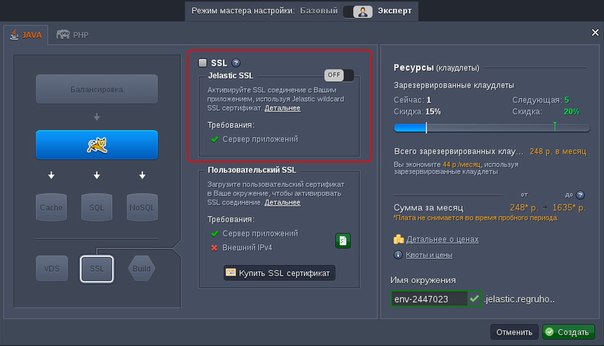
That is all there is to it!
The next time you click the Open in Browser button , you will see that communication with the environment now takes place via HTTPS.

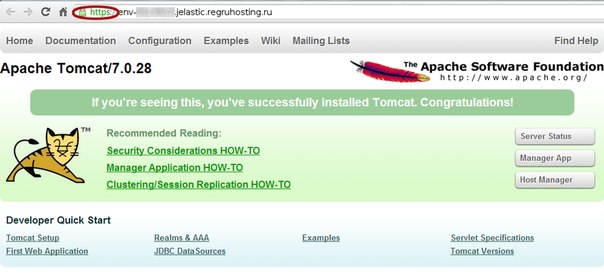
Note :
• Wildcard SSL is available only for sites on * .jelastic.regruhosting.ru, not for custom URLs;
• Wildcard SSL will be disabled when IPv4 is enabled for any node in your environment:
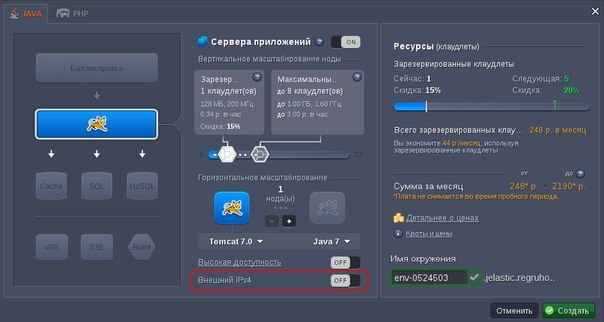
Wildcard SSL from Jelastic will help save time and money spent on protecting each of the subdomains.
More detailed information on REG.RU services based on the Jelastic platform can be found in the "Jelastic Cloud Hosting" section . on the REG.RU website.
Now go directly to the topic of the post.
What is Wildcard SSL?
Wildcard SSL is a universal SSL certificate that allows you to send multiple hosts from one domain name to one server at once. This eliminates the need to buy individual SSL certificates for each of its subdomains. That is why Wildcard SSL is an ideal solution for the sites of large organizations and commercial Internet projects.
Benefits of Wildcard SSL
• Cost . Buying a Wildcard SSL-certificate will allow the user to save a tidy sum, eliminating the need to purchase several traditional certificates.
• time saving. You no longer have to waste time setting up 20 different individual SSL certificates at once, and do it every time it comes time to update them. You will need to install and continue to support only one SSL certificate.
Wildcard SSL-certificate is:
• Convenient management . The process of setting up an SSL certificate is maximally simplified and does not require any special knowledge - everything is done in a few clicks.
• Quick check . Thanks to Wildcard SSL, the site will be checked and sealed as quickly as possible.
• Generally accepted data encryption standard. Despite the ease of use and low price, you don’t have to sacrifice security. Website visitors will always feel as secure as possible.
How to connect Wildcard SSL?
1. Register on the REG.RU website at: https://app.jelastic.regruhosting.ru/ or log into an existing Jelastic account;
2. Then, on the Jelastic control panel, click "Create Environment" :
3. Enter the "Setup Wizard Mode" and select your application server (for example, Tomcat 7);
4. Click on the “SSL” button and switch to “Jelastic SSL” (another name for Wildcard SSL);
5. Enter the name of your environment and click the "Create" button .
That is all there is to it!
The next time you click the Open in Browser button , you will see that communication with the environment now takes place via HTTPS.
Note :
• Wildcard SSL is available only for sites on * .jelastic.regruhosting.ru, not for custom URLs;
• Wildcard SSL will be disabled when IPv4 is enabled for any node in your environment:
Wildcard SSL from Jelastic will help save time and money spent on protecting each of the subdomains.
More detailed information on REG.RU services based on the Jelastic platform can be found in the "Jelastic Cloud Hosting" section . on the REG.RU website.