March 28, 2013 at 11:17 pm
Asterisk and SugarCRM Integration
- Tutorial

Let's try to combine all this and make ourselves a convenient call-center.
Initially, the task was to install CRM to work in conjunction with Asterisk in order to maintain a customer base and track incoming calls. VTigerCRM and SugarCRM were suitable for the description of needs and the declared availability of the possibility of combining. We didn’t have a friendship with vTiger - their module, which comes with the engine, was very careless about its duties: missed calls or showed them with a delay. In SugarCRM, by contrast, a module called YAAI KINAMU / abcona Open Asterisk Connector works like a clock. It does not come bundled, we will install it separately. The principle and functionality of these CRMs is similar, so we opted for SugarCRM Community Edition. There is an excellent Russification module for this system - RUSSIAN RAPIRA LANGUAGE PACK. But I will show the setting so far without it.
I will not talk about how to install SugarCRM - there is a lot of information about this on the network. Immediately move on to the method of integration with telephony.
Download the YAAI module from here . Do not unpack. Install through the admin CRM: Admin -> Module Loader . Download, click 'Install'. Again, go to the admin panel, look at the very bottom of our module, go to the configurator. Here we need the data from the /etc/asterisk/manager.conf file of our Asterisk server. You can edit manager.confand create a new AMI user or use the admin account by changing the default password (if you did not do this while installing Asterisk then your system is at risk). Here you can also specify which host the AMI manager is allowed to connect to. I have it 127.0.0.1 since we have CRM on the same machine. We take this data and copy it into the settings of the YAAI module: host, login, port, secret. It remains to drive the SOAP user. Let it be any CRM user with his password. The rest of the settings can not be touched at all.
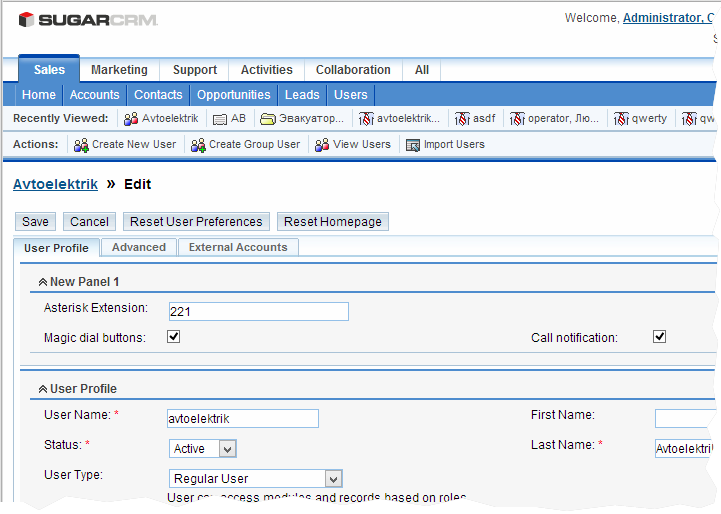
Since the latest version of the module itself does not add a field to the internal phone number to the user profile, we will have to work on the interface ourselves. Go to Admin -> Studio . We are looking for the User folder, open the list, find Layouts, Edit View.The user edit form editor opens. First drag New Panel and New Row left-to-right . We put Asterisk Extensinon, Magic Dial Buttons, Call notification on top of them . Save the view: Save & Deploy .

I hope you already have a CRM user who has his own SIP phone. Assign his account number to his account. Go to Admin -> User Management. Select the user, click Edit . Above we see the panel that we created. In the Asterisk Extension, enter the internal user number and put both checkmarks: Magic Dial- for quick recall by clicking on the icon next to the saved number (first, our device rings — pick up the phone — the outgoing number is dialed) and Call Notification - a pop-up window with the number and other data of the caller.
Now you need to run the PHP script that will interact with Asterisk. Go to the folder_c_SugarCRM / custom / modules / Asterisk and run:
php asteriskLogger.phpIf everything is in order, then we will see the message “Waiting for events” . If errors are issued, then you need to check the settings of the asterisk manager and SOAP.
In principle, everything should work, but in order for us not to run the script all the time manually, we will make it a service.
1. Download the asterisk_logger file :
wget https://raw.github.com/blak3r/yaai/master/misc/asterisk_logger or extract it from the zip-archive of the YAAI module in misc / asterisk_logger.
2. Copy it to /etc/init.d/
3. Set the attributes:
chmod 755 /etc/init.d/asterisk_logger4. Open it for editing in the editor.
- edit the path where asteriskLogger lies (usually it is / var / www / html / sugarcrm / custom / modules / Asterisk / asteriskLogger.php ) - we
leave the user the web server is running from (usually it is asterisk )
5. Install the script:
-for Centos , Red Hat, Fedora Core, Suse, etc:
chkconfig --add asterisk_loggerfor Debian, Ubuntu and the like:
update-rc.d -f asterisk_logger start 80 2 3 4 5 . stop 30 0 1 6 .Check by running
/etc/init.d/asterisk_logger startIf it starts, then everything was done correctly. If errors pour in, then look further. It is likely that asterisk_logger will have to remove the line break characters ^ M. You can do this in the editor built into mc. Also, if you have CentOS 6.X you will have to change the line with
. /lib/lsb/init-functions on the
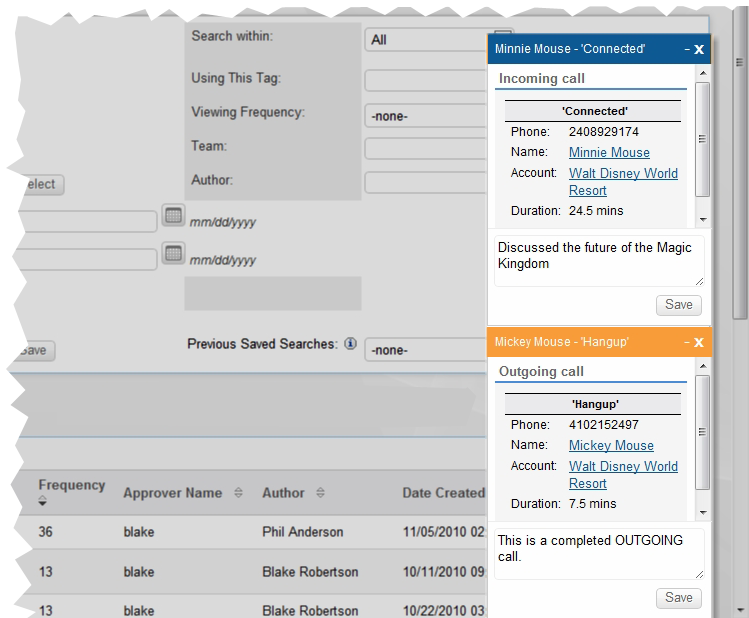
/etc/init.d/functionsThat's all. You can call and check how pop-ups with numbers in CRM appear. True, if the number is less than four digits, then it will be eliminated. This behavior is configured in the YAAI module in CRM.
Pls, throw karma if someone came in handy article.