February 12, 2013 at 11:49
Cisco 1603 Router
Good afternoon, dear readers. I would like to continue the journey through the history of telecommunication equipment. Today came the turn of the Cisco 160x series routers, or more precisely, the Cisco 1603. Having carried
out archaeological excavations in the warehouse, I found the Cisco 1603 router, in surprisingly good condition, in a standard box, equipped with, among other things, a large amount of advertising and reference books . For me, this find was especially enjoyable because it was with this series that the acquaintance with the routers of this manufacturer began.
So what is this device?
The network interfaces are: 10BaseT, while the AUI output allows you to use a different physical transmission medium, depending on the converter — for example, optics or coaxial. ISDN BRI S / T - this interface is not widespread in our country, I have only seen this in Moscow and the Krasnodar Territory (UTK). There is a WIC expansion slot for installing modules such as WIC-1T.
Here's what the internal world of the device looks like:
As you can see, you can increase the amount of internal memory and replace the PCMCIA card, which will allow you to use iOS 12 version and add support for OSPF, IPSec and other useful little things.
I got a copy with 2MB of RAM and 4MB PCMCIA Flash. By the way, as I understand it, the presence of Flash for this router is not necessary, in its absence, c1600-boot-r.111-10.AA is loaded from eprom, which has some minimal functionality. Flash found c1600-yl.113-11a.bin, which, despite its modest size, had rather impressive functionality - it supports dynamic routing protocols RIP, EIGRP, packet filtering functions (of course, not inspect and ZBF, but established and reflect).
After downloading and conducting the password recovery procedure, a configuration file was found on it, which I want to bring in order to show how little the CLI has changed over a period exceeding 10 years.
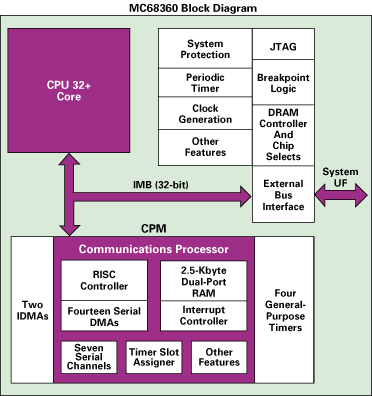
The core of the router is the MC68360 microprocessor, which contains four serial communication controllers (SCC), two serial control controllers and an SPI interface controller. The CPU performance is 8.3 MIPS at a frequency of 33MHz, but it is possible to install a MC68040 coprocessor that increases performance up to 29 MIPS at a frequency of 33 MHz (not in our case).
The processor architecture is shown in the figure below:
Data Sheets The
performance of the device, by today's standards, can be bewildering, but it is worth considering that in 2001, when I first saw such a router, the 1 Mb / s channel impressed my imagination with a huge data transfer speed.
The sale of this series ended on February 28, 2003. The link to the device description on cisco.com
included 2 diskettes for the initial configuration of the router (Win 3.11 / Win 95), but, unfortunately, it was not possible to verify their functionality.
Also, there is a CD with a full set of documentation for all Cisco devices for December 1997.
My attention was drawn to a nondescript advertising poster mentioning Cisco Micro Webserver:
And how many of you remember when it was possible to connect to the manufacturer’s “site” using telnet?
And here is the feedback form. I have never heard of most of these devices (with the exception of Catalyst 1900 with CatOS and 3000, in which the duplex was set on the port by switching DIP from the back of the device).
Instructions for connecting, using the initial configuration utilities, and the router settings form:
Here is a page of history. There is nowhere to attach this device, but it is a pity to throw it away. I’ll put it back to the warehouse, to the company for Cisco 2509, Catalyst 4000 and others ...
out archaeological excavations in the warehouse, I found the Cisco 1603 router, in surprisingly good condition, in a standard box, equipped with, among other things, a large amount of advertising and reference books . For me, this find was especially enjoyable because it was with this series that the acquaintance with the routers of this manufacturer began.
So what is this device?
The network interfaces are: 10BaseT, while the AUI output allows you to use a different physical transmission medium, depending on the converter — for example, optics or coaxial. ISDN BRI S / T - this interface is not widespread in our country, I have only seen this in Moscow and the Krasnodar Territory (UTK). There is a WIC expansion slot for installing modules such as WIC-1T.
Here's what the internal world of the device looks like:
What is there?
As you can see, you can increase the amount of internal memory and replace the PCMCIA card, which will allow you to use iOS 12 version and add support for OSPF, IPSec and other useful little things.
I got a copy with 2MB of RAM and 4MB PCMCIA Flash. By the way, as I understand it, the presence of Flash for this router is not necessary, in its absence, c1600-boot-r.111-10.AA is loaded from eprom, which has some minimal functionality. Flash found c1600-yl.113-11a.bin, which, despite its modest size, had rather impressive functionality - it supports dynamic routing protocols RIP, EIGRP, packet filtering functions (of course, not inspect and ZBF, but established and reflect).
ACL
After downloading and conducting the password recovery procedure, a configuration file was found on it, which I want to bring in order to show how little the CLI has changed over a period exceeding 10 years.
Show version output
Configuration
!
version 11.3
no service pad
service timestamps debug datetime localtime show-timezone
service timestamps log datetime localtime show-timezone
service password-encryption
service udp-small-servers
service tcp-small-servers
!
hostname isdn
!
aaa new-model
aaa authentication login default local tacacs+ enable
aaa authentication ppp default local
aaa authorization exec tacacs+ if-authenticated
aaa authorization network none
enable password 7 06050346324F41
!
username cisco privilege 15 password 7 08902455D0A16
ip subnet-zero
ip nat inside source list PAT interface Ethernet0 overload
ip telnet source-interface Ethernet0
ip domain-name rtsnet.ru
ip name-server 194.247.133.3
ip name-server 172.16.32.3
ip accounting-threshold 8192
isdn switch-type basic-net3
isdn leased-line BRI0
clock timezone MSK 3
clock summer-time MSD recurring last Sun Mar 3:00 last Sun Oct 2:00
!
!
interface Ethernet0
 ip address 10.38.100.1 255.255.255.0 secondary
 ip address 194.247.149.49 255.255.255.248
 ip accounting output-packets
 ip nat inside
 no cdp enable
!
interface BRI0
 no ip address
 ip nat outside
 no cdp enable
!
interface BRI0:1
 ip address 192.100.0.1 255.255.255.252 secondary
 ip address 10.38.0.2 255.255.255.252
 ip nat outside
 encapsulation frame-relay IETF
 bandwidth 64
 frame-relay map ip 192.100.0.2 17
 frame-relay map ip 10.38.0.1 16 broadcast
 frame-relay interface-dlci 16
 frame-relay interface-dlci 17
 frame-relay lmi-type q933a
!
interface BRI0:2
 no ip address
 ip nat outside
 no cdp enable
!
router rip
 version 2
 timers basic 60 300 360 900
 redistribute connected
 passive-interface Ethernet0
 network 10.0.0.0
 distribute-list 34 out
 no auto-summary
!
ip classless
ip route 0.0.0.0 0.0.0.0 10.38.0.1
!
!
ip access-list extended PAT
 deny   ip any 194.247.133.0 0.0.0.255
 deny   ip any 172.16.0.0 0.3.255.255
 deny   ip any 192.168.0.0 0.0.255.255
 deny   ip any 10.0.0.0 0.0.0.255
 permit ip 10.38.100.0 0.0.0.255 any
logging buffered 8192 debugging
no logging console
logging 172.16.32.15
access-list 13 permit 172.16.32.16
access-list 34 permit 10.38.100.0 0.0.0.255
access-list 34 permit 194.247.149.48 0.0.0.7
access-list 120 permit ip any any log
no cdp run
tacacs-server host 172.17.5.8
tacacs-server key TACx Kei123
snmp-server community public RO
snmp-server community RW_COMM RW 13
snmp-server trap-source Ethernet0
snmp-server location Moscow
snmp-server contact [email protected] (Serge Goncharov)
alias exec .s sh conf
alias exec .c conf t
alias exec .n no deb all
alias exec .tn term no mon
alias exec .t term mon
alias exec .r sh ip rou
alias exec .a sh arp
alias exec .g sh logg
alias exec .l sh access-lists
alias exec .d sh dialer
alias exec .e0 sh int e0
alias exec .s0 sh int s0
alias exec .f sh fra pvc
alias exec .v sh ver
alias exec .b sh deb
alias exec .i sh int
alias exec .ac sh ip acco
!
line con 0
 exec-timeout 0 0
line vty 0 4
 access-class 77 in
 exec-timeout 0 0
 password 7 02123D4F0E0A36
!
end
The core of the router is the MC68360 microprocessor, which contains four serial communication controllers (SCC), two serial control controllers and an SPI interface controller. The CPU performance is 8.3 MIPS at a frequency of 33MHz, but it is possible to install a MC68040 coprocessor that increases performance up to 29 MIPS at a frequency of 33 MHz (not in our case).
The processor architecture is shown in the figure below:
Data Sheets The
performance of the device, by today's standards, can be bewildering, but it is worth considering that in 2001, when I first saw such a router, the 1 Mb / s channel impressed my imagination with a huge data transfer speed.
| Process Switching: PPS 600 / Mbps 0.3072 | Fast / CEF Switching: PPS 4,000 / Mbps 2.05 |
The sale of this series ended on February 28, 2003. The link to the device description on cisco.com
included 2 diskettes for the initial configuration of the router (Win 3.11 / Win 95), but, unfortunately, it was not possible to verify their functionality.
Floppy disk photo
Also, there is a CD with a full set of documentation for all Cisco devices for December 1997.
Photo CD
My attention was drawn to a nondescript advertising poster mentioning Cisco Micro Webserver:
Large drawing
And how many of you remember when it was possible to connect to the manufacturer’s “site” using telnet?
And here is the feedback form. I have never heard of most of these devices (with the exception of Catalyst 1900 with CatOS and 3000, in which the duplex was set on the port by switching DIP from the back of the device).
Lots of great drawings.

Instructions for connecting, using the initial configuration utilities, and the router settings form:
Big Drawings Again


Here is a page of history. There is nowhere to attach this device, but it is a pity to throw it away. I’ll put it back to the warehouse, to the company for Cisco 2509, Catalyst 4000 and others ...