January 29, 2013 at 17:31
Review Assistant AE-601 Reader

When choosing a reader for this test review, I was looking for a device from a manufacturer less known in the reader market than Amazon and PocketBook. The main search criteria was support for the FB2 format, as well as a convenient and thoughtful interface. Looking through different options, I stopped at the Assistant AE-601 reader, the reviews of people who chose this reader for themselves were very positive, so I decided to test this device personally.
Read more about the capabilities and features of the device under Habrakat.
For starters, I note the strengths of the device that I personally liked, these are:
- convenient and thoughtful interface;
- support for most formats related to e-books;
- rich equipment, including a good cover for the device, as well as full charge;
- the ability to listen to MP3 music, as well as radio in the background when reading books;
- as well as 3.5 GB of free space on board the device, which makes it possible to fill the device with a very tangible library from the start.
Some disadvantages of the device have also been noticed, I will also talk about them in this review.
So, let's move on to the review itself.
Caution, below are a lot of photos and slideshows (Traffic!)
Appearance of the device
A nice bonus of the Assistant AE-601 reader is the cover included in the kit, cover material: on the outside there is a leather substitute, inside there is a pleasant to the touch fabric. The cover will protect the device during transportation, but still do not advise dropping the device.
The case of the device is made in black, the case material is plastic, the assembly is decent, I did not notice any backlashes. I find the layout of the buttons thoughtful and convenient. It is convenient to turn pages with the joystick both when grabbing with two hands, and when grabbing with one hand.
Buttons for quickly changing the font size, turning the book (book / album), as well as a button for quickly switching from reading a book to a list of pieces of music playing in the background, complement the presence of a joystick to control the device. The basic tasks that are relevant for most readers on this device are very easy to solve, you do not need to go to menus and submenus in order to select the desired size for the font or rotate the book, just press the corresponding button once or several times.
Experimenting with PocketBook Touch , PocketBook Basic New, as well as with the Kindle 5, I did not have the opportunity to assess the sensations of working with these devices dressed in covers, but as for the Assistant AE-601, I want to note that it’s personally more convenient and pleasant for me to read books from this device when it’s in the cover than when he was without her.
I measured the dimensions of the device in the cover, received the following numbers 18.2 cm x 12.6 cm x 2 cm (the dimensions of the device without a cover, declared by the manufacturer: 17.3 cm x 11.3 cm x 0.9 cm).
Below, see photos of the device in different angles and at different viewing angles. I remind you that all the photos (except the slideshow) are clickable, I recommend that you look at the photos in the original resolution for completeness by clicking on them in this article.
Assistant AE-601 in cover and A4 white sheet: Assistant AE-601 reader and pen:


Assistant AE-601 and notebook: Reader Assistant AE-601 - back view: Reader in the cover, closed version: Procedure for removing the cover: step1 , step2 , step3 , step4 Assistant AE-601 and Lbook V3 +: Assistant AE-601 and Kindle 5 : The device is interesting, I’ll tell you a little more about it below.


Product Specifications
- Display: 6 ", E-ink, 800 x 600, 16 shades of gray
- Processor: RK2808A, 600 MHz
- Operating System: Linux
- Internal memory: 4 GB
- Connection of external devices: Mini-USB (USB 2.0); memory card support: microSD (up to 32 GB)
- Battery: Polymer Li-Ion, 1200 mA / h; Charging time for a fully discharged battery:
~ 2.5 hours (AC adapter); ~ 5 hours (USB port of a PC or laptop)
- Text formats: PDF, EPUB, FB2, TXT, MOBI, HTML, PDB, RTF, LRC, DJVU, DOC, ZIP, RAR, 7Z
- Audio Formats: MP3, WMA (headphone connection: micro-jask, 2.5 mm; there are 2 built-in speakers 1 W)
- Images: JPG, BMP, GIF, PNG
- FM Frequency Range: 76 ~ 108 MHz (50 positions)
- Conditions for normal operation: operating temperature range: -10 ... + 60 ° C;
storage temperature: -40. + 125 ° C; permissible humidity: 20-90% - Weight: ~ 160 g
- Continuous reading time: up to 9,000 pages
Reader work with different formats
FB2 and EPUB
The reader copes with these formats at "Excellent." For reading books in these formats, 5 font sizes are available for you, which makes it possible to adjust the reader to the capabilities of your vision.
For clarity, I’ll show you what the text of the book looks like with each of the 5 available font sizes:
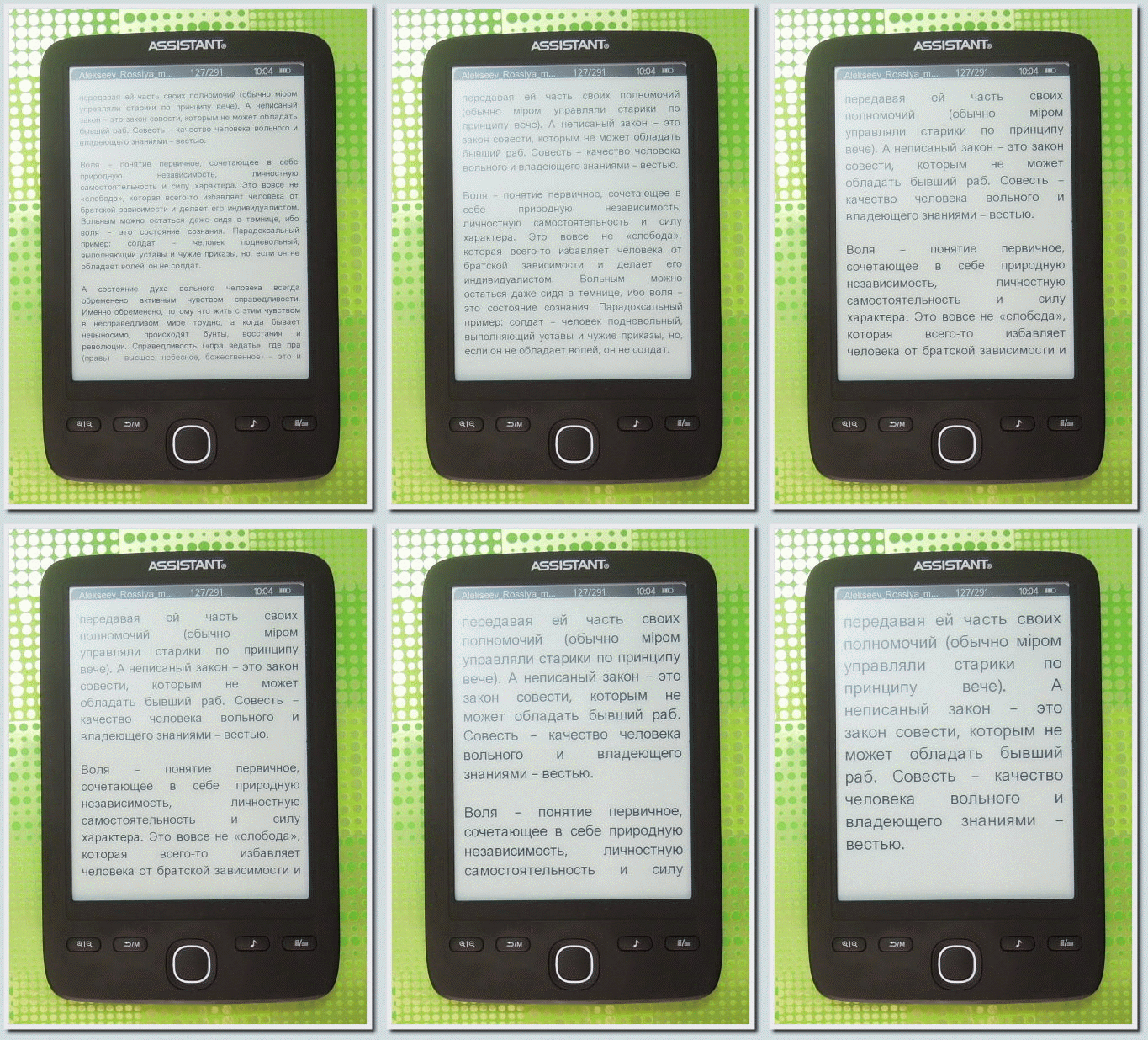
Slides: 1 , 2 , 3 , 4 , 5
Additionally, I note that for the FB2 and EPUB formats, as well as for other e-book formats, you can add bookmarks (up to 7 pieces per book). This feature is very useful for a curious reader.
PDF and DJVU
When reading scanned books in PDF format and DJVU format, the limitation of this reader is a 6-inch screen, the width of which does not allow a clear view of the text and images in the book when reading in book mode. For books with small text, you can use the transition to landscape reading mode.
On this reader in landscape display mode, it is more convenient to read the PDF format than DJVU. For DJVU, scrolling of one page occurs in 3 visits, for PDF using the Scale 1 option (a special setting available for displaying PDF), scrolling occurs in 2 visits, which is more convenient for me personally.
I tested books of different sizes (from 30 to 100 MB for PDF, from 3 MB to 30 MB for DJVU, with illustrations and diagrams), the speed of working with books is sufficient for normal reading.
For clarity, I present in the form of a slideshow some of the nuances of working with books in PDF and DJVU format when reading in landscape display mode:
PDF:
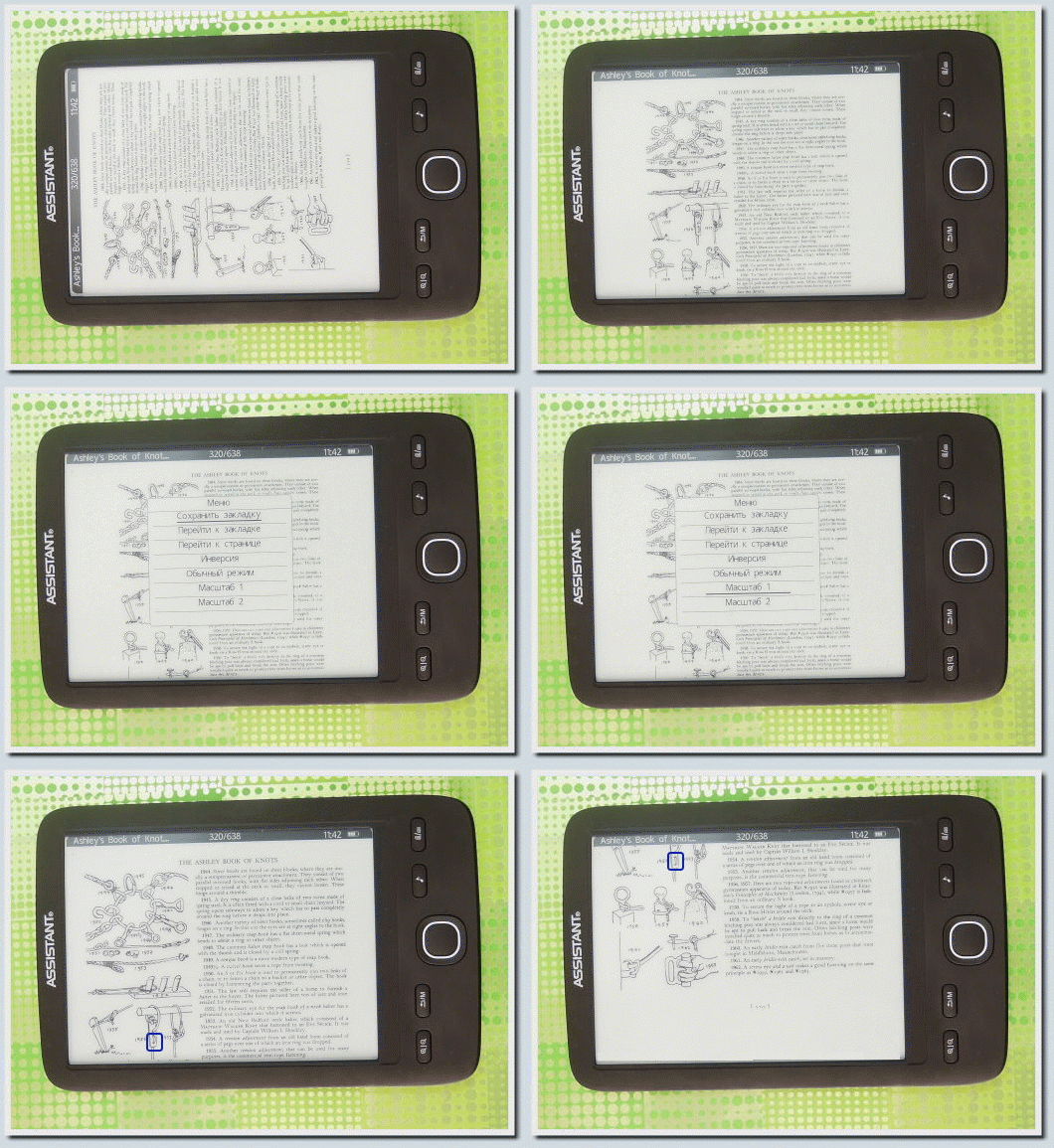
Slides: 1 , 2 , 3 , 4 , 5 , 6
DJVU:
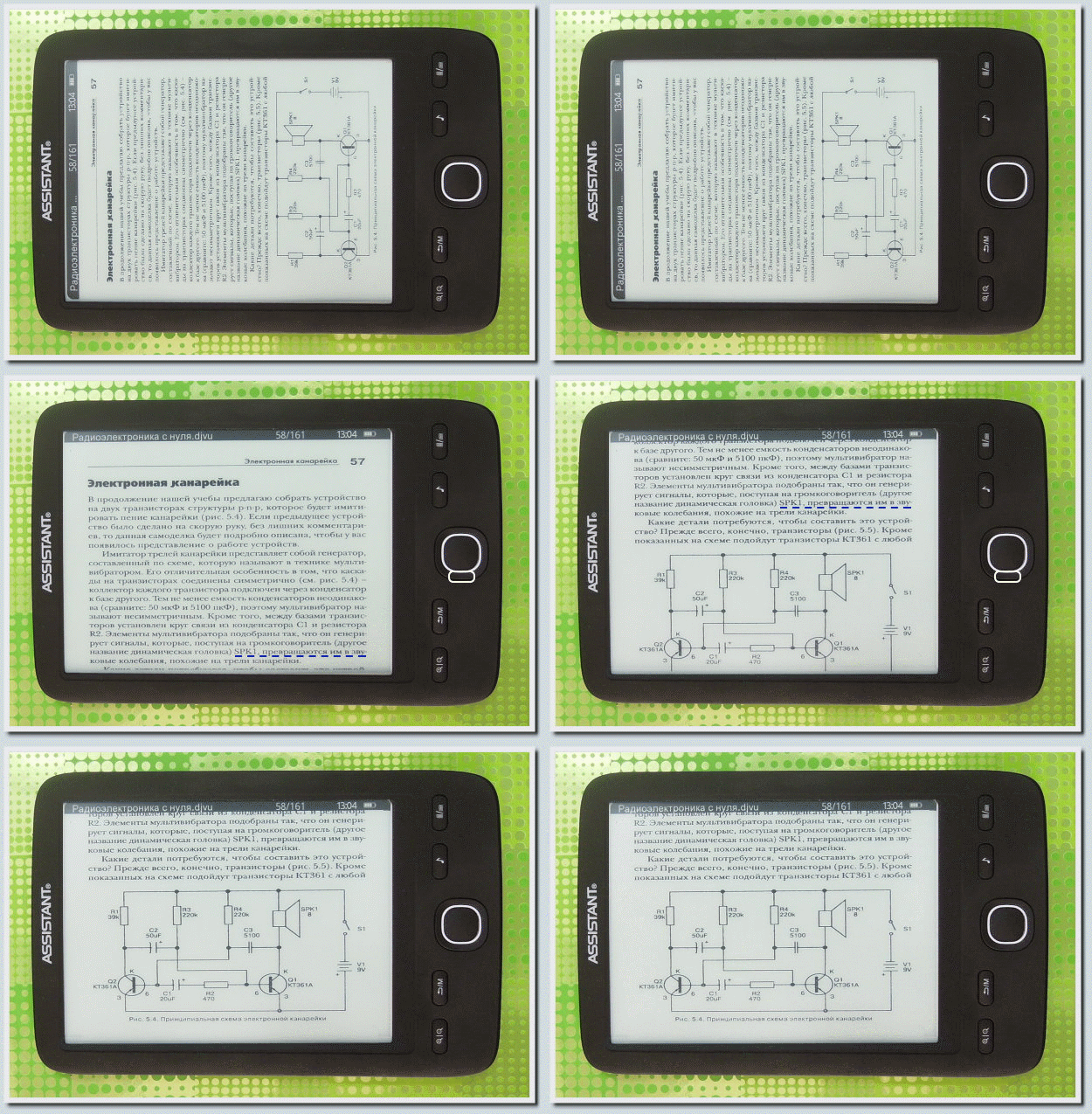
Slides: 1 , 2 , 3 , 4
Doc
The reader copes with the DOC format with dignity, the reader does not support documents with the .docx extension (but you can always save the desired document with the .doc permission to get the opportunity to get acquainted with its contents using the reader).
In the case of the DOC format, in the reader you can choose from three font sizes, the way to switch the font size is similar to the one already shown above.
HTML and MOBI
The reader does not work with these formats, although the manufacturer claims to support them, but when testing, I could not read HTML and MOBI format documents normally. In the case of HTML, there were problems with the encoding, images were displayed normally, but the text was hieroglyphic. In the case of MOBI, part of the text of the book disappeared somewhere, although the same book can be read on the Kindle 5 without any problems.
Problems with displaying the MOBI format can easily be compensated for by the decent work of the reader with the FB2 format. Personally, reading HTML from a reader is not particularly relevant, but for those who work a lot with this format, such restrictions can create some discomfort.
MP3 music and Radio in the background
Listening to music or your favorite radio station in the background while reading an interesting book - this trick can come in handy for many music lovers. I have a different situation with reading music: I read some books to rock music and the background doesn’t bother me, for some books I choose relaxation or nature music as the background design (Dan Gibson Solitudes is a thing!), But there is also and books that are best read thoughtfully and in absolute silence.
I read most of the books at home, so I still prefer native speakers to the reader’s capabilities as an MP3 player.
But I decided to test the music support in this reader.
The reader comes with simple headphones, they don’t differ in special bells and whistles, but the cleanliness of the sound they give out made me personally happy. Headphones are connected via micro-jask (2.5 mm), the connector differs from the classic computer one, but if it is important to connect headphones with a higher class to the reader, this problem can be easily solved with an adapter (we cost about 10 UAH, which is about 40 rubles). I didn’t have such an adapter on hand, so I tested the music only with the complete headphones.
In the Assistant reader, the AE-601 was pleased with the thoughtful interface, which makes it possible to quickly switch to an MP3 player, select the appropriate composition and immediately return to the book. For this, a special button is provided in the device.
The interface of the software MP3 player is also very convenient:

In addition to the MP3 player, I also looked at what the radio built into this device can do. To listen to the radio, it is necessary to insert headphones into the device, they also act as an antenna. The automatic search for radio stations found 6 signal sources, for adding to the list of Radio Rocks I had to use a manual search. The signal quality changes from place to place, so listening to the radio is better in a more or less static position (when reading at home or at work). I did not check the signal level in public places and transport, I can’t say anything about this, at home there were places with both good and terrible signal levels.
View images
Experimented with pictures and photos in JPEG format. Photos and images weighing up to 2.4MB, the device displays normally (as normal as 16 grayscale allows), the device no longer wants to display heavier images. Compared to PocketBook Basic New , the device displays photos and pictures from any folder located on the internal memory or on a memory card (the PocketBook device has one folder for this purpose and only it), while at the same time, images are rotated in Assistant AE- 601 is not provided, which is not very convenient for photographs in classic resolutions.
Looking at the images on the Assistant AE-601 reader looks like this:

A few words about useful settings

Of the available settings, I personally was interested in some points:
- Memory status - provides an opportunity to get information about the amount of free and occupied space on the device’s internal memory and on a memory card connected to the device.
- Off timer - makes it possible to set the time after which the device automatically turns off if you haven’t bothered with it during this time. When disconnected, the device remembers the page of the book you were on, but after restarting you need to re-enter the book itself. Therefore, I recommend disabling the timer (you must specify the time 0).
- The choice of language is closer to me, Russian, but in addition to the Russian language, Chinese, English, French, Japanese, Korean, Polish and Ukrainian are also available for the shell of the program.
The rest of the settings available in this reader for me personally are not of particular interest (except perhaps the option to Set the date and time , but this operation is enough to be done once, and after that it is no longer needed).
I had such a device under consideration today. Below I note the strengths and weaknesses of the device, and this is where I will end my small review.
Strengths Assistant AE-601:
- thoughtful tools for managing the device;
- successful equipment, including a good cover, nicely complementing the device, as well as a full-fledged charger;
- support for most current formats of electronic books;
- support for MP3 music, as well as built-in radio;
- 3.5 GB of internal memory makes it possible to work comfortably with the device without even having to buy an additional memory card for it.
Weaknesses of Assistant AE-601:
- limited ability to work with images;
- problems when working with MOBI and HTML formats.
In general, I note that the device is interesting and worthy of attention. That's all, I hope, the above information will be useful to someone.
Offline version of the review of the Assistant AE-601 reader in HTML5 format (6.58 Mb)
MD5: DDB4128853FD948B7A5BAE0787BFF45F
Photos of the Assistant AE-601 reader can be viewed in a separate album as a folder on Dropbox by clicking on this link .
The Assistant AE-601 device was provided by the Sokol.UA store for this test review.
I took photographs for review with a Nikon Coolpix P300 camera , which the manufacturer kindly provided to me.