Rotatable bitboards: a new round of an old idea

Short description
This article talks about some of the nuances of using “bitboards” (a 64-bit integer, each bit of which represents a single checkerboard field). Back in 1994, after the ACM chess symposium in Cape May, New Jersey, I decided to completely replace the program for Cray Blitz (a computer program written by Robert Hyatt, Harry Nelson and Albert Gover for the Cray supercomputer - approx. transfer.). I was interested in trying out the bitboard method tested by Slate and Atkin in Chess 4.x (a chess program developed at Northwestern University of Illinois and dominating in the 70s of the 20th century - approx. Translation.) To decide for yourself whether it is suitable for chess or not. During the development of this new program, the concept of “rotatable bitboards” was invented, and it turned out that this is what was needed
1. Introduction
Bitboards are mentioned many times in computer chess literature. In the mid-1970s, Slate and Atkin came up with and described a method for using twelve 64-bit integers, each of which represented one type of chess pieces on a chessboard (six for white and six for black). It should be noted that the KAISSA team (Donskoy and others) apparently invented the same idea independently of the Northwestern University team, and that over the past 25 years many other programs have been written using the same approach.
Slate proposed matching bits to the fields of a chessboard; a bit with a value of 1 served as a sign of the presence of a piece on a chessboard, while bit 0 indicated its absence. Thus, in the white_pawn bitboard, which corresponds to the fields occupied by white pawns, there can be at most eight bits with a value of 1. (In this article, the fields are numbered from 0 to 63, where position 0 corresponds to field A1, 7 corresponds to field H1, 56 corresponds to field A8, and 63 to field H8. Bits that are in position 0 in a 64-bit integer are called the "most significant bits", and bits in position 63 are called the "least significant bit.") (most significant bit, MSB and least significant bit, LSB - approx. translation.)
In addition to storing position information on the board in these twelve 64-bit words, Slate and Atkin described how to generate and subsequently update two additional sets of bitboards intended for information of a different kind. attacks_from [64] - an array of bitboards with values of 1 for each field that can be attacked by a figure standing on a given field. For example, attacks_from [E4] gives us fields directly attacked by a figure standing on the field E4. In addition, the attacks_to [64] array contains bitboards with bits 1 for all fields occupied by figures attacking this field. For example, attacks_to [E4] is a bitboard that contains bits 1 for all the fields on the board, where there is a striking field E4 figure.
These two sets of bitboards are the subject of this article, which describes a new and very fast way to dynamically calculate the attacks_from [] bitboard without significantly reducing the execution speed, which was the case for the update method described by Slate and Atkin. (It should be noted that Slate / Atkin used a sequential update because the procedure described below is too slow to calculate attacks of long-range figures “on the fly.” In order to somehow make bitboards work and at the same time avoid high computational cost, they resorted to a sequential update .)
There are other useful properties of bitboards that make them very useful in chess programs. One of these properties is something that could be called “bit-parallel” operations. For example, in traditional chess programs, if your pawn is on the E4 field and you want to check if it is a checkpoint, you will have to check the D5, E5, F5, D6, E6, F6, D7, E7, F7 fields to make sure that there are no enemy pawns. This requires nine comparison operations. Using bitboards, you just need to pre-calculate the array of masks for each field where the pawn can stand, and then take the is_passed_white [E4] mask and perform bitwise “AND” operation with the bitboard for black pawns. If you correctly calculated the mask so that it has units in each of the nine top fields, then one AND operation can determine the absence of black pawns or, conversely, their presence, which will not allow the white pawn on E4 to be passed. In fact, we performed 9 different checks in parallel and with just one AND operation answered nine questions at the same time.
There are other advantages, but the topic of this article is rotatable bitboards and how they can be used as needed to obtain data from the attacks_from [64] and attacks_to [64] arrays, without the restrictions imposed by consecutive updates, and without complex / slow cycles .
2. Calculation of the attacks_from array [64] using ordinary bitboards
Before proceeding to the method of rotated bitboards, it is necessary to pay attention to the complexity of computing attacks_from []. For short-range figures, this, of course, is very simple; we can, for example, prepare the knight_attacks [64] array in advance so that if the horse is on the F6 field, then knight_attacks [F6] is a bitboard containing bit 1 on all fields where the horse can attack from the F6 field (note that the fields attacked by a horse, do not depend on the arrangement of pieces on a chessboard). The same idea works for the king and for pawns (with minor changes, since the pawns hit diagonally, and without taking move forward one or two squares).
However, for long-range figures, a simple appeal to the array (as done above) does not work, because long-range figures attack only in the direction of their movement and only the first figure that they encounter in this direction. So how do we calculate this?
Firstly, we need a bitboard called occupied_squares, which is nothing more than a bitboard with units displayed in all fields where any shape of any color is (for example, it can be considered as the result of bitwise “OR” (OR) between all twelve bitboards for each type of figure, although in fact we store two such bitboards: one for black and one for white - and use the OR operation between them if necessary to get occupied_squares bitboards).
Figure 1 shows an example of a chess position where occupied fields are marked with “X” and unoccupied fields with “-”.
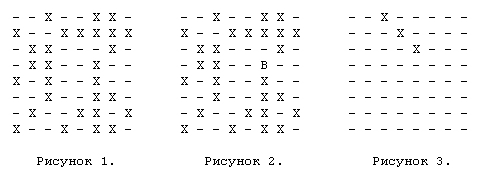
Note that it doesn’t matter what exactly is in the fields, because a long-range figure stops when it encounters a figure of any kind. If an elephant stands on field F5 (for clarity, it is marked with a B in Figure 2), then we see that it directly attacks the following set of fields: {B1, C2, D3, E4, G6, H3, G4, E6, D7}. After we calculate the attack bitboard (if that’s what the allowable elephant moves from this position will be used for), we may need to exclude all the moves that beat our own pieces. Using the white_occupied bitboard mentioned earlier, we can apply the complement operation (bitwise negation) to it and then the AND operation with the attack bitboard, which will reset those bits that correspond to attacks on our own pieces in the elephant’s attack bitboard, since these are invalid moves.
So far so good. But how do we determine the attacked bits without enumerating all 4 (or 8 for the queen) rays along which the piece can move? This, in general, is not so difficult, but not very effective in that each direction requires a separate iteration of the loop.
First, we will create a set of masks for each of the 8 directions in which the figure can move. We call them plus1 [64], plus7 [64], plus8 [64], plus9 [64], minus1 [64], minus7 [64], minus8 [64], minus9 [64]. These bitboards contain bit 1 for any field that can attack an elephant from the SQ field in some given direction. For our example, with an elephant on F5 in the direction plus7 (these are the fields F5-E6-D7-C8), plus7 [F5] will look like that shown in Figure 3.
This will give us all the fields that the bishop can attack in the +7 direction, if there weren’t blocking pieces between the bishop and the edge of the board. But we know that they can be present, and, if so, we must find blocking figures in this direction. In order to do this, we take the above bitboard and do AND between it and the occupied_squares bitboard. If the elephant is blocked in this direction, we will get a non-empty bitboard in which bits 1 will stand for each field, where there is a figure blocking the movement of the elephant diagonally to C8. Since we only need the first blocking figure, we will use the FirstOne () function, which will return the index of the first bit with the value 1. For example, if the elephant was blocked on C8 and D7, FirstOne () should return the field number D7 (51).
Now we have a list of attacked fields along this diagonal and a field where the long-range figure is blocked. All that remains for us to do is to remove the attacked fields after the blocking figure. And this is just the easiest part. The following code example explains how to do this:
	diag_attacks = plus7 [F5];
	blockers = diag_attacks & occupied_squares;
	blocking_square = FirstOne (blockers);
	diag_attacks ^ = plus7 [blocking_square];
Here is all you need to do for one beam. To make the code clearer, diag_attacks is the bitboard described above, which contains the attacked fields from the F5 field in the +7 direction. Blockers have a bitboard with all the pieces located on this diagonal. We find the first blocking figure and then make an exclusive "OR" between plus7 [blocking_square] and diag_attacks, which actually "cuts off" all the attacked fields following it. (Let's try to figure it out. If the bishop with F5 is blocked on E6, then plus7 [E6] in this case will look like this: bits with units will only be on D7 and C8. Since the D7 / C8 bits are non-zero in both bitboards, then after the exclusive " OR ”between bitboards, these (and only these) bits are reset.)
We repeat this for all four directions with the only difference that for minus directions we do not use FirstOne (), since we need to find the last blocking figure. Instead of this, we switch to LastOne (). Now the code for counting elephant attacks in all four directions looks like this:
	diag_attacks = plus7 [F5];
	blockers = diag_attacks & occupied_squares;
	blocking_square = FirstOne (blockers);
	bishop_attacks = diag_attacks ^ plus7 [blocking_square];
	diag_attacks = plus9 [F5];
	blockers = diag_attacks & occupied_squares;
	blocking_square = FirstOne (blockers);
	bishop_attacks | = diag_attacks ^ plus9 [blocking_square];
	diag_attacks = minus7 [F5];
	blockers = diag_attacks & occupied_squares;
	blocking_square = LastOne (blockers);
	bishop_attacks | = diag_attacks ^ minus7 [blocking_square];
	diag_attacks = minus9 [F5];
	blockers = diag_attacks & occupied_squares;
	blocking_square = LastOne (blockers);
	bishop_attacks | = diag_attacks ^ minus9 [blocking_square];
This translates into a large number of operations with AND and OR and the need for masking, plus the use of the FirstOne () / LastOne () functions to detect a blocking field. This is very expensive, but since with Boolean operators most of the work is done in parallel, it can still justify itself. However, there is a better way to get rid of FirstOne () / LastOne () calls and which processes the entire diagonal / horizontal / vertical in one step, and not in two, as in this method.
It should also be noted that the FirstOne () / LastOne () functions are very expensive if performed as procedures in C, because finding the first or last bit is a non-trivial task that requires a lot of time in the above calculation of attacks. Fortunately, modern microprocessors have hardware instructions for calculating these values (Intel has BSF / BSR [bit-scan forward, bit-scan reverse] instructions in the X86 architecture), which makes these functions extremely fast. Other types of architecture also offer similar instructions.
3. Rotatable bitboards
After the Crafty version using bitboards appeared in September 1994, I started conducting seminars at UAB (Crafty - a chess program written by Robert Hyatt, UAB - University of Alabama at Birmingham - approx. Translation.) To study 64-bit approach and develop new ways to increase efficiency. One of the first discussions came down to how easy it is to generate the movement of a long-range figure along the horizontal.
If you take any field on a certain horizontal line (a horizontal row of fields on a chessboard), then the movement of a long-range piece is quite easy to obtain, because the horizontal is determined by 8 bits in the occupied_squares bitboard. If we shift this bitboard to the right so that its lower bits contain 8 bits of our horizontal, and then do AND with the number 255, we get 8 bits that correspond to the fields of this horizontal.
With this in mind, consider an array of rank_attacks [64] [256] bitboards. To initialize this array, take any field, for example, A1. You can see that its horizontal has only 256 different states, depending on which fields are occupied and which are not. If, before starting the game, we pre-calculate which fields the rook from A1 can go to, taking into account all 256 different combinations of single bits on this horizontal, we can get the fields attacked on this horizontal by simply referring to the rank_attacks [A1] [contents] bitboard, where contents is an 8-bit representation of the state of a given horizontal. All we need to do is compute a set of bitboards for each of the 64 fields and all 256 different states of the contours where these fields are located (yes, if you think about it, a horizontal can have only 128 states, because we _know_ that a rook is on one of the fields, but it’s easier to ignore this simplification). It should be noted here that although the horizontal has 8 status bits, the two extreme bits (LSB and MSB) do not change anything, since they are attacked regardless of whether there is a figure on them or not. As a result, we remove them from further calculations in order to reduce the table size for each horizontal by 75%. Thus, we reduce the size of the rank_attacks array to rank_attacks [64] [64]. All other similar arrays will use the same simplification. As a result, we remove them from further calculations in order to reduce the table size for each horizontal by 75%. Thus, we reduce the size of the rank_attacks array to rank_attacks [64] [64]. All other similar arrays will use the same simplification. As a result, we remove them from further calculations in order to reduce the table size for each horizontal by 75%. Thus, we reduce the size of the rank_attacks array to rank_attacks [64] [64]. All other similar arrays will use the same simplification.
So far so good, we can get half the rook attacks by simply accessing the memory with the rank_attacks array. But what about vertical attacks and two diagonals for elephants? There, the bits are not adjacent in the occupied_squares bitboard, and this makes our idea inapplicable to anything other than contour lines.
During the discussion of this at the seminar, we noticed that when using specialized chess equipment, we would probably allocate a register to store the 64-bit occupied_squares value, but then we could highlight three other “pseudo-registers” that will allow us to access occupied_squares different ways. For example, one will rotate the entire contents of occupied_squares 90 degrees so that now the bits on the same vertical become adjacent; and we can use this to find attacks vertically in the same way as we did with pre-calculated horizontal attacks. And we can distinguish two registers that will rotate the occupied_squares bitboard left and right by 45 degrees so that the diagonal bits in these rotated bitboards become adjacent. Figure 4 illustrates
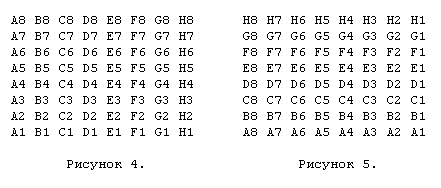
Recall that A1 is the zero bit bit (MSB), and H8 is the 63rd bit (LSB) in the occupied_squares bitboard. First things first, we rotate it 90 degrees to the left to make the vertical bits contiguous (note that the lower left corner remains the zero bit in the 64-bit bitboard, and the upper right corner will always have the serial number 63), as shown in Figure 5.
Then we rotate the original 45 degrees to the left, as shown in Figure 6.
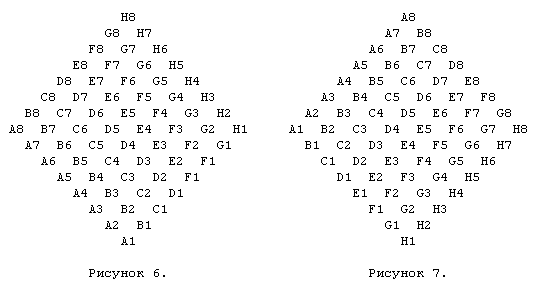
In this rotated bitboard, the bottom field (A1) becomes the zero bit count, and the next ones become in order. So, for example, A2 becomes bit 1, B1 becomes bit 2, and so on until H8, which becomes bit 63.
Note that in the bitboard above, the bits on the diagonal from H1 to A8 and on all the diagonals that are parallel to it are now adjacent. This is not as convenient as in the first two bitboards; there we could easily calculate how much we need to shift a given horizontal or vertical to the right end of the number so that it can be used as an index of an array; and we also knew that to extract the eight bits we need, we need to do AND with the number 255. In the case of diagonals, we have a different length for each diagonal, which means a different offset and mask to eliminate extra bits. A solution to this problem will be described later.
Now we rotate the original bitboard 45 degrees to the right to make adjacent bits on other diagonals, as in the bitboard in Figure 7.
Now that we have all this, it becomes obvious that we need to add three more arrays of bitboards for attacks in addition to the rank_attacks [64] [64] already considered. File_attacks [64] [64], diaga1h8_attacks [64] [64] and diagh1a8_attacks [64] [64] are added, and if we learn to rotate the original occupied_squares bitboard, we can use the same indexing scheme, which will allow us to replace the complex update procedure for two calls to the table for elephants or rooks and four for queens.
Later, after much discussion about how to rotate the occupied_squares bitboard, a simple solution was found. Instead of storing the only occupied_squares bitboard and rotating it if necessary (which we consider almost impossible due to inefficiency), we can store four bitboards for occupied fields: normal and rotated 90 degrees, 45 degrees to the left and 45 degrees to the right. This is really quite easy, because in the procedure for moving the MakeMove () figure we can find similar code for updating the occupied_squares bitboard:
occupied_squares ^ = set_mask [from] | set_mask [to];
This is a simple mechanism for ordinary moves (taking, castling and taking on the aisle are handled a little differently), because we know that the bit of the starting field “from” in occupied_squares must be set to 1 (otherwise there would be no figure to move on this field ); and we also know that the bit of the final “to” field in the occupied_squares bitboard must have a value of zero (otherwise it would be a take). So, using the exclusive “OR”, the start field bit is reset, and the end field bit is set.
All elements of the set_mask [64] bitboard array have only 1 set bit in the corresponding position. For example, the leftmost bit (zero bit) is set in set_mask [0], while the least significant bit (63rd bit) is set in set_mask [63]. To work with rotatable bitboards, we created three new sets of such masks: set_mask_rl90 [64], set_mask_rr45 [64] and set_mask_rl45 [64]. Each of them takes the field number as an index, and returns a bitboard in which the corresponding bit is set in the occupied_squares rotatable bitboard. For example, set_mask_rl90 [0] actually sets the seventh bit, because if you look at the picture, in the rotated_left bitboard, bit 0 becomes the seventh.
This was the solution we needed in order to make everything work. Instead of rotating the occupied_squares bitboard, we now store four occupied_squares bitboards at the same time and can use two of them for bishops / rooks or four for queens at any time when you need to get attacks for these types of figures.
For elephants, there is one good optimization that can be used, although it is expensive relative to memory. Recall that for the rooks we moved the corresponding horizontal or vertical to the right end of the number, then we did AND with 255 to get the contents of this horizontal or vertical. This worked since each horizontal or vertical contains eight bits. But in the case of diagonals, each is different in length from its neighbor.
To simplify this algorithm, we will do AND 255 in the case of diagonals, which, obviously, will give us the desired diagonal, but with a few extra bits from the adjacent diagonal (diagonals). If the diagonal of interest to us has only three bits (a total of 8 unique states), we get each of these 8 states combined with 32 states of extra bits. In other words, we have the states of the three bits we need, which are repeated 32 times. Thus, it does not matter what is contained in the extra 5 bits, we will still get the correct attack bitboard for our three-bit diagonal.
4. Calculation of attacks_from [64] using rotatable bitboards
To calculate the attacks, we use 4 different arrays: one for horizontal attacks, one for vertical attacks and one for two diagonals that pass through the field. We named these arrays rank_attacks [64] [64], file_attacks [64] [64], diaga1h8_attacks [64] [64] and diagh1a8_attacks [64] [64].
To initialize these arrays (this is done when the application starts, and from then on the arrays remain unchanged), we simply assumed that there is a long-range figure on the field that can move in the direction in question (for example, the queen). Then for each field we introduced rank_attacks [square] [rank_contents] - a bitboard that shows which horizontal lines the rook / queen standing on the square square can move when the fields of this horizontal are occupied according to eight bits of the rank_contents number ". For example, take the previously considered occupied_squares bitboard, but instead of the bishop on the F5 field, as in the previous example, we put a rook there (Figure 8). Suppose we are trying to initialize rank_attacks [37] [100] (37 is the F5 field, and 100 corresponds to the occupied fields on this horizontal - 01100100).
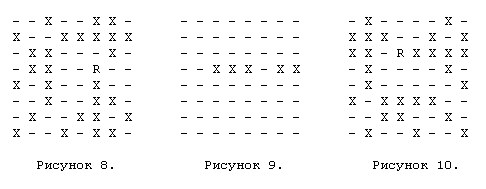
Well, not bad. By doing this, we can quickly get rook attacks along the horizontal. But now we need to calculate the attacks not horizontally, but along the vertical. To do this, we take the occupied_rl90 bitboard, which is an exact copy of the previous occupied_squares, but rotated 90 degrees, as shown in Figure 10.
When we extract the third “horizontal”, we actually get information about the employment on the vertical F (maybe there is third view from above horizontal - approx. translation.). The previously calculated attack bitboards are used again, but this time we take attacks_file [37] [251] (again, 37 means the field F5, and the occupied fields on this vertical form 11111011), the value of which we determined as shown in the figure eleven.
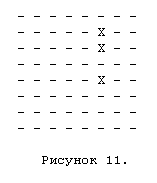
Now, taking both of these values — horizontal attacks and vertical attacks — and making OR between them, we get a full set of attacked fields for a rook standing on field F5, for a special case with given horizontal and vertical positions. In the case of the queen, in the same way we use two bitboards for diagonal attacks and two occupied_squares rotated diagonally in order to get diagonal attacks in the same way, and in the end we do OR between diagonal and vertical / horizontal attacks. Note that there are no cycles. The algorithm for a long-range figure is as follows:
    BITBOARD attacks = 0;
    if (BishopMover (piece)) {
      get diaga1 status (shift / AND); / * 6 bits * /
      attacks | = diaga1h8_attacks [square] [status];
      get diagh1 status (shift / AND); / * 6 bits * /
      attacks | = diagh1a8_attacks [square] [status];
    }
    if (RookMover (piece)) {
      get rank status (shift / AND); / * 6 bits * /
      attacks | = rank_attacks [square] [status];
      get file status (shift / AND); / * 6 bits * /
      attacks | = file_attacks [square] [status];
    }
And that’s it, we are done, completely. The two conditions BishopMover () and RookMover () return TRUE if the piece moves diagonally like an elephant (elephant or queen), or moves like a rook (rook or queen). In Crafty, this is encoded in the shape type, where P = 1, N = 2, K = 3, B = 5, R = 6, and Q = 7. When analyzing these numbers, the result of piece_type & 4 is checked, and if the result is nonzero, this is a long-range figure. Further, if the result of piece_type & 1 is nonzero, this figure moves along the diagonal, and if the result of piece_type & 2 is nonzero, then the figure can move along the horizontals / verticals.
5. Calculation of attacks_to [64]
The attacks_to [] bitboard was defined by Slate and Atkin as a bitboard with one bit for each field from which an attack is made on this field. For example, attacks_to [28] (28 = E4) may look like Figure 12, assuming that E4 is attacked by a black rook on E8 and a black knight on F6, and is defended by a white rook on E1 and a white pawn on D3 (E4 marked with the letter T, from "target").
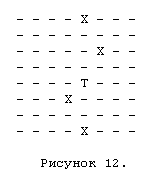
In this picture, “T” is the attacked field, in fact, it corresponds to bit 0 in the bitboard. Four bits X (bits 1) show four fields from which figures standing on them make attacks on the field E4. If we want to know how many black pieces E4 attacks, we can just do AND of this occupied_squares bitboard for black pieces. The result will have bits 1 on each field occupied by the black piece that attacks E4. Similarly with white pieces attacking E4, we do exactly the same with the occupied_squares bitboard for white pieces.
The questions are as follows: (a) How can we calculate such a bitboard and (b) how laborious is it? Using the above method of generating attack bitboards (recall that the generation of attack bitboards for short-range figures is trivial, since all fields attacked by a figure, unlike long-range figures, can be calculated at the application start and will not change in the future), we will calculate the elephant attack on E4 and then do AND with a bitboard for white / black bishops and queens, which will give us 1 bit for each bishop / queen, regardless of their color, which will attack the target field. We memorize the result and do the same for the rook and the rook / queens beatboards. Then we take the horse’s attack beatboard, do AND with the beatboard for white / black horses, and repeat this for kings and pawns. As a result, we have five bitboards, which, if we do OR between them, will show all the fields,
Now that we can get a set of fields that a piece can attack (used to generate a move) and a set of fields from which an attack is made on a certain field (used, for example, to determine if a king is under check), we can use this information in the chess program.
6. The use of bitboards in a chess engine
It is important to note that the indicated algorithm gives a bitboard with a complete set of moves of a piece, without using any cycles. However, in the chess program, these movements have to be divided into a set of separate moves from where to where to evaluate them, and this process will definitely be a cycle, although it’s very simple. The where field is known, so we just use the FirstOne () function to turn the first bit into an integer corresponding to the where field, and then reset this bit. The cycle continues until all bits are reset. Below is the real code that does just that for the white queen: (note that in Crafty the move is stored in 21 bits. The lower 6 bits indicate the “FROM” field (from where), the next 6 bits indicate the “TO” field (where), yet 3 is a MOVING_PIECE (moveable figure), and the last 3 is a PROMOTE_TO figure,
    piecebd = WhiteQueens;
    while (piecebd) {
      from = LastOne (piecebd);
      moves = AttacksQueen (from);
      temp = from + (queen << 12);
      while (moves) {
        to = LastOne (moves);
        move_list [i ++] = temp + to << 6;
        Clear (to, moves);
      }
      Clear (from, piecebd);
    }
At first glance, this may seem rather ineffective, but when studying the chess program and the task of evaluating the move, it turns out that the moves that need to be evaluated are, first of all, captures. To generate only moves with captures, you just need to get the above attack bitboard and then do AND with a bitboard containing all the fields occupied by the opponent’s pieces - only those bits that correspond to captures will remain after that. Consequently, when generating the captures, which are the largest part of the chess tree, only some moves that lead to the capture of the enemy piece are selected in the cycle; there is no enumeration of empty fields between the long-range figure and the figure that it beats, and there are no special checks on whether we have reached the edge of the board or not. As a result, this is a significant gain in comparison with the traditional approach.
    piecebd = WhiteQueens;
    while (piecebd) {
      from = LastOne (piecebd);
      moves = AttacksQueen (from) & BlackPieces;
      temp = from + (queen << 12);
      while (moves) {
        to = LastOne (moves);
        move_list [i ++] = temp + to << 6;
        Clear (to, moves);
      }
      Clear (from, piecebd);
    }
It is simple and understandable, and if the queen does not have a single move with the capture of an enemy piece, then the inner cycle will never be completed at all. If you want, you can pass the “goals” bitboard to your move generator. To generate all the moves, pass the target bitboard, which is a simple addition to occupied_squares for the party making the move, and as a result all the moves will be generated (except for taking your own pieces).
As shown before, it’s pretty easy to get attack_to [] bitboards if necessary. It does not have high computational complexity, is easily implemented and provides functionality (attacks_to [sq]), if / when it is needed. The most common application for this type of information is the answer to the question “is the king under the check?”, Which is even easier to do than described earlier. For each type of pieces (bishop / queen, rook / queen, knight, king and pawn) we generate an attack bitboard and then do AND for each of them with an enemy piece’s bitboard (we don’t care if our pieces attack our own king, only important opponent’s pieces), and if the result is non-zero, we immediately return “TRUE” saying “yes, the king is attacked also under the check”.
It can also be used to implement a static exchange calculation block used in evaluating moves. For some field where it is required to calculate the sequence of exchanges, we first take attacks_to [sq], which gives each figure directly attacking this field. We find the least significant enemy figure that attacks this field; to do this, we do AND between attacks_to and each of the six bitboards for enemy pieces, starting with pawns and moving up the figure value up to the king. When the AND result is a non-zero result, we find out the value of the figure, which will be the first to attack the target field. We reset this attacking figure from attacks_to, since it has already been used, after which we do AND the resulting attacks_to with six bitboards for our figures, to get a defender with the least cost. Repeat until attacks_to is empty.
However, what about long-range figures that attack the target field so that one is behind the other? This is also easy to calculate. We know the piece that we just “used” by dropping it from the attacks_to bitboard, so that we can determine whether it is long-range or not (for example, a pawn, bishop, rook or queen, behind which there are other pieces, can form a “battery” ) We just need to do another AND operation to find out if there is another figure in this direction behind the one we just used. If so, and it is of the appropriate type (bishop / queen for diagonals, rook / queen for contours / verticals), we simply do OR of this piece with attacks_to, as a result of which it now attacks the target field, without having any obstacles in front of itself. (we use now familiar bitboards plusN [] / minusN [],
Please note that we only considered the question of whether the figure is attacking the field or not, nothing more. This can be applied to the king, to a more significant figure or overloaded to protect two fields at the same time. Consequently, errors are possible. However, for one field, the algorithm works quite accurately. For example, in the case when we have three pieces in the battery (say, a queen and two rooks), the queen in front can be a problem, because when analyzing the exchange we must be sure that he will be the first to be used. This algorithm guarantees this, since the rooks will not be reflected in attacks_to until the queen is removed.
7. Conclusion
There are many benefits to using bitboards, but by far the most important is data density. Note that all 64 bits are important, even if many end with zeros, as they reflect the status of a certain field. This means that since the CPU moves these 64-bit bitboards, it does not spend internal bandwidth on moving unused data, which happens when a regular chess program runs on a 64-bit machine. Most 64-bit words are not used there, they are simply additional unnecessary information.
For the current 64-bit architectures (Alpha, HP, MIPS - these are a few of them) and for new 64-bit architectures, such as the Intel Merced processor, the use of bitboards makes a lot of sense, because here bitboards get the most out of the size of the processor’s internal register and tires. For example, most common bit operations (AND, OR, XOR, shift, and so on) on 32-bit machines use at least two instructions — one for each half of the 64-bit bitboard. On a 64-bit architecture with the same clock speed, these operations are performed twice as fast, because they require only one instruction to process. This is a performance gain that should not be neglected, because it is absolutely free.
Many programs now use bitboards for some functions, such as calculating a pawn structure (because this is a convenient and compact way to represent pawns as a single variable), determining whether the king is under the check or not (since with just one AND operation, bitboards make it very simple decide whether the piece can attack the king), and for other purposes. Chess 4.0 began the bitboard revolution, being the first program to use it solely to represent the whiteboard, and programs like Crafty (there are many others. Too many to list all) continued this development. However, it is likely that the main performance improvements when using bitboards came from the Crafty project, when, as an alternative to the regular sequential update found in Chess 4.0, the concept of “rotatable bitboards” was invented, which gave a significant increase in productivity without losing opportunities. Currently, the most burning question is “how else can you use bitboards in a chess program to further increase its productivity?”. There is a great danger of abuse of bitboards. As the old saying warns, “for a man with a hammer everything looks like a nail” (“make a fool pray to God, he will break his forehead” - translation approx.) However, it’s very important that we (at least once) try to hammer everything around so that see if the hammer will work, or is it better to find another tool for some tasks. Currently, the most burning question is “how else can you use bitboards in a chess program to further increase its productivity?”. There is a great danger of abuse of bitboards. As the old saying warns, “for a man with a hammer everything looks like a nail” (“make a fool pray to God, he will break his forehead” - translation approx.) However, it’s very important that we (at least once) try to hammer everything around so that see if the hammer will work, or is it better to find another tool for some tasks. Currently, the most burning question is “how else can you use bitboards in a chess program to further increase its productivity?”. There is a great danger of abuse of bitboards. As the old saying warns, “for a man with a hammer everything looks like a nail” (“make a fool pray to God, he will break his forehead” - translation approx.) However, it’s very important that we (at least once) try to hammer everything around so that see if the hammer will work, or is it better to find another tool for some tasks.
Author: Robert Hyatt
Original: http://www.cis.uab.edu/info/faculty/hyatt/bitmaps.html
From translator
This article assumes that the reader has some basic knowledge about bitboards and how a chessboard is presented using them. However, there is a lot of information about this, there are many good translations into Russian, so it’s not difficult to familiarize yourself. I translated this article, because, unfortunately, I did not find a single good translation of the methods of rotatable and magic bitboards.
As a guide, I recommend that you look at the following links:
www.frayn.net/beowulf/theory.html#bitboards
www.craftychess.com
I took the liberty of translating the English word “bitboard” as “bitboard”, as I find the generally accepted chess term failed, and the closely related Russian “bitfield” is ambiguous and cumbersome.
In English, the words “bitmap” and “bitboard” are synonyms, while the Russian concepts “bit field” and “bit map” differ significantly in meaning. In both cases, I use the word bitboard.
In programming, bitwise operations are more familiar in English, so I left the English versions: AND, OR, etc., but for clarity, I also cited the Russian version when I first entered such a word.









