How to organize the subscription process on your site
If you have a website, you are probably concerned that your visitors can receive news, updates and offers in a variety of ways - through social networks, RSS, mail and so on. In all cases, the user’s subscription process is in the way - and if it is simplified as much as possible on social networks, subscribing to an e-mail newsletter often sins with unnecessary difficulties. Therefore, we decided to devote another article to our usability blog the process of subscribing to your newsletter. Based on the experience of UniSender, we will talk about how to simplify the life of ourselves and your visitor. To start, we’ll analyze a few gross errors with the following example:
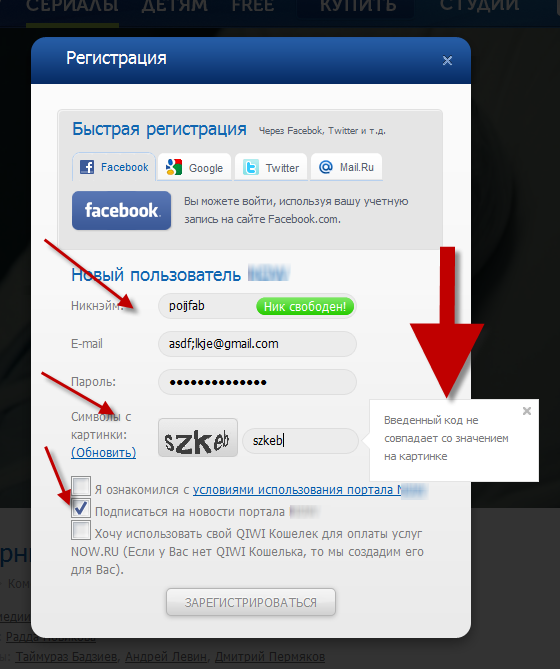
So, what we see:
After the client has filled out the form and clicked “register”, he will see the so-called “thank you page”. Carefully look at the example below and tell me why this is a bad example:
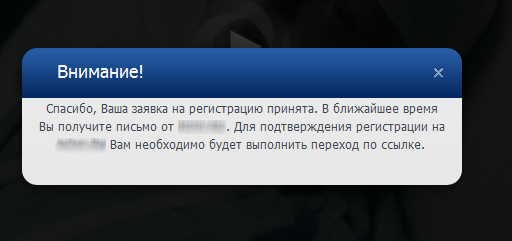
Correct answers:
1. Thank you - this is ok, in the example it is. Although you can speak a less clerical language.
2. Tell me from whom the letter will come - in this case, it is better to indicate from which mailbox it will come.
3. Show on which mailbox the letter was sent!
Thanks to this, you do not need to ask the client to enter the box twice - he can see that he sent the letter to the wrong place if he does not receive a letter confirming registration. Otherwise, without receiving confirmation and not being able to go on your site, the client will leave. Example:
Thank you for registering. A confirmation email was sent to the mailbox% email address%.
4. Tell me what to do if the letter did not arrive!
As a rule, a registration confirmation letter may not come for two reasons. First, the mechanism does not work for you. Therefore, "if the letter did not come - write to us" the actual phrase. However, do not rush with it, as more often the letter falls into spam, so first write - “If you do not see the letter in the inbox, check the spam folder. So that in the future letters from us will come to you correctly, please add <SENDER> to the contact list. ”After these words, it’s appropriate to add that if the letter has not arrived anywhere,“ write to us ”.
After you quickly left the mail and password (without any captcha, nicknames and other bells and whistles), you automatically send a registration letter to the client. But do not rush him, like an obedient cow, to send him to his mailbox. Give him the opportunity to use the site now, but write somewhere above that "at the moment you are using the site in limited mode. In order to ... <for example, leave comments or place an order> you need to confirm your mailbox. Registration confirmation sent to <MAILER> »
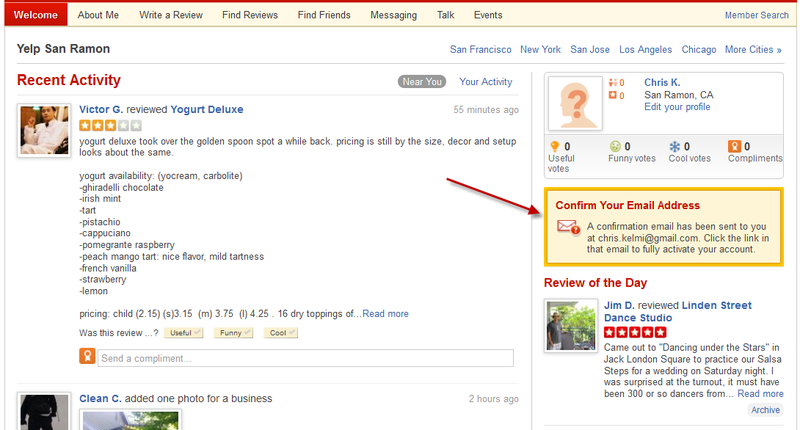
The simplest registration confirmation letter contains a number of necessary elements, namely:
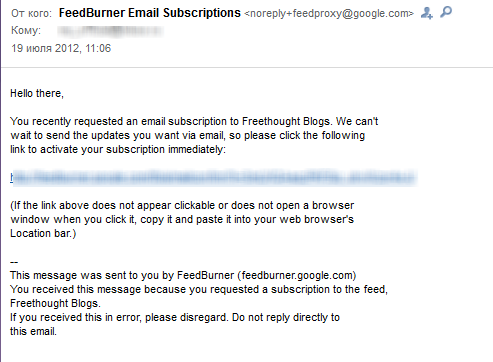
In the registration confirmation letter, you can immediately use it as the correct mailbox (instead of noreply it is customary to use mailboxes to which the client will be able to write your CRM in the future), you can also put the header of the corporate letter.
As a rule, after registration is confirmed, a Welcome Email is sent to the subscriber and the subscriber is put in the appropriate chain. In the Welcome email you can give a link that will send the client to manage his subscriptions, talk about the opportunities that he received by registering on your site, hand in the product keys and much more.
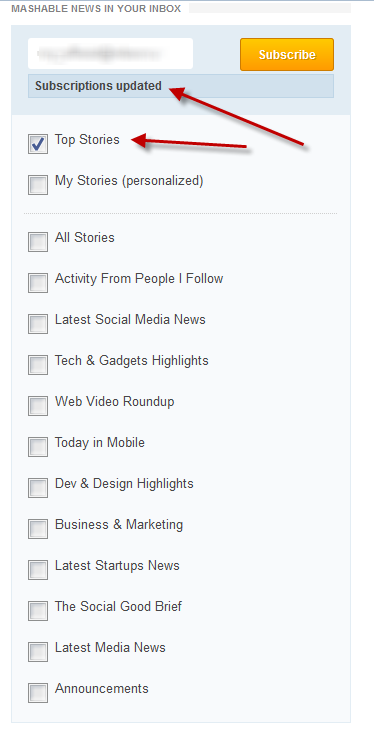
The client can get to this page by the link from your Welcome email, and also if he clicks on the link, which must be in each of your letters, this is an opportunity to unsubscribe or setting up notifications. It may look like this:

From here, the client gets into his cozy account, where he has the opportunity to configure the subscription settings. You can add here the setting of the frequency of sending your news and notifications, as well as the ability to change the password from the account and - the “delete account” field.

Thus, we have examined how you can thoughtfully make the process of subscribing and managing your account so that it is as convenient as possible for the client and, at the same time, does not lead to loss of lead. We have given here as many options and steps as possible, but those that you choose specifically for your site depend on its theme and goals. So, for a selling site in this standard chain you will need to include various marketing manipulations. To subscribe to new posts on the news resource, you can significantly reduce the number of steps - take the email address on the site and include the ability to configure your account in the next mailing list. Then the whole process will look like this:
We hope that our instruction was useful for you, and you use it to improve the process of subscribing to your newsletters through the site. Of course, there are situations when they simply tell you how to do it, and to put into practice the good advice, generally given in this article, you simply won’t give. In this case, if you certainly do not have the opportunity or desire to change jobs, you can leave the subscription process as it is now, even if it does not satisfy you. Then look at the statistics - what is the refusal process, how many people came to the site and did not register, and - most importantly - how many began to register, but did not complete the registration. Thus, you will have the actual argument that the current process of subscribing to mailing lists does not work. And you may be able to tweak this process better.
We will write about how to correctly organize the unsubscribe process in a week.
Good luck!
So, what we see:
- The need to fill in three fields - nickname, mail and password. Why nickname if mail can be used instead? If you simplify, then you need to get rid of this field. Offer to fill it out later.
- CAPTCHA - chances are that they’ll just spit on you. Especially if CAPTCHA is not introduced the first time, which can happen quite often due to the distraction of people. And from whom are you defending yourself in this case? It turns out especially good when you enter the captcha incorrectly, and on a new call you are offered to fill out the password field again, for example. It’s easier to really go to another site.
- The pre-checked “I want to receive newsletter” checkbox is considered a violation of anti-spam legislation in a number of countries. We already wrote about this earlier . And although in Russia this does not violate the law, it still looks rather wretched - even if you force the client to sign up in such a forced way, he will send your letter to spam at the very first mailing.
- Just in case, do not ask the client to enter a password or mailbox twice. This is tedious and not necessary - you will see it now.
- It is not necessary to tick “I agree with the confidentiality agreement” - you can simply write “by clicking the register button, you agree to our privacy policy <link>”. However, you cannot do without a privacy policy - make such a page on the site immediately.
- If the client entered something incorrectly, do not reset the remaining fields, for example, the password field is a harmful practice. Write in red letters what and where you need to fix it, but leave in place everything that the client has already entered - this is true for any data collection system.
Thank you page
After the client has filled out the form and clicked “register”, he will see the so-called “thank you page”. Carefully look at the example below and tell me why this is a bad example:
Correct answers:
1. Thank you - this is ok, in the example it is. Although you can speak a less clerical language.
2. Tell me from whom the letter will come - in this case, it is better to indicate from which mailbox it will come.
3. Show on which mailbox the letter was sent!
Thanks to this, you do not need to ask the client to enter the box twice - he can see that he sent the letter to the wrong place if he does not receive a letter confirming registration. Otherwise, without receiving confirmation and not being able to go on your site, the client will leave. Example:
Thank you for registering. A confirmation email was sent to the mailbox% email address%.
4. Tell me what to do if the letter did not arrive!
As a rule, a registration confirmation letter may not come for two reasons. First, the mechanism does not work for you. Therefore, "if the letter did not come - write to us" the actual phrase. However, do not rush with it, as more often the letter falls into spam, so first write - “If you do not see the letter in the inbox, check the spam folder. So that in the future letters from us will come to you correctly, please add <SENDER> to the contact list. ”After these words, it’s appropriate to add that if the letter has not arrived anywhere,“ write to us ”.
The ability to use your site should be given immediately
After you quickly left the mail and password (without any captcha, nicknames and other bells and whistles), you automatically send a registration letter to the client. But do not rush him, like an obedient cow, to send him to his mailbox. Give him the opportunity to use the site now, but write somewhere above that "at the moment you are using the site in limited mode. In order to ... <for example, leave comments or place an order> you need to confirm your mailbox. Registration confirmation sent to <MAILER> »
Registration confirmation letter
The simplest registration confirmation letter contains a number of necessary elements, namely:
- Information about why you received this letter: because you or someone else registered on the site <SITE>
- Link to confirm registration, which is accompanied by two phrases. The first one says that "in order to complete the registration, follow the link." And the second - "if for some reason the link is not clicked, copy it and paste it into the browser window." Attention! Think over the page that the client will see after clicking on the link. By default, this is the phrase “Thank you, your mailing address has been confirmed.”
- The message is that "if you received this letter by mistake, you do not need to take any action." Plus you can add a few more words that can reassure the client.
In the registration confirmation letter, you can immediately use it as the correct mailbox (instead of noreply it is customary to use mailboxes to which the client will be able to write your CRM in the future), you can also put the header of the corporate letter.
Welcome email
As a rule, after registration is confirmed, a Welcome Email is sent to the subscriber and the subscriber is put in the appropriate chain. In the Welcome email you can give a link that will send the client to manage his subscriptions, talk about the opportunities that he received by registering on your site, hand in the product keys and much more.
Subscription Management Page
The client can get to this page by the link from your Welcome email, and also if he clicks on the link, which must be in each of your letters, this is an opportunity to unsubscribe or setting up notifications. It may look like this:
From here, the client gets into his cozy account, where he has the opportunity to configure the subscription settings. You can add here the setting of the frequency of sending your news and notifications, as well as the ability to change the password from the account and - the “delete account” field.
Thus, we have examined how you can thoughtfully make the process of subscribing and managing your account so that it is as convenient as possible for the client and, at the same time, does not lead to loss of lead. We have given here as many options and steps as possible, but those that you choose specifically for your site depend on its theme and goals. So, for a selling site in this standard chain you will need to include various marketing manipulations. To subscribe to new posts on the news resource, you can significantly reduce the number of steps - take the email address on the site and include the ability to configure your account in the next mailing list. Then the whole process will look like this:
We hope that our instruction was useful for you, and you use it to improve the process of subscribing to your newsletters through the site. Of course, there are situations when they simply tell you how to do it, and to put into practice the good advice, generally given in this article, you simply won’t give. In this case, if you certainly do not have the opportunity or desire to change jobs, you can leave the subscription process as it is now, even if it does not satisfy you. Then look at the statistics - what is the refusal process, how many people came to the site and did not register, and - most importantly - how many began to register, but did not complete the registration. Thus, you will have the actual argument that the current process of subscribing to mailing lists does not work. And you may be able to tweak this process better.
We will write about how to correctly organize the unsubscribe process in a week.
Good luck!