 September 24, 2012 at 14:35
802.11 Network Security - Key Threats
Recently, the Wi-Fi theme on Habré is gaining popularity, which cannot but rejoice. However, some important aspects, in particular, security, are still covered rather one-sidedly, which is very clearly visible in the comments. A couple of years ago, an abridged version of the material below was published in the journal Computer Review . I think that it will be interesting and useful for readers of Habr to familiarize themselves with it, especially in the full and updated version. The first article discusses the main threats. In the second, we will discuss how to implement WIPS-based security.
The popularity of wireless local area networks has already passed the stage of explosive growth and reached the state of "familiar to all" technology. Home access points and Wi-Fi mini routers are inexpensive and widely available, hotspots are common enough, a laptop without Wi-Fi is an anachronism. Like many other innovative technologies, the use of wireless networks entails not only new benefits, but also new risks. The Wi-Fi boom has spawned a whole new generation of hackers specializing in inventing more and more new ways to crack wireless and attack users and corporate infrastructure. Since 2004, Gartner has been warned that WLAN security will be one of the main problems - and the forecast is justified.
The wireless communications and mobility that it provides are interesting and beneficial to many. However, as long as the question of wireless security is not completely clear, opinions differ radically: some (for example, warehouse operators) are now not afraid to tie their key business processes to Wi-Fi, while others - on the contrary, barricade themselves and prohibit the use of wireless elements in their networks. Which of them chose the right strategy? Is banning Wi-Fi a guarantee of protection against wireless threats? And in general - is this Wi-Fi as dangerous and unreliable as they say? The answer is far from obvious!
In this article we will consider:
Traditional wired networks use a cable to transmit information. The cable is considered a “controlled” environment, protected by the buildings and the premises in which it is located. External "alien" traffic that enters the secure network segment is filtered by the firewall and analyzed by IDS / IPS systems. In order to gain access to such a segment of a wired network, an attacker needs to overcome either the building’s physical security system or a firewall.
Wireless networks use radio waves. Air is an environment with shared access and almost complete lack of control. It is simply not possible to provide the equivalent physical security of wired networks. As soon as the user connects the access point to the wired network, its signal can pass through walls, floors, windows of the building. Thus, the connected network segment becomes accessible from another floor or even from a neighboring building, parking or the other end of the street - the radio signal can spread hundreds of meters outside the building. The only physical boundary of the wireless network is the level of this signal itself.
Therefore, unlike wired networks, where the user’s connection point to the network is well defined and known - this is a wall outlet - in wireless networks you can connect to the network from anywhere, if only the signal is strong enough.
Also, ether is a shared medium. All wireless devices are included in one giant "hub" (hub) - and any wireless device can "see" all the wireless neighbors in the network. At the same time, a receiver operating in passive mode (listening only) cannot be determined at all.
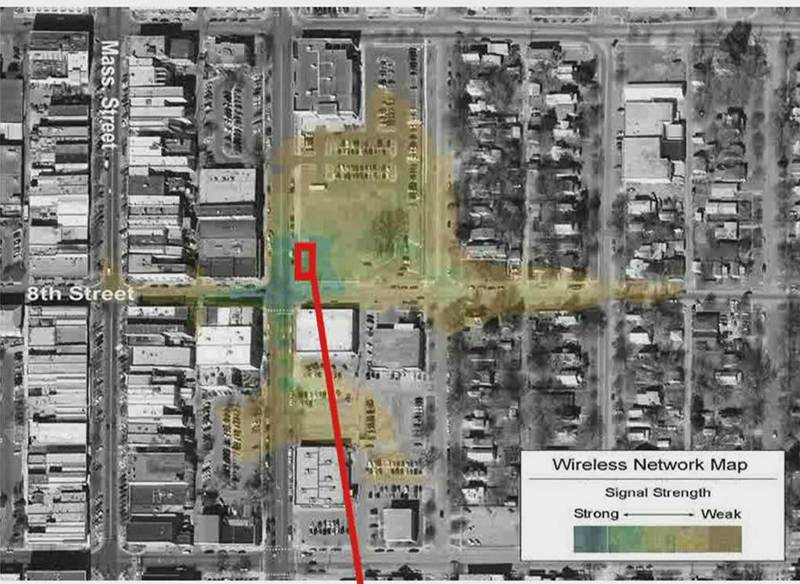
The perimeter of the wireless network is not limited to the perimeter of the building.
Thanks to the efforts of suppliers of consumer Wi-Fi equipment, even the most unprepared user can now deploy a wireless network. A set of an inexpensive access point and a wireless adapter will cost $ 50-80. However, most devices come pre-configured by default, which allows you to immediately start working with them - without even looking at the configuration. It is this amount that can cost a deliberate or unintentional hacking of your network by your own employees, who installed their own access point without approval and did not take care of ensuring its proper security.
An even bigger problem is that wireless users are, by definition, mobile. Users can appear and disappear, change their location, and are not tied to fixed entry points, as is the case with wired networks - they can be anywhere in the coverage area! All this greatly complicates the task of “keeping uninvited guests over the threshold” and tracking the sources of wireless attacks.
In addition, an important component of mobility, such as roaming, is another problem of wireless security. This time - users. Unlike wired networks, where the user is “tied” by a cable to a specific outlet and port of the access switch, in wireless networks the user is not tied to anything. Using special software, it’s quite easy to “transfer” it from an authorized access point to an unauthorized or even to an attacker's laptop working in Soft AP (software access point) mode, opening up the possibility for a number of attacks against an unsuspecting user.
Since the radio signals have a broadcast nature, are not limited by the walls of buildings and are accessible to all receivers whose location is difficult or impossible to fix at all, it is especially easy and convenient for attackers to attack wireless networks. Therefore, formally, even a teenager riding a bicycle in the yard now with a smartphone in his pocket can engage in radio intelligence of your network - purely out of youthful curiosity. The huge variety of ready-made tools for analyzing protocols and vulnerabilities available on the Internet will also help him purely out of curiosity to find the access point that some of the employees recently brought to work and did not bother to reconfigure from the default settings, purely out of curiosity, the instructions contain a key network access - and voila!
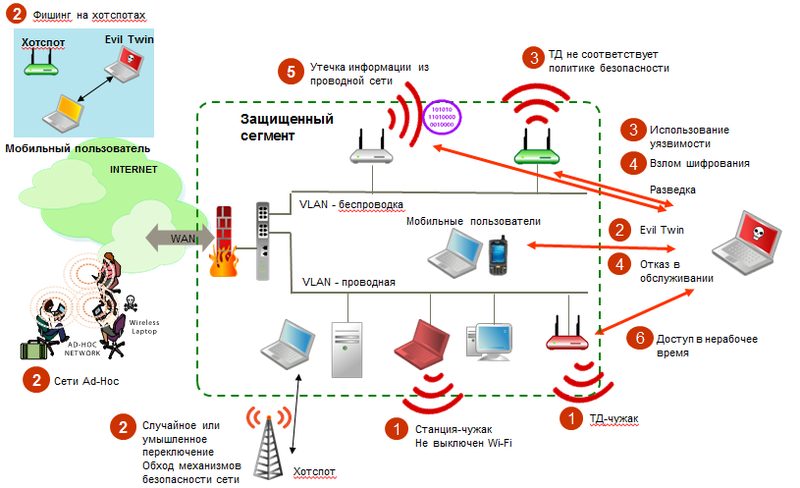
Traditional defenses do not save against new attack classes
So, wireless technologies that work without the physical and logical limitations of their wired counterparts, significantly increase the flexibility of the workflow and user productivity, reduce the cost of network deployment, also expose the network infrastructure and users to significant risks. In order to understand how to ensure the safe functioning of wireless networks, let's take a closer look at them.
Strangers are devices that provide unauthorized access to the corporate network, often bypassing the protection mechanisms defined by the corporate security policy. Most often these are the same unauthorized access points. Statistics around the world, for example, indicate strangers as the cause of most hacking networks of organizations. Even if the organization does not use wireless communication and considers itself as a result of such a ban protected from wireless attacks - an intruded (intentionally or not) alien will easily correct this situation. The availability and low cost of Wi-Fi devices has led to the fact that in the United States, for example, almost every network with more than 50 users has become familiar with this phenomenon.
In addition to access points, a home router with Wi-Fi, a soft AP software access point, a laptop with both a wired and wireless interface, a scanner, a projector, etc. can act as a stranger.
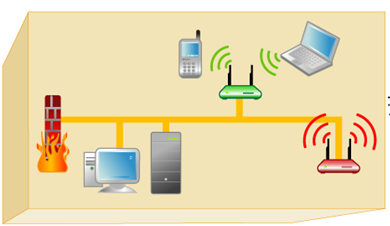
Wireless threats also affect those who do not use Wi-Fi. For $ 50, you can [not] intentionally create a hole in the protection system for $ 50,000.
As mentioned above - wireless devices are not “tied” by a cable to a power outlet and can change network connection points right in the process. For example, “Random Associations” can occur when a laptop with Windows XP (fairly trustworthy for all wireless networks) or just an incorrectly configured wireless client is automatically associated and connects the user to the nearest wireless network. Such a mechanism allows attackers to “switch to themselves” an unknowing user for subsequent scanning of vulnerabilities, phishing, or Man-in-The-Middle attacks. In addition, if the user is simultaneously connected to the wired network - he just became a convenient entry point - i.e. a classic stranger.
Also, many users of laptop devices equipped with Wi-Fi and wired interfaces and not satisfied with the quality of the wired network (slowly, the evil admin set URL filtering, ICQ does not work), like to switch to the closest available hotspot (or the OS does this automatically for them in case, for example, a wired network failure). Needless to say, in this case, all the efforts of the IT department to ensure network security remain literally “overboard”.
Ad-Hoc networks - direct peer-to-peer connections between wireless devices without the participation of access points - are a convenient way to quickly transfer a file to a colleague or print the desired document to a printer with Wi-Fi. However, this way of organizing the network does not support most of the methods necessary for ensuring security, providing attackers with an easy way to hack into the computers of users of Ad-Hoc networks. Recently available VirtualWiFi and Wi-Fi Direct technologies only exacerbate the situation.
Some network devices may be more vulnerable than others - they may be misconfigured, use weak encryption keys, or authentication methods with known vulnerabilities. It is not surprising that in the first place, attackers attack them. Analyst reports say that more than 70 percent of successful hacking wireless networks occurred as a result of incorrect configuration of access points or client software.
A single incorrectly configured access point (including a stranger) can cause a hacking of the corporate network. The default settings of most access points do not include authentication or encryption, or use static keys recorded in the manual and therefore well-known. In combination with the low price of access points, this factor significantly complicates the task of monitoring the integrity of the wireless infrastructure configuration and its level of protection. Employees of the organization can arbitrarily bring access points and connect them wherever they want. At the same time, it is unlikely that they will pay enough attention to their competent and secure configuration and coordinate their actions with the IT department. It is these points that pose the greatest threat to wired and wireless networks.
Incorrectly configured user devices present an even greater threat than incorrectly configured access points. These devices literally come and go from the enterprise, often they are not configured specifically to minimize wireless risks and are content with the default configuration (which, by default, cannot be considered safe). Such devices provide invaluable assistance to hackers in their work of penetrating into a wired network, providing a convenient entry point for scanning the network and spreading malware in it.
Special tools have been available to attackers for hacking networks based on the WEP encryption standard (see risk 4). These tools are widely covered on the Internet and do not require special skills for use. They exploit vulnerabilities in the WEP algorithm by passively collecting traffic statistics on the wireless network until the collected data is sufficient to recover the encryption key. Using the latest generation of WEP hacking tools using special traffic injection methods, the “until” time ranges from 15 minutes to 15 seconds. Similarly, there are vulnerabilities of varying degrees of danger and complexity that allow breaking TKIP and even WPA2. The only "impenetrable" method so far is the use of WPA2-Enterprise (802.1x) with at least server certificates.
Wireless technologies have spawned new ways to implement old threats, as well as some new, hitherto impossible in wired networks. In all cases, it became much harder to fight an attacker, as it is impossible to track its physical location or isolate it from the network.
Most traditional attacks begin with intelligence, as a result of which the attacker determines the further development paths of the attack. For wireless intelligence, both wireless network scanning tools (NetStumbler, Wellenreiter, JC built-in client) and packet collection and analysis tools are used, because many WLAN control packets are unencrypted. At the same time, it is very difficult to distinguish a station collecting information from a regular station trying to get authorized access to a network or from an attempt at random association.
Many people try to protect their networks by hiding the network name in the Beacon sent by the access points, and by disabling the response to the broadcast ESSID (Broadcast ESSID). These methods, which belong to the Security through Obscurity class, are universally recognized to be insufficient, because the attacker still sees the wireless network on a certain radio channel, and all that remains for him is to wait for the first authorized connection to such a network, because during such a connection, the ESSID is transmitted on the air in unencrypted form. Then such a safety measure simply loses its meaning. Some features of the Windows XP SP2 wireless client (as amended in SP3) exacerbated the situation. the client constantly sent the name of such a hidden network to the air, trying to connect. As a result, the attacker not only got the network name,
The impersonation of an authorized user is a serious threat to any network, not just wireless. However, in a wireless network, determining user identity is more difficult. Of course, there are SSIDs and you can try to filter by MAC addresses, but both are broadcast live, and it’s easy to fake it, and fake it - at least “bite” part of the network bandwidth, insert the wrong frames in order to violation of authorized communications, and splitting at least a little encryption algorithms - to arrange attacks on the network structure (for example, ARP Poisoning, as is the case with the recently discovered TKIP vulnerability). Not to mention the WEP hack discussed in paragraph above!
There is a false belief that impersonation of a user is possible only in the case of MAC authentication or the use of static keys, that 802.1x-based schemes are absolutely safe. Unfortunately, this has not been the case for a long time. Some mechanisms (LEAP) are cracked no more complicated than WEP. Other schemes, such as EAP-FAST or PEAP-MSCHAPv2, are more reliable, but do not guarantee resistance to a complex attack that uses several factors at the same time.
The objective of the Denial of Service attack is either to violate the quality of network services or to completely eliminate the possibility of access to them for authorized users. For this, for example, the network may be littered with “garbage” packets (with the wrong checksum, etc.) sent from a legitimate address. In the case of a wireless network, it is simply impossible to trace the source of such an attack without special tools, because he can be anywhere. In addition, it is possible to organize DoS at the physical level, simply by running a fairly powerful interference generator in the desired frequency range.
The toolkit for organizing attacks on wireless networks is widely available and is constantly updated with new tools, starting from the well-known AirCrack and ending with cloud hash decryption services. Plus, as soon as access is gained, the traditional tools of higher levels are used.
Almost all wireless networks at some point connect to wired networks. Accordingly, any wireless access point can be used as a bridgehead for an attack. But this is not all: some errors in the configuration of access points in combination with errors in the configuration of a wired network can open the way for information leaks. The most common example is access points operating in Layer 2 Bridge mode, connected to a flat network (or a network with VLAN segmentation violations) and broadcasting packets from the wired segment, ARP, DHCP requests, STP frames, etc. . Some of this data can be useful for organizing Man-in-The-Middle attacks, various Poisoning and DoS attacks, and just intelligence.
Another common scenario is based on the implementation of 802.11 protocols. In the case when multiple ESSIDs are configured on the same access point, broadcast traffic will be distributed immediately to all ESSIDs. As a result, if a secure network and a public hotspot are configured at one point, an attacker connected to the hotspot may, for example, disrupt the operation of DHCP or ARP protocols in a secure network. This can be corrected by organizing a competent binding of ESS to BSS, which is supported by almost all manufacturers of equipment of the Enterprise class (and few from the Consumer class), but you need to know about this.
Some features of the functioning of wireless networks pose additional problems that can affect their overall availability, performance, security, and operating costs. A competent solution to these problems requires special support and operation tools, special administration and monitoring mechanisms that are not implemented in traditional wireless network management tools.
Since wireless networks are not limited to premises like wired networks, you can connect to them anywhere and anytime. Because of this, many organizations limit the availability of wireless networks in their offices exclusively to working hours (up to physical disconnection of access points). In the light of what has been said, it is natural to assume that any wireless activity in the network during off-hours should be considered suspicious and subject to investigation.
Access points that allow connections at low speeds allow connections at longer ranges. Thus, they represent an additional possibility of safe remote hacking. If in an office network where everyone works at 24/36/54 Mbit / s speeds, a 1 or 2 Mbit / s connection suddenly appears - this may be a signal that someone is trying to break into the network from the street. The picture has already been cited. Read more about slow speeds here (Section 3.1) .
Since wireless networks use radio waves, the quality of the network depends on many factors. The most striking example is the interference of radio signals, which can significantly degrade the throughput and the number of supported users, up to the complete impossibility of using the network. The source of interference can be any device that emits a signal of sufficient power in the same frequency range as the access point: from neighboring access points in a densely populated office center, to electric motors in production, Bluetooth headsets and even microwave ovens. On the other hand, attackers can use interference to organize DoS attacks on the network.
Strangers working on the same channel as legitimate access points not only open access to the network, but also disrupt the functioning of the “correct” wireless network. In addition, in order to carry out attacks on end users and to penetrate the network using the Man-In-The Middle attack, attackers often mute access points of a legitimate network, leaving only one - their access point with the same network name.
In addition to interference, there are other aspects that affect the quality of communication in wireless networks. Since the wireless environment is a shared environment, each incorrectly configured client or a failing antenna of the access point can create problems, both at the physical and at the data link level, leading to a deterioration in the quality of service for the remaining network clients.
In total, wireless networks give rise to new classes of risks and threats from which it is impossible to defend themselves with traditional wired means. Even if Wi-Fi is formally prohibited in the organization, this does not mean that any of the users will not install a stranger and this will reduce all investments in network security to zero. In addition, due to the features of wireless communications, it is important to control not only the security of the access infrastructure, but also to monitor users who may become the target of an attacker’s attack or simply accidentally or intentionally switch from a corporate network to an insecure connection.
The good news, after such a depressing presentation, is that most of these risks can be minimized or even reduced to zero. To organize the safe operation of a wireless network (including infrastructure and users), an approach is used that generally coincides with the "multi-level security" approach used for traditional wired networks (adjusted for WLAN specifics). But this is a topic for a separate article of no less volume, which will follow later.
Introduction
The popularity of wireless local area networks has already passed the stage of explosive growth and reached the state of "familiar to all" technology. Home access points and Wi-Fi mini routers are inexpensive and widely available, hotspots are common enough, a laptop without Wi-Fi is an anachronism. Like many other innovative technologies, the use of wireless networks entails not only new benefits, but also new risks. The Wi-Fi boom has spawned a whole new generation of hackers specializing in inventing more and more new ways to crack wireless and attack users and corporate infrastructure. Since 2004, Gartner has been warned that WLAN security will be one of the main problems - and the forecast is justified.
The wireless communications and mobility that it provides are interesting and beneficial to many. However, as long as the question of wireless security is not completely clear, opinions differ radically: some (for example, warehouse operators) are now not afraid to tie their key business processes to Wi-Fi, while others - on the contrary, barricade themselves and prohibit the use of wireless elements in their networks. Which of them chose the right strategy? Is banning Wi-Fi a guarantee of protection against wireless threats? And in general - is this Wi-Fi as dangerous and unreliable as they say? The answer is far from obvious!
In this article we will consider:
- What are the important security features of wireless communications,
- why the "non-use" or ban of Wi-Fi does not save from wireless threats,
- what new risks should be considered.
What are the security features of wireless?
A shared environment that is almost impossible to control
Traditional wired networks use a cable to transmit information. The cable is considered a “controlled” environment, protected by the buildings and the premises in which it is located. External "alien" traffic that enters the secure network segment is filtered by the firewall and analyzed by IDS / IPS systems. In order to gain access to such a segment of a wired network, an attacker needs to overcome either the building’s physical security system or a firewall.
Wireless networks use radio waves. Air is an environment with shared access and almost complete lack of control. It is simply not possible to provide the equivalent physical security of wired networks. As soon as the user connects the access point to the wired network, its signal can pass through walls, floors, windows of the building. Thus, the connected network segment becomes accessible from another floor or even from a neighboring building, parking or the other end of the street - the radio signal can spread hundreds of meters outside the building. The only physical boundary of the wireless network is the level of this signal itself.
Therefore, unlike wired networks, where the user’s connection point to the network is well defined and known - this is a wall outlet - in wireless networks you can connect to the network from anywhere, if only the signal is strong enough.
Also, ether is a shared medium. All wireless devices are included in one giant "hub" (hub) - and any wireless device can "see" all the wireless neighbors in the network. At the same time, a receiver operating in passive mode (listening only) cannot be determined at all.
The perimeter of the wireless network is not limited to the perimeter of the building.
Easy to deploy and mobility
Thanks to the efforts of suppliers of consumer Wi-Fi equipment, even the most unprepared user can now deploy a wireless network. A set of an inexpensive access point and a wireless adapter will cost $ 50-80. However, most devices come pre-configured by default, which allows you to immediately start working with them - without even looking at the configuration. It is this amount that can cost a deliberate or unintentional hacking of your network by your own employees, who installed their own access point without approval and did not take care of ensuring its proper security.
An even bigger problem is that wireless users are, by definition, mobile. Users can appear and disappear, change their location, and are not tied to fixed entry points, as is the case with wired networks - they can be anywhere in the coverage area! All this greatly complicates the task of “keeping uninvited guests over the threshold” and tracking the sources of wireless attacks.
In addition, an important component of mobility, such as roaming, is another problem of wireless security. This time - users. Unlike wired networks, where the user is “tied” by a cable to a specific outlet and port of the access switch, in wireless networks the user is not tied to anything. Using special software, it’s quite easy to “transfer” it from an authorized access point to an unauthorized or even to an attacker's laptop working in Soft AP (software access point) mode, opening up the possibility for a number of attacks against an unsuspecting user.
Easy to attack
Since the radio signals have a broadcast nature, are not limited by the walls of buildings and are accessible to all receivers whose location is difficult or impossible to fix at all, it is especially easy and convenient for attackers to attack wireless networks. Therefore, formally, even a teenager riding a bicycle in the yard now with a smartphone in his pocket can engage in radio intelligence of your network - purely out of youthful curiosity. The huge variety of ready-made tools for analyzing protocols and vulnerabilities available on the Internet will also help him purely out of curiosity to find the access point that some of the employees recently brought to work and did not bother to reconfigure from the default settings, purely out of curiosity, the instructions contain a key network access - and voila!
Traditional defenses do not save against new attack classes
Six Essential Wireless Risks
So, wireless technologies that work without the physical and logical limitations of their wired counterparts, significantly increase the flexibility of the workflow and user productivity, reduce the cost of network deployment, also expose the network infrastructure and users to significant risks. In order to understand how to ensure the safe functioning of wireless networks, let's take a closer look at them.
Risk One - Strangers (Rogue Devices, Rogues)
Strangers are devices that provide unauthorized access to the corporate network, often bypassing the protection mechanisms defined by the corporate security policy. Most often these are the same unauthorized access points. Statistics around the world, for example, indicate strangers as the cause of most hacking networks of organizations. Even if the organization does not use wireless communication and considers itself as a result of such a ban protected from wireless attacks - an intruded (intentionally or not) alien will easily correct this situation. The availability and low cost of Wi-Fi devices has led to the fact that in the United States, for example, almost every network with more than 50 users has become familiar with this phenomenon.
In addition to access points, a home router with Wi-Fi, a soft AP software access point, a laptop with both a wired and wireless interface, a scanner, a projector, etc. can act as a stranger.
Wireless threats also affect those who do not use Wi-Fi. For $ 50, you can [not] intentionally create a hole in the protection system for $ 50,000.
The second risk is the unfixed nature of communication
As mentioned above - wireless devices are not “tied” by a cable to a power outlet and can change network connection points right in the process. For example, “Random Associations” can occur when a laptop with Windows XP (fairly trustworthy for all wireless networks) or just an incorrectly configured wireless client is automatically associated and connects the user to the nearest wireless network. Such a mechanism allows attackers to “switch to themselves” an unknowing user for subsequent scanning of vulnerabilities, phishing, or Man-in-The-Middle attacks. In addition, if the user is simultaneously connected to the wired network - he just became a convenient entry point - i.e. a classic stranger.
Also, many users of laptop devices equipped with Wi-Fi and wired interfaces and not satisfied with the quality of the wired network (slowly, the evil admin set URL filtering, ICQ does not work), like to switch to the closest available hotspot (or the OS does this automatically for them in case, for example, a wired network failure). Needless to say, in this case, all the efforts of the IT department to ensure network security remain literally “overboard”.
Ad-Hoc networks - direct peer-to-peer connections between wireless devices without the participation of access points - are a convenient way to quickly transfer a file to a colleague or print the desired document to a printer with Wi-Fi. However, this way of organizing the network does not support most of the methods necessary for ensuring security, providing attackers with an easy way to hack into the computers of users of Ad-Hoc networks. Recently available VirtualWiFi and Wi-Fi Direct technologies only exacerbate the situation.
Third risk - network and device vulnerabilities
Some network devices may be more vulnerable than others - they may be misconfigured, use weak encryption keys, or authentication methods with known vulnerabilities. It is not surprising that in the first place, attackers attack them. Analyst reports say that more than 70 percent of successful hacking wireless networks occurred as a result of incorrect configuration of access points or client software.
Incorrectly configured access points
A single incorrectly configured access point (including a stranger) can cause a hacking of the corporate network. The default settings of most access points do not include authentication or encryption, or use static keys recorded in the manual and therefore well-known. In combination with the low price of access points, this factor significantly complicates the task of monitoring the integrity of the wireless infrastructure configuration and its level of protection. Employees of the organization can arbitrarily bring access points and connect them wherever they want. At the same time, it is unlikely that they will pay enough attention to their competent and secure configuration and coordinate their actions with the IT department. It is these points that pose the greatest threat to wired and wireless networks.
Incorrectly configured wireless clients
Incorrectly configured user devices present an even greater threat than incorrectly configured access points. These devices literally come and go from the enterprise, often they are not configured specifically to minimize wireless risks and are content with the default configuration (which, by default, cannot be considered safe). Such devices provide invaluable assistance to hackers in their work of penetrating into a wired network, providing a convenient entry point for scanning the network and spreading malware in it.
Hacking encryption
Special tools have been available to attackers for hacking networks based on the WEP encryption standard (see risk 4). These tools are widely covered on the Internet and do not require special skills for use. They exploit vulnerabilities in the WEP algorithm by passively collecting traffic statistics on the wireless network until the collected data is sufficient to recover the encryption key. Using the latest generation of WEP hacking tools using special traffic injection methods, the “until” time ranges from 15 minutes to 15 seconds. Similarly, there are vulnerabilities of varying degrees of danger and complexity that allow breaking TKIP and even WPA2. The only "impenetrable" method so far is the use of WPA2-Enterprise (802.1x) with at least server certificates.
Fourth risk - new threats and attacks
Wireless technologies have spawned new ways to implement old threats, as well as some new, hitherto impossible in wired networks. In all cases, it became much harder to fight an attacker, as it is impossible to track its physical location or isolate it from the network.
Intelligence service
Most traditional attacks begin with intelligence, as a result of which the attacker determines the further development paths of the attack. For wireless intelligence, both wireless network scanning tools (NetStumbler, Wellenreiter, JC built-in client) and packet collection and analysis tools are used, because many WLAN control packets are unencrypted. At the same time, it is very difficult to distinguish a station collecting information from a regular station trying to get authorized access to a network or from an attempt at random association.
Many people try to protect their networks by hiding the network name in the Beacon sent by the access points, and by disabling the response to the broadcast ESSID (Broadcast ESSID). These methods, which belong to the Security through Obscurity class, are universally recognized to be insufficient, because the attacker still sees the wireless network on a certain radio channel, and all that remains for him is to wait for the first authorized connection to such a network, because during such a connection, the ESSID is transmitted on the air in unencrypted form. Then such a safety measure simply loses its meaning. Some features of the Windows XP SP2 wireless client (as amended in SP3) exacerbated the situation. the client constantly sent the name of such a hidden network to the air, trying to connect. As a result, the attacker not only got the network name,
Impersonation and Identity Theft
The impersonation of an authorized user is a serious threat to any network, not just wireless. However, in a wireless network, determining user identity is more difficult. Of course, there are SSIDs and you can try to filter by MAC addresses, but both are broadcast live, and it’s easy to fake it, and fake it - at least “bite” part of the network bandwidth, insert the wrong frames in order to violation of authorized communications, and splitting at least a little encryption algorithms - to arrange attacks on the network structure (for example, ARP Poisoning, as is the case with the recently discovered TKIP vulnerability). Not to mention the WEP hack discussed in paragraph above!
There is a false belief that impersonation of a user is possible only in the case of MAC authentication or the use of static keys, that 802.1x-based schemes are absolutely safe. Unfortunately, this has not been the case for a long time. Some mechanisms (LEAP) are cracked no more complicated than WEP. Other schemes, such as EAP-FAST or PEAP-MSCHAPv2, are more reliable, but do not guarantee resistance to a complex attack that uses several factors at the same time.
Denial of Service (DoS)
The objective of the Denial of Service attack is either to violate the quality of network services or to completely eliminate the possibility of access to them for authorized users. For this, for example, the network may be littered with “garbage” packets (with the wrong checksum, etc.) sent from a legitimate address. In the case of a wireless network, it is simply impossible to trace the source of such an attack without special tools, because he can be anywhere. In addition, it is possible to organize DoS at the physical level, simply by running a fairly powerful interference generator in the desired frequency range.
Specialized attacking tools
The toolkit for organizing attacks on wireless networks is widely available and is constantly updated with new tools, starting from the well-known AirCrack and ending with cloud hash decryption services. Plus, as soon as access is gained, the traditional tools of higher levels are used.
Fifth Risk - Wired Network Information Leaks
Almost all wireless networks at some point connect to wired networks. Accordingly, any wireless access point can be used as a bridgehead for an attack. But this is not all: some errors in the configuration of access points in combination with errors in the configuration of a wired network can open the way for information leaks. The most common example is access points operating in Layer 2 Bridge mode, connected to a flat network (or a network with VLAN segmentation violations) and broadcasting packets from the wired segment, ARP, DHCP requests, STP frames, etc. . Some of this data can be useful for organizing Man-in-The-Middle attacks, various Poisoning and DoS attacks, and just intelligence.
Another common scenario is based on the implementation of 802.11 protocols. In the case when multiple ESSIDs are configured on the same access point, broadcast traffic will be distributed immediately to all ESSIDs. As a result, if a secure network and a public hotspot are configured at one point, an attacker connected to the hotspot may, for example, disrupt the operation of DHCP or ARP protocols in a secure network. This can be corrected by organizing a competent binding of ESS to BSS, which is supported by almost all manufacturers of equipment of the Enterprise class (and few from the Consumer class), but you need to know about this.
Sixth Risk - Features of Wireless Networks
Some features of the functioning of wireless networks pose additional problems that can affect their overall availability, performance, security, and operating costs. A competent solution to these problems requires special support and operation tools, special administration and monitoring mechanisms that are not implemented in traditional wireless network management tools.
Out-of-hours activity
Since wireless networks are not limited to premises like wired networks, you can connect to them anywhere and anytime. Because of this, many organizations limit the availability of wireless networks in their offices exclusively to working hours (up to physical disconnection of access points). In the light of what has been said, it is natural to assume that any wireless activity in the network during off-hours should be considered suspicious and subject to investigation.
Speeds
Access points that allow connections at low speeds allow connections at longer ranges. Thus, they represent an additional possibility of safe remote hacking. If in an office network where everyone works at 24/36/54 Mbit / s speeds, a 1 or 2 Mbit / s connection suddenly appears - this may be a signal that someone is trying to break into the network from the street. The picture has already been cited. Read more about slow speeds here (Section 3.1) .
Interference
Since wireless networks use radio waves, the quality of the network depends on many factors. The most striking example is the interference of radio signals, which can significantly degrade the throughput and the number of supported users, up to the complete impossibility of using the network. The source of interference can be any device that emits a signal of sufficient power in the same frequency range as the access point: from neighboring access points in a densely populated office center, to electric motors in production, Bluetooth headsets and even microwave ovens. On the other hand, attackers can use interference to organize DoS attacks on the network.
Strangers working on the same channel as legitimate access points not only open access to the network, but also disrupt the functioning of the “correct” wireless network. In addition, in order to carry out attacks on end users and to penetrate the network using the Man-In-The Middle attack, attackers often mute access points of a legitimate network, leaving only one - their access point with the same network name.
Communication
In addition to interference, there are other aspects that affect the quality of communication in wireless networks. Since the wireless environment is a shared environment, each incorrectly configured client or a failing antenna of the access point can create problems, both at the physical and at the data link level, leading to a deterioration in the quality of service for the remaining network clients.
What to do?
In total, wireless networks give rise to new classes of risks and threats from which it is impossible to defend themselves with traditional wired means. Even if Wi-Fi is formally prohibited in the organization, this does not mean that any of the users will not install a stranger and this will reduce all investments in network security to zero. In addition, due to the features of wireless communications, it is important to control not only the security of the access infrastructure, but also to monitor users who may become the target of an attacker’s attack or simply accidentally or intentionally switch from a corporate network to an insecure connection.
The good news, after such a depressing presentation, is that most of these risks can be minimized or even reduced to zero. To organize the safe operation of a wireless network (including infrastructure and users), an approach is used that generally coincides with the "multi-level security" approach used for traditional wired networks (adjusted for WLAN specifics). But this is a topic for a separate article of no less volume, which will follow later.









