XML serialization for deploying seed data in Caché. Part I
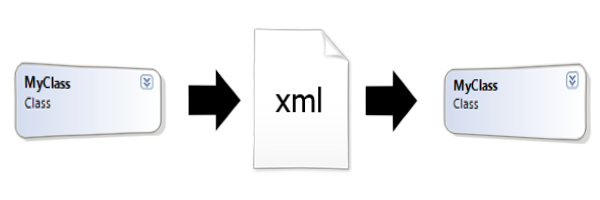
I think it is no exaggeration to say that almost every developer of an information system is faced with the task of generating initial data during implementation.
Caché developers have several standard approaches to initializing initial data:
- loading data for reference classes from external files,
- receiving data from online services,
- import of static data from global files,
- execution of class methods that create initial data from “wired” into the data code.
For initialization of static data, small directories or any configuration data of the system, there is another way, which will be discussed in the article.
Caché has the ability to include XML data blocks in the class code - XDATA blocks. Typically, this data is used to store data about Zen page forms and Zen reports with the class . In these blocks, you can also perfectly store the initial data for persistent classes.
Deserialization from XData
Consider an example of a simple stored class with one property. This will be a class of regions with names - a typical example of a directory.
The code for this class in Caché is as follows:
Class map.Region Extends% Persistent
{
/// Name
Property Name As% String;
}
Add the initial data in the XML form to the class in the XData block:
XData populate
{
}
In order to load this data from the class, we add the Populate class method. In addition, to work with XML data, you need to make the class XML-enabled — we also add the% XML.Adaptor class to the inheritance list. As a result, the converted class code looks like this:
Class map.Region Extends (% Persistent,% XML.Adaptor)
{
/// Name
Property Name As% String;
ClassMethod Populate () As% Status
{
#dim sc As% Status = $$$ OK
// clear existing class data
s sc = ..% DeleteExtent ()
if $$$ ISERR (sc) quit sc
// load xml data XData block from compiled class library
#dim stream As% Stream.Object = ## class (% Dictionary.CompiledXData).% OpenId (..% ClassName (1) _ "||" _ "populate"). Data
// creating an instance of an XML reader
#dim reader As% XML.Reader = ## class (% XML.Reader).% New ()
// open the stream in the reader xml
set sc = reader.OpenStream (stream, "literal")
if $$$ ISERR (sc) quit sc
// instruct the reader in which element to look for class data
do reader.Correlate ("item", ..% ClassName (1))
#dim obj as% Persistent
// load in the loop of class elements
while reader.Next (.obj, .sc )
{
if $$$ ISERR (sc) quit
// save the read from xml instance to the database
set sc = obj.% Save ()
if $$$ ISERR (sc) quit
set obj = ""
}
quit sc
}
XData populate
{
}
}
As you can see from the code, all the work is done by the% XML.Reader class, which allows you to read “object” data from XML.
To load data into the class during deployment, it is enough to execute the method of the Populate class:
w ## class (map.Region) .Populate ()
Make sure that the class instances are really created. Let's execute the query in the SQL shell of the terminal:
XMLDEPLOY>d $System.SQL.Shell()
SQL Command Line Shell
----------------------------------------------------
The command prefix is currently set to: <>.
Enter q to quit, ? for help.
XMLDEPLOY>>select * from map.Region
1.      select * from map.Region
ID      Name
1       Красноярский край
2       Свердловская область
3       Хабаровский край
3 Rows(s) Affected
statement prepare time: 0.9125s, elapsed execute time: 0.0687s.
---------------------------------------------------------------------------
XMLDEPLOY>>quit
XMLDEPLOY>
XData Fill
Obviously, the XData block can be filled “manually”. And this is convenient if there are few objects in the class. But if there are a lot of them, the program can do it.
We will use the% XML.Writer class, which allows us to serialize class instances into XML.
To do this, add the serialization method to the class:
ClassMethod SerializeToFile (file as% String) as% Status
{
#dim sc as% Status
#dim wr as% XML.Writer
set wr = ## class (% XML.Writer).% New ( )
// set the file as the output device
set sc = wr.OutputToFile (file) if $$$ ISERR (sc) quit sc
// open the root tag
set sc = wr.RootElement ("xml") if $$$ ISERR ( sc) quit sc
#dim rset as% ResultSet
// execute an Extent request containing all the objects of the class
set rset = ## class (% ResultSet).% New ("map.Region: Extent")
do rset.Execute ()
#dim obj
while (rset.Next ()) {
set obj = ## class (map.Region).% OpenId (rset.Data ("ID"))
// serialize the object
set sc = wr.Object (obj)
if $$$ ISERR (sc) quit
}
if $$ $ ISERR (sc) quit sc
// close the root tag
set sc = wr.EndRootElement ()
quit sc
}
The method outputs to the file all the objects of the class serialized in XML.
Let's execute the method in the terminal:
XMLDEPLOY>D $System.OBJ.DisplayError(##class(map.Region).SerializeToFile("C:\cache\region.xml"))
XMLDEPLOY>
And then open the file with any editor / viewer:
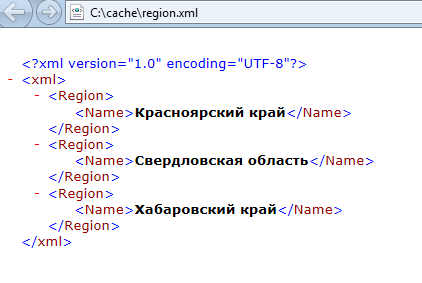
The resulting XML can be easily inserted into the XData block.
Total
Similarly, you can provide similar methods to all classes that require input of initial data during deployment. As a result, using the above technique, the initial data is stored together with the class for which they are needed in a technologically advanced XML format. Only class code can be supplied to the client, and initial data can be generated using the Populate method. But what if classes are connected to each other? We will consider this and other scenarios in the second part of the article. To be continued…