 July 18, 2012 at 10:02
Edit-in-place on Bootstrap components
Hello, Habr!
In this article, I will briefly talk about the Editable for Bootstrap library , which allows you to enter data on a page using the edit-in-place method and based on Bootstrap components . I use it in the admin part of projects, or when I need to quickly make an interface with the ability to user input.
Details under the cut.
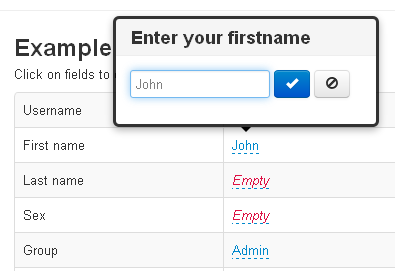
The data entry mechanism is based on the Bootstrap Form and Popover plugins. When a user clicks on an element, a popover pops up in which the control is located depending on the specified type. Now 4 types of controls are supported:
For Date , the jQuery UI Datepicker, styled as bootstrap, is used .
The type of control and all other parameters can be specified both through data- * attributes, and in the form of options when called.
For example, to make plain text editable and send data to post.php, you need:
Javascript:
Or:
When sending to the server, the field name, the object identifier (primary key) and the new value will be included in the request:
This is enough to save a new value in the database.
A complete list of parameters and examples of working with other types are described in detail in the documentation. There is also an example of creating a new record .
I will be glad to hear any ideas / comments in the comments or on github .
Thanks for attention!
In this article, I will briefly talk about the Editable for Bootstrap library , which allows you to enter data on a page using the edit-in-place method and based on Bootstrap components . I use it in the admin part of projects, or when I need to quickly make an interface with the ability to user input.
Details under the cut.
The data entry mechanism is based on the Bootstrap Form and Popover plugins. When a user clicks on an element, a popover pops up in which the control is located depending on the specified type. Now 4 types of controls are supported:
- Text
- Select
- Date
- Textarea
For Date , the jQuery UI Datepicker, styled as bootstrap, is used .
The type of control and all other parameters can be specified both through data- * attributes, and in the form of options when called.
For example, to make plain text editable and send data to post.php, you need:
JohnJavascript:
$('#firstname').editable();
Or:
John$('#firstname').editable({
url: 'post.php',
type: 'text',
pk: 1,
name: 'firstname',
title: 'Enter your firstname'
});
When sending to the server, the field name, the object identifier (primary key) and the new value will be included in the request:
{name: 'firstname', pk: 1, value: 'John2'}This is enough to save a new value in the database.
A complete list of parameters and examples of working with other types are described in detail in the documentation. There is also an example of creating a new record .
I will be glad to hear any ideas / comments in the comments or on github .
Thanks for attention!









