Customizable custom blue screen of death
He turned blue, does he feel sick?
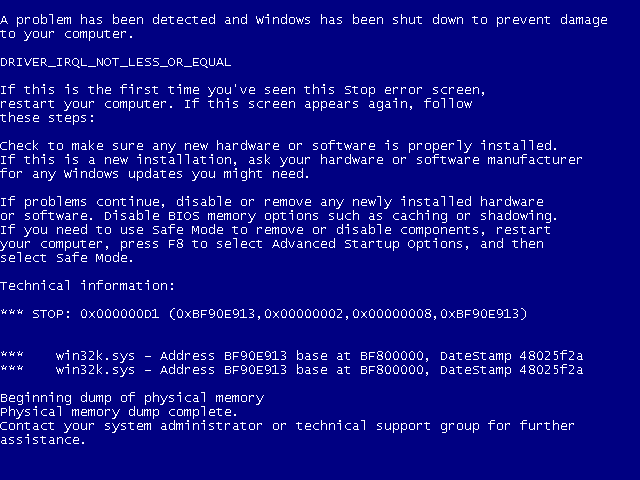
BSOD is the reaction of the kernel to an unsolvable exception. If you see him, it means that something definitely wrong has happened.
The kernel environment imposes many restrictions on the programmer’s freedom of action: consider IRQL, synchronize access to shared variables, do not linger in ISR, check any data from the userland ... Violating at least one of the rules, you will get a real reprimand from stamped phrases in standard VGA- video mode with a thin palette.
Actually there is logic to this. If in a user-mode, with an unhandled exception and a complete crash of the execution logic, the application simply terminates without even removing the traces of life (which the kernel will kindly do for it), it will not pull the user-mode neighbors along with it, and will not violate their integrity, and even more so the integrity of the entire system. Well, well, it can pull a couple with which it was connected through interprocess communication, no more.
In kernel mode, everything is different. Firstly, kernel fashion neighbors are not neighbors in the apartment, but in the room. Between them there are no strong walls that would protect some residents from the drunken tricks of others. In this case, the interconnections of kernel modules are thin and fragile. The core and its components are giant watches, with a huge number of components. And this is the point: if one screw is damaged, the whole system stops. Of course, there are modules whose failures do not logically affect the operation of the OS. It would be possible to isolate a failed module - they do it in some places, well, you know. However, the logic is that the nuclear component actively interacts with other components and the kernel of the OS, therefore, a failure in one component can lead to a chain of failures in others, ultimately destroying all nuclear structures, or, even worse, damage user data. Moreover,
Nevertheless, suppose you are a user of the “kettle” level. What is the likely reaction you will have when you see a blue screen?
Suppose now that you are a system administrator. What is your reaction to the bruise? Well, before you start reading the error code and all that.
Suppose you are a kernel encoder, and you have had to see this sophisticated debug output a bunch of times. What comes to your mind when you see it again? Well, apart from interjections.
And we have for this, on the one hand, the inability to continue the normal functioning of the system, on the other hand, priceless non-repairing nerve cells. How to be KeBugCheck does not offer an interception - we all know what will come of it. Before the release of Windows 8 with its soulful DirectX BSOD, you still have to wait a while. In the meantime ...
Myself Russinovich
I think everyone knows this name. Russinovich is cool, although he is cunning. Among the heap of useful utilities from Sysinternals there is one interesting - NotMyFault. It can artificially generate various errors in kernel mode, which, of course, will display the BSOD. In addition, it has an interesting opportunity - to change the background color and font of the death screen. This utility is so cool that it even comes with the source! However, as I said, Russinovich is cool ...
For some time I could not understand what was happening: in the header file ioctlcmd.h there is such code:
#define IOCTL_BSOD_COLOR (ULONG) CTL_CODE (FILE_DEVICE_MYFAULT, 0x10, METHOD_BUFFERED, FILE_ANY_ACCESS)
But this is the only place where there is a trace of code responsible for changing the color of the death screen. The myfault.c driver file contains a cookbook of nuclear perversions without a main course! But! The assembled driver, apparently, still has the necessary code, since it works out with a bang. Okay, I thought.
Let's digress for a moment. Before you think of splicing something in the kernel, don't be too lazy to look at MDSN, since there are plenty of callback functions (callback functions) in the kernel. So with the blue screen: there is a callback function, the call of which occurs immediately after the blue screen is displayed. It is registered with the following function:
BOOLEAN KeRegisterBugCheckReasonCallback (
__out PKBUGCHECK_REASON_CALLBACK_RECORD CallbackRecord,
__in PKBUGCHECK_REASON_CALLBACK_ROUTINE CallbackRoutine,
__in
KBUGCHECK_CALLBACK_REASON PUCHAR__
,
This callback function indicates the reason for registering: either it needs to add something to the dump, or track the moment when the dump is already recorded, or by specifying KbCallbackReserved1 as the reason, we can be called “just like that”. The KbCallbackReserved1 parameter is private and is called before all other callback functions when critical errors occur.
In addition to this callback function, there is another similar one that is registered with the following function:
BOOLEAN KeRegisterBugCheckCallback (
__out PKBUGCHECK_CALLBACK_RECORD CallbackRecord,
__in PKBUGCHECK_CALLBACK_ROUTINE CallbackRoutine,
__in_opt PVOID Buffer,
__in ULONG Length,
__in PUCHAR Component
);
It notifies the registered module of a critical error after all the worst has already happened, and you can restart the computer.
Back to business. When I saw in the disassembled listing the automatically assigned name of the CallbackRoutine function, I did not even know where else I could go in search of a magic code. And here he is! ... Wait, what is this? "Mov-out, mov-out." I don’t know about you, but I had the feeling that I was deceived. I was waiting for miracles and fairy tales. And here Mark takes the VGA ports and through them changes the palette. It is a palette! That is, it makes blue, for example, green, so that the background turns green:
mov edx, 3C8h; port to which the color index is written in the DAC palette
mov al, 4; was blue
out dx, al
mov al, 0x00003F00; turns green (6 bits per color)
lea ecx, [edx + 1]; edx = 0x3C9 - port for recording color components
mov edx, ecx
out dx, al; install the Red component
mov eax, 0x00003F00
shr eax, 8
out dx, al; Green
mov eax, 0x00003F00
shr eax, 10h
out dx, al; Blue

Well then, in principle, it will do. But I want more.
Enjoy the little things
The animated OS loading screen, in principle, gives a good idea of what you can squeeze out of a VGA video mode. You can even guess that the code for rendering graphics is already ready somewhere in the kernel. I will not torment: we are interested in the Inbv * family of functions. Note that some of them are even exportable from the kernel. Using KiDisplayBlueScreen reverse as an example, you can figure out how to use such functions:
if (InbvIsBootDriverInstalled ())
{
InbvAcquireDisplayOwnership (); // now we command
InbvResetDisplay (); // clear the screen, reinitialize the
InbvSolidColorFill palette (0, 0, 639, 479, 4); // fill everything with blue paint
InbvSetTextColor (15); // and write white
InbvInstallDisplayStringFilter (0); // reset the callback function to display the text string
InbvEnableDisplayString (TRUE); // allow writing lines
InbvSetScrollRegion (0, 0, 639, 475); // narrow the scope of the screen
...
InbvDisplayString ("Hello world!"); // print the text
...
};

You can safely use these functions in the code of your driver. But do not forget that switching to this mode, you cannot return from it so easily.
But the most noteworthy feature is InbvBitBlt:
VOID NTAPI InbvBitBlt (IN PUCHAR Buffer, IN ULONG X, IN ULONG Y)
You guess? Yes, it directly renders a BMP image (read, a BMP file with 256 colors without a file header)! The only problem is that it is not exportable. Fortunately, it is just a wrapper for a similar VidBitBlt function. The role of the wrapper is only to synchronize the rendering, which, in general, we are not very interested in. And VidBitBlt is exported from the bootvid.dll module, which, as the name suggests, entertains the user with boot animation. So go on, my dears! We are absolutely legally looking for loaded modules, parsing the export table and getting a pointer to this magic function. And then you are limited only by your imagination.
One could boast of this craft or argue on a hot dog, for example. Most importantly, do not forget what is the difference between a person and a machine.
All positive!