
 April 5, 2012 at 16:53
The architecture of the interaction of the client and server parts of the Web application
I wanted to tell how I see the architecture of the interaction between the server and client parts. And I would like to know to ask the Khabrovsk residents how bad or good this architecture is.
Even outdated browsers offer us a set of features for creating fully functional interactive Web applications. And thanks to libraries such as jQuery, which offer modest cross-browser and multi-platform solutions, the development of client parts is accelerated many times. This is what webmasters use to the fullest, using the most diverse interfaces for the interaction of the server and client parts.
Why jQuery? In this article, I use it just as an example. For the interaction of the client and server parts of the applications, it does not matter what you use: any library, your own development or bare javascript. The main thing is to achieve the goal: that everything works and works correctly.
Of course, many of us started learning jquery with article loops for beginners, introducing dynamic loading of content to our sites, and checking forms on the server side, and much more.
Over time, the code size grew: a lot of response handlers from the server part appeared in the project. Somewhere the whole page is requested and a piece of content breaks out from it, somewhere there is a request for various files, somewhere JSON is expected, and in some XML. All this must be tidied up so that there is less code, and it works faster, and it is easier to work with it.
Firstly. Let's create a single interface for sending requests.
To do this, wrap $ .ajax in its own sugar function.
Of course, $ .ajax can be configured through $ .ajaxSetup. And it is more convenient and practical. But then a few problems arise.
I prefer to wrap everything in a different function. It may not be so practical, and generate more code, but safer to use. Another programmer, having seen an unfamiliar function, immediately draws attention to it. And, perhaps, having seen how another request is sent, he will also. And if you do not understand, then nothing will prevent you from using the standard function $ .ajax.
Secondly , you need to reduce the number of entry points for AJAX requests. If requests were sent to index.php, request.pl, and upload.xml, then this is a huge amount of work, and it often happens that you cannot do this without rewriting the entire server part. Although this must be done if you want to quickly and simply expand the client side. Like all rules, this one has exceptions. About them a little lower.
Thirdly, the most important thing : it is necessary to unify the response handler.
For example, in our project all ajax requests go only to the ajax.php file. It always returns some data in the form of XML, quite simply structured.
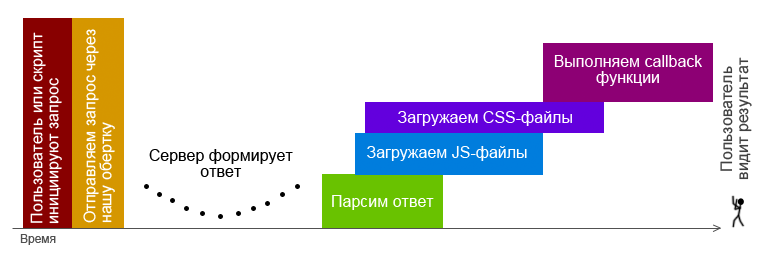
A single response handler parses XML and arranges:
• A list of js files that are needed to process the response.
• Callback functions that must be run, and what arguments must be passed to these functions.
• Pieces of HTML code to be applied in the above functions.
• List of css files that are needed to decorate html code.
When everything is laid out, load the missing js-files. Perhaps one or more of the requested scripts have already been downloaded previously downloaded, so first check this. Validation methods depend on the general architecture of javascript code.
Then we load styles. The mechanisms for loading scripts and styles are almost identical. Of course, styles are needed only at the moment of displaying data to the user, but by this moment they should already be loaded.
When all the scripts are loaded, run the callback functions.
It should be noted that to speed up loading, all js files are loaded asynchronously, and accordingly, there may be a problem with launching callback functions. After all, they can be in these files.
The solution to this problem may be to create function dependencies on js files. This, in turn, gives rise to problems of controlling these dependencies by the programmer and transferring them along with the response to the client side.
The second solution is to wait for the download of absolutely all the requested files and only then start executing the functions.
How to make it beautiful, you can listen in this wonderful podcast habrahabr.ru/blogs/hpodcasts/138522
For my projects, I chose the simplest solution - the second. I proceeded from the fact that loading the necessary js files is extremely rare, because all the scripts are combined on the server side in packages. And usually the package contains all the necessary callbacks in advance. And if file loading is needed, it will require a maximum of one or two files, which will not significantly delay the processing of the response.
Let me remind you that by this moment the user still does not see the changes on the screen. Well, let’s show him them - we will begin to perform functions. The main thing to consider is that all response handler functions must be independent of each other. They can depend on one large component (for example, the functions of the core of the project), but should not be from each other. This will allow you to move and integrate callbacks into other parts of the project without any special troubles. For example, pop-ups with error messages may be required on all pages.
The functions are completed, the user continues to work.
Now I would like to parse the situation when a request was sent that the server could not parse for some reason.
With us, all requests are not only sent to one file, but all the data in it is sent using the POST method. On the server side, a certain “action” POST parameter is expected. The value of this parameter determines which site module should work. The pairs themselves with the expected values and module names are recorded in the configuration file. If the configuration has an appropriate module, it starts; if not, the default module starts, which is configured to return an error message.
Also, we can write all request parameters to the server log. Log analysis then allows you to quickly track and fix the error. Or, during the execution of the script, ban the user's IP for 15 minutes for enumerating the values, if there is confidence that there are no errors in our application. But this is already extreme.
We must not forget about the processing of failed requests, for example, timeout or sudden disconnection of the user from the network.
Let's get back to the question about entry points. From the point of view of writing beautiful code, specifying only one address for the entry point is not quite the right decision. This in no way contradicts my second advice. I will try to analyze all sides of this issue.
How could everything be done beautifully? - Send requests to specific addresses. For example, ajax.php? Action = feedback or ajax.example.com/feedback. This would save the request of unnecessary garbage. When a module is defined that will process data, it no longer needs this information. Flies separately, cutlets separately. Handsomely? Handsomely.
If there are no POST parameters in the request at all, then this is a good opportunity to use the caching capabilities on intermediate proxies or the browser cache.
Google’s recommendations for Webmasters say that the lack of GET parameters in the http request provokes the proxy server to use the cache. Therefore, a request without POST and GET parameters, for example ajax.mysite.com/footer, would be ideal for adding it to the cache by a proxy server. Of the additional advantages, I note that if the response is from a proxy server, then this will slightly offload our server.
When can this be needed at all? When we load parts of the page through ajax. However, they are unchanged over time.
But using an ajax request without GET or POST parameters is not worth it, since there is a chance of receiving inappropriate data.
Suppose we have chat and we don’t use web sockets. Every second we go to the server to watch new messages. The user caught some proxy server. The first request will succeed and return that there are no messages. For all subsequent requests, the proxy server will return the original response. And this will disrupt all chat work. Adding a parameter to the query will help to avoid problems. Which, in turn, will create the very garbage that we tried so hard to avoid.
In matters of caching, each time you need to approach individually and use what is necessary for the project.
In our project, the data in the request is sent only by the POST method, because the caching mechanism we have is laid in the very same interface for sending ajax requests. By default, absolutely every request and response is stored for 3600 seconds. At the next similar request, it will work out the cache, take the answer from the box and start immediately all the mechanisms for its analysis, without sending the request directly to the server. After all, we are already sure that all styles and scripts are already in place.
If you do not need to remember a request-response pair, or you just need to reduce the cache lifetime, the server side reports this in the initial response, changing the cache time to 0 or another number of seconds.
Why only POST, and not a combined option? It’s easier to compare queries.
The data sent through the ajax function in jQuery is a js object.
The requested data is quickly compared by brute force with objects in the cache, of course, if the client has a modern browser. If the browser is old, you have to force the cache to be disabled.
As a result, we get a stable working bunch of client and server parts. And this bundle allows us to create safe and easy to further expand Web applications.
The post was written in the name of saving nanoseconds and many nerve cells of programmers creating their beautiful creations.
Customer structure
Even outdated browsers offer us a set of features for creating fully functional interactive Web applications. And thanks to libraries such as jQuery, which offer modest cross-browser and multi-platform solutions, the development of client parts is accelerated many times. This is what webmasters use to the fullest, using the most diverse interfaces for the interaction of the server and client parts.
Why jQuery? In this article, I use it just as an example. For the interaction of the client and server parts of the applications, it does not matter what you use: any library, your own development or bare javascript. The main thing is to achieve the goal: that everything works and works correctly.
Of course, many of us started learning jquery with article loops for beginners, introducing dynamic loading of content to our sites, and checking forms on the server side, and much more.
Over time, the code size grew: a lot of response handlers from the server part appeared in the project. Somewhere the whole page is requested and a piece of content breaks out from it, somewhere there is a request for various files, somewhere JSON is expected, and in some XML. All this must be tidied up so that there is less code, and it works faster, and it is easier to work with it.
Firstly. Let's create a single interface for sending requests.
To do this, wrap $ .ajax in its own sugar function.
Of course, $ .ajax can be configured through $ .ajaxSetup. And it is more convenient and practical. But then a few problems arise.
- Suddenly, you may need to send a request, which would be an exception to the general rule. This problem can be easily solved by resetting the settings using the “global” option with the value “false”.
For example, like this:// где-то определяем глобальные настройки
$.ajaxSetup({
url: 'mysite.ru/ajax.php',
dataType: 'xml'
});
/* ...спустя много кода вызываем */
$.ajax({
url: 'ajax.mysite.ru',
data: {
action: 'do_something'
username: 'my_username'
},
global:false // сбрасываем настройки
}); - The second problem may arise when using ajaxSetup, when the completion of the functionality will be given to a third-party developer. After looking at the code, he will see the familiar $ .ajax functions for him and will not understand that somewhere something global is being redefined. And if he notices, there is no guarantee that he will not try to change something in it, and as a result, he will not break any old piece of code.
I prefer to wrap everything in a different function. It may not be so practical, and generate more code, but safer to use. Another programmer, having seen an unfamiliar function, immediately draws attention to it. And, perhaps, having seen how another request is sent, he will also. And if you do not understand, then nothing will prevent you from using the standard function $ .ajax.
// расширяем

$.extend({

  gajax: function(s) {

    // наши настройки здесь

    var options = {

      url: "ajax.mysite.ru",

    };

    // объединяем настройки

    $.extend( options, s, { action:s.action } );

    $.ajax( options );

  }

});

// вызываем

$.gajax({

  data: {

    username: 'my_username'

  },

  action: 'do_something'

});
Secondly , you need to reduce the number of entry points for AJAX requests. If requests were sent to index.php, request.pl, and upload.xml, then this is a huge amount of work, and it often happens that you cannot do this without rewriting the entire server part. Although this must be done if you want to quickly and simply expand the client side. Like all rules, this one has exceptions. About them a little lower.
Thirdly, the most important thing : it is necessary to unify the response handler.
For example, in our project all ajax requests go only to the ajax.php file. It always returns some data in the form of XML, quite simply structured.
A single response handler parses XML and arranges:
• A list of js files that are needed to process the response.
• Callback functions that must be run, and what arguments must be passed to these functions.
• Pieces of HTML code to be applied in the above functions.
• List of css files that are needed to decorate html code.
// расширяем

$.extend({

  gajax: function(s) {

  var recognize = function( xml, s ) {

   /* я сознательно описал только комментариями, потому что иначе получилось бы целое полотно */

   // парсим xml (вообще jQuery сам парсит XML, так что этот пункт можно пропустить)

   // смотрим есть ли в нем js-файлы, которые надо погрузить и начинаем их загружать

   // смотрим есть ли стили, которые надо погрузить

   // смотрим есть ли в нем callback`и

   // ищем html

  };

  // наши настройки здесь

  var options = {

   url: "ajax.mysite.ru",

   success: function(xml){

    recognize( xml, s );

   }

  };

  $.extend( options, s, { action:s.action } );

  $.ajax( options );

  }

});
When everything is laid out, load the missing js-files. Perhaps one or more of the requested scripts have already been downloaded previously downloaded, so first check this. Validation methods depend on the general architecture of javascript code.
Then we load styles. The mechanisms for loading scripts and styles are almost identical. Of course, styles are needed only at the moment of displaying data to the user, but by this moment they should already be loaded.
When all the scripts are loaded, run the callback functions.
It should be noted that to speed up loading, all js files are loaded asynchronously, and accordingly, there may be a problem with launching callback functions. After all, they can be in these files.
The solution to this problem may be to create function dependencies on js files. This, in turn, gives rise to problems of controlling these dependencies by the programmer and transferring them along with the response to the client side.
The second solution is to wait for the download of absolutely all the requested files and only then start executing the functions.
How to make it beautiful, you can listen in this wonderful podcast habrahabr.ru/blogs/hpodcasts/138522
For my projects, I chose the simplest solution - the second. I proceeded from the fact that loading the necessary js files is extremely rare, because all the scripts are combined on the server side in packages. And usually the package contains all the necessary callbacks in advance. And if file loading is needed, it will require a maximum of one or two files, which will not significantly delay the processing of the response.
Let me remind you that by this moment the user still does not see the changes on the screen. Well, let’s show him them - we will begin to perform functions. The main thing to consider is that all response handler functions must be independent of each other. They can depend on one large component (for example, the functions of the core of the project), but should not be from each other. This will allow you to move and integrate callbacks into other parts of the project without any special troubles. For example, pop-ups with error messages may be required on all pages.
The functions are completed, the user continues to work.
Server request processing
Now I would like to parse the situation when a request was sent that the server could not parse for some reason.
With us, all requests are not only sent to one file, but all the data in it is sent using the POST method. On the server side, a certain “action” POST parameter is expected. The value of this parameter determines which site module should work. The pairs themselves with the expected values and module names are recorded in the configuration file. If the configuration has an appropriate module, it starts; if not, the default module starts, which is configured to return an error message.
Also, we can write all request parameters to the server log. Log analysis then allows you to quickly track and fix the error. Or, during the execution of the script, ban the user's IP for 15 minutes for enumerating the values, if there is confidence that there are no errors in our application. But this is already extreme.
Handling erroneous requests on the client side
We must not forget about the processing of failed requests, for example, timeout or sudden disconnection of the user from the network.
// наши настройки здесь

var options = {

  url: "ajax.mysite.ru",

  success: function(xml){

    recognize( xml, s );

  },

  error: function( s,err ){

    // серверная ошибка

    if ( s.status == 200 && err == 'parsererror' ) {

      alert( s.responseText );

    }

    // Обрабатываем срыв запроса по таймауту

    else if ( err == 'timeout' ) {

      alert('Connection to the server was reset on timeout.');

    }

    // или из-за отсутствия подключения к сети.

    else if ( s.status == 12029 || s.status == 0 ) {

      alert('No connection with network.');

    }

};
Caching
Let's get back to the question about entry points. From the point of view of writing beautiful code, specifying only one address for the entry point is not quite the right decision. This in no way contradicts my second advice. I will try to analyze all sides of this issue.
How could everything be done beautifully? - Send requests to specific addresses. For example, ajax.php? Action = feedback or ajax.example.com/feedback. This would save the request of unnecessary garbage. When a module is defined that will process data, it no longer needs this information. Flies separately, cutlets separately. Handsomely? Handsomely.
If there are no POST parameters in the request at all, then this is a good opportunity to use the caching capabilities on intermediate proxies or the browser cache.
Google’s recommendations for Webmasters say that the lack of GET parameters in the http request provokes the proxy server to use the cache. Therefore, a request without POST and GET parameters, for example ajax.mysite.com/footer, would be ideal for adding it to the cache by a proxy server. Of the additional advantages, I note that if the response is from a proxy server, then this will slightly offload our server.
When can this be needed at all? When we load parts of the page through ajax. However, they are unchanged over time.
But using an ajax request without GET or POST parameters is not worth it, since there is a chance of receiving inappropriate data.
Suppose we have chat and we don’t use web sockets. Every second we go to the server to watch new messages. The user caught some proxy server. The first request will succeed and return that there are no messages. For all subsequent requests, the proxy server will return the original response. And this will disrupt all chat work. Adding a parameter to the query will help to avoid problems. Which, in turn, will create the very garbage that we tried so hard to avoid.
In matters of caching, each time you need to approach individually and use what is necessary for the project.
Inventing a bicycle
In our project, the data in the request is sent only by the POST method, because the caching mechanism we have is laid in the very same interface for sending ajax requests. By default, absolutely every request and response is stored for 3600 seconds. At the next similar request, it will work out the cache, take the answer from the box and start immediately all the mechanisms for its analysis, without sending the request directly to the server. After all, we are already sure that all styles and scripts are already in place.
If you do not need to remember a request-response pair, or you just need to reduce the cache lifetime, the server side reports this in the initial response, changing the cache time to 0 or another number of seconds.
Why only POST, and not a combined option? It’s easier to compare queries.
The data sent through the ajax function in jQuery is a js object.
The requested data is quickly compared by brute force with objects in the cache, of course, if the client has a modern browser. If the browser is old, you have to force the cache to be disabled.
Eventually
As a result, we get a stable working bunch of client and server parts. And this bundle allows us to create safe and easy to further expand Web applications.
The post was written in the name of saving nanoseconds and many nerve cells of programmers creating their beautiful creations.