IconBIT XFIRE 550DV: review and test of a portable gaming system with a large touch screen and integrated video decoder
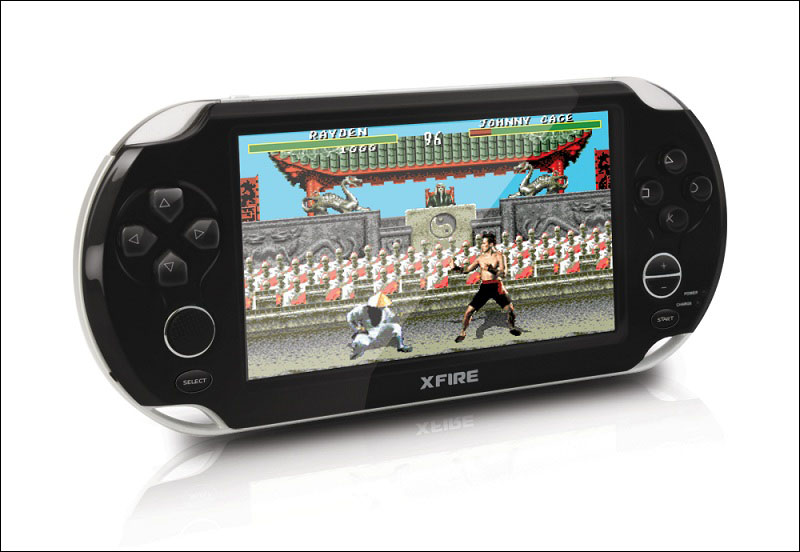
Recently, a new direction has become popular: portable devices, the main task of which is the emulation of game consoles and slot machines of past centuries. And they are popular in different age categories: such devices are played, like children who are just taking their first steps in the world of the gaming industry, and adults who are already over 20 or 30 years old and for them such devices are superfluous reason for nostalgia.
IconBIT company did not pass by and released a portable gaming system XFIRE 550DV, which allows you to emulate slot machines CP System, Neo-Geo, stationary consoles Nintendo Entertainment System and Sega Mega Drive, as well as a portable system Game Boy Advance. A distinctive feature of this device is the presence of a large five-inch touch screen and hardware FULL HD video decoder, which allows you to watch video without prior conversion. A detailed review and test results under the cut.

Specifications
Support for games from popular 8bit, 16bit game consoles such as: NES (Dendy, Lifa), Game Boy Advance, SEGA (Mega Drive, Genesis), slot machines Capcom, Neo-Geo and others
Video : avi, divx, mp4, mkv, wmv, mpg, mpeg, dat, vob, m2ts, mts, ts, tp, mov, flv
Audio : mp3, wav, aac, wma, ogg, ac3, dts, flac, ape
E-books : TXT / TTS / PDF / EPUB
Image Formats : JPEG / GIF / BMP / PNG
Video Camera : 5mpix, 24 bit, video recording 720P
Voice Recorder : MP3
Radio : Built-in FM tuner
LCD display : 5 "touch screen, 800x480
Video Output : Composite
Interfaces : USB 2.0
Processor: 32bit RISC CPU 700Mhz
Video processor : 2D / 3D video core + hardware Full HD 1080p video decoder
Audio processor : Audio DSP core with a multi-channel sound mixer
Memory cards : Micro SecureDigital High Capacity (microSDHC / TF) up to 32GB
Interface languages : Russian / English
Power : DC5V / USB
What's in the box: Headphones, USB cable, Power supply, audio / video cables (optional)
Equipment
In the simple white box is the device itself, a brief instruction, as well as a cable for connecting the device to a computer, a charger and earphones.

However, this is only the basic equipment. Soon, cables for displaying pictures and sound on the TV screen should appear on sale, and branded joysticks, apparently wireless, should also appear. The presence of the latter accessory noticeably improves the situation, because it’s not very convenient to play your favorite games while sitting in front of the TV and using the console itself as a controller — wires will interfere, but if you have a universal controller, preferably programmable, then this is a completely different “level” ".

On the Internet, you can find a picture of a branded gamepad. But it’s not clear - this is a prototype or a ready-made device that just has not yet gone on sale. The release date of the controller has not yet been reported, alas. It is possible that XFIRE supports gamepads from other manufacturers, most likely soon an updated list of compatible controllers will appear on the developer's site.
Appearance
The device looks like a copy of the PSP, and the dimensions of the XFIRE and PS Vita are close. The case is made of plastic, but the device looks strong - it does not give in to bending pressure and does not creak. The coating of the upper and lower parts is glossy and easily soiled, made in black, and the middle part is gray and matte. The device is quite lightweight, conveniently in the hands.

On the front side there is a five-inch touch screen with a resolution of 800x480 pixels, LED indicators, as well as various buttons: D-pad (cross, located on the left), analog 360-degree stick (located under the cross), action buttons - the right “petal” (hereinafter in the text, these buttons will be called “cross”, “circle”, “square” and “triangle”), service buttons - “select”, “start”, as well as buttons for adjusting the sound volume.

At the bottom on the side there is a slot for Micro-SD memory cards, and next to the right side there is a two-position lever for hardware power off / on.

At the top are various connectors: 3.5 mm for headphones, mini-USB 2.0 video output, a connector for connecting a charger, as well as a microphone and a button to turn off / on the screen. Above the sides are the triggers "L" and "R". By the way, these triggers with a dark blue backlight, which, as it turned out, cannot be turned off. Although it especially does not interfere.

On the back cover there is a camera, a backlight for the camera (a small flashlight) and speakers.

The quality of the buttons is good: the triggers do not “play” and do not hang out, the D-Pad has no problems with pressing diagonally, the action buttons are pressed confidently, have a small “backlash”, but the inscriptions on them are hidden under the transparent main one and cannot be erased after intensive use of the device. The analog stick has a ribbed surface for better “grip” with the finger, it takes some time to “develop” - the first time it moves tight and it is not always possible to control it confidently, but after several hours of play the stick is “developed” - the course becomes softer. But those who are not used to this method of management can use the classic D-pad.
Screen
On board the device is a TFT touch screen with a resolution of 800x480 pixels and a diagonal of 5 inches. The screen coating is glossy, but all problems associated with such a coating are solved by applying an anti-reflective film to the screen. The color rendition is pretty good, for example, “saturated” scenes in films or, for example, cartoons look pretty nice.

The screen backlight is designed to use the device indoors - on the street, the screen fades noticeably. There are 14 gradations of screen brightness, the lowest is useful to those who like to play in the dark.
Touch stack resistive type, no stylus included. But you can do without it - the sensitivity of the screen is sufficient so that you can control your fingers. The benefits of the touch screen cannot be taken away - with it you can move around the menu much faster, especially on the desktop screens, than using the buttons. It should be noted that although the surface of the screen is easily soiled, fingerprints are not very noticeable on it.
Menu

The desktop consists of three screens, on each there are large shortcuts for pre-installed games (a total of 12 such shortcuts), as well as small shortcuts at the bottom of the screen (“Browse”, “Cinema”, “Music”, “Photo”, “Books”, “ Games ”,“ Radio ”,“ Record ”,“ Menu ”,“ Calculator ”,“ Tetris ”,“ DV ”,“ PDF ”,“ TXT ”). All shortcuts are clickable. You can switch between desktop screens by moving your finger from one edge of the screen to the other, as well as using ciphers or a cross.

There are few settings, but there are the most basic ones: TV output (LCD, NTSC 60Hz, PAL 50Hz, PAL 720p 50Hz, NTSC 720p 50Hz), Power (shows interactive graphs of battery voltage, percentage of charge, as well as estimated remaining time or remaining time charging), Language (Russian, English and two more, apparently Chinese), Auto off (5, 10, 30 minutes, 1 hour, Always), Screen off (5, 10, 15, 30 seconds, 1 minute, Always), Button volume (On, Off), Joystick (On, Off), Brightness (14 gradations), Calibration, Inf. about the system, Wallpaper (three options), Default (reset).
Games
Below we will discuss the features of emulation of each of the supported platforms.
CP system

CPS-1 is an arcade system developed by Capcom. For this system, more than 20 games were released from 1988 to 1995, until the company switched to the successor of this system. CP System became popular due to the games of the Shoot 'em up / Beat' em up genre - shooter / beaters walkers with a side view, and also with this system a massive love for fighting games began, thanks to the release of Street Fighter II.
Screen resolution 384x224 pixels, control using an eight-axis gamepad, from 3 to 6 buttons.
On XFIRE, it was possible to launch all the games found on the network from this arcade system, including the famous Street Fighter II (various versions), Final Fight, Cadillacs and Dinosaurs, 1941: Counter Attack, etc.
Previously, in order to play on the CPS-1 slot machine, it was necessary to purchase special tokens, without which the game would not start. In the prefix, the "input system" of tokens is emulated by pressing the trigger "R". Management is carried out using the cross / joystick, as well as using the buttons "cross" and "circle", "start" and "select". Mostly games with landscape orientation were made for CPS-1, but there are several games with portrait orientation, for example 1941 - Counter Attack, Mercs. On XFIRE there are no control problems in such games - the joystick axes are changed accordingly.
All games go without brakes, there are no problems with sound.
CP System II

CPS-2 is a small update to CPS-1, the reason for which is the lack of anti-piracy protection in the first version of CP System. In fact, CPS-2 is CPS-1 with a QSound chip + ROM encryption algorithm (by the way, only in early 2007 the encryption method was unraveled). Games were released from 1993 to 2003. the same genres as on CPS-1, but the number of fighting games increased noticeably - a series of Street Fighter games was developed, and new fighting games appeared, such as X-Men: Children of the Atom, Marvel Super Heroes and others.
Screen resolution 288x224 pixels, control using an eight-axis gamepad, from 3 to 6 buttons.
Almost all the games for this platform found on the network were launched on XFIRE. Games like Marvel Super Heroes, Alien vs. Predator, Street Fighter Alpha: Warriors' Dreams, Super Street Fighter II: The New Challengers, X-Men: Children of the Atom, 1944: The Loop Master and others. But, unfortunately, not all Street Fighter games started on device. Street Fighter Alpha 3 and Marvel Super Heroes Vs. Street Fighter did not go to XFIRE. Coins are still entered using the “R” shift key, and the cross / joystick buttons “cross”, “circle”, “square”, “triangle” and shift “L”, “start” and “select” are now involved in the control .
All the games that it turned out to start did not slow down, there were no problems with sound either.
Neo-geo

Neo-Geo is an arcade system created by the Japanese company SNK. Games for this platform were released from 1989 to 2004. The most popular games were Art of Fighting, Metal Slug, Samurai Shodown, Fatal Fury and The King of Fighters.
Screen resolution 320 × 224 pixels, control using an eight-axis gamepad, from 3 to 6 buttons.
Unfortunately, not all games made for this slot machine can be launched on XFIRE. If the ROM "weighs" more than 18-19MB (meaning the Zip archive), then you can be sure that the game will not start on the console, and therefore it will not be possible to play some popular games: Metal Slug 3/4/5, Samurai Shodown IV / V, Garou: Mark of the Wolves.
It will still be possible to play some games, for example, on the console there are games from the Art of Fighting series, the first part of Metal Slug, the first part of Samurai Shodown, as well as The King of Fighters. And several dozens of "light" games for this platform (ROMs of which weigh less than 18-19MB), for example, World Heroes, Ghost Pilots, Burning Fight, etc. Also, it turned out to launch Metal Slug 2, Samurai Shodown II / III on the console. , but they slow down, and the brakes are non-linear and depend on the number of effects / enemies on the screen. Management is implemented as in the case of CPS-1 / CPS-2.
Games, ROMs of which are less than 12-13MB, started normally - occasionally there are problems with sound. Games, ROMs of which weigh 14-18 MB, can slow down and sometimes much, but more "heavy" games did not start at all.
Nintendo Entertainment System

NES (NES in the USA, Famicom in Japan and Dendy in Russia) - 8 bit game console. Games for this console were released from 1985 to 2004. A huge number of games have been released for this console, including Super Mario Bros, Battle City, Contra, Chip 'n Dale, Rescue Rangers and others.
Screen resolution 256 × 240 pixels, control with a cross and 4 buttons (“start”, “Select”, “A”, “B”).
XFIRE launched all the games selected for the test, and these are several dozen games. However, some look noticeably elongated due to different screen proportions for NES and XFIRE. The control involves a cross / joystick, buttons "cross", "circle", "start" and "select".
All games are going fine, there were no problems with sound.
Sega mega drive

Sega Mega Drive - 16 bit game console. In North America, known as Genesis. Games for this console were released from 1988 to 1998. At one time, was the "killer" of NES, and even after the release of SNES continued to maintain a strong position in the gaming market. Many games have been released for this console, including Ultimate Mortal Kombat 3, Mortal Kombat, Sonic the Hedgehog, Sonic 3D Blast, Comix Zone, Prince of Persia and others.
Screen resolution 320 × 240 pixels, control with a cross and buttons " start "," A "," B "," C "(the first gamepads were just three-button, and later gamepads with additional buttons" X "," Y "," Z "appeared).
XFIRE launched all the popular games from this console. There are no problems with games sharpened by three-button control. But with games that were released later and were sharpened for a larger number of buttons, problems may arise. In some cases, the ability to select a control mode saves: 6 or 3-button mode (the choice is made in the menu of the game itself).
All games go fine, there were no problems with sound - this is a very good result, because practice shows that when emulating SMD there are often problems with sound - this is typical for “emulators” for both computers and portable systems. Fortunately, XFIRE proved worthy when emulating this console.
Game boy advance

GBA is a 32-bit handheld game console released by Nintendo in 2001. This console was compatible with its predecessor, Game Boy Color. A huge number of 2D games for this console and several dozen 3D games have been released.
Screen resolution 240 × 160 pixels, control of the cross, the cipher “L”, “R”, the buttons “A”, “B”, “Select” and “Start”.
XFIRE did a great job with this console. I managed to launch almost all the games - only rare games did not start. It is controlled by a cross / joystick, buttons “cross”, “circle”, “square”, “triangle”, “select” and “start”. Unfortunately, the triggers do not work - they “sit” on the “square” and “triangle” buttons.
All 2D games made for this console are excellent, almost perfect. For example, the GBA Sonic Advance port is better emulated on XRIFE than the original SMD game. The same can be said about other ported games, for example, King of Fighters EX is very fluent and Metal Slug Advance looks much better than the original first part from the Neo-Geo slot machine. Other 2D games also performed very well: Guilty Gear X Advance Edition, Crash Bandicoot, Prince of Persia Sand of Time, and many others. Sometimes there are problems with sound, but in most cases the problems are not significant.
Although the manufacturer did not declare support for “heavy” 3D games, such games as Driver 3, V Rally-3, Max Payne, NFS Porsche Unleashed and Baldur's Gate, etc. were launched on XFIRE. All of the above games are quite fluent, there are almost no problems with sound no - sometimes minor artifacts appear.
Save
In order to save / load the game you need to go to a special menu by long pressing the “select” key. You can save anywhere in the game. If you encounter a difficult moment in the game, then surviving it, you can return to this moment many times. But such a “trick” will not greatly simplify the game process - XFIRE allows you to keep in memory only one save (one for each game), and therefore cannot be saved every 5 seconds - you must save it wisely.
Video player

The manufacturer claims support for the console of many video formats, as well as Full HD video. The device is positioned not just as a game console, but as a personal entertainment system. Therefore, let's check whether this is really so, and what the device really has in terms of video playback.
A sufficiently large test was carried out to verify the support of various containers, codecs and subtitles:


Well, the results speak for themselves, and they are very good. After all, the device without problems read almost all the containers used in the test - AVI, FLV, F4V, MOV, MP4, MPG, TS, WMV, MKV (by the way, the off site does not say about device support for the F4V container, although such support is implemented). The device also understands such codecs as DivX 3, DivX 5, Xvid, FMP4, MJPG, avc1, MPEG 1, MPEG 2, VC-1 and V_MPEG4 / ISO / ASP - and these are the most popular codecs. Unfortunately, the set-top box did poorly with the fourth version of the DivX codec, as well as with the Microsoft codec with Microsoft MPEG-4 v2, but these are minor disadvantages against the background of outstanding test results. On the above, the advantages do not end there - the device successfully passed the tests on B-Frame - a video was launched in which there were segments from 1, 2 and 3 Bframes, a test on the Custom Matrix, on the Quarter Pixel,
It is stated that XFIRE supports audio in DTS format and this is true - the device perfectly decodes DTS, WMA 5.1, AAC 5.1, Dolby Digital 5.1. It was also verified that XFIRE supports audio tracks in mp2, mp3, ac-3, aac and wma formats. Although the prefix allows you to output only 2 audio channels, support for the above formats will allow you to play any "rip", even if the film does not have a stereo track, but only multichannel.
The menu of the Cinema application is not as extensive as the capabilities of the built-in decoder, but the most demanded settings are present: you can select the audio track, subtitle language or turn them off, change the screen brightness, select the aspect ratio: full-screen 1, full-screen 2, original, 4: 3 and 16: 9 (the difference between the full-screen 1 and full-screen 2 modes is that in the first case, the image is enlarged to full screen while maintaining the proportions, and in the second case, the image is stretched to the screen size); You can also adjust the playback order, select the audio output mode (stereo, left or right channel), and also select the subtitle size. And with the help of “L”, “R” triggers and crosses, you can rewind, go to the next or previous video, and the other four buttons (on the right of the device) are responsible for pausing, open the menu and exit the application. Also on the screen there is a timeline with a slider, clickable slider.
And yet, the bailiff has a “prohibitively cool” hardware decoder, of course, the set-top box has TV-OUT, but you can’t watch FULL HD with it - a maximum of 720p, and the data transfer speed between microSD and the device is not enough to watch “heavy »Movies, and in the memory of the device such films simply will not fit. But support for 720p is very welcome - you can not "bother" with file conversion, but simply download movies to 720p and be sure that the device can play these movies.
Audio player
A test was conducted to test support for various audio formats:

The console played music in AAC, AMR, APE, FLAC, MP3, OGG, WAV, WMA formats and could not cope only with the "apple" format. Great result, especially for a game console.

When you open the “Music” application, the prefix offers to find the desired track in the device’s memory, on the memory card, or go to the “medialib” section. In this section, audio files stored on the console are sorted by artist, album, genre, star and year. During playback, the buttons work just like in the Cinema app. When you turn off the screen, all buttons are automatically locked. It is also possible to listen to music in the background.
There are few settings: there are 9 equalizer presets (Nature, Bass, Popular, Rock, Classical, Jazz, Vocal, Dance, Soft), there is no user mode. Apparently, the “Normal” mode corresponds to the “Nature” preset. You can set the playback order and display the text of the song, as well as select the font color of this text.

I liked the sound quality and the presence of a large margin in volume. The power of the audio output with a large margin is enough to swing any plug-in headphones, most overheads, and may well be enough to swing the monitor ones, for example, in conjunction with the Axelvox HD 241 headphones, the console behaved very worthily. The sound quality is comparable to the level of a portable audio player in the price range of 2-3K, which is a pretty good result, given the fact that audio playback is far from the main function of the console. The volume margin is large, for example, if you listen to music in gags, 20 out of 30 divisions are enough for the metro.
But the built-in speaker does not differ in special quality, if you select a volume level of more than 20 out of 30 divisions, then when listening to music various sounds and sounds appear, if you continue to increase the volume, the speaker begins to wheeze. It seems that the speaker was set to play sounds from games, because it’s perfect for this, and for music it’s better to use the console with headphones, since there is a good audio chip on board.
Rest
A photo

The device allows you to view pictures in the formats JPEG, GIF, BMP and PNG. XFIRE easily opened pictures of these formats, including “heavy” photographs.
Any picture can be put on the desktop, and it will automatically stretch to the screen size, if the aspect ratio of the picture is not the same as the screen. You can enable music playback, view thumbnails of photos in the form of a scrollable column, enlarge images, and there are also many slideshow settings - delay time, playback order and transition effects. You can switch between pictures in normal mode using triggers, D-pad, or tapes to the corresponding areas of the screen.
Books

There are two different softwares: one for reading TXT, and the other for reading PDF.
Txt. You can navigate through the text using the D-pad or using the “scroll”. You can configure automatic page turning, rotate the screen 90 degrees, add a bookmark (8 pieces), select the font size (16, 20, 24, 28, 32), color text (black, blue, green, red, white), select a background (4 pictures, the default is a yellow texture), change the screen brightness, turn on music playback, select the value for indenting from the left edge (4 gradations), select an encoding (Cyrillic or apparently Chinese). Also, softina can "read by voice", but only in Chinese. TXT reading capabilities are quite wide - this is undoubtedly a plus, but there is one minus - the letter “I” is displayed as “Y” with two dots on top. Hopefully this bug will be fixed soon.
PDF Softina is weak. For her, there is no difference between “PDF with text” and between “PDF with image” (for example, scanning a page from a book), in other words, there is no PDF REFLOW function. It will be possible to read far from every PDF file, and most likely only in the porter orientation of the screen, because there is no tool for cropping the borders, and the scaling capabilities are reduced to a simple increase - and a maximum of 200% percent - for example, you can’t make it so that in landscape mode, the page was stretched across the width of the screen - although if this feature is added in future firmware, then it will be possible to read PDF files, including heavy “scans”.
Because Reading books is far from the main function of this device, then some flaws in the work of the software may well be acceptable at the first stage - at the official forum the developers directly said that they would work on expanding the functionality of the device.
Radio

Simple radio for undemanding. You can remember 12 radio stations, there is auto search. And there is one minus - the operation of the screen greatly affects the reception quality, but if you turn it off, then a significant part of the interference disappears.
Dictaphone

A surprisingly good voice recorder. Writes in MP3, you can choose three quality options (Good -320 Kbps, Normal - 160 Kbps, Low - 80 Kbps), shows the signal level, how much time is left for recording (based on the remaining memory space), shows the size of the recorded file, and also allows you to quickly move to the folder that contains all the records. For the test, music was recorded from the speakers in three different quality options. The recording in “good” quality turned out to be quite good, all the elements of music were distinguishable, there was no hum, but the recording in “normal” and “low” quality was not at all impressive - there were a lot of artifacts and a characteristic hum from the speakers appeared.
Calculator

A simple calculator, designed to be controlled using a touch screen.
Tetris

You can control it using the buttons, although this is not very convenient due to the fact that the application is made in portrait orientation, and the buttons work as if the application was made in landscape orientation. But on the screen there are “clickable” buttons with which you can fully play.
Working hours
The prefix works on a single charge in the region of 3-4 hours in the "game mode" at the maximum level of screen brightness and sound volume.
Pros and cons
Pros:
• Large touch screen
• 700M MHz processor
• Built-in video decoder
• Omnivorous video player
• High-quality audio chip
• Good level emulation CP / CPII, NES, GBA
• Normal level emulation Neo-Geo, SMD
• Understands microSD memory cards ( the HC)
• Availability of the analog stick
• Ability to display images on a TV
• The ability to use wireless controllers
• Many additional features
• High-quality voice recorder
Cons:
• No HDMI output
• Only one save slot (for each game)
• You can not change the appointment Knop
Total
The results were good. XFIRE 550DV is an almost omnivorous video and audio player; the device allows you to emulate various consoles, both stationary and portable, has a large touch screen on board and has a number of additional features. Also, branded wireless controllers should soon be on sale.
Of course, there are some flaws, but they are smoothed out by two things - the developers plan to “finish” the firmware and expand the functionality, as well as at the cost of this device: 3500r (the average price at the time of writing).









