How to reduce the build time of a project using the Firebase Performance Plugin
- Transfer
Firebase Performance Monitor is a useful tool to make the Android application better. But when it is connected, the assembly time of our project immediately increased by 20-30 seconds, which, you see, is not short.
We are not alone, and I decided to publish the solution found on the Medium. I hope it will help and save you precious time building the project.
Recently, I added the Firebase Performance Plugin to one of my projects and faced a radical increase in the build time of the application. Initially, the assembly took place in less than 20 seconds, after adding a plug-in - 5-6 minutes. The behavior is annoying, so I looked at what increases the assembly time.
If you look closely, you can see that the next Gradle task takes a very long time:
There is a post-compilation phase that uses Firebase Performance on Android and leads to an increase in build time.
The fix I applied smoothes the problem by adding a parameter to the build command so that the plugin can be disabled during development.
In the block,
The need for an exception
Then,
Now you can simply build the project via the command line, using the parameter to disable the plugin:
If you are using Android Studio to build a project, you can add the same setting in the “Compiler Setup” section. You need to set command line options,
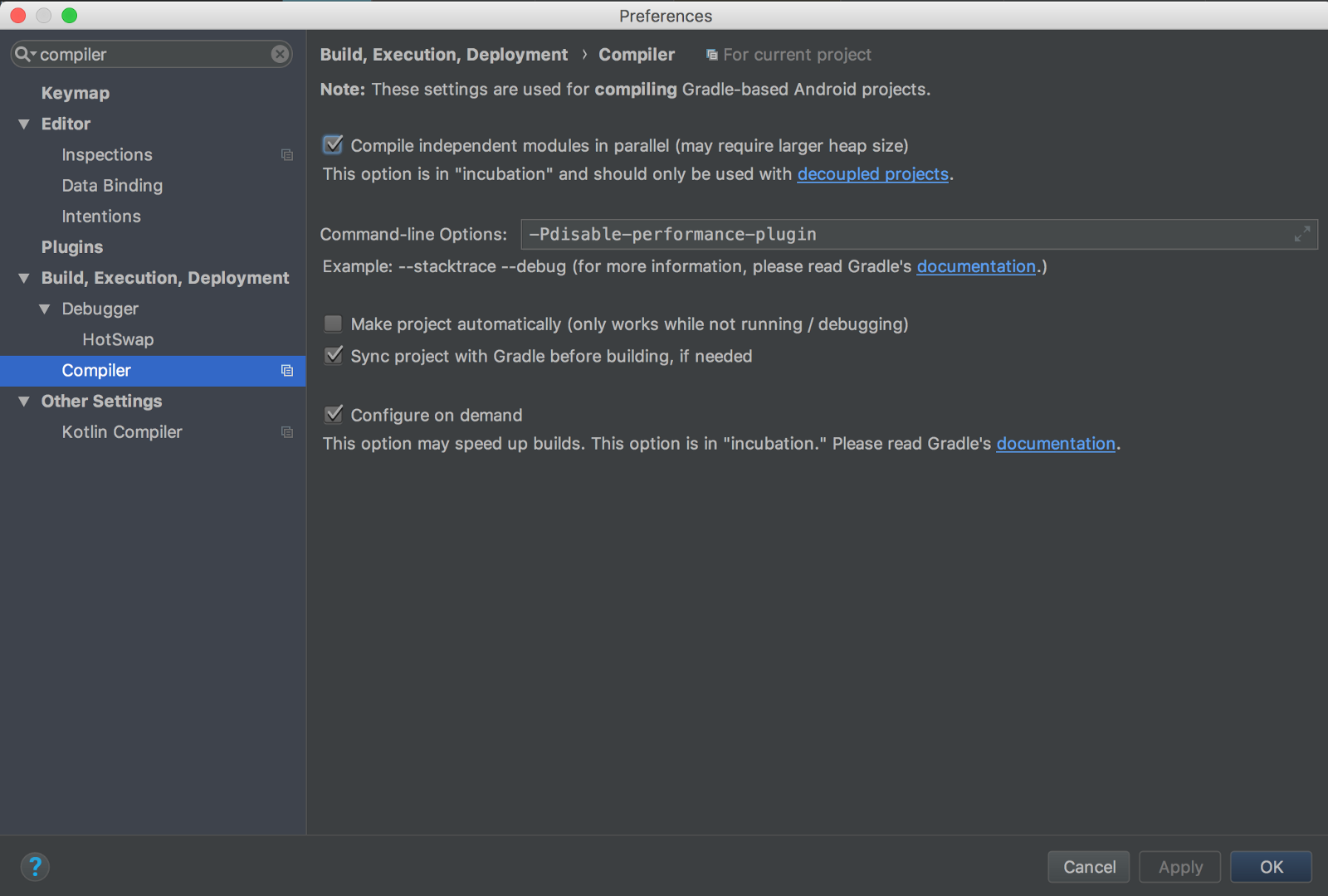
That's all. Adding this option will make your life easier!
We are not alone, and I decided to publish the solution found on the Medium. I hope it will help and save you precious time building the project.
How to reduce the build time of a project using the Firebase Performance Plugin
Recently, I added the Firebase Performance Plugin to one of my projects and faced a radical increase in the build time of the application. Initially, the assembly took place in less than 20 seconds, after adding a plug-in - 5-6 minutes. The behavior is annoying, so I looked at what increases the assembly time.
If you look closely, you can see that the next Gradle task takes a very long time:
app:transformClassesWithFirebasePerformancePluginForDebugThere is a post-compilation phase that uses Firebase Performance on Android and leads to an increase in build time.
How to smooth the problem
The fix I applied smoothes the problem by adding a parameter to the build command so that the plugin can be disabled during development.
In the block,
root/buildscript/dependencieswrap the plugin classpathin the following condition:if (!project.hasProperty("disable-performance-plugin")) {
classpath('com.google.firebase:firebase-plugins:1.1.5') {
excludegroup: 'com.google.guava', module: 'guava-jdk5'
}
}The need for an exception
com.google.guavadepends on whether the library leads to conflicts with your dependencies on Guava, as described in the documentation . Then,
app/build.gradle add the following condition:if (!project.hasProperty("disable-performance-plugin")) {
apply plugin: 'com.google.firebase.firebase-perf'
}Now you can simply build the project via the command line, using the parameter to disable the plugin:
./gradlew your-task -Pdisable-performance-pluginIf you are using Android Studio to build a project, you can add the same setting in the “Compiler Setup” section. You need to set command line options,
-Pdisable-performance-pluginThat's all. Adding this option will make your life easier!