February 6, 2012 at 14:33
D-Link PowerLine: DHP-306AV Review
 PowerLine technology is not new and unusual. However, little is said about such devices and little is said. It is difficult for me to judge the foreign market, however, we have such adapters completely out of the ordinary. And this is understandable: this technology has enough shortcomings, and devices for building a PowerLine network still do not cost a penny. At the time of publication of this article, the recommended price for the cheapest adapter from D-Link is $ 44. Probably not everyone in our country is willing to pay more than $ 80 in order to be able to refuse to lay a twisted pair cable. Not to mention that this is far from an equivalent substitute.
I came across several devices from D-Link for deploying a PowerLine network, and in this article I will try to describe in more detail one (or rather two, because the adapters are used in pairs) of them. This is DHP-306AV.
A bit of theory.
As I have already noted, the technology is not new, not a little has been said and written about it. The network has both fairly accessible descriptions of the technology and comparative tests of existing adapters (for example: THG.ru: Building a network for wiring: tests of six adapters ). Therefore, I will try to dwell on, as it seems to me, insufficiently covered issues.
The name of the technology (PLC, Power Line Communication, and in Russian - data transmission via electrical wiring) can be understood ambiguously: data is transmitted not simply via electrical wiring, but via a real and working power supply network. The data encrypted with a special key is encoded into an analog signal with a frequency of more than 30 MHz, which is subsequently superimposed on the existing ripple in the power network, which in our country is 50 Hz. On fingers, this principle is presented in this picture:

This is one of the reasons why a device brought in from the United States, for example, will not start on our network, even if you choose the right adapter. Also, this is why such an adapter will not work in a network with active filtering: any network filters, uninterruptible power supplies and transformers will ruthlessly crush the information component of the signal. On the other hand, as practice shows, the presence of such devices connected in parallel to the adapter, although not desirable, does not significantly affect the signal quality.
If we talk about speeds, then everything is still ambiguous. On the one hand, in recent years, technology has taken a significant step forward: if back in 2001, the standard was up to 14 Mbps, today devices are manufactured on the boxes of which there are 200 and even 500 Mbps numbers. On the other hand, we are talking about physical speed. The actual data transfer rate is highly dependent on many factors and can be many times less. The quality of wiring, twisting in the line, its heterogeneity - everything that is so inherent in our homes, destructively affects both physical speed and speed and quality of data transfer. The physical speed declared by the manufacturer can be safely divided by 2, and subtract 10% for each power device in the house.
Well, the last thing that often raises questions is how several PowerLine devices connected to the same network will function. Everything is simple here: since the adapters work at the physical level of the OSI network model, being included in one power supply network and synchronized among themselves, they, in essence, are a regular network hub with all its capabilities and disadvantages.

Appearance and equipment.
The DHP-306AV package does not include anything superfluous: a device, a patch cord, instructions, a disk and a cardboard box. Although perhaps this is quite enough.
The device looks nice and is made in white, relatively new for D-Link, style. The power supply connector is located directly on the case, which provides a possible minimum of wires to the adapter. Perhaps I find fault, but in the kit, as usual, there is a "branded" blue patch cord, which by no means harmonizes with a neat little white device.
On the label directly on the device, in addition to the serial number and MAC address, the so-called “PLC PWD” is also indicated - a unique password necessary to configure the adapter, which I recommend immediately writing down in a convenient place for myself. I myself ran to the outlet three times to enter this password again and again into the configuration utility, which for some reason persistently forgot it.
Indication of the current state is made by three LEDs: the first informs about the status of the device, the second - PowerLine-network, the third - Ethernet. In general, such an indication is quite enough to judge the status of the device.

I must say that the light from the indicators is not very bright, pleasant yellow-green color. It seems to me that this remark is especially relevant when many manufacturers sin by installing blue LEDs in bright eye-cutting devices.
All controls are on the one hand: this is a button for hardware reset of the device to factory settings and a button for synchronizing two devices. On the same side is the 8P8C connector.

Software.
Devices of this kind do not have any web interface, and they are not needed: the buttons and three indicators on the case are enough to comfortably use the adapter. However, the HomePlug AV standard implies remote control of the adapters, and the synchronization button allows you to connect only two devices to the network. Therefore, the review was not complete without a review of the D-Link PowerLine AV Utility, which is available for download from FTP D-Link .
I must say right away that the program is not ideal to put it mildly and, looking ahead, I’ll say that this is perhaps the only thing that leaves an unpleasant impression on the use of the device. So, for example, an unpleasant bug met me from the threshold: the utility sees and can only control devices connected to the first system network adapter. How much I did not try to get it to work without disconnecting the main home network - I did not succeed.
Here is a small screencast describing all the charms of this program:
Apparently, there are enough problems. The program does not show the firmware version, the scanner does not always find devices, there are no indications, and the program itself occasionally pretends to hang. The Quality column in me always showed three bars, which is at full speed, which is in the worst conditions, and the Link Rate testimony, which should display the physical speed between the devices, I did not manage to attach to the real connection speed at all. There are a number of usability errors: for example, I would prefer specific decay figures of the signal line loss in dB to the signal quality stripes.
Testing.
Testing of devices was carried out in an ordinary apartment of a rather old building, with all the problems of electrical wiring. The Intel® Gigabit ET Dual Port Server dual port gigabit network card was used as the network adapter .
Programmatically, the network channel was tested by the iperf utility, which was launched sequentially from 1, 10, 100, and 1000 simultaneous connections. Each test was performed three times, for 5 minutes, after which the results were averaged. Two parameters were taken: data transfer rate and ping during data transfer.
It should be noted that the connection of the PC network ports directly showed a speed of 946 Mbit / s, and the average ping was 1 ms. From this data, you can build on PowerLine testing.
The first test is ideal conditions.
The first test was performed under ideal conditions: both adapters were plugged into adjacent sockets of one 20-meter extension cord, i.e. the distance between the adapters was about 5 cm, and the distance from the nearest source of electrical noise was more than 20 meters. At this moment, only a PC was connected to the power supply, the light was also turned off.

The utility showed perfect connection quality and 190 Mbps Link-Rate. The test results also turned out to be excellent:

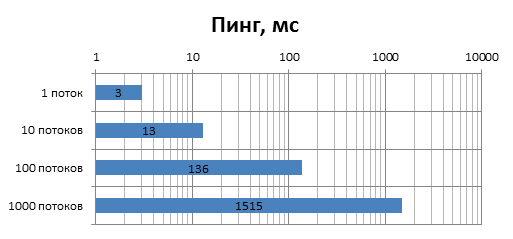
According to these graphs, it is clear that despite AES encryption of traffic and its large volumes, the data transfer speed rests more on the physical parameters of the line than on the performance of the device controller. It should also be noted that the connection was completely stable and there were no packet losses.
Second test.
The second test was carried out in conditions closer to real ones: the second adapter was transferred to another outlet in another room. There were still no other electrical appliances on the network, but about 5 energy-saving lamps were turned on in the rooms, the presence of which, according to the manufacturer, is rather detrimental to the signal quality. Here's what the utility reported:

As you can see, the signal quality remained supposedly ideal, and the physical speed decreased slightly. However, testing showed a speed of 68.9 Mbps with an average ping of 15 ms.
Third test.
The third test was performed in slightly more difficult conditions for the adapters: the second adapter was taken to the farthest room (in my case, to the bathroom), but the “ether” on the network remained clean. By this moment I had ceased to be surprised at the data that the utility provided me, I was not surprised even now: she reported that the speed was higher:
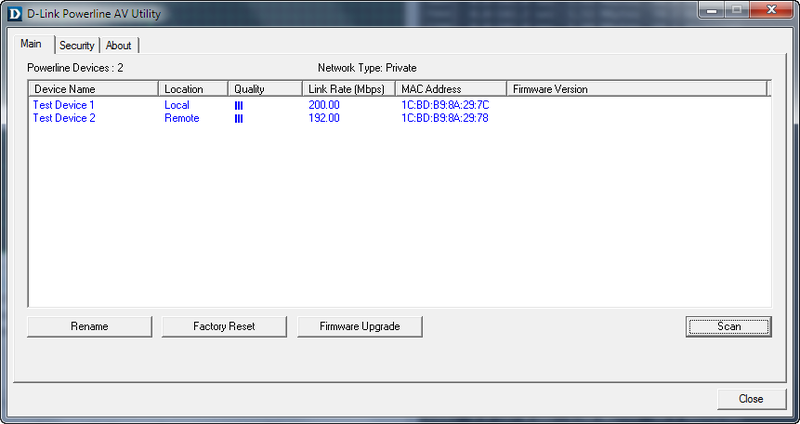
The test performed at the same time showed that the conditions were really more complicated: the data transfer rate dropped to 36.4 Mbit / s, and the average ping increased to 30 ms.
The fourth test - the most difficult conditions.
Of course, we are talking about the most difficult conditions for my very small apartment: the device remained in the farthest outlet, however, in addition, a TV, a media player, a refrigerator, a washing machine and an ionizer with a total capacity of about 5 kW were included in the network.
Also in this test, 8 energy-saving lamps were included in the network, which, according to D-Link, have a very negative effect on the quality of the PowerLine network. This is due to the fact that each lamp has a switching power supply, which gives interference to the common network.
The utility reported that the situation is as follows:
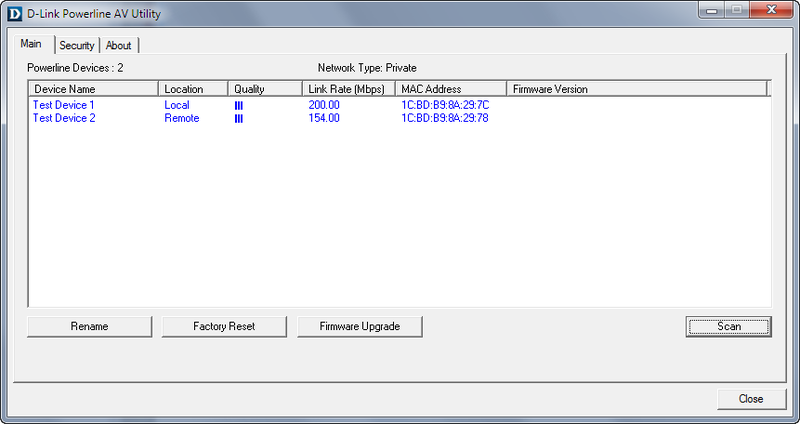
At the same time, the data transfer rate decreased to 27.8 Mbit / s, and the average ping remained almost unchanged and amounted to 38 ms.
General test results.
At the moment, I have nothing to compare: this is the first PowerLine device that I managed to get to know quite closely. The diagrams below show the change in the characteristics of the communication channel under various conditions.

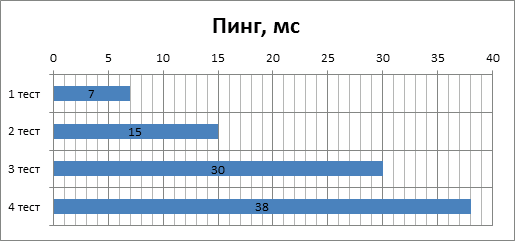
Looking at these diagrams, the first thing that comes to mind is a comparison with Wi-Fi: as you can see, the speed indicators are quite comparable. If you compare other aspects of these technologies, then PowerLine has its trump card against the mobility and convenience of Wi-Fi: high connection stability. During testing, I was surprised to find that neither power surges, nor the inclusion of power devices do not cause the connection to break. Another important aspect - PowerLine looks more secure. If the Wi-Fi password under certain conditions is quite possible to crack at the time of client authentication, then here the connection is established using a predefined key, and hacking from a theoretical point of view is impossible. Although, if you recall what traffic is usually chased on home networks, this is probably not a very important advantage.
Conclusion
To start, a couple of final words about PowerLine. Yes, it's more expensive than using a regular twisted pair cable. Yes, we do not always get acceptable speed and quality of the connection. Yes, there are quite widespread wireless standards that do not have all of the above problems. Yes, the use-case of this technology is not obvious. However, despite all the limitations and problems of use, this technology seems interesting and quite useful to me.
What is the scope of PowerLine? Perhaps it can be used in cases where you need to provide LAN access for small devices with which there is no constant and active data exchange. For example, I tried to connect my Asus O! Play media player in this way and watch IPTV on it: the picture did not pour in, and the video never broke, which I can not say about Wi-Fi connection. Another example that immediately comes to mind is the connection of VOIP devices via PowerLine. I have not tried it, but it seems to me that problems should not arise, but it will save me from extra wires.
As for the DHP-306AV, given that this is the youngest device in the line from D-Link, it showed quite good results, both in connection speed and in quality. In the next review I will try to consider older models and compare their characteristics. In the meantime, you can confidently put a convincing five D-Link engineers.
Devices for review are kindly provided by the Crimean representative office of D-Link in Simferopol.
I would like to express special gratitude for the help in conducting the testing to Artyom Chikalkin and Yuri Prokopenko.