 February 1, 2012 at 14:52
CAD in the fields of CAD
We already wrote that an application written for nanoCAD can be launched in AutoCAD. But on the contrary, it’s much more interesting: to use in nanoCAD the code that was developed for AutoCAD. As always, I decided to do it effortlessly.
It turns out that the idea that you can make a game for CAD does not come to us alone. For example, a blog post by Kean Walmsley, a leading AutoCAD .NET API evangelist, has an article on Minesweeper. It is this sapper that we will launch under nanoCAD. See details under the cut.

I think everyone who develops .NET applications under AutoCAD is familiar with Kean Walmsley's “Through the Interface” blog . In oneFrom the posts, the author writes about the Minesweeper game, it is also Minesweeper made for AutoCAD.
There are no files to download in the article, so you have to “copy” the code of the two VB files and create the project yourself. The article is accompanied by many comments, allowing you to understand in detail how the game works, but our goal is not that. Our goal is to launch Minesweeper under nanoCAD.
To do this, we need to do three things:
The first one. Adding the hostdbmgd.dll, hostmgd.dll libraries is necessary, because they contain all the classes for working with the nanoCAD .NET API. Without them, we can’t do anything. This is clear.
The second one. In AutoCAD, all classes are contained in the Autodesk.AutoCAD namespace. There are two namespaces in nanoCAD: the database classes (that is, the drawing and its contents) are in the Teigha space, and the classes associated with the application, with the description of the document, with the command line, are in the HostMgd namespace. It turned out like this:
And finally, the third. In the code, explicit class name references are sometimes found. For example, on Autodesk.AutoCAD.DatabaseServices.TransactionManager. In this case, you need to make the same replacement as in paragraph two.
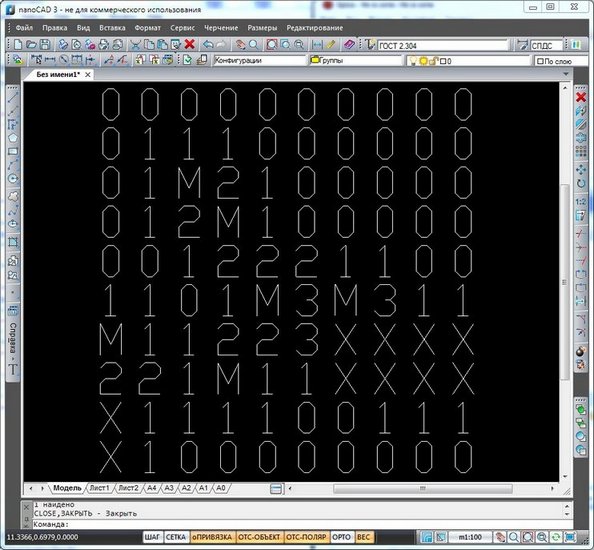
As a result, we get a compiled .NET assembly. It can be downloaded to nanoCAD and the game can be started with the “MINESWEEPER” command.
When I adapted the Minesweeper code for nanoCAD, it turned out to be extremely convenient and almost necessary to compile my project for both platforms at once.
I made two configurations: AutoCAD configuration and nanoCAD configuration.
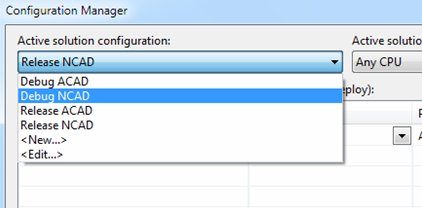
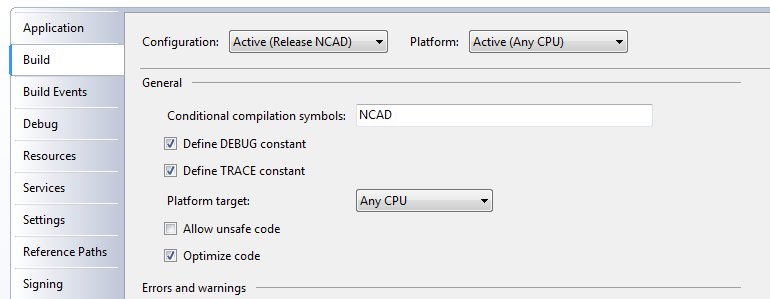
We configure both configurations: specify the paths to acad.exe and ncad.exe, set the directories where the libraries should be collected. In the nanoCAD configuration, we set the NCAD constant.
Namespace connections are framed by preprocessor directives #IF THEN ... #END IF. To bind the full class names, we use aliases:
The result is the following:
Now you can collect the same code for both configurations. Profit!
It turns out that the idea that you can make a game for CAD does not come to us alone. For example, a blog post by Kean Walmsley, a leading AutoCAD .NET API evangelist, has an article on Minesweeper. It is this sapper that we will launch under nanoCAD. See details under the cut.
I think everyone who develops .NET applications under AutoCAD is familiar with Kean Walmsley's “Through the Interface” blog . In oneFrom the posts, the author writes about the Minesweeper game, it is also Minesweeper made for AutoCAD.
There are no files to download in the article, so you have to “copy” the code of the two VB files and create the project yourself. The article is accompanied by many comments, allowing you to understand in detail how the game works, but our goal is not that. Our goal is to launch Minesweeper under nanoCAD.
To do this, we need to do three things:
- add the nanoCAD .NET libraries to References: hostdbmgd.dll, hostmgd.dll;
- replace in the Imports Autodesk.AutoCAD block with Teigha or HostMgd (see below);
- Replace the full names of AutoCAD classes (where they occur) with the full names of the nanoCAD classes.
The first one. Adding the hostdbmgd.dll, hostmgd.dll libraries is necessary, because they contain all the classes for working with the nanoCAD .NET API. Without them, we can’t do anything. This is clear.
The second one. In AutoCAD, all classes are contained in the Autodesk.AutoCAD namespace. There are two namespaces in nanoCAD: the database classes (that is, the drawing and its contents) are in the Teigha space, and the classes associated with the application, with the description of the document, with the command line, are in the HostMgd namespace. It turned out like this:
  Imports Teigha.Runtime
  Imports Teigha.Geometry
  Imports Teigha.DatabaseServices
  Imports HostMgd.ApplicationServices
  Imports HostMgd.EditorInput
And finally, the third. In the code, explicit class name references are sometimes found. For example, on Autodesk.AutoCAD.DatabaseServices.TransactionManager. In this case, you need to make the same replacement as in paragraph two.
As a result, we get a compiled .NET assembly. It can be downloaded to nanoCAD and the game can be started with the “MINESWEEPER” command.
When I adapted the Minesweeper code for nanoCAD, it turned out to be extremely convenient and almost necessary to compile my project for both platforms at once.
I made two configurations: AutoCAD configuration and nanoCAD configuration.
We configure both configurations: specify the paths to acad.exe and ncad.exe, set the directories where the libraries should be collected. In the nanoCAD configuration, we set the NCAD constant.
Namespace connections are framed by preprocessor directives #IF THEN ... #END IF. To bind the full class names, we use aliases:
  Imports Platform = HostMgd
  Imports PlatformDb = Teigha
The result is the following:
#If NCAD Then
    Imports Teigha.Runtime
    Imports HostMgd.ApplicationServices
    Imports Teigha.DatabaseServices
    Imports Teigha.Geometry
    Imports HostMgd.EditorInput
    Imports System
    Imports Platform = HostMgd
    Imports PlatformDb = Teigha
#Else
    Imports Autodesk.AutoCAD.Runtime
    Imports Autodesk.AutoCAD.ApplicationServices
    Imports Autodesk.AutoCAD.DatabaseServices
    Imports Autodesk.AutoCAD.Geometry
    Imports Autodesk.AutoCAD.EditorInput
    Imports System
    Imports Platform = Autodesk.AutoCAD
    Imports PlatformDb = Autodesk.AutoCAD
#End If
Now you can collect the same code for both configurations. Profit!









