 January 31, 2012 at 16:38
Overview of programs for monitoring the consumption of mobile Internet
Modern smartphones are increasingly turning to the Internet, both on the initiative of the owners, and of their own free will. Unfortunately, tools for detailed traffic monitoring, as a rule, are not included in the basic set of pre-installed software (only recently released models can make an exception), and tariffs with unlimited Internet access, although cheaper, are not always available. The solution was and remains the installation of a third-party application, the only question is which program to stop at.
Among the many different utilities for monitoring and planning traffic consumption, 3G Watchdog, Onavo Lite and Traffic Counter Extended should be noted. The main criteria for choosing a tool were the availability of a free version of the program, as well as its availability in the Android Market.
Without scattering attention to numerous analogues, we suggest that you consider these programs and directly compare them in terms of ease of use, functionality and stability. The main emphasis will be placed on a characteristic that is of priority for the application — objectivity, expressed in accordance with the calculated indicators and billing information provided by the telecom operator.
Due to the fact that the programs belong to the same category, the initial setup procedure is similar for them, but already at this stage there are certain nuances.
We will consider each program individually, and then arrange a final test with a comparison of the measurement data and the information provided by the operator.

The program welcomes us with a screen with general information, decoding of the notification bar indicators, as well as tips for future use. By pressing the “Next” button, a direct transition to the settings section is made, and the following parameters can be changed:
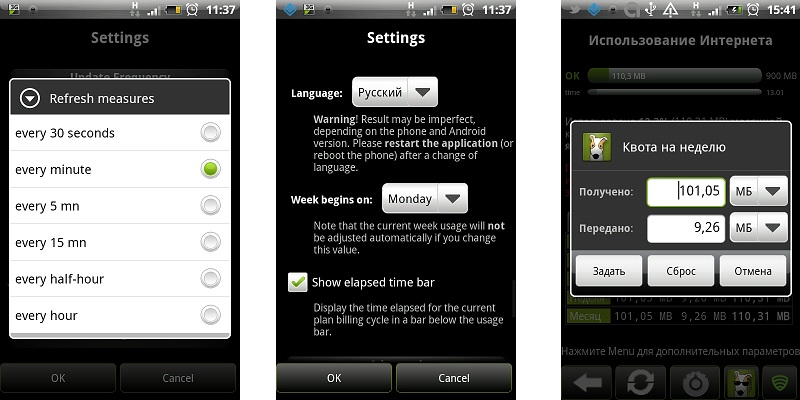
In the future, the settings can be accessed at any time by pressing the corresponding button on the main screen.
Thus, the 3G Watchdog can be completely customized "for itself", including hiding the indicators of the notification panel when using mobile Internet within the allotted quota.
The main screen displays a summary of statistics on incoming and outgoing traffic in the context of the main time intervals, and the Wi-Fi tab allows you to get acquainted with the results of using the existing wireless connection.
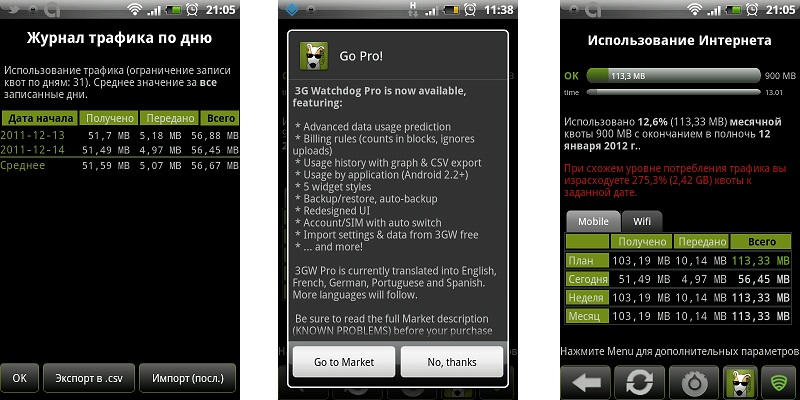
Pressing the Menu key allows you to quickly set quotas for specific time periods (for example, for a day), as well as switch to viewing the results of traffic consumption for a specific date. 3G Watchdog systematizes the results in visual tables and supports the export of results to CSV format.
The forecast for traffic consumption is constantly being adjusted, and if you exceed the daily norm, the program will warn you about this and suggest reducing the use of mobile Internet to a certain limit.
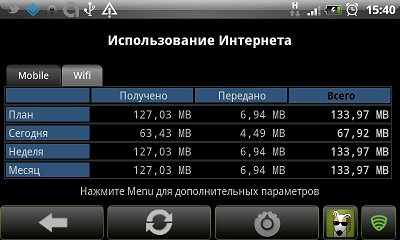
The application has a paid version, the features of which are a larger number of widgets, customizable by the nature of the displayed data and appearance, as well as additional statistics and backup options. Of course, data from 3G Watchdog is available for transfer to the Pro version by creating a backup.

The utility left an extremely favorable impression; over the entire period of use, cases of abnormal completion of work or incorrect functioning were not noticed. The only serious gripe is that the paid version has not yet been translated into Russian.
Install the free version of 3G Watchdog:
market.android.com/details?id=net.rgruet.android.g3watchdog

Buy for $ 2.99 the full version of 3G Watchdog:
market.android.com/details?id=net.rgruet.android.g3watchdogpro

Having barely appeared in the Android Market, this utility has attracted increased attention, and rightfully so. It’s not often that you come across a free program that is not inferior in functionality to many commercial counterparts.
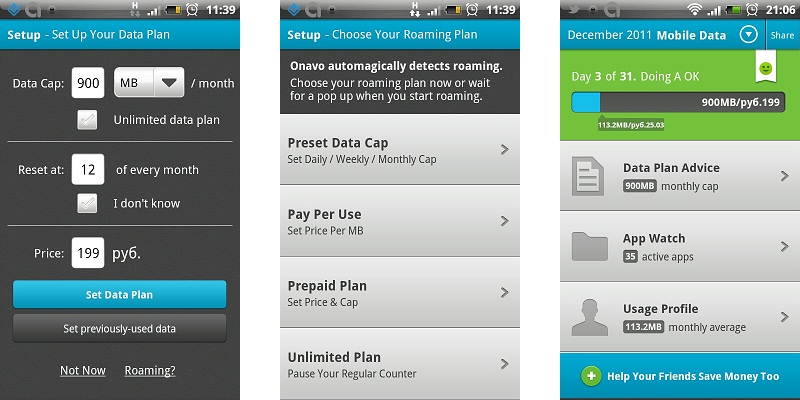
The basic settings are the same, but already at this stage the program’s focus on several other landmarks is noticeable. Firstly, you can indicate that your tariff plan is unlimited, and secondly, to make the costs of the package or tariff option used. Onavo will analyze the plan used, based on this information and the information gathered about the expenditures for this package, and may offer another option that is more suitable for your needs. In addition, the program compiles an Internet usage profile that visually displays the degree of your network activity depending on the time of day and other parameters.
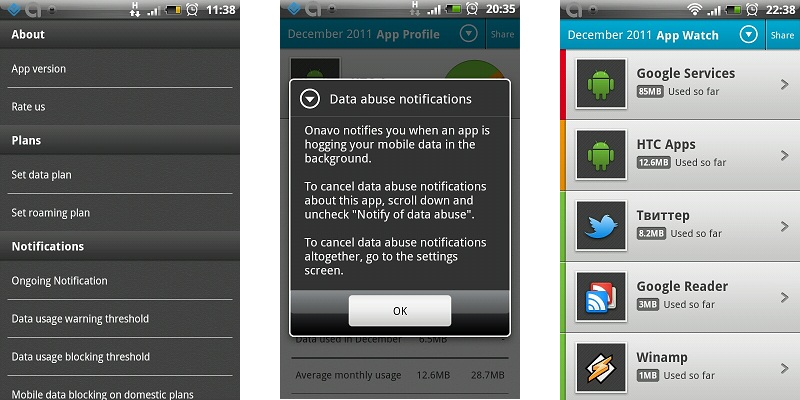
Considerable attention is paid to roaming. Given the constant decline in prices for GPRS-roaming, as well as the emergence of attractive tariff options for those who are used to always staying in touch, this section can become very popular.
Settings mainly relate to displaying notifications about traffic consumption by individual applications, as well as setting alerts and blocking data transfer. Unfortunately, behind the external attractiveness of the interface, there are flaws in usability. So, to change or at least view the value of any of the parameters, you have to additionally click on the corresponding menu item.
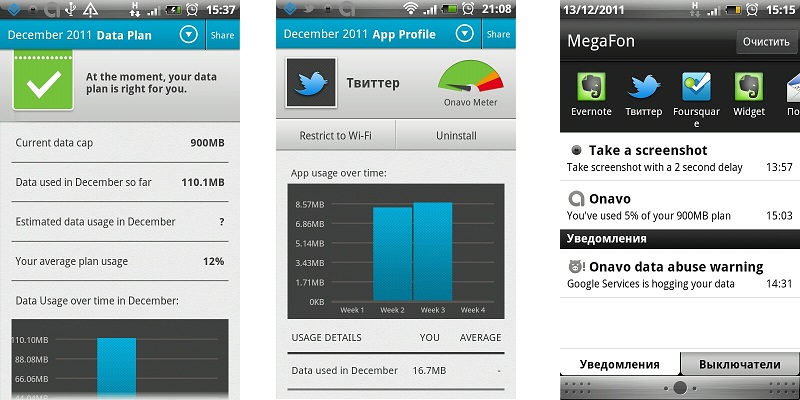
Passing to any section, you can see a pop-up window with a brief help, and in the notification panel there will constantly be a non-disconnect counter showing the degree of quota spending (in percent). Typically, from time to time its value was arbitrarily reset to zero, but this did not affect the results of the application itself. Fortunately, other notifications (about applications consuming these data, about checking installed programs, etc.) are flexibly configured, albeit at the cost of additional clicks.
Of particular interest is the App Watch screen, which details traffic consumption by individual applications. In addition, by switching to a specific program (from among the user programs), you can switch it to work exclusively via Wi-Fi, uninstall it, and also indicate whether to notify the user about data transfer by the selected application.
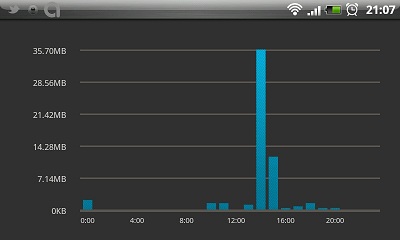
The latest update brought convenient desktop widgets. Onavo can be praised for its nice interface with intuitive graphics, but the design of the settings screen should be carefully worked out.
Free Install Onavo Software | Monitor Data Usage:
market.android.com/details?id=com.onavo.android.onavoid

Perhaps the most serious person involved in today's review. The program allows you to take into account not only cellular and wireless traffic, but also calls with SMS messages. However, as part of this review, it was decided to focus on the adequacy of accounting for mobile traffic specifically, so the rest of the counters were turned off.

The initial setup is complicated by the fact that when choosing any option, including quotas, information for billing, etc., you have to specify the type of counter. Entering data on the money side of the issue is not as friendly as in Onavo, you can specify only the price per megabyte, and in the case of connecting a conditionally unlimited tariff option this is difficult.
For the most advanced users, the program offers a unique opportunity - manual selection of an adapter for monitoring. We advise you to change this parameter only if you are completely confident in your actions.
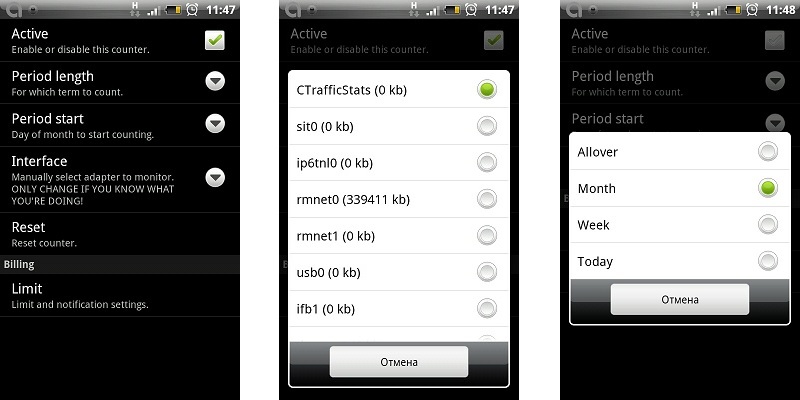
Each type of counters can be individually set, and the icon in the notification area can be removed if desired (setting the displayed information is available only in the paid version). The interval for updating data varies from a minute to an hour.
The application interface as a whole does not raise questions, Traffic Counter is divided into three tabs responsible for accounting for traffic, costs and monitoring applications, respectively.
It is not very convenient that the data on the expenditure of traffic by the programs are displayed in aggregate, without dividing into data transmission channels, and it is also not possible to establish any time frames. All information, as honestly stated at the bottom of the screen, is relevant since the last reboot of the device.

As compensation, Traffic Counter can offer flexibly customizable charts and tables for the selected meter (in our case, mobile data transfer) for an arbitrary period.
As expected, the accounting utility, which has a paid version, is backed up and then restored.
Among other things, Traffic Counter boasts many different widgets. Unfortunately, only two of them are functioning in the free version, 1x1 in size. However, even they are more informative than standard 3G Watchdog widgets.

We believe that this program may appeal to amateurs to keep everything under control, as well as just tidy users who want to avoid unnecessary expenses for any of the services provided by mobile operators.
Install the free version of Traffic Counter Extended:
market.android.com/details?id=com.carl.trafficcounter

Buy for € 1.99 the full version of Traffic Counter Pro:
market.android.com/details?id=com.carl.tcpro

Let's try to reduce the main features of the considered programs to a small table, on the basis of which it will be possible to conclude on the degree of suitability of a particular utility for everyday use.
At the end of the review, we compare the values calculated by the programs with the data obtained using selective account detailing (114.1 Mb). As you can see, none of the programs showed a noticeable deviation in one direction or another, but there is still a slight difference in the readings. However, it can be attributed to the category of statistical error, in addition, part of the traffic could be lost by the utilities at the time of transition from mobile Internet to Wi-Fi connection.
Summing up, we can say the following: if you are interested in a simple and high-quality solution for traffic accounting, not deprived of additional functions - pay attention to 3G Watchdog. There is an unlimited tariff, and traffic accounting is of purely academic interest - we recommend Onavo. If monitoring tools are not enough - Traffic Counter from Carl Hopf is at your service.
The final choice is up to you and your preference. If you think that we have paid attention to any worthy alternative to the considered programs, please do not hesitate to mention this in the comments.
Among the many different utilities for monitoring and planning traffic consumption, 3G Watchdog, Onavo Lite and Traffic Counter Extended should be noted. The main criteria for choosing a tool were the availability of a free version of the program, as well as its availability in the Android Market.
Without scattering attention to numerous analogues, we suggest that you consider these programs and directly compare them in terms of ease of use, functionality and stability. The main emphasis will be placed on a characteristic that is of priority for the application — objectivity, expressed in accordance with the calculated indicators and billing information provided by the telecom operator.
Due to the fact that the programs belong to the same category, the initial setup procedure is similar for them, but already at this stage there are certain nuances.
We will consider each program individually, and then arrange a final test with a comparison of the measurement data and the information provided by the operator.
3G watchdog
The program welcomes us with a screen with general information, decoding of the notification bar indicators, as well as tips for future use. By pressing the “Next” button, a direct transition to the settings section is made, and the following parameters can be changed:
- Quota size and unit of measure (bytes, Kb, Mb, GB);
- The period (day, week, month), as well as the day from which traffic should be taken into account;
- A warning method about the imminent end of the package (including vibration);
- Disabling data transfer to achieve the maximum allocated quota (available only through third-party applications APNDroid and JuiceDefender, the performance of which is not guaranteed);
- The data update period (from 30 seconds to an hour), a longer interval should affect the increase in battery life;
- Application language (Russian is present in the free version and suddenly disappears in the paid one);
- The day on which the application should consider the week to begin.
In the future, the settings can be accessed at any time by pressing the corresponding button on the main screen.
Thus, the 3G Watchdog can be completely customized "for itself", including hiding the indicators of the notification panel when using mobile Internet within the allotted quota.
The main screen displays a summary of statistics on incoming and outgoing traffic in the context of the main time intervals, and the Wi-Fi tab allows you to get acquainted with the results of using the existing wireless connection.
Pressing the Menu key allows you to quickly set quotas for specific time periods (for example, for a day), as well as switch to viewing the results of traffic consumption for a specific date. 3G Watchdog systematizes the results in visual tables and supports the export of results to CSV format.
The forecast for traffic consumption is constantly being adjusted, and if you exceed the daily norm, the program will warn you about this and suggest reducing the use of mobile Internet to a certain limit.
The application has a paid version, the features of which are a larger number of widgets, customizable by the nature of the displayed data and appearance, as well as additional statistics and backup options. Of course, data from 3G Watchdog is available for transfer to the Pro version by creating a backup.
The utility left an extremely favorable impression; over the entire period of use, cases of abnormal completion of work or incorrect functioning were not noticed. The only serious gripe is that the paid version has not yet been translated into Russian.
Install the free version of 3G Watchdog:
market.android.com/details?id=net.rgruet.android.g3watchdog
Buy for $ 2.99 the full version of 3G Watchdog:
market.android.com/details?id=net.rgruet.android.g3watchdogpro
Onavo | Monitor data usage
Having barely appeared in the Android Market, this utility has attracted increased attention, and rightfully so. It’s not often that you come across a free program that is not inferior in functionality to many commercial counterparts.
The basic settings are the same, but already at this stage the program’s focus on several other landmarks is noticeable. Firstly, you can indicate that your tariff plan is unlimited, and secondly, to make the costs of the package or tariff option used. Onavo will analyze the plan used, based on this information and the information gathered about the expenditures for this package, and may offer another option that is more suitable for your needs. In addition, the program compiles an Internet usage profile that visually displays the degree of your network activity depending on the time of day and other parameters.
Considerable attention is paid to roaming. Given the constant decline in prices for GPRS-roaming, as well as the emergence of attractive tariff options for those who are used to always staying in touch, this section can become very popular.
Settings mainly relate to displaying notifications about traffic consumption by individual applications, as well as setting alerts and blocking data transfer. Unfortunately, behind the external attractiveness of the interface, there are flaws in usability. So, to change or at least view the value of any of the parameters, you have to additionally click on the corresponding menu item.
Passing to any section, you can see a pop-up window with a brief help, and in the notification panel there will constantly be a non-disconnect counter showing the degree of quota spending (in percent). Typically, from time to time its value was arbitrarily reset to zero, but this did not affect the results of the application itself. Fortunately, other notifications (about applications consuming these data, about checking installed programs, etc.) are flexibly configured, albeit at the cost of additional clicks.
Of particular interest is the App Watch screen, which details traffic consumption by individual applications. In addition, by switching to a specific program (from among the user programs), you can switch it to work exclusively via Wi-Fi, uninstall it, and also indicate whether to notify the user about data transfer by the selected application.
The latest update brought convenient desktop widgets. Onavo can be praised for its nice interface with intuitive graphics, but the design of the settings screen should be carefully worked out.
Free Install Onavo Software | Monitor Data Usage:
market.android.com/details?id=com.onavo.android.onavoid
Traffic counter extended
Perhaps the most serious person involved in today's review. The program allows you to take into account not only cellular and wireless traffic, but also calls with SMS messages. However, as part of this review, it was decided to focus on the adequacy of accounting for mobile traffic specifically, so the rest of the counters were turned off.
The initial setup is complicated by the fact that when choosing any option, including quotas, information for billing, etc., you have to specify the type of counter. Entering data on the money side of the issue is not as friendly as in Onavo, you can specify only the price per megabyte, and in the case of connecting a conditionally unlimited tariff option this is difficult.
For the most advanced users, the program offers a unique opportunity - manual selection of an adapter for monitoring. We advise you to change this parameter only if you are completely confident in your actions.
Each type of counters can be individually set, and the icon in the notification area can be removed if desired (setting the displayed information is available only in the paid version). The interval for updating data varies from a minute to an hour.
The application interface as a whole does not raise questions, Traffic Counter is divided into three tabs responsible for accounting for traffic, costs and monitoring applications, respectively.
It is not very convenient that the data on the expenditure of traffic by the programs are displayed in aggregate, without dividing into data transmission channels, and it is also not possible to establish any time frames. All information, as honestly stated at the bottom of the screen, is relevant since the last reboot of the device.
As compensation, Traffic Counter can offer flexibly customizable charts and tables for the selected meter (in our case, mobile data transfer) for an arbitrary period.
As expected, the accounting utility, which has a paid version, is backed up and then restored.
Among other things, Traffic Counter boasts many different widgets. Unfortunately, only two of them are functioning in the free version, 1x1 in size. However, even they are more informative than standard 3G Watchdog widgets.
We believe that this program may appeal to amateurs to keep everything under control, as well as just tidy users who want to avoid unnecessary expenses for any of the services provided by mobile operators.
Install the free version of Traffic Counter Extended:
market.android.com/details?id=com.carl.trafficcounter
Buy for € 1.99 the full version of Traffic Counter Pro:
market.android.com/details?id=com.carl.tcpro
Conclusions and Conclusion
Let's try to reduce the main features of the considered programs to a small table, on the basis of which it will be possible to conclude on the degree of suitability of a particular utility for everyday use.
| Characteristic | 3G watchdog | Onavo | Monitor data usage | Traffic counter extended |
| Support for various options and charging periods | Yes completely | Partially, period - month . Unlimited tariff is supported. | Yes completely |
| Accounting for mobile Internet expenses | Not | Yes, the package price | Yes, cost per megabyte |
Application traffic control | Yes, in the paid version | Yes, you can set rules for individual programs | Yes, no breakdown |
| Accounting for other expenses | Yes, Wi-Fi traffic | Not | Yes, Wi-Fi, SMS, calls |
| Widget availability | Yes, in the paid version custom | Yes, total quota consumption, current usage and by applications | Yes, in the paid version more (4 pcs.) |
| Localization | Free version only | Not | Not |
| Cost | Free / $ 2.99 | Free | Free / € 1.99 |
| Indications for the reporting period, total Mb | 113.3 | 113.2 | 113.2 |
At the end of the review, we compare the values calculated by the programs with the data obtained using selective account detailing (114.1 Mb). As you can see, none of the programs showed a noticeable deviation in one direction or another, but there is still a slight difference in the readings. However, it can be attributed to the category of statistical error, in addition, part of the traffic could be lost by the utilities at the time of transition from mobile Internet to Wi-Fi connection.
Summing up, we can say the following: if you are interested in a simple and high-quality solution for traffic accounting, not deprived of additional functions - pay attention to 3G Watchdog. There is an unlimited tariff, and traffic accounting is of purely academic interest - we recommend Onavo. If monitoring tools are not enough - Traffic Counter from Carl Hopf is at your service.
The final choice is up to you and your preference. If you think that we have paid attention to any worthy alternative to the considered programs, please do not hesitate to mention this in the comments.









