 October 15, 2011 at 15:22
PNG - not GIF!
Good day!
Have you ever wanted to know how PNG files work? Not? I’ll tell you anyway.
The PNG (Portable Network Graphics) format was invented in 1995 to become a replacement for GIF , and already in 1996, with the release of version 1.0, it was recommended by W3C as a full-fledged network format. Today, PNG is one of the main formats of web graphics.
Under the cut you will find a general description of the structure of the PNG file, a number of schematic images, preparation in a hex editor, and, of course, a link to the specification.
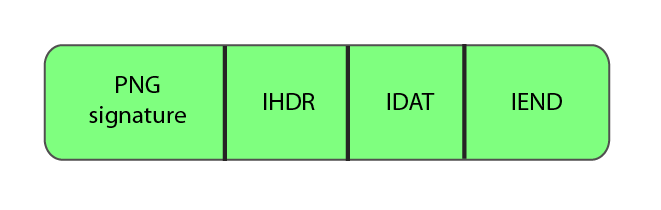
The PNG structure in its most general form is shown in the following figure.
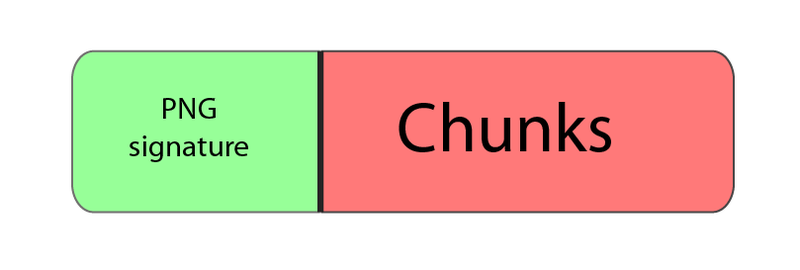
That is, the file consists of a signature and a number of blocks (chunks, chunks), each of which carries some information (thanks KO!). But why the signature can not be considered one of the chunks? Let's take a closer look.
The signature of the PNG file is always the same, consists of 8 bytes, and represents (in hex record)
What does this mean?
Chunks are the data blocks that make up a file. Each chunk consists of 4 sections.
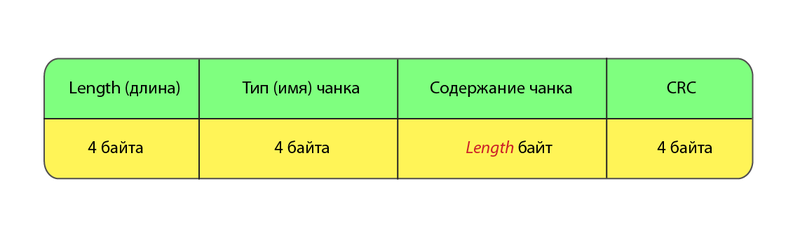
We will analyze these sections in order.
Well, with a length everything seems to be clear. Just a numeric value for the length of the data block.
With the type a little more interesting. The type is 4 case-sensitive ASCII characters. Character registers (the fifth bit in the numerical character record) in the chunk name differ for a reason - these are flags that tell the decoder some additional information.
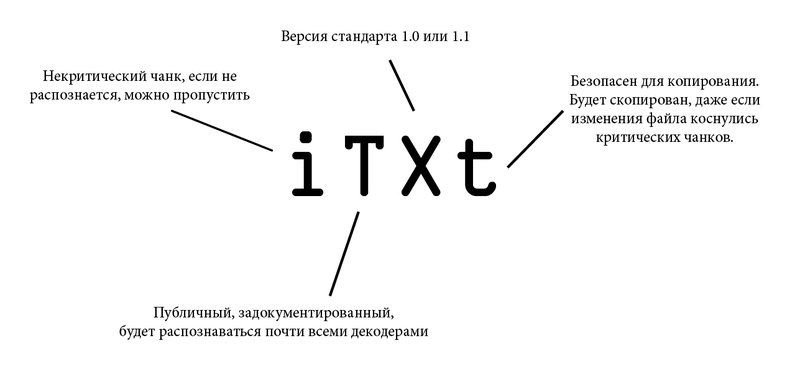
For a better understanding, let's look at the flags using the example of a chunk containing text.
The following is a list of chunk types with brief explanations.
Critical chunks
Auxiliary Chunks
More information can be found in the specification.
CRC-32 checksum . By the way the other day there was a topic about its calculation in Windows.
With the general structure sorted out. Now let's analyze the content of the required chunks. But which of them are mandatory (not critical, critical must be recognized by the decoder, and not present in each file), and what does the minimal PNG file look like? That's how:
The data block in IHDR contains the following fields:
Adam7 interlacing perfectly demonstrates the picture from Wikipedia (yes, GIF in the article about PNG):

Signals the end of the file, the data block of this chunk does not contain anything.
Contains data encoded according to the compression method field in the header. The decoding algorithm is beyond the scope of this article (however, if you wish, it may appear in the next one), but it is described quite well (and in Russian) here .
Thus, the simplest PNG file (for example) is as follows.

When writing this article, I set myself the task of giving the reader general knowledge about the structure of the PNG file, for a better understanding it is recommended to read the specifications .
Topic on the hub about the structure of JPEG: habrahabr.ru/blogs/algorithm/102521
Topic on the hub about the structure of GIF: habrahabr.ru/blogs/algorithm/127083
Thank you for your attention, I will be glad to any criticism!
Have you ever wanted to know how PNG files work? Not? I’ll tell you anyway.
The PNG (Portable Network Graphics) format was invented in 1995 to become a replacement for GIF , and already in 1996, with the release of version 1.0, it was recommended by W3C as a full-fledged network format. Today, PNG is one of the main formats of web graphics.
Under the cut you will find a general description of the structure of the PNG file, a number of schematic images, preparation
in a hex editor, and, of course, a link to the specification.General structure
The PNG structure in its most general form is shown in the following figure.
That is, the file consists of a signature and a number of blocks (chunks, chunks), each of which carries some information (thanks KO!). But why the signature can not be considered one of the chunks? Let's take a closer look.
File signature
The signature of the PNG file is always the same, consists of 8 bytes, and represents (in hex record)
89 50 4E 47 0D 0A 1A 0A
What does this mean?
- 89 is a non-ASCII character. Prevents PNG from being recognized as a text file, and vice versa.
- 50 4E 47 - PNG to ASCII record.
- 0D 0A - CRLF (Carriage-return, Line-feed), DOS-style line feed.
- 1A - stops the file output in DOS mode (end-of-file) so that you will not fall out a multi-kilobyte image in text form.
- 0A - LF, Unix-style line feed.
Chunks
Chunks are the data blocks that make up a file. Each chunk consists of 4 sections.
We will analyze these sections in order.
Length
Well, with a length everything seems to be clear. Just a numeric value for the length of the data block.
Type (name)
With the type a little more interesting. The type is 4 case-sensitive ASCII characters. Character registers (the fifth bit in the numerical character record) in the chunk name differ for a reason - these are flags that tell the decoder some additional information.
- The case of the first character determines whether the given chunk is critical (upper case) or auxiliary (lower case). Critical chunks must be recognized by each decoder. If the decoder encounters a critical chunk whose type cannot be recognized, it must complete the execution with an error.
- The second character case defines “publicity” (upper case) or “privacy” (lower case) of the chunk. “Public” chunks are official, documented, recognized by most decoders. But if you suddenly need to encode specific information for some of your needs, then simply make the second character small in the name of the chunk.
- The third character case is reserved for future purposes. It is assumed that it will be used to differentiate between different versions of the standard. For versions 1.0 and 1.1, the third character must be large. If it (suddenly!) Turned out to be small, all current decoders should act with a chunk, as well as with any other not recognized (that is, exit with an error if the chunk is critical, or skip otherwise).
- The case of the fourth character means the ability to copy this chunk by editors who cannot recognize it. If the register is lower, the chunk can be copied, regardless of the degree of modification of the file, otherwise (upper case) it is copied only when no critical chunks were affected during the modification.
For a better understanding, let's look at the flags using the example of a chunk containing text.
The following is a list of chunk types with brief explanations.
Critical chunks
- IHDR - file header, contains basic information about the image. Must be the first chunk.
- PLTE - palette, list of colors.
- IDAT - contains, in fact, the image. The picture can be divided into several IDAT chunks for streaming. Each file must have at least one IDAT chunk.
- IEND - the final chunk, must be the last in the file.
Auxiliary Chunks
- bKGD - This chunk sets the foreground color.
- cHRM is used to specify the CIE 1931 color space.
- gAMA - defines the gamma.
- hIST - a histogram or the total content of each color in the image can be stored in this chunk.
- iCCP - ICC color profile
- iTXt - contains text in UTF-8, possibly compressed, with an optional language tag. The iTXt chunk with the keyword 'XML: com.adobe.xmp' may contain the Extensible Metadata Platform (XMP) .
- pHYs - contains the estimated pixel size and / or aspect ratio of the image.
- sBIT (significant bits) - defines the “color accuracy” (color-accuracy) of the image (black and white, full color, black and white with transparency, etc.), for easier decoding.
- sPLT - offers a palette for use if the full range of colors is not available.
- sRGB - indicates the use of a standard sRGB scheme.
- sTER is an indicator of stereoscopic images.
- tEXt - may contain text in ISO / IEC 8859-1 format, with one name = value pair for each chunk.
- tIME - stores the date of the last image change.
- tRNS - Contains transparency information.
- zTXt is compressed text with the same limitations as tEXt.
More information can be found in the specification.
CRC
CRC-32 checksum . By the way the other day there was a topic about its calculation in Windows.
Minimum PNG
With the general structure sorted out. Now let's analyze the content of the required chunks. But which of them are mandatory (not critical, critical must be recognized by the decoder, and not present in each file), and what does the minimal PNG file look like? That's how:
IHDR
The data block in IHDR contains the following fields:
- Width, 4 bytes
- Height, 4 bytes
- Bit depth, determines the number of bits per sample (not pixel), 1 byte
- Color type, consists of 3 flags 1 (using a palette), 2 (using color, not a monochrome image), and 4 (alpha channel present), 1 byte
- Compression method. At the moment, only the value 0 is available - compression by the deflate algorithm . If the value is other than 0, the chunk is considered unrecognized, and the decoder reports an error. 1 byte
- Filtration method. As in the case of compression, at the moment it can only be zero. 1 byte
- Interlace method. Defines the data transfer order. Currently 2 values are available: 0 (no interlace) and 1 ( Adam7 interlace). 1 byte
Adam7 interlacing perfectly demonstrates the picture from Wikipedia (yes, GIF in the article about PNG):
IEND
Signals the end of the file, the data block of this chunk does not contain anything.
IDAT
Contains data encoded according to the compression method field in the header. The decoding algorithm is beyond the scope of this article (however, if you wish, it may appear in the next one), but it is described quite well (and in Russian) here .
Thus, the simplest PNG file (for example
) is as follows.Conclusion
When writing this article, I set myself the task of giving the reader general knowledge about the structure of the PNG file, for a better understanding it is recommended to read the specifications .
Topic on the hub about the structure of JPEG: habrahabr.ru/blogs/algorithm/102521
Topic on the hub about the structure of GIF: habrahabr.ru/blogs/algorithm/127083
Thank you for your attention, I will be glad to any criticism!









