Comparative review of devices for reading electronic books on LCD screens from Ritmix
Devices for reading books have long been included in our everyday life, more and more often in transport and on the street you can see people reading texts from special devices called “electronic books”, “readers”. There are two main varieties of such devices - based on E-Ink screens (the so-called “electronic ink”), and based on familiar TFT screens.
Not everyone is ready to pay a considerable amount for an e-book based on E-Ink screens and as a result have a highly specialized device that allows you only to read books and in some cases listen to music. It’s just such people who will be interested in budget options for e-books on TFT displays, which, unlike the more expensive “brothers” on E-Ink, have more functionality: they allow not only reading books and listening to music, but also fully viewing pictures, watch movies, etc.
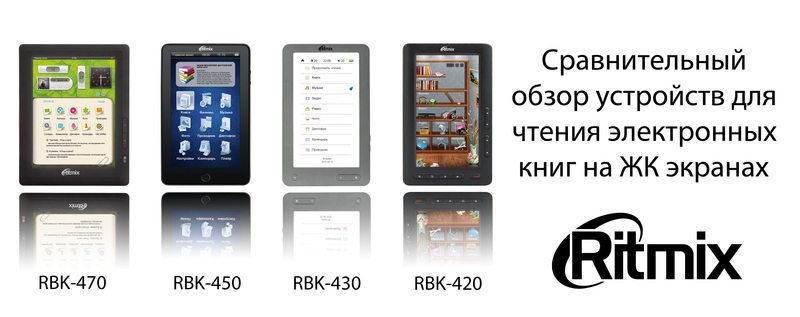
Today I will try to talk about the line of electronic books on TFT screens from Ritmix. These are four models: RBK-420, RBK-430, RBK-450 and RBK-470, differing in appearance, form factor, functionality and price. Actually, the differences, advantages and disadvantages of each of them will be discussed.

Specifications
The following is a summary table of the characteristics of these electronic books. Data taken from the off site *
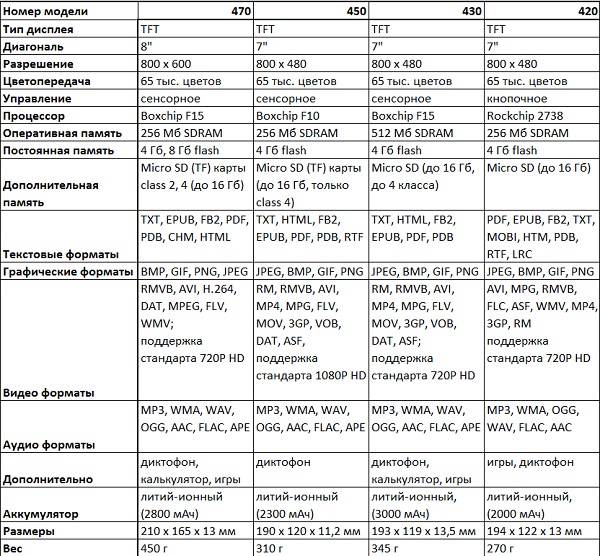
* tests showed that some data needed to be clarified, in particular, the formats of supported text files were indicated incorrectly: some unsupported, but at the same time some formats that books can open were specified. This is described in more detail below.
Appearance, equipment
All four devices come with the necessary minimum equipment: a 220 volt charger, a cable for connecting to a computer, instructions and a leatherette case. The presence of a cover in the kit can not but rejoice - you do not need to spend additional time and money on the purchase of protection necessary for such books (the screen is still quite fragile).
RBK-420
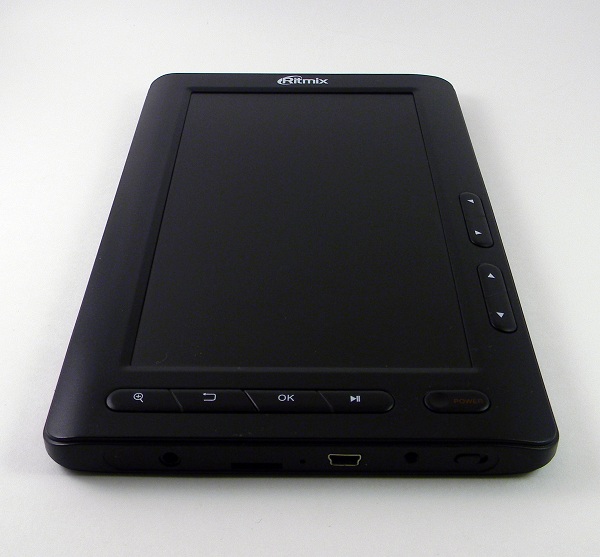

This is the cheapest e-book of the line. It stands out for its low weight - only 270 grams and the lack of a sensor grid on the screen, i.e. push-button control. This option may appeal to those people who cannot stand the current mode of shoving sensors everywhere.
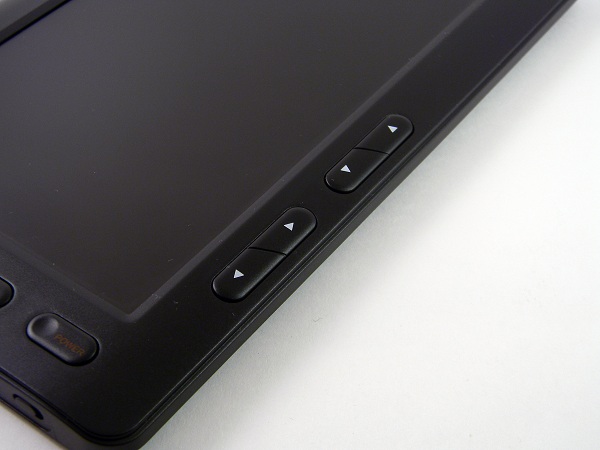
The case is made of black plastic. All control elements are located on the front side of the device - 4 buttons to the right of the screen for moving up-down and left-right and 5 buttons under the screen for calling the context menu, etc. At the bottom of the device are located: hardware shutdown button, connector for the charger, a connector for connecting to a computer (mini USB), a slot for Micro SD (HC) cards and a standard headphone jack (3.5mm). On the back cover of the e-book is a small speaker, protected by a metal mesh.
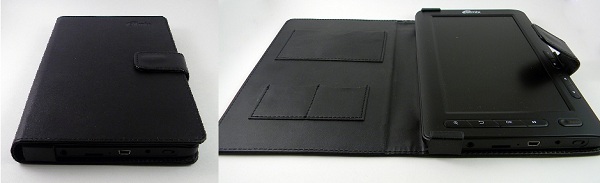
The cover consists of two dense halves that are connected by a soft cloth, there are 3 internal pockets. A large pocket, apparently, can be suitable for a business card, and two small ones for additional memory cards or, for example, for an adapter from microSD to SD. The device is mounted in a case using metal staples covered with a cloth. The closure of the case is magnetic. In general, the cover perfectly fulfills its function - the screen is reliably protected, does not thicken the reader much and does not cause inconvenience using the device in the case.
RBK-430

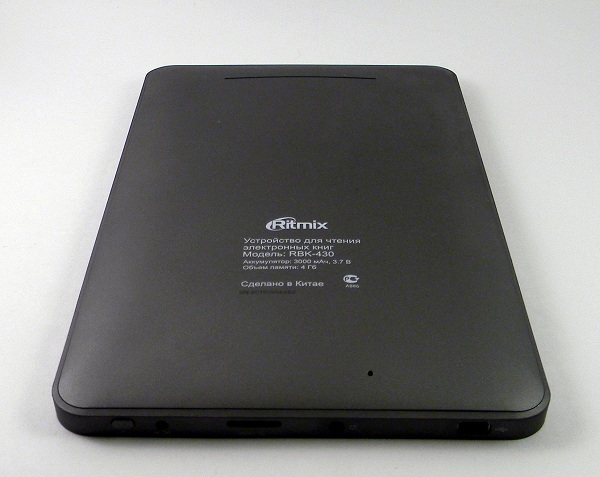
This is the most "long-playing" model from the line. However, the presence of a large battery is reflected in the weight of the device - 370 grams. Of course, there are no problems with use because of this - the weight is quite acceptable, but the difference compared with the 420th is noticeable.
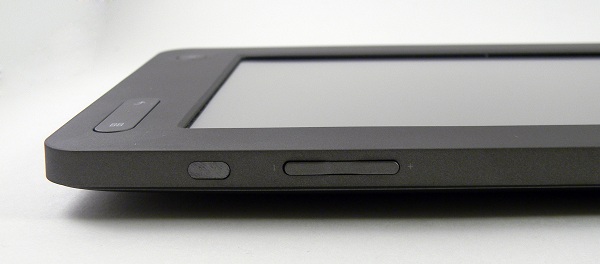
Externally, the device resembles a tablet. The case is apparently made of plastic, which has undergone a special treatment - “hardening”. According to the tactile sensations, the case of the 430th is more durable and less amenable to torsional effects compared to the 420th. The front part of the body is matte and smooth, but the lower part (cover) is covered with a small layer of Soft-touch paint, due to which, when you hold the device in your hands, you get a pleasant tactile sensation.
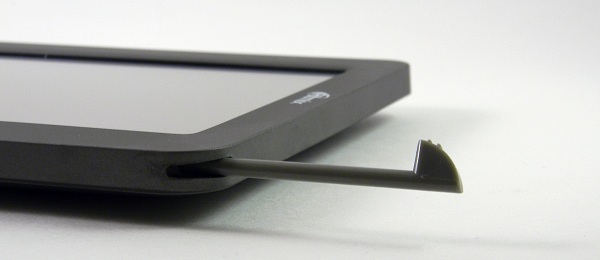
Under the screen there are three buttons to go to the desktop, return to the item back and call up the menu. There is a stylus in the upper right corner, on the right side there is a “rocker” button for adjusting the volume, as well as a mirror oval plate, the purpose of which for me is still a mystery. At the bottom there are: a mini USB connector for a computer, a 3.5 mm headphone jack, a Micro SD (HC) slot, a mains charger connector and an on / off button. Also on the back cover is a longitudinal cutout with a metal mesh, behind which the built-in speaker is hidden.

The cover is tight, has several bend points. It is softer than the case from the 420th model. The device is also mounted in a case with metal brackets covered with a cloth and the clasp is also magnetic. However, there is already only one pocket - a small one, for an additional memory card. But there is a special latch on the back of the case, allowing you to fix it in the open state. Thanks to this, you can put the reader on the table at an angle. The cover is more pleasant to the touch than the cover from the 420th reader, and more "functional".
RBK-450


The most elegant model from the line. Thin, looks like a “mini” iPad and looks very elegant. Although the design repeats to some extent the design of the apple tablet - we must pay tribute, the device does not look like a cheap fake for the iPad. Externally, the device looks quite respectable and tactile sensations are not inferior in strength to the 430th - its body also does not lend itself to torsion.
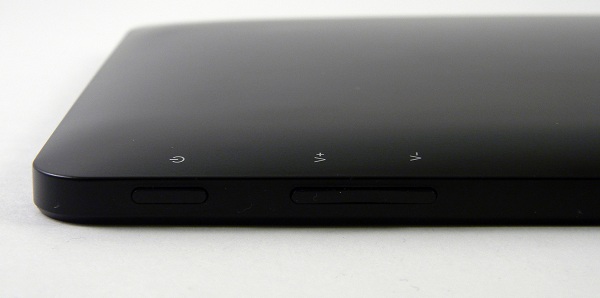

The case of the e-book is made of glossy black plastic. But you have to pay for beauty - the surface is easily soiled, fingerprints remain. The overall design is made with a bias towards minimalism - on the front side there is nothing except the screen and one button. On the right side is the on / off button and the rocker button for adjusting the volume. A stylus is attached in the lower right corner. At the bottom there are: a mini USB connector for a computer, a Micro SD (HC) slot for a microphone, a microphone, a mains charger connector and 2 whole 3.5 mm headphone jacks. On the back cover there is a speaker and a reset button.

The case is also the most original of the entire line - the thinnest, thickest, covered with suede on the inside. The latch, like other covers, is magnetic. But the reader is fixed in the case with the help of special pockets and straps - a large pocket at the bottom with a hole for the button, covered with suede on the inside, and two small straps on the top on the sides. The case almost does not thicken the device, durable and comfortable.
RBK-470
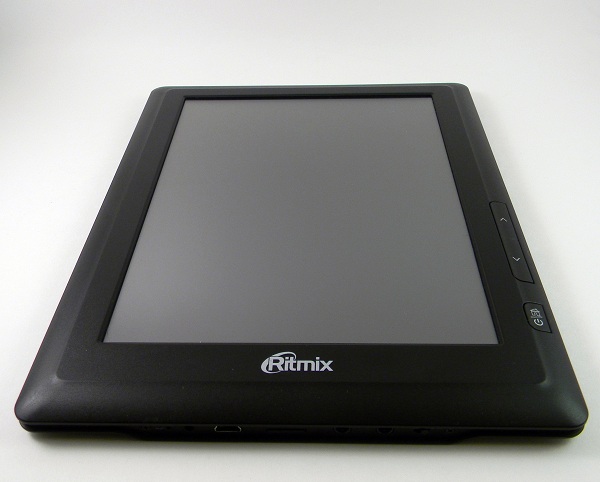

The largest reader with a non-standard aspect ratio for such devices is 4: 3. By manufacturers, it is positioned as the first e-book in Russia with a color touch screen of 8 inches.
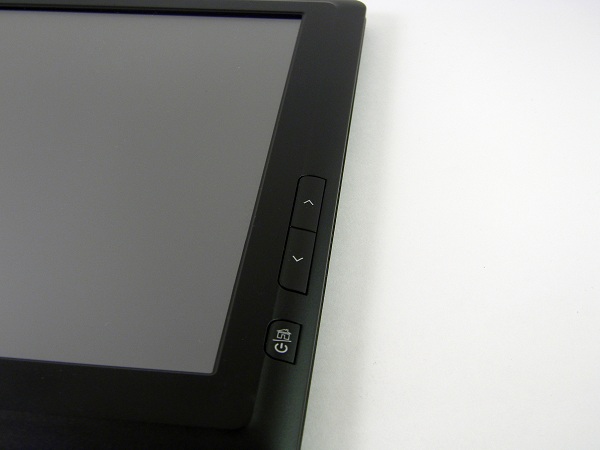
The case is made of matte black plastic - of two halves and a fringing made in the form of a specific groove. Although the case and matte, it is still easily soiled. The device does not abound with buttons - there are only three of them and they are located to the right of the screen on the front side. Due to its large size, the device cannot be called as reliable as, for example, the 430th or 450th model - the case is a bit, but still lends itself to torsion.
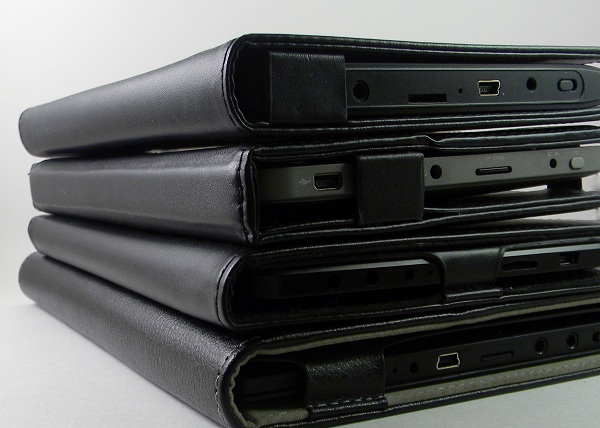
At the bottom end in this same “groove” are: a microphone, a connector for connecting a charger from the network, a connector for connecting to a mini USB computer, a slot for Micro SD (HC), in the 8-gigabyte version there is a connector for connecting a cable that allows you to output video on the TV screen, a 3.5 mm headphone jack and a hardware shutdown button. On the upper back side is an integrated speaker protected by a metal mesh.

The cover of this model is no longer as strict as that of other models - a white border, a rubberized white inner surface. There are two pockets for additional memory cards. The device is mounted in a case using a special compartment with a cutout for the screen and side buttons. Like all other cases - magnetic closure. There is also a latch on the back side (like the 430th model) that allows you to put the reader in a case on a table at an angle.

Screen
All readers except the 470th have screens with a diagonal of 7 inches and a resolution of 800 x 480, and the 470th screen diagonal of 8 inches and a resolution of more than 800 x 600.
The viewing angles of all readers are acceptable - from all angles, except from the left, you can watch, the colors are practically not inverted. However, absolutely all screens fade in the sun, and the instructions explicitly say - do not hold the screen in direct sunlight "to avoid damage to the device."
The brightness of the screens . 470th, 450th and 430th have a 15 gradation of brightness, but the 420th only 5.
The leader in maximum brightness is the 450th model, then comes the 420th model and the last place is shared by 430 and 470th model. However, this does not mean that the 430th or 470th lacks it, rather the 450th maximum brightness is too large, but it is too large for reading indoors or in transport, but thanks to such brightness only from this reader from the entire line you can at least somehow read on the street on a sunny day, provided that direct sunlight does not fall on the screen - then it immediately fades.
But the distribution according to the minimum possible brightness of the backlight is already somewhat different - 430 leads, then goes 470, then 450 and in last place 420. However, at 420 the minimum brightness may be too large for fans to read in the dark. But the difference in minimum brightness at 430, 470 and 450 is small. In principle, it is quite pleasant to read from all readers in complete darkness - the eyes practically do not get tired.
It is also worth saying a few words about sensor grids (the 420th model does not concern it - it does not have a sensor). 430 and 450th readers have the same grids oriented under the stylus, i.e. they have resistive screens. You can try to press the screen with your nails, however, with this control method, pressing will not always work and it is easy to miss - it is better to use the stylus that each of these readers has. There are no problems with stylus device management. And the 470th already has a screen oriented under finger pressure, although the screen is also resistive - you can use the stylus from third-party devices if you wish. Of course, the sensitivity of the screen of the 470th reader is not high and it is far from the sensitivity of the capacitive screen of modern smartphones, but there are no special control problems.
Menu
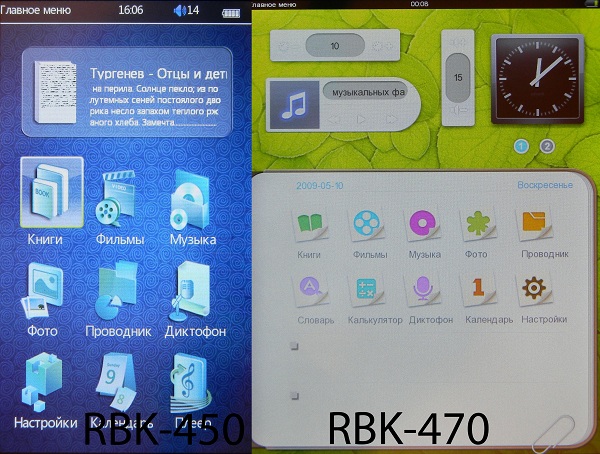
Here I can do without a detailed description - from photographs, and so everything is clear.

Reading of books
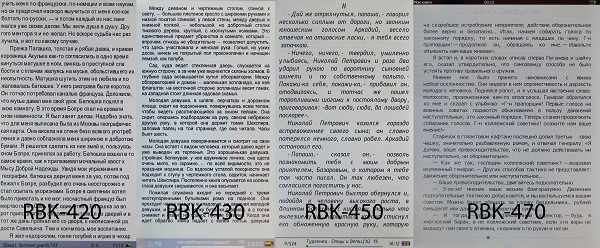
The structure of this section will be constructed as follows: first, a table will be presented in which the main features of each reader will be described when working with text (font size, font selection, etc.), followed by a table in which test results of the operation of devices with various text formats, including those that are not indicated in the specifications on the off site. And in conclusion, it is worth talking separately about the work of each of the readers with PDF files.

I will comment on this table.
As for the transition to the desired page, then in the 450th, 430th and 420th models this is done by entering the number of the desired page in the corresponding menu item (we are talking about switching to a page far from the current one, because you can go to a page close to the current one and normal flipping). But in the 470th model there is no such menu item, however, in the reading mode of books at the bottom of the screen there is a slider, moving which you can navigate through the pages. However, the minimum step of the slider depends on the number of pages in the book - if the pages are around 100, then using the slider you can easily get to any page, and if there are 500 or more pages in the book, sometimes it’s difficult to get to the desired page with the slider - its minimum step it becomes 4-5 pages, in which case it’s more rational to get the slider to the nearest page to the desired one,
420th and 430th are different in that they have the ability to select the encoding for TXT files, and this is important for books in foreign languages. But the other two - the 470th and 450th - cannot boast of such an opportunity, however, this will not be a problem for books in Russian or English.

The 450th was distinguished by the lack of the ability to rotate text 90 degrees, which is why it is simply not possible to read some PDFs. However, the absence of such a function doesn’t particularly hinder books in other formats - you can read, although perhaps someone fundamentally does not like to read in portrait orientation, then such a reader will not work for him.
470th has a rare opportunity - handwritten notes. There are few settings for this function: you can enable or disable “tags” or delete them. You cannot change the line thickness or color (standard - red). However, the function can be very useful and will appeal to those people who are used to reading ordinary paper books with a pencil, and when switching to the electronic version, they suffer from a lack of the ability to mark fragments of text.

Testing various book formats
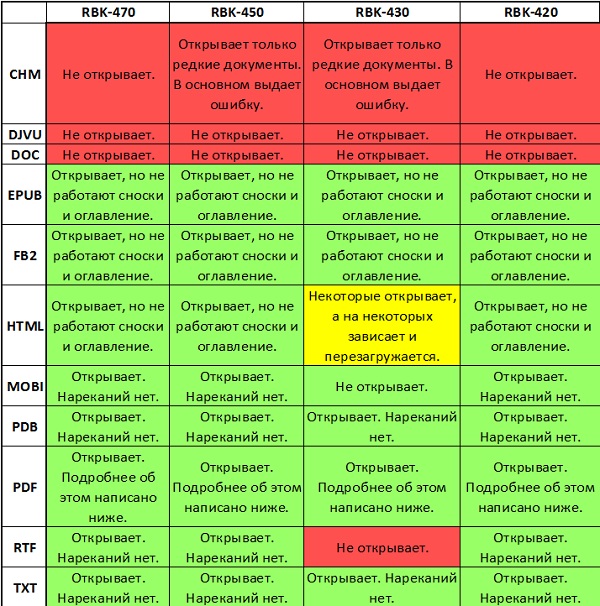
In principle, the test results are good. However, some discrepancies with the information indicated on the manufacturer's website are noticeable. For example, about the 470th on the site it is written that it reads TXT, EPUB, FB2, PDF, PDB, CHM, HTML, but in fact the list is slightly different: EPUB, FB2, HTML, MOBI, PDB, PDF, RTF, TXT .
Work with PDF
Work with this format of books should be discussed in more detail, given that the PDF file can be a repository of scanned images with text (hereinafter referred to as the “PDF-scan”, or it can be a combination of text and raster and vector graphics (hereinafter referred to as "PDF text + pictures").
RBK-420
PDF scan When working with such documents, there are the following options: rotate the text 90 degrees, fit the entire page on the screen, scale to the width or height of the page, as well as several scale options (very small, small, medium, large and very large). In the enlarged state, the transition through the text occurs on-screen, rather than smoothly. Unfortunately, there is no manual adjustment of scaling, therefore, depending on the "complexity" of the file, it will not be possible to read it or not.
PDF text + pictures. When reading PDF, an additional item “PDF REFLOW” appears in the menu, which is necessary for files such as “PDF text + pictures”. Its essence is that the reader tries to determine where the text is in the file and where the pictures are and arrange them in such a way that it is more convenient to read - i.e. to fit the screen. In most cases, this function works well, but part of the formatting flies. For example, in most cases the reader puts its own font, also if a table appears along the text, the reader will show it, however, it can ignore the colors of the cells - it will show them all in white. For technical documents in which the formulas are presented in the form of text, and not in the form of pictures, this function will not work - it will show “crooked hair” instead of formulas or will show nothing at all.

RBK-430
PDF scan. When working with such files, the set of possibilities is limited: you can rotate the image 90 degrees or increase it, only 4 gradations of magnification and the maximum is approximately 200% of the initial scale (the page is inscribed on the screen). Enlarged image navigation is done with a stylus. In principle, it is quite convenient, such documents are rarely found in which the text is so small that there is not enough maximum magnification, and there are problems with reading. It is also worth noting that in the case when the image is enlarged, point and short presses on the corresponding areas of the screen allow you to go forward or backward on the page, or call up the menu, and long presses with the stylus moving around the screen allow you to move around the image. However, if the image is enlarged,
PDF text + pictures. The work of this reader with documents of this type is identical with the capabilities of the 420th model, with one exception: the presence of the “PDF REFLOW” function in the 430th model is somewhat veiled and you may not immediately learn about its existence. When reading PDF, the number of menu items changes slightly - two identical “font size” items appear at once, separated from each other by two other items. So, if you select the first item “font size”, you will be able to increase or decrease the size, but in this case the reader treats the file as a set of pictures and increases the image, not the font size. But when you select the second item "font size" offers a choice of its size - 14, 18, 22, 26 or 36.

RBK-450
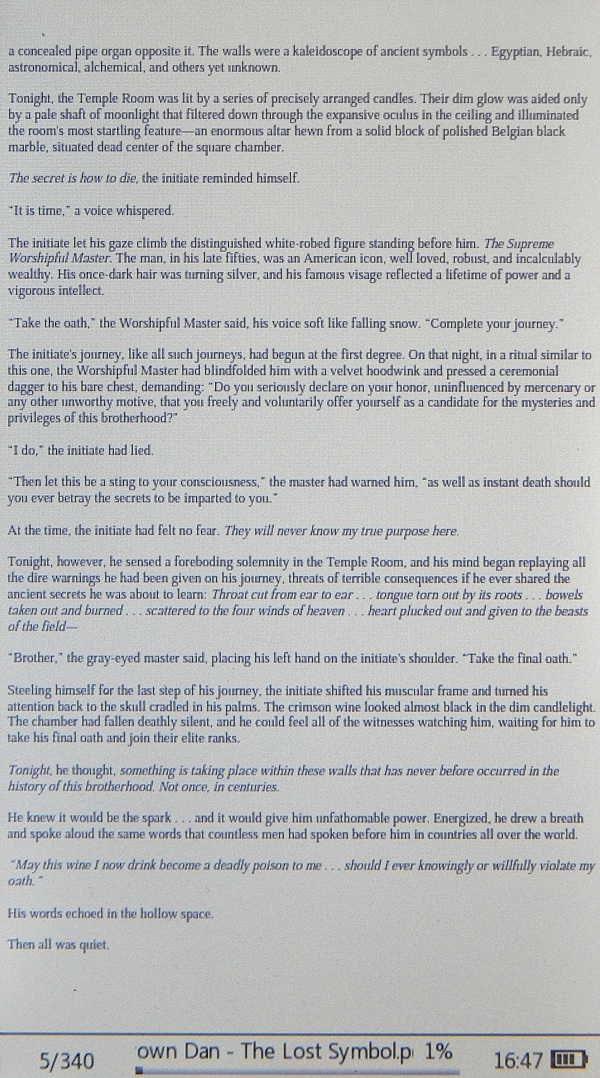
PDF text. You can only enlarge the image. Only 6 gradations of magnification, and the maximum magnification corresponds to approximately 200% of the minimum (the page is inscribed on the screen). Moving through the enlarged image is carried out using the stylus, however, due to the inability to rotate the image 90 degrees, sometimes it becomes inconvenient to read documents - you need to carry the stylus back and forth all the time. On "heavy" documents, the reader thinks and does not always respond to clicks.
PDF text + pictures. The 420th model has no function similar or similar to the “PDF REFLOW” function.
RBK-470
PDF scan. The possibilities when working with such documents are similar to the possibility of a 430 model. You can rotate the text, or enlarge the image, only 3 gradations. However, the method of enlargement is a bit unusual - in portrait orientation, the page is initially stretched to full screen, at the first enlargement the picture is stretched only vertically, and at the next enlargement it grows both vertically and horizontally. The same situation is observed with landscape orientation of the text.
PDF text + pictures. The reader handles such files as well as documents such as "PDF-scan." However, with the poor capabilities of the software, problems when reading PDFs are rare, and most documents can be read without any increase.

Video
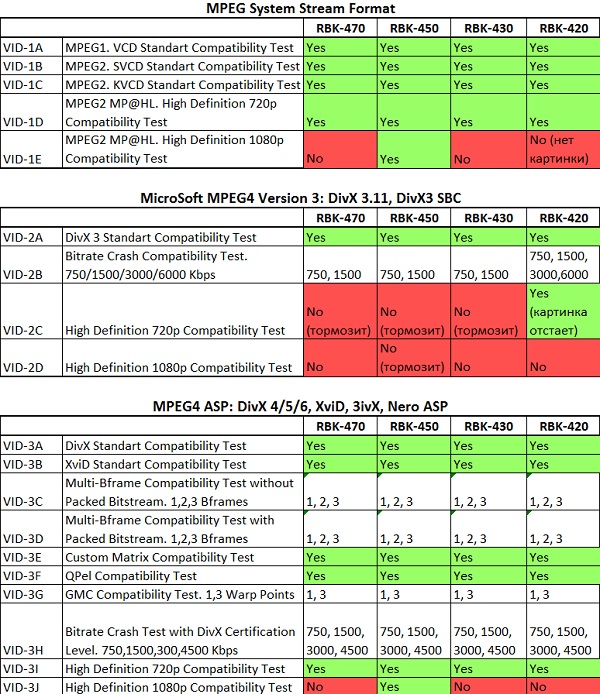
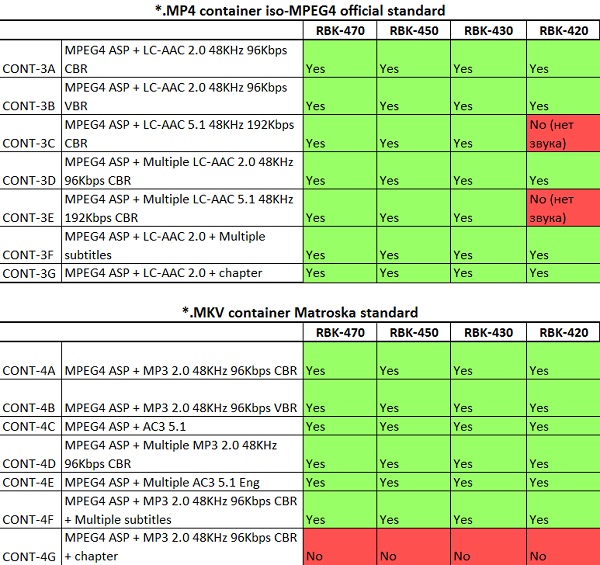
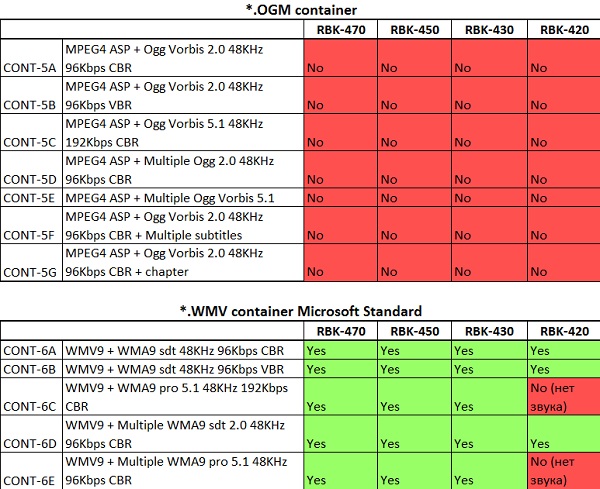
Below are the test results using the DivXTestCD v2.0 disc:
Supported video codecs

Video containers and “bivx” tests

Separated subtitle files tests

The results speak for themselves, and the results for these 4 readers are very good. Readers are almost omnivorous and fully justify the manufacturer's information about them. So, for example, the 470th, 430th and 420th honestly open video files up to 720p, and the 450th quietly opens 1080p - as, in fact, it was announced. The 470th, 450th and 430th models have almost the same capabilities in terms of video playback, container support and opening various subtitles, but the 420th one is losing ground - for example, it does not see * DivX containers and most subtitle files. However, the 420th is the most budget option and therefore its smaller capabilities, which are still pretty good, justifies its low cost.
Audio

In general, the information written on the off site coincides with reality, with some exceptions: AAC is played only lossy, you can also say about WMA.
Some features of each model can be noted:
RBK-420
High frequencies are slightly overestimated, the bass is surprisingly there, but a little weak. In general, the nature of the sound is melodic. It is not suitable for heavy music, but for light instrumental, classical or electronic, which does not require a powerful and clear bass - it’s quite. When using plugs, the volume margin remains large - for example, 18 out of 32 divisions are enough for me.
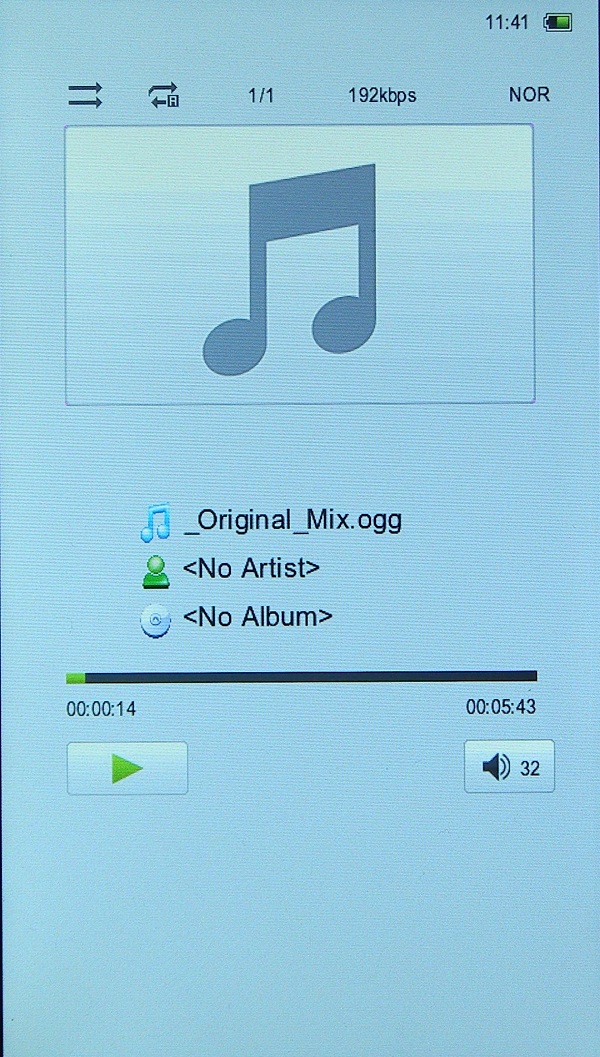
You can listen to music while reading a book, but there is no way to control playback without being in the “music” mode. Those. to switch the composition or change the volume you need to exit the book, go to the “music” item, perform the necessary operations, and only then stomp back to the “books” section.
RBK-430
The situation is similar to the situation with the 420th model - high frequencies are slightly overestimated. However, in general, the sound is more detailed. The volume margin is greater than that of the 420th model - 16-17 divisions out of 30 are enough, however, the maximum volume of the 430th model is greater than that of the 420th. In general, the nature of the sound is melodic.

You can listen to music while reading, but the situation is similar to the 420th model - while reading it is impossible to control playback, unless the 430th model has buttons on the case that are responsible for changing the volume.
RBK-450
In this model, the bass is not littered and the overall frequency balance is fairly even. Unlike the previous two models, the sound character is assertive, and on this reader it is much more pleasant to listen to energetic music. The detail is even greater than the 430th model. The situation with a margin in volume is similar to the 430th model.

While reading, you can not only listen to music, but also control it - you can see the name of the playing song, pause it, or switch the track forward or backward, as well as change the volume using the buttons on the case. But if you need to go to another folder, you will need to return to the player.
RBK-470
The situation is almost identical to the situation with the 430th model, both in terms of frequency balance, volume margin, and in terms of the nature of the sound.
As in the case of the 450th model, while reading, you can control playback, the possibilities are the same. Only here you can control the volume in this reader from the menu sub-item in reading mode, and not using the buttons.
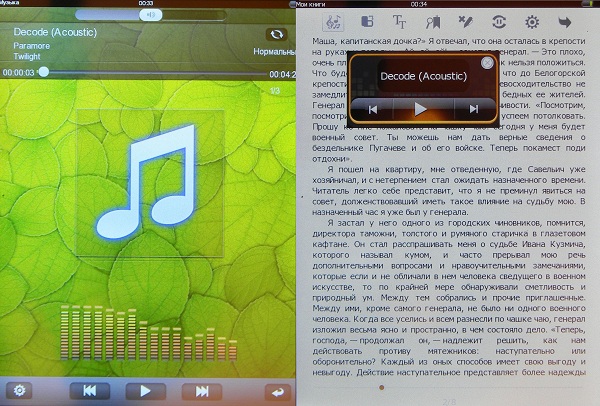
In general, the audio quality of the devices is at a good level and is a cut above that of many other e-books. I was even surprised that they began to put good audio chips in electronic books. Most of all I liked how the 450th model plays - for a device whose main functions are video and books, and not music, it's not even bad.
Additional features briefly
The playback of audio / video and reading books do not end with the capabilities of these devices. However, I will not dwell on additional functions in detail, but simply list them: *
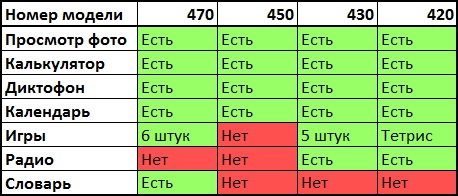
* on the 470th reader there is an EN-RUS, RUS-EN dictionary that can pronounce words in English (cannot speak Russian words), but it can only be used as a standalone application. It is impossible to single out words and translate in the text of a book. Therefore, this opportunity is taken out as "additional".
Price
At the time of writing, the average prices on Yandex Market for these devices are as follows:

Summary
Ritmix RBK-470
Pros:
• Factory fitted cover
• Large touch screen
• Video output to TV (in 8Gb version)
• Convenient software for reading books
• Almost omnivorous video player
• Decent audio player
• Good set of additional features
• Small price
Cons:
• Not optimal aspect ratio for viewing widescreen movies
• Does not recognize footnotes and table of contents in books
Ritmix RBK-450
Pros:
• Appearance
• Factory fitted cover
• Good color
rendering • Almost omnivorous video player
• Excellent audio player
• 2 audio outputs
• Low price
Cons:
• Inability to rotate text 90 degrees
• Does not recognize footnotes and table of contents in books
Ritmix RBK-430
Pros:
• Rugged case
• Factory fitted cover
• Long battery
life (9 hours of video playback at maximum brightness) • Convenient software for reading books
• Almost omnivorous video player
• Decent audio player
• Nice set of additional features
• Small price
Cons:
• Does not recognize footnotes and table of contents in books
Ritmix RBK-420
Pros:
• Low weight
• Factory fitted cover
• Convenient software for reading books
• Almost omnivorous video player
• Decent audio player
• Low price
Cons:
• Does not recognize footnotes and table of contents in books
• Understands few UPD1 subtitle
formats
Firmware
RBK-420
There were no updates.
RBK-430
There is a firmware update from September 13th. Found changes: now the reader understands RTF and MOBI formats.
RBK-450
As it turned out, the developers relatively regularly updated the firmware since January 2011. 4 firmwares have already been released and the latest is dated September 13th. Also on the site there is a detailed manual for the reader and instructions with pictures on how to reflash the device.
Of the pluses, the poorest list of changes can be noted (the list is taken from the off site):
05/23/2011
• Major errors in the device drivers were fixed, and reliability was improved.
• Added the ability to read in landscape mode.
• Fixed the function of auto power off and screen off.
03/10/2011
• Fixed a bug where the font color was not saved
• in “Settings” - “Battery” the percentage of the remaining battery capacity has been added, as well as a bug with incorrect display of the remaining operating time has been fixed.
• Corrected auto power off and screen off functions
• Fixed bugs in the firmware kernel. Now the device works more stable, the firmware will not fall.
01/12/2011
• Fixed some errors in the operation of the device.
• You can change the font for reading - now 5 fonts are available.
• You can change the font color and background. You can now select the desired color using the RGB palette.
• The appearance of the status line when reading is changed - the battery status, hours, percentage of the book read are added.
09/09/2011
• Added English-Russian dictionary.
• Changed the appearance of the main menu.
• Added games and calculator. Together with the calendar, all these new applications are placed in the Applications folder and are located on the “second page” of the main menu.
The information as a whole is true. However, if you follow the threads on the forums dedicated to this reader, you will notice that each new firmware fixed old bugs, added new features, but at the same time brought some new glitches, such as the fact that some firmware might unexpectedly crash while the device was working. However, the latest firmware, judging by the reviews, is the most stable, which cannot but rejoice.
But you need to be careful when flashing the device, because the 450th model has one feature - the firmware easily drops after updating, but, fortunately, it is also easily restored. Actually, when I updated the firmware and immediately to the latest version, I did it not according to the instructions, i.e. not using a computer or a special flasher, but simply uploaded the firmware file and launched it from the explorer on the reader - the update started, the device turned off, then it turned on by itself and the reader asked me to calibrate the screen, then the device showed the desktop and turned off. The feeling was that it simply died - no signs of life: it does not respond to button presses, does not turn on and does not give any signals when the charger is connected. However, if you encounter such a situation and get a “corpse”, then do not despair. The reader is easily animated. After several unsuccessful attempts, I did it as follows (I am writing this procedure, because according to the instructions offered on the off site, the device could not be restored):
1) First, everything is according to the instructions from the off site until the moment where you need to connect the reader to the computer.
2) I connected the dead reader to the computer. The computer swore at the lack of drivers. Firewood must be installed independently, but you can find them in the folder with the flasher.
3) Temporarily disconnected the reader from the computer.
4) After that, I clamped the only button on the front panel of the device (the round button is the cancel button), connected USB, then I pressed the power button for 3 seconds, released for 3 seconds and then quickly pressed the power button three more times and only then released the round button.
5) After that, the flasher suggested starting the firmware update, and then following the instructions.
6) Enjoy the busy device and new firmware.
Now a little about what was actually added to the firmware.
Several photos with a modified desktop:

An important feature has been added - reading books in landscape mode:
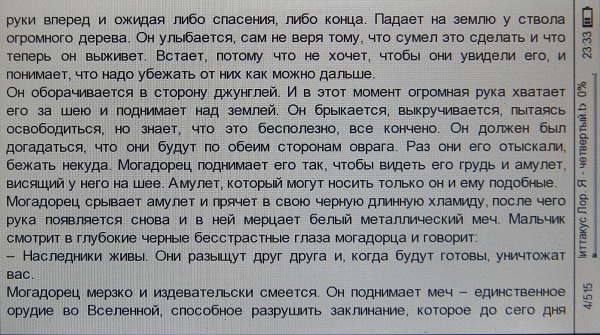
At the same time, the appearance of the software for reading all formats except PDF has remained the same. But the software for working with PDF has changed externally and began to resemble software from the 470th model. And the capabilities of software for working with PDF are the same for the 470th and 450th models: you can only rotate the screen and enlarge the image several times. Softines work equally with both PDF files of the “PDF – scan” type and with files of the “PDF – text + picture” type. Those. PDFREFLOW has no similar function as the 420th model in this reader.

It is worth noting a markedly increased navigation speed, as well as the fact that now the reader does not begin to "crawl" or freeze when reading "heavy" PDFs.
An English-Russian and Russian-English dictionary has also been added. Knows how to pronounce English words. However, as in the case of the 470th model, the dictionary can only be used as a separate application, i.e. while reading a book, you cannot select an unknown word and translate it.
Added games only 6 pieces - the same as on the 470th model.
Now you can open the last book immediately after turning on the device.
RBK-470
At the time of writing the review on the 470th, there was already an updated firmware from September 13th. Actually this update brought the EN-RUS and RUS-ENG dictionary, the fonts were changed and a new function appeared - when you turn it on, the last open book immediately opens.
It is worth making a clarification, because the September update appeared on the 13th, but first, in addition to new features, it brought new glitches. For example, when the device was turned on, the last book did not open; instead, the reader swore that it was impossible to open the file. You could also find reviews that the book is off when discharged in a couple of days. As a result, the firmware from the off site disappeared somewhere, but soon a newer one appeared, dated with a later date. Most bugs were fixed in it, but one new one was added - the soft keys “up” and “down” worked the same way — they both turned back a page, and a bug with incorrect operation of the function that allowed opening the last book when it was turned on was not fixed. But relatively recently there was an updated firmware from October 3,
Working hours
All of the results below were obtained on “developed” batteries. On the Internet you can find reviews in which sometimes more scarce results are given, which is most likely due to the fact that sometimes users forget to do 3-4 cycles of full discharge / charge, thereby reducing the battery potential. Although at the same time you can find more optimistic reviews about how much the devices work on a single charge.
RBK-420
At a brightness of 13 out of 15, a full battery charge is enough for 4-5 hours of video viewing.
At medium brightness - 5-6 hours of reading books.
RBK-430
At a brightness of 13 out of 15, a full battery charge is enough for 8-9 hours of video viewing.
At medium brightness - 10-12 hours of reading books.
RBK-450
At a brightness of 13 out of 15, a full battery charge is enough for 4-5 hours of video viewing.
At low brightness - up to 7 hours of reading books.
RBK-470
At a brightness of 13 out of 15, a full battery charge lasts for 5-7 hours of video viewing.
At low brightness - up to 10 hours of reading books.