Robotic Operating System Basics
Introduction
Good day to all!
Mastering the expanses of Habr once again, he noticed that there is practically no information about the Robotic Operating System (hereinafter simply ROS). I hasten to correct this oversight and popularize a wonderful product.
What is it? ROS is an add-on for the OS, which makes it easy and simple to develop robot control systems. What does this mean and how to live with it later - and a series of topics is intended to tell.
In essence, ROS is a collection of various widely (and not very) well-known libraries, such as:
- OpenCV - a library containing computer vision and image processing algorithms;
- PCL-library for working with clouds of 3D points;
- Ogre is an open source object-oriented graphics engine;
- Orocos - a library for controlling robots (for example, the calculation of kinematics).
ROS also includes drivers for various manipulators and sensors (including MS Kinect). But what makes ROS different from a simple library build? The fundamental advantage is the client-server architecture of ROS - the developers have implemented a mechanism for sending messages between different objects, the ability to build distributed systems, providing brige'ey to C ++ and Python.
To start using ROS, you still have to start with the installation. The work plan itself looks something like this:
- Installation, basic concepts
- We create our own package, get acquainted with messages, a simple program
- Services and options
Deployment
Today, ROS is stably installed and works only on Ubuntu versions 10 and higher, using Natty as an example, we will consider all the subtleties of this process.
So, the first step is to set up repositories. We need to unlock the "restricted," "universe," and "multiverse" components, for this we need to uncomment the following lines in the /etc/apt/sources.list file:
deb-src http://security.ubuntu.com/ubuntu natty-security main restricted
deb http://security.ubuntu.com/ubuntu natty-security universe
deb-src http://security.ubuntu.com/ubuntu natty-security universe
deb http://security.ubuntu.com/ubuntu natty-security multiverse
deb-src http://security.ubuntu.com/ubuntu natty-security multiverse
Then you need to add the repository for installation and updates:
sudo sh -c 'echo "deb http://packages.ros.org/ros/ubuntu natty main" > /etc/apt/sources.list.d/ros-latest.list'The next step is the installation of a digital signature. Everything here is also quite trivial:
wget http://packages.ros.org/ros.key -O - | sudo apt-key add -After that, update:
sudo apt-get updateand try to install the ROS meta-package itself. There are 4 installation packages, differing in the volume of modules provided. I will use the most complete:
sudo apt-get install ros-electric-desktop-fullAfter the process of downloading and deploying all kinds of gizmos is over, in the / opt directory you should see the ros folder.
The final step is updating the environment variables:
source /opt/ros/electric/setup.bashFrom this moment, ROS is ready for
roscoreThis will start the master process, from which ROS, in fact, starts work.
In another write
rosrun turtlesim turtlesim_nodeAnd don't forget to initialize environment variables in each terminal first!
source /opt/ros/electric/setup.bash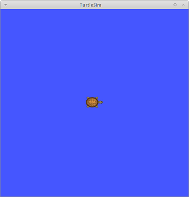 If a cute turtle appeared in front of you, then everything is fine. Do not close this window, it is still useful to us. To not be so bored, open a new terminal and enter the following:
rosrun turtlesim turtle_teleop_keyFrom this terminal, you can now control the reptile.
The installation process on other OSs is not much more complicated, but, unfortunately, much less stable (on Fedora 15, for example, I could not get it started). We can only recommend writing bug reports, publishing patches and we will all be happy.
Basic concepts
Let's start by looking at the basic concepts of the ROS file system (FS).
A package is called the smallest unit of FS. It is a directory containing any data, libraries, executable and configuration files, etc. etc., logically combined into some kind of useful module. The purpose of this structuring is completely transparent - to increase usability and reusability.
The package structure is as follows:
- bin /: compiled binaries
- include / package_name: header files for C ++ (must be described in manifest.xml!)
- msg /: message types
- src / package_name /: C ++ source code and Python scripts exported to other packages
- srv /: types of services provided by the package
- scripts /: scripts in Python
- CMakeLists.txt: CMake file for building a package
- manifest.xml: package manifest
- mainpage.dox: Doxygen documentation
Packages in turn are stacked . In the picture you can see an example of such a structure.
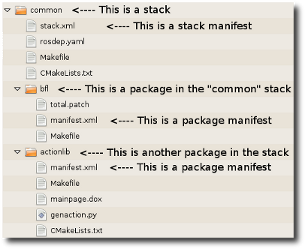
As you can see, ROS has a rather complicated file system and in order not to bother with long paths to various directories, users are provided with a number of utilities.
rospack find [pack_name] - returns the full path to the package directory
crady@cradyLap:~$ rospack find rviz
/opt/ros/electric/stacks/visualization/rviz
rosstack find [pack_name] - the same thing, but for the stack
crady@cradyLap:~$ rosstack find navigation
/opt/ros/electric/stacks/navigation
This, so to speak, is static. Dynamics in ROS is described by nodes and buses (topic).
A node is a running process that can communicate with other processes.
A bus is a named pipe that connects various nodes.
Nodes and buses form an asynchronous data exchange mechanism. If you still have a window with a turtle, then you can now see it also. If it is closed, somewhere somewhere above it is written how to return everything to its place.
Open the third terminal and enter the command
rxgraph
In a new window you will see which nodes are currently active and through which buses they communicate with each other. If you also want to listen to what they are discussing there, then you need the following command:
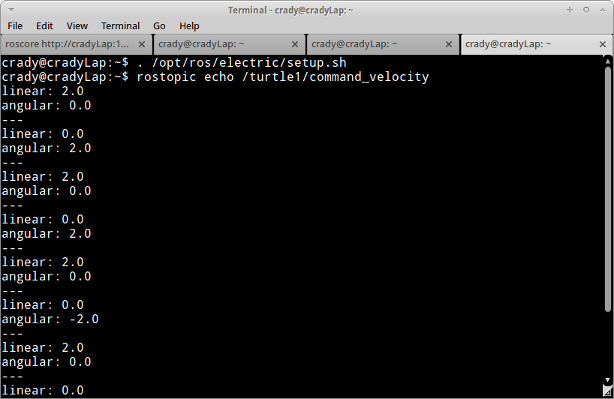
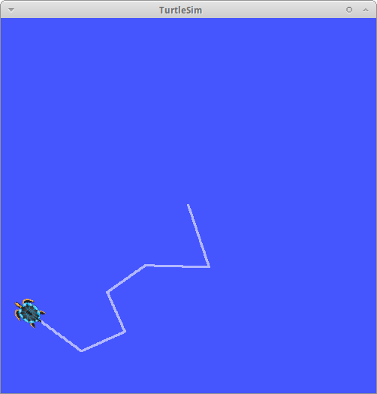
rostopic echo /turtle1/command_velocityMove the turtle and see the commands appear on the / turtle1 / command_velocity bus.
Conclusion
That’s probably all for today. There are still services, parameters, detailed explanations of messages and tires, and now is the time to reward those who have overcome the basics of ROS with a bottle of cold-that-same. )
Useful links:
- www.ros.org/wiki - headquarters for users and developers
- answers.ros.org/questions - a collective mind will help you with any problems (but, nevertheless, not beyond ROS)