September 8, 2011 at 15:05
Capturing Cisco ASA Traffic with NetFlow and nfdump on FreeBSD or Linux
Introduction
Almost every network administrator faces the task of accounting for traffic. Either you need it for billing, or just to monitor activity.
To solve this problem, you can use the standard NetFlow protocol (RFC 3954), which is supported by network equipment manufacturers (Cisco, Juniper, 3Com, etc.), as well as Linux, * BSD, and DD-WRT firmware. Netflow allows you to transfer traffic data (sender and receiver address, port, amount of information, etc.) from network equipment ( sensor ) to the collector . The collector, in turn, stores the received information. You can use a regular server as a collector. I will illustrate the scheme with a picture from Wikipedia:
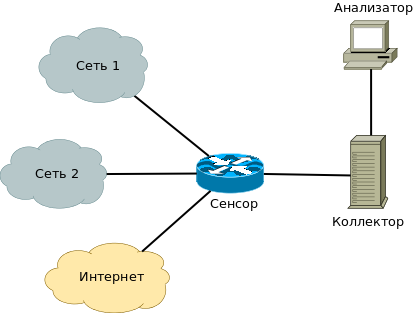
When I started to configure NetFlow, it turned out that open source solutions for implementing the collector do not work well with Cisco ASA, and there is very little information on the Internet what to do in this case. I decided to fill this gap: FreeBSD / Linux can become friends with Cisco ASA in 20 minutes.
To begin with, what didn’t work for me:
flow-tools - does not work at all, apparently it does not support NetFlow v9.
flowd - does not save data on the number of bytes and packets transmitted.
nfcapd - incorrectly saves date and time, number of bytes transferred.
I do not deny the possibility that my crooked hands are to blame, or that the new version of these programs will add buggy support for Cisco ASA.
Collector
After a long search, I came across a version nfdump supporting the NSEL : nfdump-1.5.8-the NSEL , which works perfectly with the ASA.
The installation process is standard:
First, download and unpack nfdump-1.5.8-NSEL.
Then in the nfdump-1.5.8-NSEL folder: After that, we will get several programs: nfcapd - the collector daemon, listens to the port, collects data and writes to files. nfdump - reads and displays the data collected by nfcapd. nfexpire - Rotates files created by nfcapd. nfreplay - reads collected nfcapd files and sends them over the network to another collector. We start the collector: nfcapd will begin to write the received data to a temporary file nfcapd.current. PID
./configure

make

make install
nfcapd -l <папка для записи данных> -t <интервал ротации файлов (сек)> -Din the folder specified by the -l option. When the time interval specified by -t has passed, nfcapd will copy the contents of the temporary file to nfcapd. yyyymmddhhmm . Thus, in each such file traffic information for the last -t seconds will be stored.
The -D switch indicates to work in daemon mode.
The -b option specifies the IP address to listen on, -p allows you to change the default port.
Sensor
Now you need to configure the Cisco ASA. Because I am a Cisco professional, I will provide links to ready-made manuals:
If you configure ASA through the ASDM GUI.
If you configure ASA through Truy console.
Unfortunately, in my version of ASDM (6.3) there was a glitch that did not allow adding a collector to the policy rule, so I still had to climb into the console.
Now, if everything went well, packets should sprinkle on the collector: And in the folder where the nfcapd files are saved, the file size should begin to grow.
tcpdump port 9995

tcpdump: verbose output suppressed, use -v or -vv for full protocol decode

listening on em0, link-type EN10MB (Ethernet), capture size 96 bytes

18:22:36.909747 IP 192.168.4.1.56684 > 192.168.4.7.9995: UDP, length 1436

18:22:37.012687 IP 192.168.4.1.56684 > 192.168.4.7.9995: UDP, length 1464

18:22:37.065782 IP 192.168.4.1.56684 > 192.168.4.7.9995: UDP, length 1432

...
Garbage collection
At ~ 30 connections per second (network of 150 users), the log per 1 minute takes about 2 Mb.
To avoid cluttering the disk, add nfexpire to crontab command:
/usr/local/bin/nfexpire -e <папка для записи данных> -s <макс. размер данных> -t <макс. время жизни данных>For example, running nfexpire with the -t 2w option will delete all files older than two weeks, and with -s 20g the oldest files, so that their total size is no more than 20 GB. These options can be used together.
Data processing
You can get data from nfcapd. * Files in a human-readable format using the nfdump utility: As you can see, the output of nfdump is easily amenable to further parsing. It should be borne in mind that each record contains information not about one packet, but about a stream - a set of packets passing in one direction. Nfdump can also read multiple files, collect statistics, and filter records. There is also a web interface to nfdump - NfSen , which can draw beautiful graphics.
nfdump -r <путь к файлу>

2011-09-04 19:53:45.484 TCP 192.168.2.11:1057 NA -> 217.20.152.98:80 DENIED I-ACL 0

2011-09-04 19:53:45.554 TCP 66.249.66.34:55383 NA -> 46.46.152.214:80 DELE-U Deleted 0

2011-09-04 19:53:30.887 TCP 192.168.4.183:63015 46.46.152.212:63015 -> 89.185.97.235:80 CREATE Ignore 214

...
If you want to process the data yourself, you will need the -x switch of the nfcapd daemon - it allows you to start the program when the next file is ready. For example, I wrote a php script to process the output of nfdump, and my nfcapd launch line looks like this:
/usr/local/bin/nfcapd -t 600 -w -p 9999 -l /data/flows/ -D -x '/usr/local/bin/php /usr/local/share/sams/all_traf_stats.php %d/%f' &Note that the command is enclosed in single quotes and that% d and% f are passed as parameters to the script - this is the nfcapd folder and the name of the last file, respectively .
Logging every packet in the database turned out to be very expensive, so my script just counts the statistics for each host and protocol in bytes every 10 minutes. Thus, I track the infected machines and amateurs to download the organization’s channel by downloading films - in the morning I receive a letter from the top20 “rockers”. Also, the data from nfdump supplements the statistics of the transparent Squid proxy server, which only serves port 80.
If someone needs this script as an example, you can download it , but do not expect beautiful code :) The script does a good job at ~ 500 records per second. If the load is very large, then he will begin to eat too much memory.
conclusions
Using NetFlow it is possible to organize traffic accounting, receiving information from routers and firewalls. This will allow you to log traffic, receive statistics for billing, or detect suspicious activity on the network. Also in this topic I tried to tell how to make Cisco ASA work in tandem with FreeBSD, because at one time I did not find such howto on the net.