OpenVPN Web Manager VPNFace Lite Client Keys
Intro
About the increased, in a distant from the network technologies of the population, the demand for the magic letters of the VPN and their reasons are not even interested in joking.
Hi, and you understand computers? will you help me about vpn?
In fact, I am even glad that people start learning the basics of computer networks (what is Vpn, what is it like, and why do different sites start to open with it?), And, if possible, I help. I try to push on the processes of self-configuration of my own VPN servers, but I understand perfectly well that not everyone can be sysadmins , so I just suggest that I familiarize some of my friends with a server and give it to me for configuration.
But any programmer should be lazy so as not to repeat the same thing many times. Performing the same actions over and over again sharpens the new ones, but kills the entire interest of development and creativity (and time).
And so, setting up the third server, I realized that I had to automate all this and make the user friendly so that after a little instruction even the most ordinary user could share the ovpn key with a friend or relative. And even better - that the user could install the system on his own with minimal skills and knowledge.
This is how the VPNFace project was born - a set of server scripts for managing user keys of OpenVPN servers, and a web control panel for them. And after a few days of development, I caught myself thinking that already somewhere around 25% of the pledged functionality would never be demanded by this very “ordinary user”, and the Lite prefix was added to the name, and the main concept of the project changed from general design to narrow-design tool , which at the same time also significantly reduced development time before release.
Of course - well, never such as was not - why another OpenVPN upravlyator? To be honest - the thought of other projects as managers came to me when the main core was already working, and I was cutting all sorts of stuff. At first, I was upset that I was so stupid and did not even conduct a minimal study (since I don’t like to produce bicycles especially), but after studying the above projects, I realized that mine also has its niche.
Key features:
- Functional minimalism: a normal user when interacting with vpn as an administrator requires only a few functions - create a key, lock, and unlock. It is unlikely that he would think about creating another VPN server, if he has a working one, or climb up to change certificate center data. Very few people will need beautiful graphics of traffic, and the functionality of the Enterprise E-server, for the purpose of quietly using the telegram .
- Software minimalism: the only program the user needs is the official OpenVPN client available on all systems and devices. Key management panel - a web application running in a browser. Administrative authorization is carried out by the vpn key.
- Semi-fixed configuration: 80 percent of users need the same thing, and they don’t care what ip addresses inside the network (they don’t even know that they are there), another 15% require a little more, but, similarly, one also, the remaining 5% write similar things themselves, realizing in them everything as they need, so you can not worry about them. But nevertheless, the panel can be manually connected to servers that are already running openvpn, or correct certificate data before a standard installation.
- Absolute detachment to hosting companies or other third-party services - copies in disputes about the most magical hosting are not a little broken, it remains entirely up to the user's choice. The script is more important server operating system - it is written under the Ubuntu / Debian system, but all hosters have them. The system will quietly rise both in the internal home network and in the corporate one.
- the most simplified installation process on a clean, freshly purchased server: if something can be done without user participation, this is done using the hardcode. Therefore Lite. Yes, it was not possible to achieve an installer like Google Outline, a user connection via ssh is required to start the installation, and an independent server purchase, but it was possible to achieve that knowing “how to connect via ssh” would be one of the most difficult of all necessary. With the “default setting”, the user is configured with a “standard” configuration.
Key management panel
With the default installation, three VPN servers are created: the administrator, the Internet, and the dark - as it is not difficult to guess from the names, the first serves for the administrator access to the server and the key management panel (and ssh, if necessary), the second releases the users immediately to the Internet, and the third - transparently leads all possible traffic to the tor network (udp traffic except DNS does not go anywhere, but DNS goes to tor)

It was decided to do the control panel in the fresh sixth AngularJS ( during installation, the compiled version of the panel is downloaded, so that the Angular libraries are not required for the work ). I like the concept of web applications, and I try to develop in this direction, if possible. I also have long wanted to learn angular materials, which would make the admin panel in Google style in various projects.
Key management, as already indicated, is simplified to a minimum:
New key:

Key lock:

Unlocking the key:

The "download" button gives a ready ovpn file for connection.
The minimum user help is built into the panel:

And the project includes compiled documentation, which by default rises for the admin subnet on port 81:

The meaning of the "Lite" version also limited language support - at the moment the whole project exists only in Russian, and multilingualism is not even embedded in the core.
Server part
The server part works on nodejs and bash scripts. Why noda? I like it, and I have a lot of projects on it. Getting to the vpn-manager collection seemed like a good idea to me. The installation script pulls up the node version manager , sets node v10 through it, and creates a link to the system-wide folder for the services written under nodejs.
The packages installed in the node are also minimal - forever, forever-service to run the project as a system service, express - for web api, shelljs - for executing console commands, ip - address and subnet calculator, chalk - color output to the console. Of course, this list can be reduced with minimalism perfectionism, but Akina’s second law was born clearly not from scratch (the same law can be applied to the question “why is nodejs?” And some others) and despite the striving for minimalism in other issues, I decided not to go deep.
The server script manages the openvpn servers through a set of bash scripts and requires a certain file structure of the root directory and the openvpn file configuration. Two json files are used as a database, which allows:
- get rid of interaction with mongo / sql databases and related dependencies and complication of work
- without any problems prepare the "bases" (and the directory and file structure) manually or by script, when installed on a configured working server, when the installer comes bundled, it can even be harmful and the default installation process should be avoided (the need for installation is checked by the presence and content of json files "database")
A separate bonus of the control panel as a standalone web application was the allocation of server functionality into a separate set of http api endpoints, which opens up third-party programs with the ability to manage user keys through regular http requests.
Easy installation (default)
It is assumed that such an installation will run on clean fresh servers. If the server is already configured for some tasks, it is better to refer to the manual installation (so as not to damage the existing functionality).
I like the installation of nvm (node version manager) in which the user only needs to execute one command in the terminal, which he copies from the project site, so the default installer works the same way. While running the initial installation bash script, the iptables-persistent package will ask the user to save the current iptables rules.

The choice of the user is irrelevant, because upon completion of the installation, the last action will be migrated to the firewall, and the new set of rules will overwrite the current selection. At the end of the work, the script will prompt you to complete the installation via the web interface.

Web installation begins with the confirmation of the public ip address of the server. By default, the web script takes data from the browser string url. Focusing on this ip, the server code looks for the network interface of the address for the future configuration of the firewall and openvpn servers.

After receiving the network data, the installer creates an administrator vpn server. It takes some time to generate cryptographic keys during root directory setup, and during development, on the same machine, this time varied from 1 to 15 minutes.
When the server is created and running, the installer proceeds to the second step, where it prompts the user to create an administrator key.
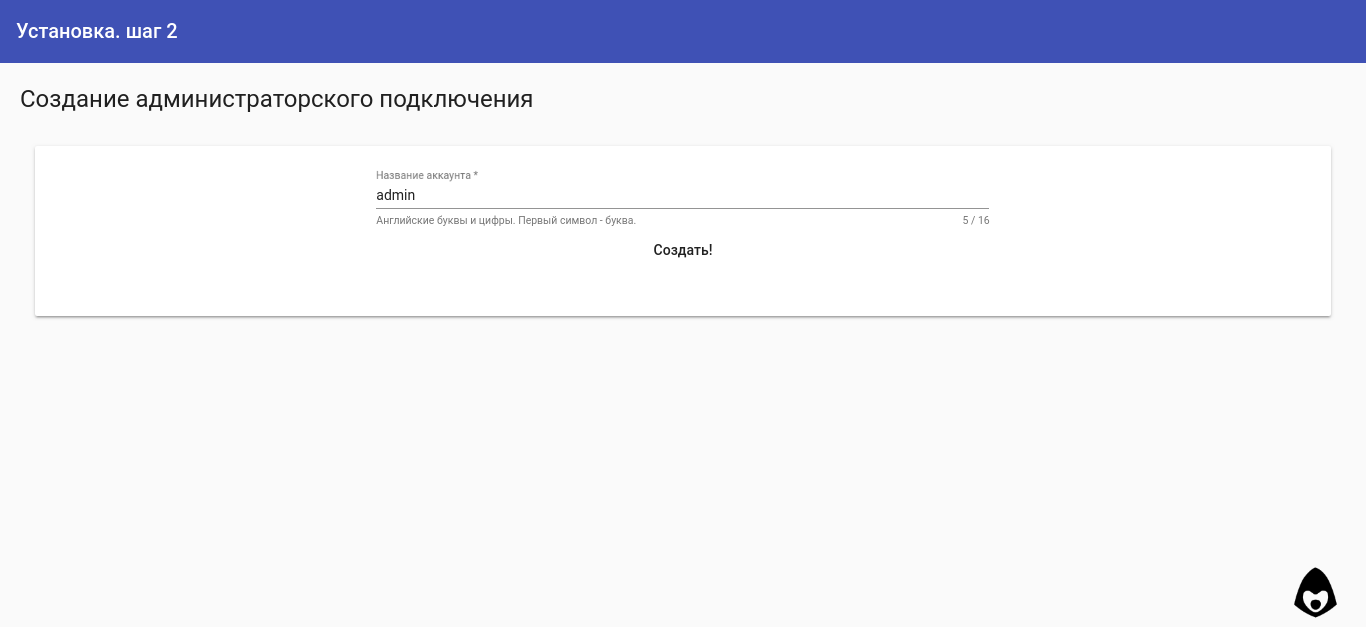
After that, it goes into standby mode to connect the administrator vpn. It is expected that the vpn will be connected on the same device from which the installation is being performed.

When a user connects to the administrator's vpn server, it becomes available at 10.1.0.1, and a jsonp request from the installer page passes there successfully, which becomes a signal to redirect the page to the internal address and complete the installation.

At the final stage of the installation, the remaining two vpn servers (time to generate cryptography * 2), tor, nginx and iptalbles are created and configured. Upon receipt of a signal that the installation of the server part has been completed, the script redirects the page to the main control panel.
Manual installation
Manual installation of the control panel on a working OpenVPN server structure requires several steps and technically executable linux by the administrator (and I don’t think that someone else needs manual installation besides them):
- preparing the nodejs environment for the requirements of the current server security and organization of the script in the required form (service, manual, etc.)
- preparing the file structure of data directories and servers, creating json "databases"
- configure nginx proxy on the control panel and documentation, if necessary
Details and technical details can be found in the online documentation .
As a conclusion
I hope the project will come in handy.
Project
repository The source repository of angular web panels
The project is distributed under the MIT license and published in support of the DIGITAL RESITANCE movement.
PS The ideas of development above the roof - and fasten the multilanguage, and get rid of hard-coded moments in the code, and add the functionality of creating servers, managing routing and firewall, turning the system into a universal designer , etc. etc., but how and when will all this be implemented? Without a clue - the future will show.









