 June 15, 2011 at 21:54
Multi-user chat on BAT
There was a period when the university was asked to do some chats. Depending on the options, various ways of interaction between programs from sockets to mail slots were set. When the tasks were finished, the forces remained to take up the BAT scripts. Here's what happened ...
Everything you need to run:
1. Get the code for the link at the end of Article
2. Save the code to a file .bat *
3. Put the file to a network folder
4. Run the file from different computers (can be from one)
in the comments They suggested using it with DropBox, but they say that it doesn’t work very fast.
First of all, I want to apologize for the code in the screenshots. Just no one will highlight the BAT nickname better than Notepad ++ does.. Snapshots of the code are saved in palette (256 colors) PNG - the weight of the screenshots of the code is 5-10Kb.
Basic elements:
1.% chat% - group name
2.% nick% - username
3. file "% chat% _history" - file with the full history of the group
4. file "% chat%" - file with the last replica in group
5 . file "% chat% _cs" - the file used for synchronization.
First, ask the user to enter the group name and his nickname. After receiving the name of the group and nickname in line No. 5, the script starts itself with three parameters: the word talk_widget, as well as the name of the group and username.

Now we display in the window title the group name and user name (line No. 3). If there is a file called% chat% _history, print its contents onto the screen (line No. 4). Then in the loop we read the contents of the file% chat% and compare it with what it was in the previous reading. If the contents of the file have changed, we print it onto the screen.

Initially, the code has the following structure: at startup, the parameters are checked, if the first parameter is the word "talk_widget", then the script executes the code related to sending the text. In the absence of such a parameter, the code performs the function of receiving and displaying data. Initially, the script is launched without parameters, it asks for the group name and user name, starts the second process with the “talk_widget” parameter, and itself starts to print the contents of the chat group.

Now about how the code accepts input from the user. He first modifies the window title (line number 5). Then it prints a notification message about its connection to the file of the last replica and appends the message to the history. When accessing the replica file, the primitive mechanism of critical sections is used (see below how it works). Further in the cycle (lines 11-19), data lines are received from the user and written to the replica file and added to the history file.

The function of entering the critical section of the file used for synchronization cyclically writes a random number. Until it is there when re-reading. If a file exists at the time the function starts, there is also a slight delay. Delays are implemented through

The critical section exit function simply deletes the synchronization file.

There is a chat with the following qualities:
1. Separation by chat groups (many groups and many users)
2. Getting the history of communication by new participants
3. Network communication (put the script in the shared folder and run from different computers)
At startup, the script asks chat group name and username.

After entering the required data, a second window appears, which serves as a console for input:

Now I will launch the same BAT file (it is in the shared folder) from another computer on the network.

After entering the same chat name and the name of the new user, again a second window will appear for entering data for sending.

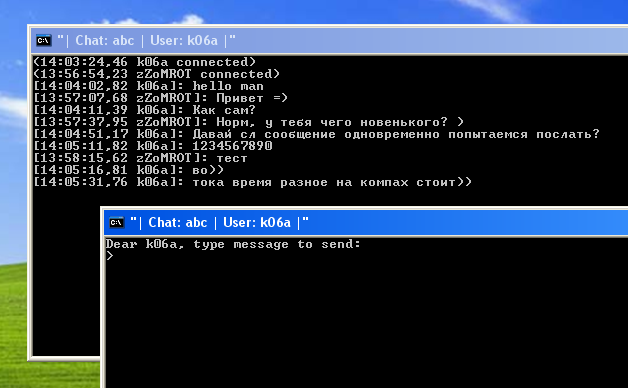
Now we will try to forward messages between subscribers:

Now we will connect from the third computer:

And we will see the following picture:

Attention! An incomprehensible bug was noticed in win7 x64 when running a script from a network folder // ***. The third line of the pushd script "% ~ dp0" has been interpreted for a very long time. It takes% ~ dp0 for a very long time to try, just try calling echo% ~ dp0 - this is at least strange. If you wait 2-3 minutes, then everything will work fine ... in WinXP there are no such problems.
Warning: each time the script is run from the network folderin “My Computer” network drives with the letters Z: Y: X: etc. will multiply After a reboot, they will disappear without a trace.
And of course, a link to the code: http://codepad.org/rvFN13LI
And also useful links:
1. Work with paths in BAT: http: //www.microsoft.com / .....
2. And generally by writing BAT nicknames: http: //www.microsoft.com / .....
UPDATE:
If you happen to use this chat for its intended purpose, khe-khe)) Please leave a comment about the feelings you received.
Everything you need to run:
1. Get the code for the link at the end of Article
2. Save the code to a file .bat *
3. Put the file to a network folder
4. Run the file from different computers (can be from one)
in the comments They suggested using it with DropBox, but they say that it doesn’t work very fast.
First of all, I want to apologize for the code in the screenshots. Just no one will highlight the BAT nickname better than Notepad ++ does.. Snapshots of the code are saved in palette (256 colors) PNG - the weight of the screenshots of the code is 5-10Kb.
First about implementation
Basic elements:
1.% chat% - group name
2.% nick% - username
3. file "% chat% _history" - file with the full history of the group
4. file "% chat%" - file with the last replica in group
5 . file "% chat% _cs" - the file used for synchronization.
First, ask the user to enter the group name and his nickname. After receiving the name of the group and nickname in line No. 5, the script starts itself with three parameters: the word talk_widget, as well as the name of the group and username.
Now we display in the window title the group name and user name (line No. 3). If there is a file called% chat% _history, print its contents onto the screen (line No. 4). Then in the loop we read the contents of the file% chat% and compare it with what it was in the previous reading. If the contents of the file have changed, we print it onto the screen.
Initially, the code has the following structure: at startup, the parameters are checked, if the first parameter is the word "talk_widget", then the script executes the code related to sending the text. In the absence of such a parameter, the code performs the function of receiving and displaying data. Initially, the script is launched without parameters, it asks for the group name and user name, starts the second process with the “talk_widget” parameter, and itself starts to print the contents of the chat group.
Now about how the code accepts input from the user. He first modifies the window title (line number 5). Then it prints a notification message about its connection to the file of the last replica and appends the message to the history. When accessing the replica file, the primitive mechanism of critical sections is used (see below how it works). Further in the cycle (lines 11-19), data lines are received from the user and written to the replica file and added to the history file.
The function of entering the critical section of the file used for synchronization cyclically writes a random number. Until it is there when re-reading. If a file exists at the time the function starts, there is also a slight delay. Delays are implemented through
ping>nul.The critical section exit function simply deletes the synchronization file.
Now about the result
There is a chat with the following qualities:
1. Separation by chat groups (many groups and many users)
2. Getting the history of communication by new participants
3. Network communication (put the script in the shared folder and run from different computers)
At startup, the script asks chat group name and username.
After entering the required data, a second window appears, which serves as a console for input:
Now I will launch the same BAT file (it is in the shared folder) from another computer on the network.
After entering the same chat name and the name of the new user, again a second window will appear for entering data for sending.
Now we will try to forward messages between subscribers:
Now we will connect from the third computer:
And we will see the following picture:
Attention! An incomprehensible bug was noticed in win7 x64 when running a script from a network folder // ***. The third line of the pushd script "% ~ dp0" has been interpreted for a very long time. It takes% ~ dp0 for a very long time to try, just try calling echo% ~ dp0 - this is at least strange. If you wait 2-3 minutes, then everything will work fine ... in WinXP there are no such problems.
Warning: each time the script is run from the network folderin “My Computer” network drives with the letters Z: Y: X: etc. will multiply After a reboot, they will disappear without a trace.
And of course, a link to the code: http://codepad.org/rvFN13LI
And also useful links:
1. Work with paths in BAT: http: //www.microsoft.com / .....
2. And generally by writing BAT nicknames: http: //www.microsoft.com / .....
UPDATE:
If you happen to use this chat for its intended purpose, khe-khe)) Please leave a comment about the feelings you received.









