
 May 18, 2011 at 23:32
TermKit: new graphical console concept
The command shell (console) is perhaps the most archaic element of Unix, which has remained almost unchanged for thirty years. We love him, but it seems strange to someone to sit at the monitor with millions of pixels, looking daily at the console window of the 70s sample, when all the information on computers was exclusively in text form.

But what if we add directly to the console the display of graphics, video and other types of data, and not just text? Changing the conceptual principles of the shell is a crazy idea, but nobody forbids experimenting.
So there was TermKit - a command shell on the WebKit engine. It is capable of displaying lists, tables, images, loading bars and so on.
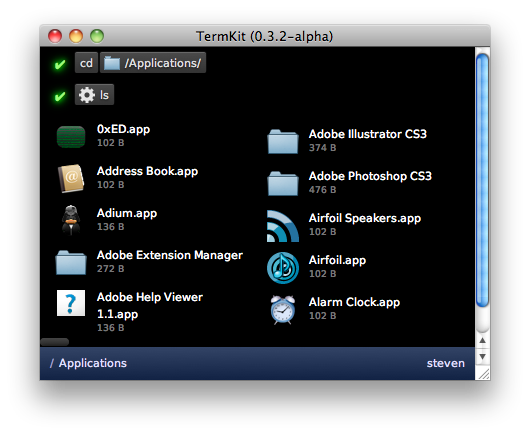
In a short video you can see the console in action. TermKit displays everything like a browser, including HTML5 content.
How it works? The architecture of the backend and frontend of TermKit is described here . Program author Steven Wittens explains in his blog that data streams in the operating system are handled differently for the new command shell. The standard circuit looks like this.
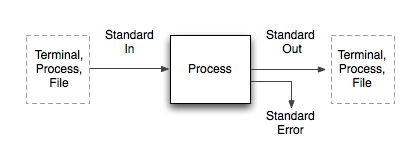
At the same time, each program should monitor whether it is in interactive mode and which data should be displayed, and which data should be output to standard output. Blending human and computer formats leads to many limitations and compromises. To solve this problem, Wittens proposes to separate human and computer flows.
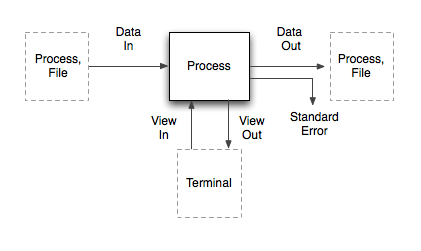
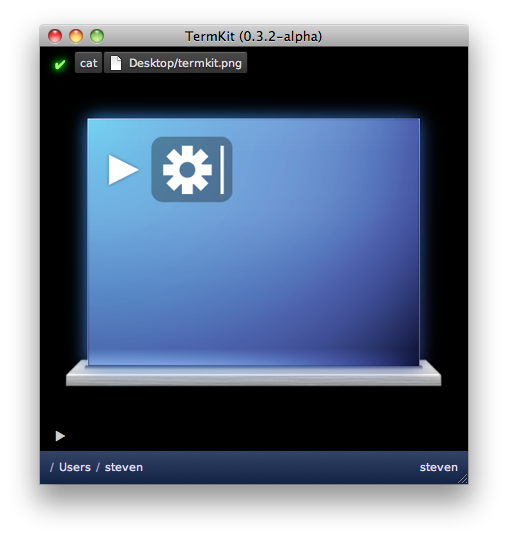
In this case, a MIME header is attached to each classic Std stream: Content-Type, Content-Length, etc., so that the program immediately knows what type of data it receives. The TermKit shell contains a series of handlers for processing each type of data (text, code, images ...) and each time it selects the desired handler, after which it generates a stream for display on the screen. Thus, using the command,
For data exchange, the JSON format is used. In the case of using the listing output command like

In addition to file types, TermKit in different ways highlights the syntax of commands, including quotes, command parameters, auto-completion, so that the shell interface itself becomes more colorful, with graphic elements.

The author of the program believes that its development is consistent with the philosophy of Unix and hopes that after appropriate refinement, the new command shell will make work in Unix more pleasant and intuitive. The current version of TermKit is a cruel alpha that often crashes, so do not expect to work in it constantly, unless you can admire and experiment.
Of course, replacing traditional bash looks too revolutionary. But if you make TermKit as an additional console mode (which you can sometimes turn on if necessary), then you can try.
But what if we add directly to the console the display of graphics, video and other types of data, and not just text? Changing the conceptual principles of the shell is a crazy idea, but nobody forbids experimenting.
So there was TermKit - a command shell on the WebKit engine. It is capable of displaying lists, tables, images, loading bars and so on.
In a short video you can see the console in action. TermKit displays everything like a browser, including HTML5 content.
How it works? The architecture of the backend and frontend of TermKit is described here . Program author Steven Wittens explains in his blog that data streams in the operating system are handled differently for the new command shell. The standard circuit looks like this.
At the same time, each program should monitor whether it is in interactive mode and which data should be displayed, and which data should be output to standard output. Blending human and computer formats leads to many limitations and compromises. To solve this problem, Wittens proposes to separate human and computer flows.
In this case, a MIME header is attached to each classic Std stream: Content-Type, Content-Length, etc., so that the program immediately knows what type of data it receives. The TermKit shell contains a series of handlers for processing each type of data (text, code, images ...) and each time it selects the desired handler, after which it generates a stream for display on the screen. Thus, using the command,
catyou can display the contents of the file directly in the shell. This command selects the MIME header based on the file name and passes the stream to the next process. For data exchange, the JSON format is used. In the case of using the listing output command like
lsdata, a header is assignedapplication/json; schema=termkit.files. The second parameter indicates that we are talking about a list of files to select the correct handler instead of the standard JSON. In addition to file types, TermKit in different ways highlights the syntax of commands, including quotes, command parameters, auto-completion, so that the shell interface itself becomes more colorful, with graphic elements.
The author of the program believes that its development is consistent with the philosophy of Unix and hopes that after appropriate refinement, the new command shell will make work in Unix more pleasant and intuitive. The current version of TermKit is a cruel alpha that often crashes, so do not expect to work in it constantly, unless you can admire and experiment.
Of course, replacing traditional bash looks too revolutionary. But if you make TermKit as an additional console mode (which you can sometimes turn on if necessary), then you can try.