 April 9, 2011 at 18:09
Connecting a Panasonic KX-TDE / TDA Series PBX to E1tele.com
Last week , a client contacted our company who wanted to connect a Panasonic KX-TDE / TDA series PBX to our service. About what our task was, and how we solved it and this topic will be.
Our task: to create access to E1tele.com for internal subscribers by accessing the appropriate trunk group using speed dial numbers. In this case, incoming calls passing through the SIP card to the PBX must go to a predefined internal phone number or to a specific subscriber.
There are two options for solving this problem:
We solved this problem using a board with support for SIP.
Here's how we did it:
To configure the PBX, we used Maintenance Console v3.0.
You must open the Maintenance console and connect to the PBX.
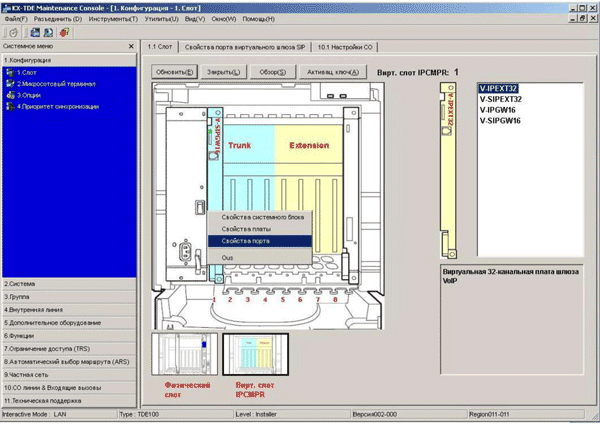
To configure the SIP connection on the PBX, go to menu 1.1., Select the “virtual slot”, in the “Trunk” area, move the mouse over the schematic image of the board and select “port properties” in the drop-down menu.
In the window that opens, the connection settings for SIP trunks are configured. The number of channels depends on the activation key. Depending on your needs, you can configure one or more channels.
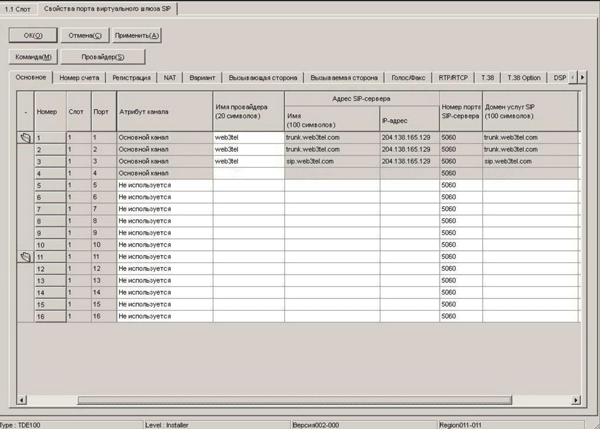
To configure the SIP trunk on E1tele.com, fill in the appropriate fields:
On the next tab “Account Number” we indicate the credentials in the E1tele.com network:
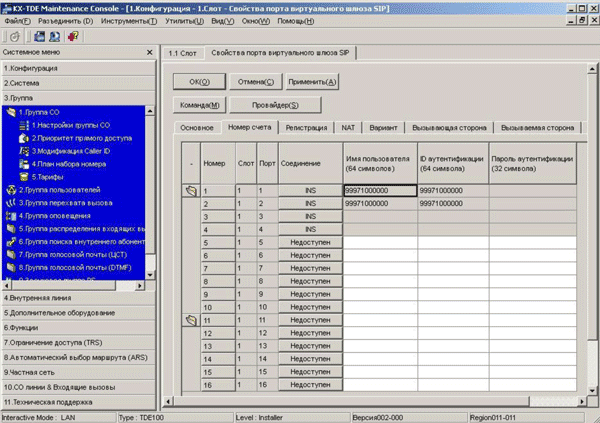
Next, fill in the appropriate fields:
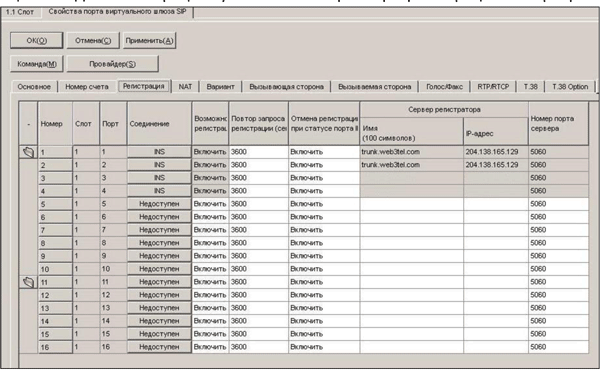
On the next tab “Registration” the registration parameters on the E1tele.com server are indicated:
On the “NAT” tab, the parameters of the STUN servers are indicated. On the E1tele.com network, there is no need to use a STUN server to configure the connection. On the “Option” tab, write down the following parameters:
Leave the remaining options unchanged. After installing the card in menu 10.1, Setting up the CO, additional lines will appear, which, if necessary, can be combined into a trunk group for ease of further use.
If necessary, you can remove these CO lines from the "automatic access to the external line". This can be done in menu 3.1.2 by removing the corresponding trunk group from the access list.

But at the same time, access to it remains under the direct selection code 8XX, where XX is the number of the trunk group. For ease of use, you can use the Quick Dialing function - quick dialing. To do this, in menu 2.6.2 we assign the number of direct access to the trunk group, for example, trunk group 10 with the code 810, the speed dial number, for example 7 or 0. In this case, you can use the speed dial number to access this trunk group.
In order to use the number 0 in speed dialing, it should not be used as a function of calling an operator. You can verify this in menu 6.2.1 on the “Functions” tab:

Setting up incoming SIP calls Depending on the SIP number used, incoming calls are distributed differently. When using a SIP card for registration, the number with the prefix 9992 (issued during registration) and an incoming SIP call can be routed to only one PBX extension number.
Using the SIP number with the prefix 9997 allows the PBX to send an incoming SIP call to any extension number by adding the extension number of the PBX to the SIP number. For example, when configuring the PBX using the SIP number 99971000000, and adding the internal PBX number to it, 110, we get the number 99971000000110, when dialing, the call will go to extension 110. The number with the prefix 9997 has a fixed length of 11 characters, all that is beyond this length, is considered the internal number of the subscriber. The distribution of incoming calls is configured in menu 10.3.
In the column “DDI / DID Number”, write down the complete internal number of the subscriber of the form 99971234567101, where 99971234567 is the SIP number, 101 internal number of the PBX. In the column "Destination DDI / DID" - the real internal phone number where you want to direct the call. Currently, numbers with the prefix 9997 are issued by technical support upon request.
After the setup is complete, internal subscribers will be able to access E1tele.com by accessing the appropriate trunk group using speed dial numbers. Incoming calls coming through the SIP card to the PBX will go to the extension number specified in the PBX or to a specific subscriber.
In this case, to connect to the PBX, we used a SIP-card. In order to connect using SIP gateways connected to the PBX CO ports, see the instructions on our website E1tele.com
Our task: to create access to E1tele.com for internal subscribers by accessing the appropriate trunk group using speed dial numbers. In this case, incoming calls passing through the SIP card to the PBX must go to a predefined internal phone number or to a specific subscriber.
There are two options for solving this problem:
- using a board with support for SIP;
- using SIP gateways connected to the PBX ports.
We solved this problem using a board with support for SIP.
Here's how we did it:
To configure the PBX, we used Maintenance Console v3.0.
You must open the Maintenance console and connect to the PBX.
To configure the SIP connection on the PBX, go to menu 1.1., Select the “virtual slot”, in the “Trunk” area, move the mouse over the schematic image of the board and select “port properties” in the drop-down menu.
In the window that opens, the connection settings for SIP trunks are configured. The number of channels depends on the activation key. Depending on your needs, you can configure one or more channels.
To configure the SIP trunk on E1tele.com, fill in the appropriate fields:
- Provider Name: E1tele.com.
- SIP server address depending on the use of the SIP number: trunk.web3tel.com - when using internal SIP numbers with the prefix 9997 sip.web3tel.com– when using internal SIP numbers with the prefix 9992
- IP Address: 204.138.165.129
- SIP Server Port Number: 5060
- SIP service domain: trunk.web3tel.com or sip.web3tel.com, depending on the SIP number used.
On the next tab “Account Number” we indicate the credentials in the E1tele.com network:
Next, fill in the appropriate fields:
- Username: SIP number received during registration with the prefix 9992 or SIP number received in those. support for connecting PBXs with a prefix of 9997.
- Authentication ID: same SIP number.
- Authentication password: password for the SIP number (by default, the same as your account).
On the next tab “Registration” the registration parameters on the E1tele.com server are indicated:
- Registration Ability: Enable.
- Repeat registration request: 3600.
- Unregister with INS port status: Enable.
- Registration server: depending on the use of the SIP number: trunk.web3tel.com - when using internal SIP numbers with the prefix 9997 sip.web3tel.com - when using internal SIP numbers with the prefix 9992
- IP Address: 204.138.165.129
- SIP Server Port Number: 5060
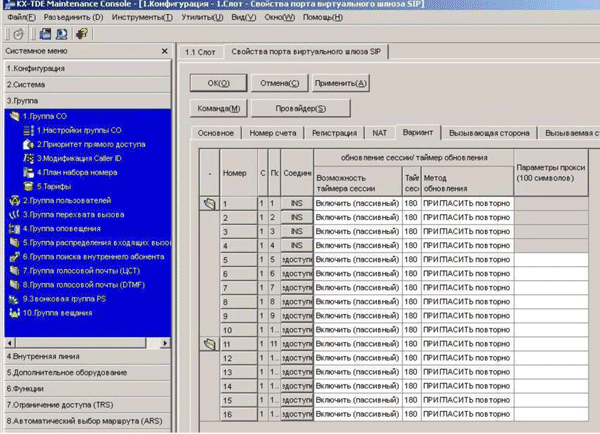
On the “NAT” tab, the parameters of the STUN servers are indicated. On the E1tele.com network, there is no need to use a STUN server to configure the connection. On the “Option” tab, write down the following parameters:
- Session timer feature: Enable (passive).
- Session End Timer (sec): 180.
- Update Method: INVIT (re).
- Proxy settings: empty.
- On the Calling Party tab, specify the following parameters:
- Type of title: from title.
- From the header: User part: username. SIP-URI: empty.
- PP-ID header: User part: username. SIP-URI: empty.
- Type: international.
- Digits to delete: 0.
- Additional set: empty.
- On the “Called Party” tab, write down the following parameters:
- Type: international.
- Type: Heading.
- On the Voice / Fax tab, specify the following parameters:
- Priority IP codec: specify voice codecs in the priority you need.
- Time to receive packets for the respective codecs: recommended 20 msec.
- Voice Detection for G.711: Disable.
- Standby: Turn off.
- Fax Sending Method: T.38
- Maximum Bit Rate: No speed Limit.
- Fax Detection Ability: Enable.
- DTMF: Out of Band (RFC2833).
- Content Type: 101.
- On the “RTP / RTCP” tab, write the following parameters:
- RTP QoS: ToS Feature
- RTP QoS-ToS Priority: 0
- RTP Type QoS-ToS: Norm.
- RTCP Packet Sending Ability: Enable. RTCP Packet Interval: 5 s.
- On the T.38 tab, write the following parameters: T.38 FAX Max Datagram: 512
T.38 FAX UDPTL Error Correction - Redundancy: Enable.
T.38 FAX UDPTL Redundancy count for data.30:
T.38 FAX UDPTL Redundancy count for data: 0
T.38 FAX Rate Manages Method: Transferred TCF - On the T.38 option tab, write down the following parameters:
T.38 FAX QoS Available: ToS
T.38 FAX QoS-ToS Priority: 0
T.38 FAX QoS-ToS Type: normal.
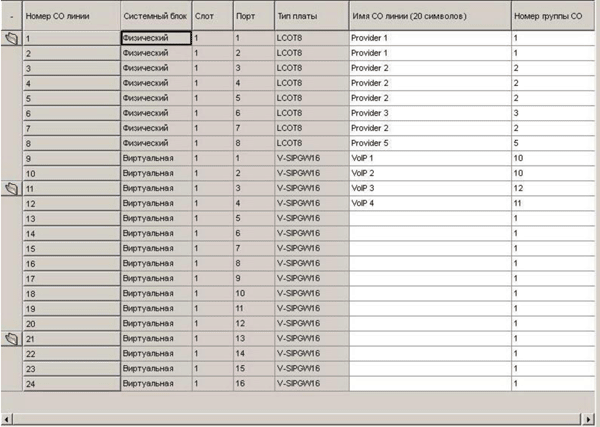
Leave the remaining options unchanged. After installing the card in menu 10.1, Setting up the CO, additional lines will appear, which, if necessary, can be combined into a trunk group for ease of further use.
If necessary, you can remove these CO lines from the "automatic access to the external line". This can be done in menu 3.1.2 by removing the corresponding trunk group from the access list.
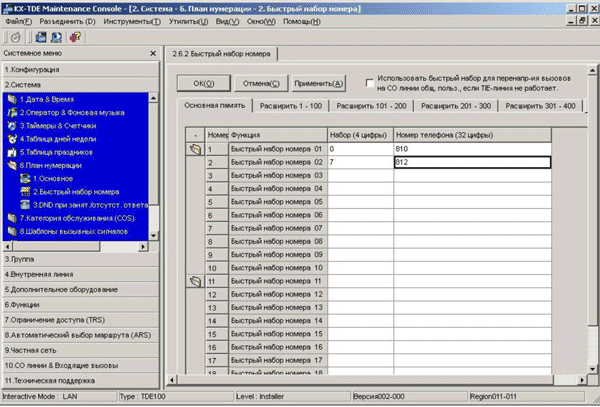
But at the same time, access to it remains under the direct selection code 8XX, where XX is the number of the trunk group. For ease of use, you can use the Quick Dialing function - quick dialing. To do this, in menu 2.6.2 we assign the number of direct access to the trunk group, for example, trunk group 10 with the code 810, the speed dial number, for example 7 or 0. In this case, you can use the speed dial number to access this trunk group.
In order to use the number 0 in speed dialing, it should not be used as a function of calling an operator. You can verify this in menu 6.2.1 on the “Functions” tab:
Setting up incoming SIP calls Depending on the SIP number used, incoming calls are distributed differently. When using a SIP card for registration, the number with the prefix 9992 (issued during registration) and an incoming SIP call can be routed to only one PBX extension number.
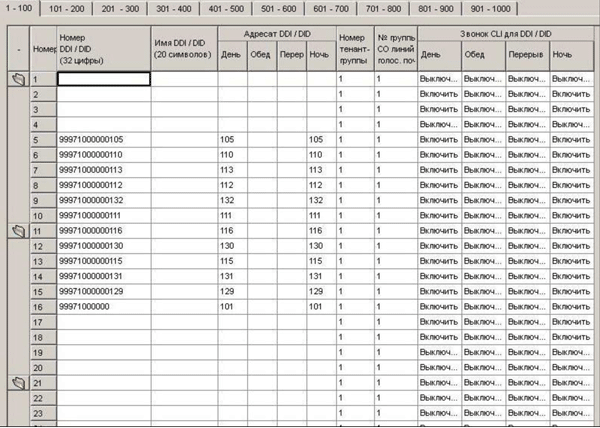
Using the SIP number with the prefix 9997 allows the PBX to send an incoming SIP call to any extension number by adding the extension number of the PBX to the SIP number. For example, when configuring the PBX using the SIP number 99971000000, and adding the internal PBX number to it, 110, we get the number 99971000000110, when dialing, the call will go to extension 110. The number with the prefix 9997 has a fixed length of 11 characters, all that is beyond this length, is considered the internal number of the subscriber. The distribution of incoming calls is configured in menu 10.3.
In the column “DDI / DID Number”, write down the complete internal number of the subscriber of the form 99971234567101, where 99971234567 is the SIP number, 101 internal number of the PBX. In the column "Destination DDI / DID" - the real internal phone number where you want to direct the call. Currently, numbers with the prefix 9997 are issued by technical support upon request.
After the setup is complete, internal subscribers will be able to access E1tele.com by accessing the appropriate trunk group using speed dial numbers. Incoming calls coming through the SIP card to the PBX will go to the extension number specified in the PBX or to a specific subscriber.
In this case, to connect to the PBX, we used a SIP-card. In order to connect using SIP gateways connected to the PBX CO ports, see the instructions on our website E1tele.com









