 April 7, 2011 at 13:40
Search plugin for wordpress. More than Sphinx Search

This article is not about how Sphinx Search is a great search engine, and how quickly it does blog searches with millions of articles.
WP Sphinx Search search plugin for more than three years, and Sphinx Search for more than 10 (according to its creator Andrei Aksenov), so you can find mountains of presentations and articles about the performance of Sphinx.
Briefly about Sphinx Search. It is an ultra fast search engine with many features and excellent relevance.
A little bit about the plugin:
- Sphinx Search Search
- support for Google like requests;
- widgets of relevant, recent and TOP search queries;
- a set of tools for managing search phrases;
- Sphinx Search Automated Installation Wizard;
- statistics of search phrases;
- all components use Sphinx Search, the number of SQL queries is minimized.
In version 3.0, three new and very useful components were developed, then I will tell you more about them.
I advise you to read the article to all owners of Wordpress blogs.
New relevance and time search mode
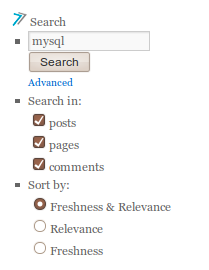
The search mode by relevance and time allows you to sort the results by relevance within time segments, which gives the best results for blogs and news sites. Thus, outdated but equally relevant news is valued lower than the latest news. This mode is used by default.
Related Keyword Widget
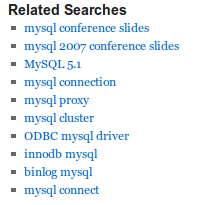
This is a great search engine optimization and website navigation tool. The widget allows you to select similar search phrases for various areas of the blog, such as:
- search query results;
- Viewed article
- page being viewed.
For example, if a website visitor is on a page about your product, then based on the page title, the widget will show similar search phrases with that name.
And if a visitor searches for a key phrase, then in similar phrases he will see all phrases that include the key phrase.
The main thing:
- this widget will help search engines (Google, Bing, Yahoo) find more relevant pages, which will improve the position in the search;
- It will help the visitor to easily find relevant information about your products and services.
Manage search phrases
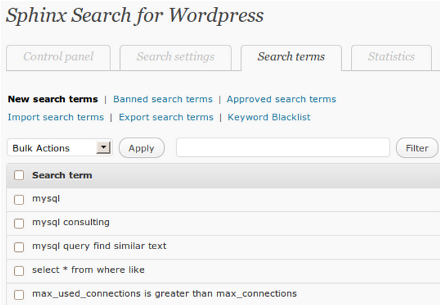
All search phrases are written to the log, and a whole set of tools has been developed to manage them in the new version. Using them, you can control which search phrases to display in widgets.
Using search phrase management, you can:
- Use only approved search phrases
- block search phrases;
- create a list of forbidden words that will block all search phrases containing words from this list;
- import into the database your own search phrases that are best suited to the theme of your blog;
- Export all phrases to an Excel-like document.
A link to a detailed description of the Wordpress plugin and a link to information on installation and use .
The authors of the plugin also blog on Sphinx Search .
MysqlPerformanceBlog.com uses the plugin from its first version, you can evaluate the plugin and its widgets on their website.









