 October 31, 2010 at 19:24
Guru Plug Server Plus: don't waste your money and nerves on this
Inspired by this article, I ordered myself from New IT GuruPlug Server Plus.
And here is my story:
My pre-order took place in July, but arrived only at the end of October. As you know, shipments were suspended due to problems with overheating. I will not give photos of the configuration, as they were already in the article mentioned above. The packaging was very good, the server box was packed in a bubble bag and already on top in a black PVC bag. Opening the box, I noted that the device looked very compact a little more than a credit card, not counting the height.
And so, in anticipation, I decided to turn it on. What was my disappointment when after turning on I heard a terrible howl of a fan. But from experience with servers, I assumed that after loading the noise level would decrease, but here I was waiting for the first and far from the last disappointment .
Caution traffic.
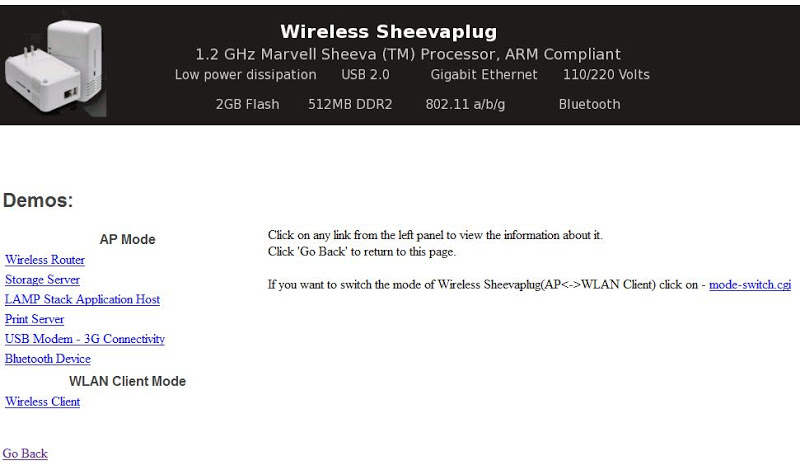
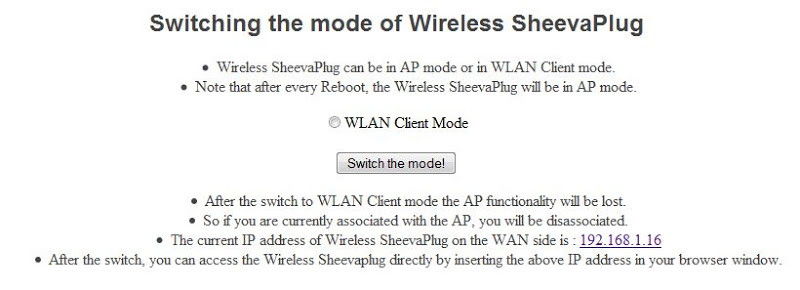
The device comes with a Debian system installed, so nothing needs to be installed to verify it. By connecting the cable to the Ethernet port, I tracked which IP address my router gave out, but then a second disappointment awaited me. The received IP address was neither pinged by the server nor responded to a Telnet, SSH, WWW request. It turned out that there are pluses. The device is configured as a Wi-Fi Access Point. Using this type of connection and getting DHCP settings, I was able to access it via SSH. That's about NAND memory: 2 Gb is a SAMSUNG memory chip, and in the file system it is divided into several sections Also, services such as MySQL, PHP, Lighttpd were raised on the device: According to the Lighttpd service seen, an attempt was made to connect via the web interface. The web interface is quite simple: the main page of the web interface. Changing the Wi-Fi mode. It is possible to change the DHCP server settings in the Wireless Router menu by calling the link
"If you wish to change the IP address range, please follow the instructions here"
DHCP server settings page
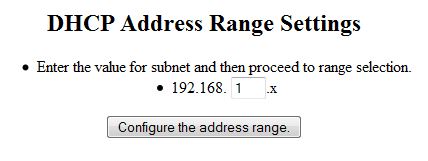
But then the following disappointment awaited me . After changing the addresses of the DHCP server, it would be customary to wait for the address of the device itself to change to the selected subnet, but no matter how. I chose the new network 192.168.2.x, I did not find the device at the address 192.168.2.1 it remained at the old address 192.168.1.1.
In the LAMP section, you can enable the default database. There is also a stream player “Flow Player”. In the Print Server and USB Modem - 3G Connectivity sections, you can configure the corresponding services. Bluetooth Device Section
involves setting up a Bluetooth headphone to listen to music. This device can be configured to work with Wi-Fi as a client. To connect to any access point, it must be insecure. "This demo only lists the 'Unsecured' (Open Security) wireless networks." The menu states that "Please note that after each reboot, the SheevaPlug wireless will be in AP mode," so keep that in mind.
To work through Ethernet, I had to conjure with a script.
I commented out the lines that belong to IPTABLES.
Attention!!! If you removed the line “/root/init_setup.sh” in the /usr/rc.local file or deleted the term “/root/init_setup.sh” rm -f /etc/wlanclient.mode from the file, then never after rebooting by disconnecting cable, no hardware reboot button heAP Mode status is not returned . For some reason, SSH stopped working, but the web continued to work.
But what to do with the fan?
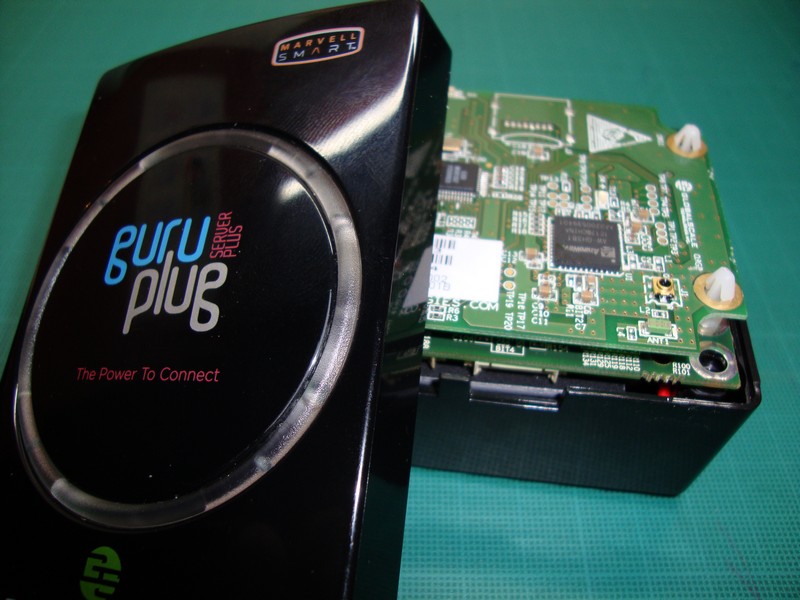
I decided to lose the guarantee to find out what was wrong with him. When I took apart the device, there was no chapel to my surprise:
Opening the server, I noticed that the processor, RAM and ports, and the connectors themselves are pretty hot. The very poor internal design of the server guarantees significant overheating of components and heating of the PSU until it dies. As it turned out, multiple failures of this server are connected precisely with the failure of the power supply, but in fact the whole problem is that the temperature conditions of the chips lead to the drying of the electrolytic capacitor in the power supply.
To edit the scripts, I had to solder the console cable based on this article , but because FTDIChip TTL-232R_3v3 cable was used, then for the cable, the wiring is as follows:
But contrary to this article, the cable started working after it was soldered in the following sequence: Black (GND), Orange (Tx), Yellow (Rx) starting from the JTAG connector. If you solder the Red cable (3.3v), then the server behaves in an original way. Without connecting the power, he takes power from USB, all the indicators of the network connectors light up, but he did not get the download.
To restore SSH access, I had to create the keys with the command , and the question of creating keys must be answered / etc / ssh / ssh_host_rsa_key and / etc / ssh / ssh_host_dsa_key, respectively. Next, I will give you photos that speak for themselves (the internal device of the server): Soldered console cable TTL-232R-3v3.

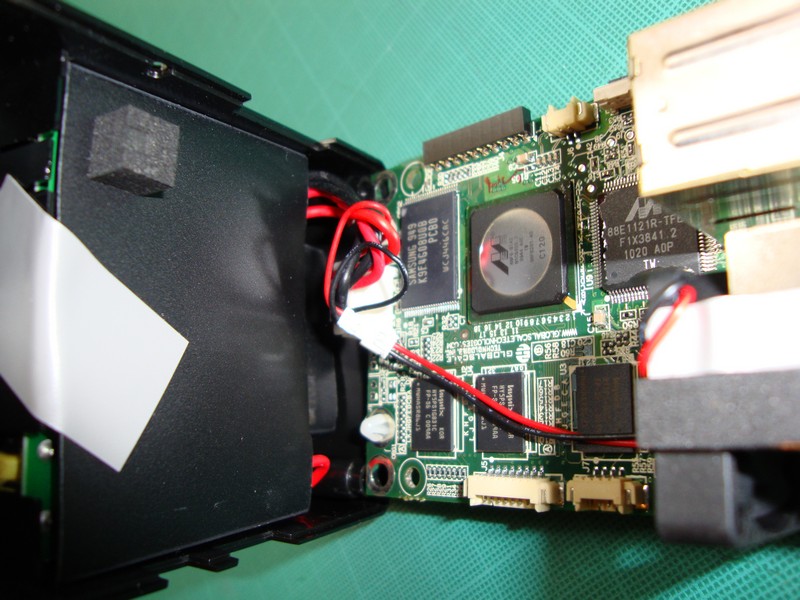
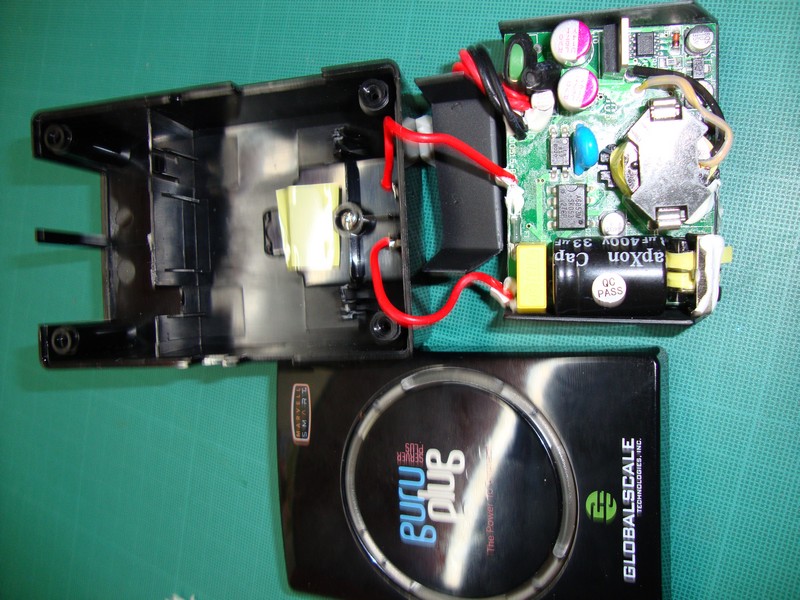
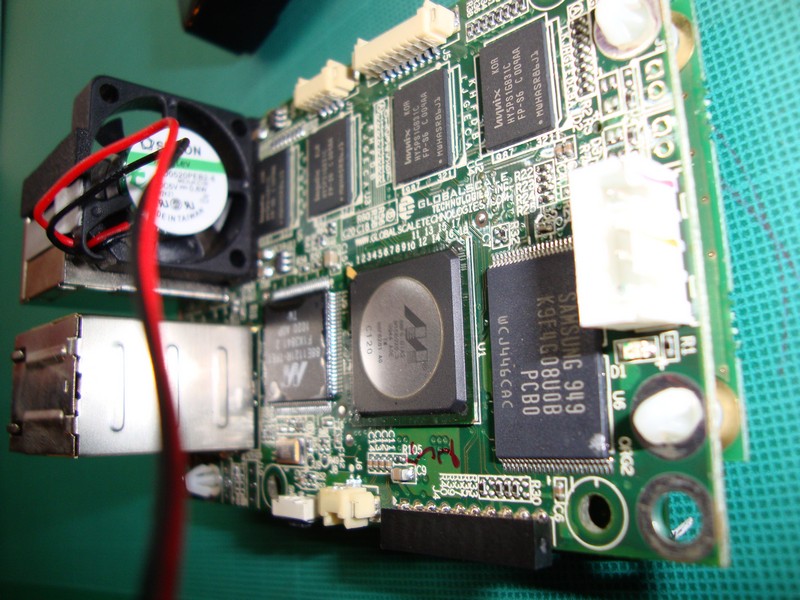
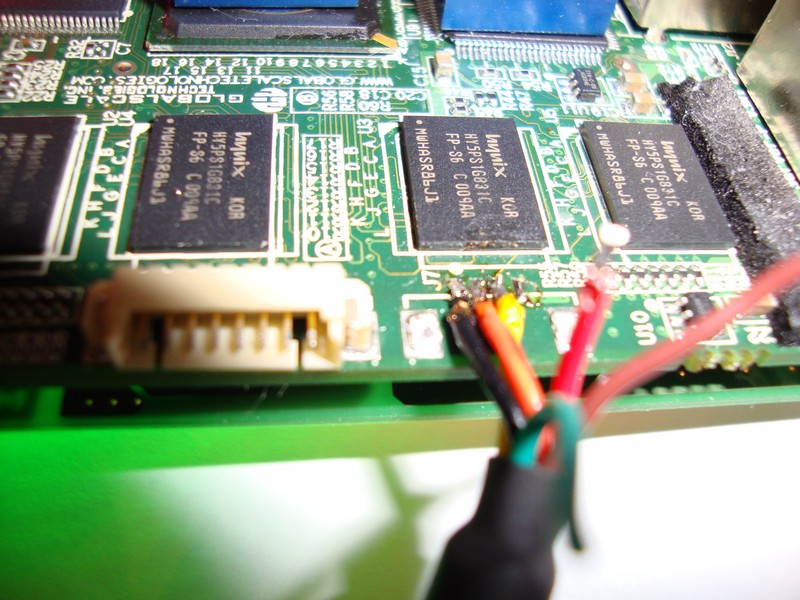
After reading a fair amount of forums, I realized that in the assembled state the operation of this server is not possible, that only people do not come up with for cooling this server (hereinafter photos are not made by me):
Mounting the radiator to the factory cooling plate. There was no plate in my version.

Mounting a large plate for passive cooling.

Thermal Radiation Photos:
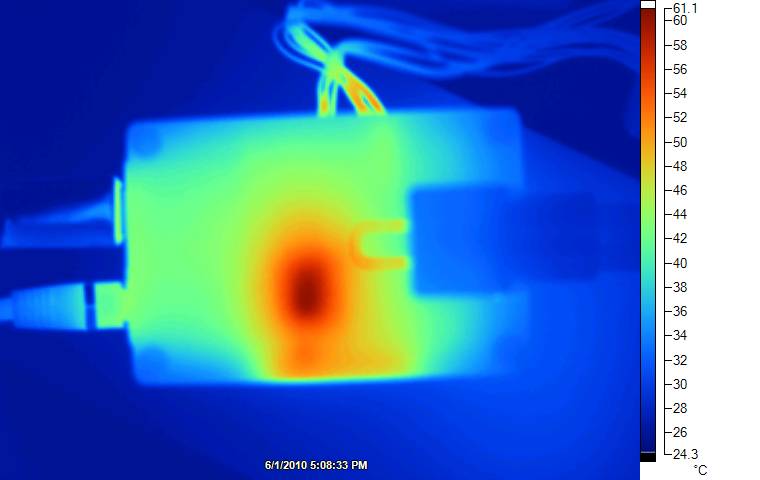
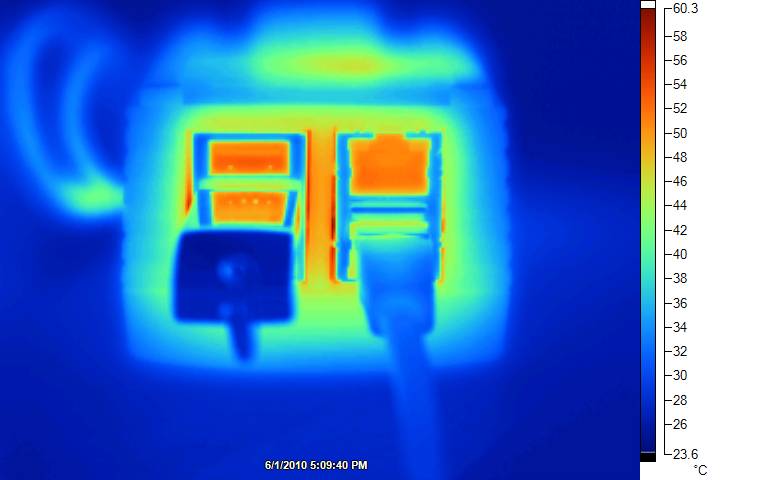
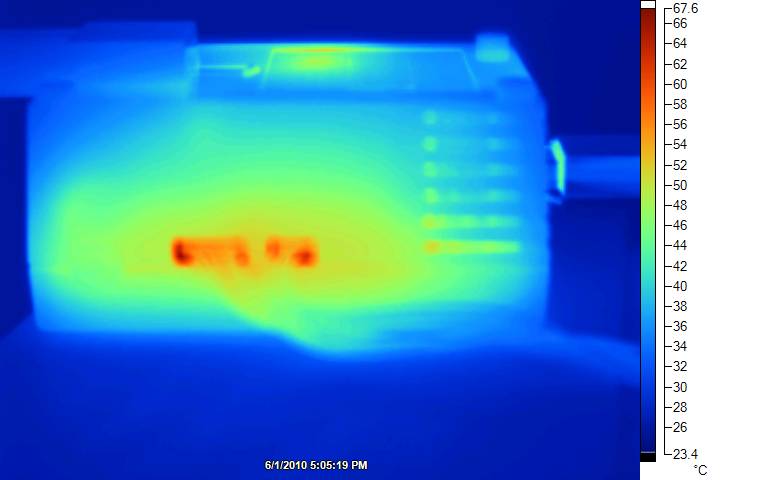
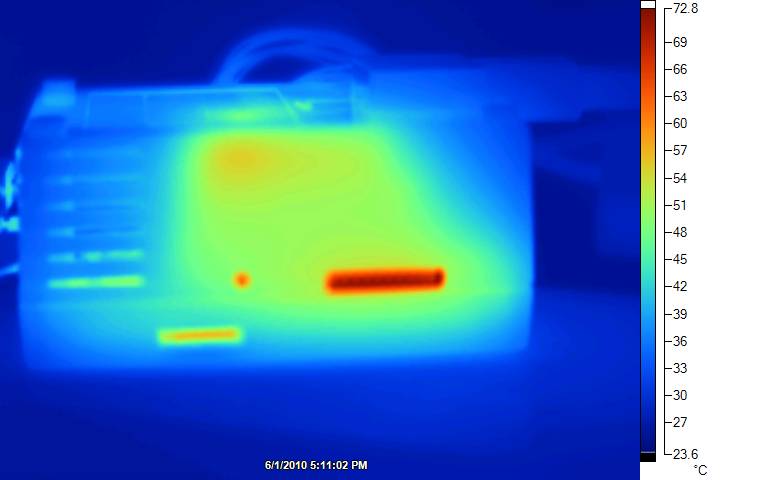
I was completely disappointed with Guru Plug Server plus, and I will never buy GlobalScale products again since they are not finished.
So decide for yourself whether it is worth spending money on this device.
A whole branch of the GP + overheating forum
And here is my story:
My pre-order took place in July, but arrived only at the end of October. As you know, shipments were suspended due to problems with overheating. I will not give photos of the configuration, as they were already in the article mentioned above. The packaging was very good, the server box was packed in a bubble bag and already on top in a black PVC bag. Opening the box, I noted that the device looked very compact a little more than a credit card, not counting the height.
And so, in anticipation, I decided to turn it on. What was my disappointment when after turning on I heard a terrible howl of a fan. But from experience with servers, I assumed that after loading the noise level would decrease, but here I was waiting for the first and far from the last disappointment .
Caution traffic.
The device comes with a Debian system installed, so nothing needs to be installed to verify it. By connecting the cable to the Ethernet port, I tracked which IP address my router gave out, but then a second disappointment awaited me. The received IP address was neither pinged by the server nor responded to a Telnet, SSH, WWW request. It turned out that there are pluses. The device is configured as a Wi-Fi Access Point. Using this type of connection and getting DHCP settings, I was able to access it via SSH. That's about NAND memory: 2 Gb is a SAMSUNG memory chip, and in the file system it is divided into several sections Also, services such as MySQL, PHP, Lighttpd were raised on the device: According to the Lighttpd service seen, an attempt was made to connect via the web interface. The web interface is quite simple: the main page of the web interface. Changing the Wi-Fi mode. It is possible to change the DHCP server settings in the Wireless Router menu by calling the link
Linux sheevaplug-debian 2.6.32-00007-g56678ec #1 PREEMPT Mon Feb 8 03:49:55 PST 2010 armv5tel


The programs included with the Debian GNU/Linux system are free software;

the exact distribution terms for each program are described in the

individual files in /usr/share/doc/*/copyright.


Debian GNU/Linux comes with ABSOLUTELY NO WARRANTY, to the extent

permitted by applicable law.

Last login: Mon Feb 1 16:42:41 2010

sheevaplug-debian:~# uname -a

Linux sheevaplug-debian 2.6.32-00007-g56678ec #1 PREEMPT Mon Feb 8 03:49:55 PST 2010 armv5tel GNU/Linux

sheevaplug-debian:~#
sheevaplug-debian:/sbin# df -h

Filesystem Size Used Avail Use% Mounted on

tmpfs 251M 0 251M 0% /lib/init/rw

udev 10M 720K 9.3M 8% /dev

tmpfs 251M 4.0K 251M 1% /dev/shm

rootfs 463M 204M 259M 45% /

tmpfs 251M 0 251M 0% /var/cache/apt
sheevaplug-debian:/sbin# top | grep mysqld

 1533 root 40 0 2852 1300 1076 S 0.0 0.3 0:00.04 mysqld_safe

 1576 mysql 40 0 124m 16m 4708 S 0.0 3.3 0:02.05 mysqld

sheevaplug-debian:/sbin# top | grep php

 2000 www-data 40 0 28108 5396 3620 S 0.0 1.1 0:00.35 php-cgi

 2006 www-data 40 0 28108 5396 3620 S 0.0 1.1 0:00.35 php-cgi

 2029 www-data 40 0 28108 2192 416 S 0.0 0.4 0:00.00 php-cgi
"If you wish to change the IP address range, please follow the instructions here"
DHCP server settings page
But then the following disappointment awaited me . After changing the addresses of the DHCP server, it would be customary to wait for the address of the device itself to change to the selected subnet, but no matter how. I chose the new network 192.168.2.x, I did not find the device at the address 192.168.2.1 it remained at the old address 192.168.1.1.
In the LAMP section, you can enable the default database. There is also a stream player “Flow Player”. In the Print Server and USB Modem - 3G Connectivity sections, you can configure the corresponding services. Bluetooth Device Section
host:localhost

username:root

password:nosoup4u

databasename:plogger
involves setting up a Bluetooth headphone to listen to music. This device can be configured to work with Wi-Fi as a client. To connect to any access point, it must be insecure. "This demo only lists the 'Unsecured' (Open Security) wireless networks." The menu states that "Please note that after each reboot, the SheevaPlug wireless will be in AP mode," so keep that in mind.
To work through Ethernet, I had to conjure with a script.
I commented out the lines that belong to IPTABLES.
Attention!!! If you removed the line “/root/init_setup.sh” in the /usr/rc.local file or deleted the term “/root/init_setup.sh” rm -f /etc/wlanclient.mode from the file, then never after rebooting by disconnecting cable, no hardware reboot button heAP Mode status is not returned . For some reason, SSH stopped working, but the web continued to work.
But what to do with the fan?
I decided to lose the guarantee to find out what was wrong with him. When I took apart the device, there was no chapel to my surprise:
- 1. The fan is directly powered by the power supply;
- 2. The absence of any radiators;
- 3. The fan is installed in such a way that its useful operation is possible only by 1/3, because everything else is covered by USB connectors.
Opening the server, I noticed that the processor, RAM and ports, and the connectors themselves are pretty hot. The very poor internal design of the server guarantees significant overheating of components and heating of the PSU until it dies. As it turned out, multiple failures of this server are connected precisely with the failure of the power supply, but in fact the whole problem is that the temperature conditions of the chips lead to the drying of the electrolytic capacitor in the power supply.
To edit the scripts, I had to solder the console cable based on this article , but because FTDIChip TTL-232R_3v3 cable was used, then for the cable, the wiring is as follows:
Red – 3.3v

Orange – Tx

Yellow – Rx

Black – GND
But contrary to this article, the cable started working after it was soldered in the following sequence: Black (GND), Orange (Tx), Yellow (Rx) starting from the JTAG connector. If you solder the Red cable (3.3v), then the server behaves in an original way. Without connecting the power, he takes power from USB, all the indicators of the network connectors light up, but he did not get the download.
To restore SSH access, I had to create the keys with the command , and the question of creating keys must be answered / etc / ssh / ssh_host_rsa_key and / etc / ssh / ssh_host_dsa_key, respectively. Next, I will give you photos that speak for themselves (the internal device of the server): Soldered console cable TTL-232R-3v3.
ssh-keygen –t rsa

ssh-keygen –t dsa
After reading a fair amount of forums, I realized that in the assembled state the operation of this server is not possible, that only people do not come up with for cooling this server (hereinafter photos are not made by me):
Mounting the radiator to the factory cooling plate. There was no plate in my version.
Mounting a large plate for passive cooling.
Thermal Radiation Photos:
I was completely disappointed with Guru Plug Server plus, and I will never buy GlobalScale products again since they are not finished.
So decide for yourself whether it is worth spending money on this device.
A whole branch of the GP + overheating forum









