Great review of the Smartq V7
About this device on Habré already wrote . But firstly, somehow casually, and secondly, then it was a question of old (relatively current time) device firmware.
I have been using the gadget for more than 2 months and can fully describe all its advantages and disadvantages. So, let's begin.

The technical characteristics of the device have not changed - these are:
The device works under three operating systems, current versions for today:
Also, since the transition to the UBIFS file system for Android, the main bootloader (offering the choice of the operating system) has been changed. New devices come immediately with it, for older ones it is proposed to download a set of utilities that update the bootloader. Distinguishing the new bootloader from the old one is very simple: the old one has a light blue background, the new one has a dark purple background. However, about everything in order.
The equipment is very economical: in the box you will find the SmartQ V7 itself, an adapter with a flat plug, an HDMI Male-To-Male cord, and instructions in Chinese.
I also bought an additional protective film on the screen.
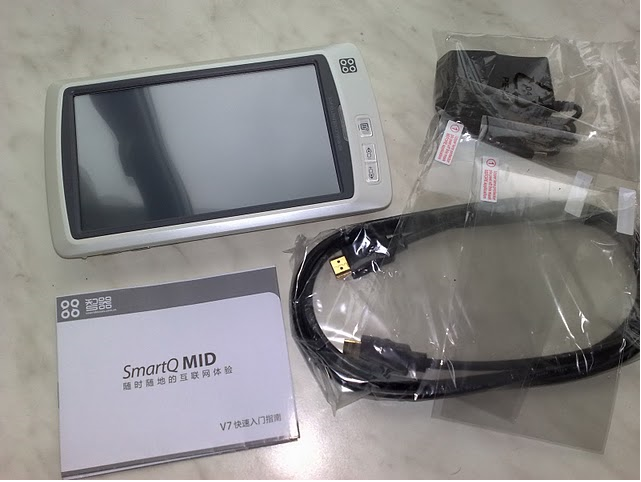
The plastic is pleasant to the touch, slightly rough at the back, due to which the device lies in the hands well and conveniently. There are no backlashes or creaks, the tablet feels completely monolithic. The screen is slightly recessed into the front panel, as for me this is a big plus, because allows you to put the device "face down" on the table without fear of leaving a scratch. In general, the build quality is not satisfactory.
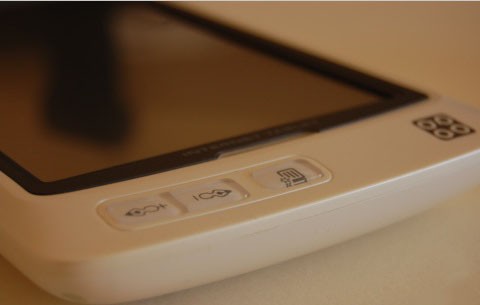
There are six hardware buttons on the device (not counting reset) - three on the front panel and three more on top. Buttons change their functional purpose depending on the operating system and therefore are decorated with “neutral” icons that do not show a specific action.
In the case of Android OS, the buttons on the front panel are the transition to the top level of the menu or the “step back” in the browser (the “+” button), exit to the main menu or return to the desktop (the “-” button), call the context menu or the main menu on the desktop (button with squares).
At the back, the device is not flat, but slightly rounded, on the back side there are relief grilles that hide the speakers, and a stand for installing the device vertically.
The stand itself seems very flimsy, made of thin plastic, but it performs its main function normally and so far is not going to break.
The top three buttons are volume control / page turning in FBReader and the on / off / sleep button (for all operating systems). Nearby is the microphone jack.
On the side is the headphone output, it is also a composite video output, an HDMI output, a USB 2.0 port and a charger connector.
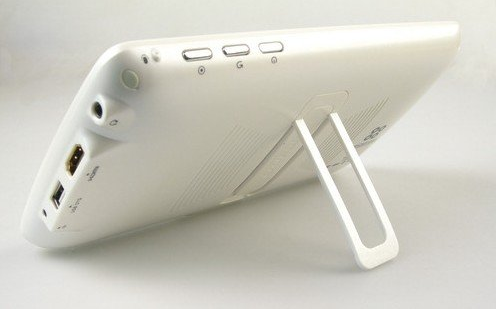
Below - a reset button and a stylus slot. Personally, I’m much more comfortable poking the screen with a stylus than with my fingers, at least because the screen does not get dirty. Many complained about the "insensitive" touchscreen, but I do not see such a problem, maybe it was about earlier versions of the device.
When you turn on the device, the main bootloader window appears, offering you to select the operating system:
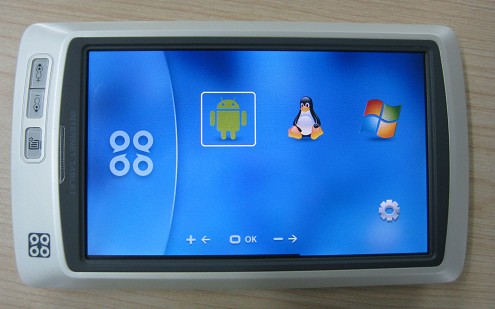
This is what the old bootloader looked like, but the new one: The

full boot of any OS takes less than a minute, Android starts most quickly.
Next, I’ll shift my review to the side of Android 2.1 on this device and that's why.
Windows CE, even the most “new” and non-Chinese, is still an outdated OS. It is used mainly for navigation (yes, you can connect GPS via Bluetooth to SmartQ V7, roll some iGo on Windows CE and get a car navigator with a record-breaking big screen) and games in the ports of old toys (for example, old Heroes of M&M were recently ported there). )
Judging by the large and friendly community of SmartQ-Linux guides, the presence of Russian adapted assemblies, as well as the development of their own Linux-firmware, many people liked this system, but Ubuntu personally seemed to me out of the box to be slow and not adapted for small screens (say, to work in a text editor with the virtual keyboard turned on, it’s very inconvenient because 4/5 of the screen is occupied by the keyboard, window title and all sorts of toolbars of the editor).
But many people like this OS, use it and actively develop it.
I opted for Android and use it as the main OS. This will be my story.
Android is most similar to a system that is ready to work out of the box, although of course a number of small and not very edits are necessary.
The firmware coming with the device had an English-language interface by default, but after flashing and installing updated versions, Android starts with the default Chinese language. This annoying oversight at first led into a stupor, but after a short google there was a guide describing how to switch the system language to Russian :)
The screen orientation is switched by a special utility, a portrait or a landscape - everyone chooses for himself. The device is not equipped with a G-sensor, the craftsmen soldered it themselves and forced it to work under Linux, but I did not see such projects for Android, and I never felt the need for a G-sensor.
The second (after installing the Russian language) correction was to reduce the size of system fonts, windows and messages. By default, the Android interface is quite large, I would say too much, but this option can be freely configured by changing the configuration file.
Next, Android just needs to root to be able to make other changes. The way to get root on Android has long existed, described and documented by me step by step .
Along with the firmware, the official Android Market application is supplied, however, to make it work, you need a short but intense dance with a tambourine. In short - you need to get a unique androidID for your Google account on the Android emulator, and flash it into your device. Step-by-step instructions also exist..
Further “tuning” boils down to installing a Russian keyboard (I recommend RuKeyboard, since only it fully supports the Russian layout of the USB hardware keyboard), removing Chinese software (there is not much of it) and the telephone part (Phone.apk and TelephonyProvider.apk - not make sense on the tablet, but they drain the battery while working in the background), and install the software you personally need.
I limited myself to a launcher (Launcher Pro), a browser (SkyFire), a reader of books (FBReader), video (Act 1) and audio (Meridian) players, a text editor, an ICQ client and a number of other utilities (task manager, backup, utilities for YouTube and video streaming).
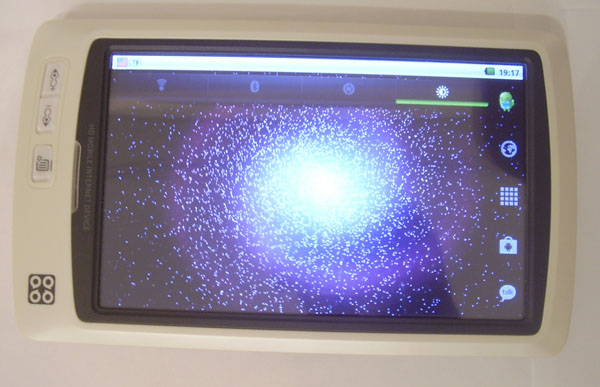
Desktop with Launcher Pro and animated wallpapers included.
After all the manipulations (and before them, to be honest), the device works pleasantly fast, plays all the videos that came to hand (up to 2.4 GB rips DivX, Xvid, MPEG-4, and 720p MKV (AC3, H. 254) movies). 1080p video is also playing, but with some brakes, it is quite possible that this can be treated by selecting a player, but I see no reason to watch 1080p on a 7-inch screen, so I did not deal with this issue.
Composite and HDMI outputs work, although composite gives a slightly “green” and blurry picture to the big screen, but using the HDMI connection you can watch movies from the device on a TV. Again, the video goes without brakes and freezes.
The USB port is not buggy in the new firmware. He understands all the flash drives that he found, a keyboard, a mouse, a 3G modem (the Huawei e1550 and some other modems of this manufacturer work just fine, but in general, not all 3G modems are supported, but there is the option to set up a connection with a mobile phone via Bluetooth and use him as a modem).
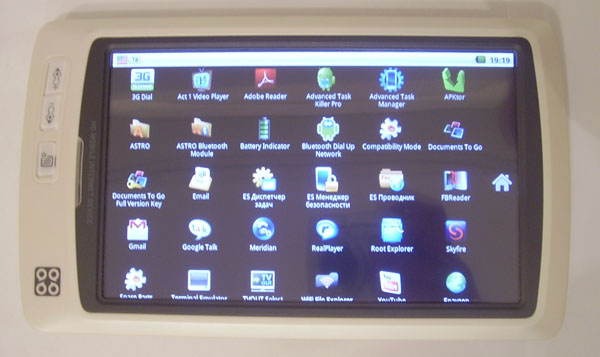
Program menu.
The browser works fast, supports Java scripts and Ajax, flash video is automatically sent to a separate player (YouTube.apk or a player selected by the user). Using Youtube RolleMod Downloader, you can not only watch videos from this service but also save them to an SD card.
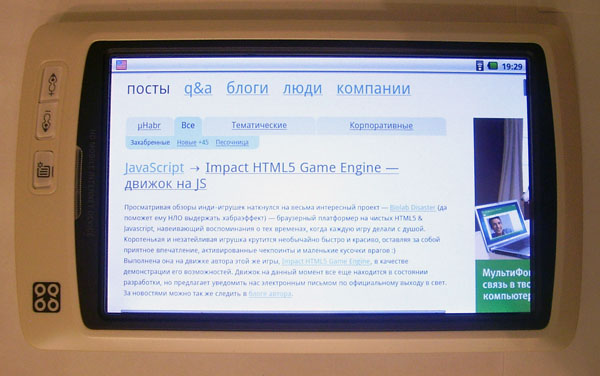
Browser.
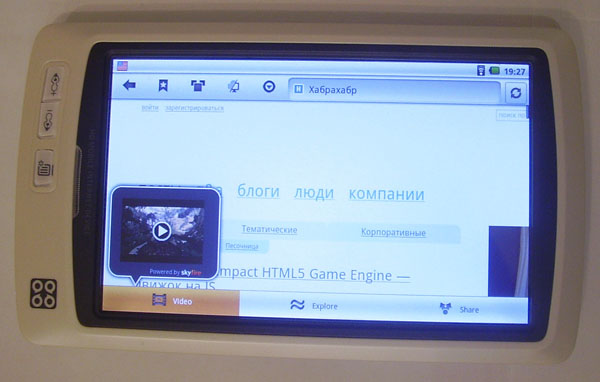
The browser kindly offers to view the embedded video on the page.
Audio player (Meridian) plays mp3, ogg, 3gp. Able to work with tags and play in the background. As for me - the best player choice. The sound on the headphones is very good, clean and without noise. Built-in speakers give a good loud stereo, sufficient for watching movies.
Books are read through FBReader, they look great, they scroll quickly. View PDF - via Documents to Go or Adobe Reader for Android. Both that and another perfectly draws PDF, works correctly with the Cyrillic alphabet and does not slow down, which is important.
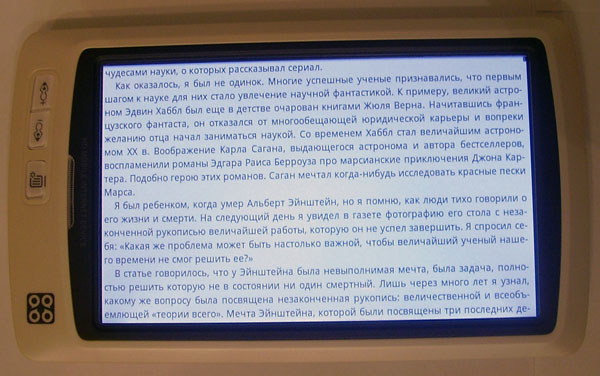
FBReader in full screen.

PDF (scanned book) opened by Abode Reader.

Summarized fragment of PDF.
There was some kind of DJVu-Droid for Djvu, but it slows down very unpleasantly, maybe things will be more fun in another viewer.
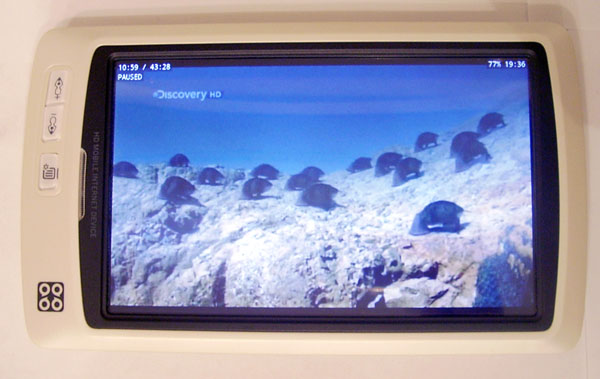
Video player TV-Rip 700 Mb.
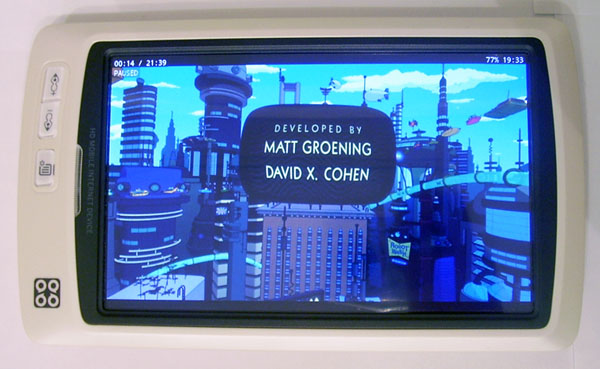
Video player HDTV-Rip, MKV H.264.
The latest firmware also fixed Wi-Fi problems, now the connection is stable and does not break.
To summarize the advantages of Android and move on to the disadvantages:
Of course, not everything is so perfect on Android, there are also disadvantages :
As for the pros and cons of the device as a whole, after reading reviews here and on other forums about a variety of Chinese tablets, I dare to say that this is one of the best tablet PCs among little-known Chinese brands.
As I said, he has:
Среди серьезных недостатков пока вижу лишь нерабочий микрофон, отсутствие программной поддержки многих 3G-модемов и 3D ускорителя, плохое качество видео через композитный (не HDMI) выход.
На этом, думаю, пора заканчивать мой обзор, будут вопросы — спрашивайте :)
P.S.
Все картинки, использованные в статье найдены в интернете, свои фотографии устройства делать не стал, поскольку в сети их существует великое множество.
* Подсказывают что китайцы начали просить за доставку 22.65$. Когда я покупал устройство, оно стоило 190$ и никаких дополнительных плат не взималось, сейчас судя по-всему мы наблюдаем хитрый китайский маркетинг, при заказе через пейпал к стоимости устройства добавляется почти 23$ и окончательная стоимость составляет 177.65$
UPD
Added some pictures of dubious quality, but mine :)
I have been using the gadget for more than 2 months and can fully describe all its advantages and disadvantages. So, let's begin.
The technical characteristics of the device have not changed - these are:
- 7-inch resistive screen, with a resolution of 800x480;
- Built-in Bluetooth 2.0, Wi-Fi 802.11b / g, USB Host / OTG;
- The Telechips TCC8900 chipset with a TCC8901 processor operating at a frequency of 600 megahertz, 256MB DDRII, 2GB non-volatile memory;
- HDMI, composite, 3.5 mm outputs, built-in microphone, SDHC card reader;
- Li-Pol battery for 4500 mAH;
- Dimensions: 200x120x24, 480 grams;
The device works under three operating systems, current versions for today:
- Android 2.1 V2 - multilingual, incl. and Russian;
- Ubuntu Linux 5.5 - English;
- Windows CE 6 - English version (used to be Chinese);
Also, since the transition to the UBIFS file system for Android, the main bootloader (offering the choice of the operating system) has been changed. New devices come immediately with it, for older ones it is proposed to download a set of utilities that update the bootloader. Distinguishing the new bootloader from the old one is very simple: the old one has a light blue background, the new one has a dark purple background. However, about everything in order.
The equipment is very economical: in the box you will find the SmartQ V7 itself, an adapter with a flat plug, an HDMI Male-To-Male cord, and instructions in Chinese.
I also bought an additional protective film on the screen.
The plastic is pleasant to the touch, slightly rough at the back, due to which the device lies in the hands well and conveniently. There are no backlashes or creaks, the tablet feels completely monolithic. The screen is slightly recessed into the front panel, as for me this is a big plus, because allows you to put the device "face down" on the table without fear of leaving a scratch. In general, the build quality is not satisfactory.
There are six hardware buttons on the device (not counting reset) - three on the front panel and three more on top. Buttons change their functional purpose depending on the operating system and therefore are decorated with “neutral” icons that do not show a specific action.
In the case of Android OS, the buttons on the front panel are the transition to the top level of the menu or the “step back” in the browser (the “+” button), exit to the main menu or return to the desktop (the “-” button), call the context menu or the main menu on the desktop (button with squares).
At the back, the device is not flat, but slightly rounded, on the back side there are relief grilles that hide the speakers, and a stand for installing the device vertically.
The stand itself seems very flimsy, made of thin plastic, but it performs its main function normally and so far is not going to break.
The top three buttons are volume control / page turning in FBReader and the on / off / sleep button (for all operating systems). Nearby is the microphone jack.
On the side is the headphone output, it is also a composite video output, an HDMI output, a USB 2.0 port and a charger connector.
Below - a reset button and a stylus slot. Personally, I’m much more comfortable poking the screen with a stylus than with my fingers, at least because the screen does not get dirty. Many complained about the "insensitive" touchscreen, but I do not see such a problem, maybe it was about earlier versions of the device.
When you turn on the device, the main bootloader window appears, offering you to select the operating system:
This is what the old bootloader looked like, but the new one: The
full boot of any OS takes less than a minute, Android starts most quickly.
Next, I’ll shift my review to the side of Android 2.1 on this device and that's why.
Windows CE, even the most “new” and non-Chinese, is still an outdated OS. It is used mainly for navigation (yes, you can connect GPS via Bluetooth to SmartQ V7, roll some iGo on Windows CE and get a car navigator with a record-breaking big screen) and games in the ports of old toys (for example, old Heroes of M&M were recently ported there). )
Judging by the large and friendly community of SmartQ-Linux guides, the presence of Russian adapted assemblies, as well as the development of their own Linux-firmware, many people liked this system, but Ubuntu personally seemed to me out of the box to be slow and not adapted for small screens (say, to work in a text editor with the virtual keyboard turned on, it’s very inconvenient because 4/5 of the screen is occupied by the keyboard, window title and all sorts of toolbars of the editor).
But many people like this OS, use it and actively develop it.
I opted for Android and use it as the main OS. This will be my story.
Android is most similar to a system that is ready to work out of the box, although of course a number of small and not very edits are necessary.
The firmware coming with the device had an English-language interface by default, but after flashing and installing updated versions, Android starts with the default Chinese language. This annoying oversight at first led into a stupor, but after a short google there was a guide describing how to switch the system language to Russian :)
The screen orientation is switched by a special utility, a portrait or a landscape - everyone chooses for himself. The device is not equipped with a G-sensor, the craftsmen soldered it themselves and forced it to work under Linux, but I did not see such projects for Android, and I never felt the need for a G-sensor.
The second (after installing the Russian language) correction was to reduce the size of system fonts, windows and messages. By default, the Android interface is quite large, I would say too much, but this option can be freely configured by changing the configuration file.
Next, Android just needs to root to be able to make other changes. The way to get root on Android has long existed, described and documented by me step by step .
Along with the firmware, the official Android Market application is supplied, however, to make it work, you need a short but intense dance with a tambourine. In short - you need to get a unique androidID for your Google account on the Android emulator, and flash it into your device. Step-by-step instructions also exist..
Further “tuning” boils down to installing a Russian keyboard (I recommend RuKeyboard, since only it fully supports the Russian layout of the USB hardware keyboard), removing Chinese software (there is not much of it) and the telephone part (Phone.apk and TelephonyProvider.apk - not make sense on the tablet, but they drain the battery while working in the background), and install the software you personally need.
I limited myself to a launcher (Launcher Pro), a browser (SkyFire), a reader of books (FBReader), video (Act 1) and audio (Meridian) players, a text editor, an ICQ client and a number of other utilities (task manager, backup, utilities for YouTube and video streaming).
Desktop with Launcher Pro and animated wallpapers included.
After all the manipulations (and before them, to be honest), the device works pleasantly fast, plays all the videos that came to hand (up to 2.4 GB rips DivX, Xvid, MPEG-4, and 720p MKV (AC3, H. 254) movies). 1080p video is also playing, but with some brakes, it is quite possible that this can be treated by selecting a player, but I see no reason to watch 1080p on a 7-inch screen, so I did not deal with this issue.
Composite and HDMI outputs work, although composite gives a slightly “green” and blurry picture to the big screen, but using the HDMI connection you can watch movies from the device on a TV. Again, the video goes without brakes and freezes.
The USB port is not buggy in the new firmware. He understands all the flash drives that he found, a keyboard, a mouse, a 3G modem (the Huawei e1550 and some other modems of this manufacturer work just fine, but in general, not all 3G modems are supported, but there is the option to set up a connection with a mobile phone via Bluetooth and use him as a modem).
Program menu.
The browser works fast, supports Java scripts and Ajax, flash video is automatically sent to a separate player (YouTube.apk or a player selected by the user). Using Youtube RolleMod Downloader, you can not only watch videos from this service but also save them to an SD card.
Browser.
The browser kindly offers to view the embedded video on the page.
Audio player (Meridian) plays mp3, ogg, 3gp. Able to work with tags and play in the background. As for me - the best player choice. The sound on the headphones is very good, clean and without noise. Built-in speakers give a good loud stereo, sufficient for watching movies.
Books are read through FBReader, they look great, they scroll quickly. View PDF - via Documents to Go or Adobe Reader for Android. Both that and another perfectly draws PDF, works correctly with the Cyrillic alphabet and does not slow down, which is important.
FBReader in full screen.
PDF (scanned book) opened by Abode Reader.
Summarized fragment of PDF.
There was some kind of DJVu-Droid for Djvu, but it slows down very unpleasantly, maybe things will be more fun in another viewer.
Video player TV-Rip 700 Mb.
Video player HDTV-Rip, MKV H.264.
The latest firmware also fixed Wi-Fi problems, now the connection is stable and does not break.
To summarize the advantages of Android and move on to the disadvantages:
- The system boots and runs fast;
- The transition effects between the windows are smooth and beautiful;
- You can make Android Market work;
- High-quality Russian interface, plug-in Russian input, hardware keyboard support;
- Most movie formats are played out of the box, the video does not slow down;
- Good sound quality, there is a convenient player;
- Browser - fast; read PDF and regular books - convenient; streaming video works well;
- You can connect a 3G-modem (not everyone), use a mobile as a modem (almost everything), a stable Wi-Fi connection;
- The manufacturer often updates firmware, promises support for Android 2.2, there are many amateur assemblies and firmware, as well as tools that allow you to modify or assemble your firmware.
Of course, not everything is so perfect on Android, there are also disadvantages :
- The built-in microphone still does not work (neither in Skype, nor in notes, anywhere, although it definitely is and is soldered);
- The new firmware has a glitch with sleep mode - sometimes the device does not exit from it and you have to restart it with a reset (there are a number of drugs against this glitch and there is hope that this will be fixed in the next firmware);
- An untrained user will have to spend about a day to google, read and configure the device (reduce font sizes, get root access, enable android market, remove unnecessary software);
- After updating the firmware, the default language is Chinese and you need to swear it, change it to Russian;
- The user has access to only 70 MB of space for installing programs on Android (to be honest, this was more than enough, and who didn’t have enough - they found a way to remove Linux and mount its partitions on Android. The result was a device with two OSs - Android and Win CE, Adnroid got 700 mb of space for programs as well as 128 mb of swap);
- The device has a 3D accelerator, but it is not yet involved in software, so most 3D games do not work or slow down on V7.
As for the pros and cons of the device as a whole, after reading reviews here and on other forums about a variety of Chinese tablets, I dare to say that this is one of the best tablet PCs among little-known Chinese brands.
As I said, he has:
- Good build quality
- Your own design;
- For a long time (I still couldn’t “plant” the device in one day, it will definitely last for 5-6 hours with Wi-Fi on or 4-5 hours of video, well, read books with Wi-Fi turned off and with minimum brightness can be more than one long winter evening);
- There is a large Russian-speaking community of SmartQ-Water , where they will help you, prompt and guide you on the true path;
- Developer support - regular firmware updates;
- There are many amateur firmware and modifications for all 3 wasps for every taste;
- The device lends itself well to hardware modding (owners successfully solder USB hubs, 3G modems and G-sensors);
- Maximum compliance of declared capabilities with real functionality;
- Low price - the device can be bought for just $
155* $ 177.65 from an authorized representative (including shipping costs).
Среди серьезных недостатков пока вижу лишь нерабочий микрофон, отсутствие программной поддержки многих 3G-модемов и 3D ускорителя, плохое качество видео через композитный (не HDMI) выход.
На этом, думаю, пора заканчивать мой обзор, будут вопросы — спрашивайте :)
P.S.
Все картинки, использованные в статье найдены в интернете, свои фотографии устройства делать не стал, поскольку в сети их существует великое множество.
* Подсказывают что китайцы начали просить за доставку 22.65$. Когда я покупал устройство, оно стоило 190$ и никаких дополнительных плат не взималось, сейчас судя по-всему мы наблюдаем хитрый китайский маркетинг, при заказе через пейпал к стоимости устройства добавляется почти 23$ и окончательная стоимость составляет 177.65$
UPD
Added some pictures of dubious quality, but mine :)









