October 10, 2010 at 21:09
Galaxy Live Wallpaper for Ubuntu 10.10
The man with the nickname Ilap, impressed by the live wallpaper on android, created a compiz plugin that mimics this wallpaper. It is noteworthy that, according to him, before that he had no experience in developing either opengl or plugins for compiz.
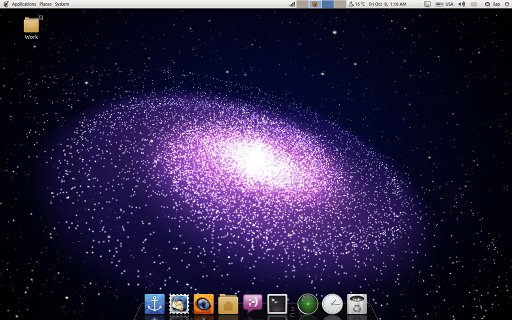
To set this wallpaper for yourself, you need to add the developer ppa repository: And then install the package itself: Then we call the wallpaper change menu - right-click on the desktop, click add and select /usr/share/backgrounds/Space_by_ilap.jpg. Now it remains to turn on the plugin: Systems -> Preferences -> CompizConfig Settings Manager -> Live Wallpapers and check Galaxy Live. The plugin is activated by pressing the keyboard shortcut win + f4.
To set this wallpaper for yourself, you need to add the developer ppa repository: And then install the package itself: Then we call the wallpaper change menu - right-click on the desktop, click add and select /usr/share/backgrounds/Space_by_ilap.jpg. Now it remains to turn on the plugin: Systems -> Preferences -> CompizConfig Settings Manager -> Live Wallpapers and check Galaxy Live. The plugin is activated by pressing the keyboard shortcut win + f4.
$sudo add-apt-repository ppa:ilap/lwp

$sudo apt-get update
$ sudo apt-get install compiz-plugins-livewallpapers compizconfig-settings-manager