 June 7, 2010 at 05:26
WebMoney Keeper Mini Extension

Due to the ever-growing popularity of the Google Chrome browser, as well as for numerous users of WebMoney, I want to introduce to the fans of this browser a useful extension for WebMoney Keeper Mini. Judging by the download counter on the installation page, only a few people know about it ...
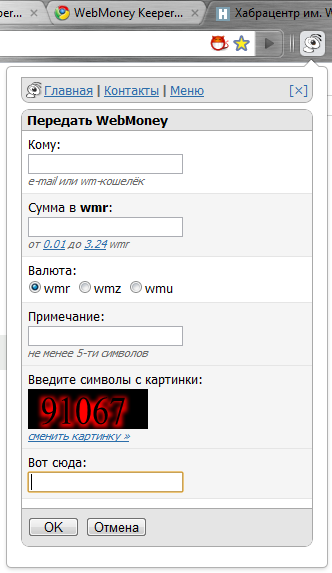
Have you ever had a situation when someone urgently asks you to borrow a web manneck and you can’t or don’t want to start your WMK Classic or Light? Or you need to check your wallet, but to log in to Classic or Light you are just too lazy? This can now be done easier by connecting WM Keeper Mini to your existing wallets and installing the WebMoney Keeper Mini Extension in your Chrome browser.
You don’t need to open an extra tab and go to mini.webmoney.ru, but you just need to click the ant icon in your browser and the extension will get access to the site and open the Mini keeper window - authorize it and get access to your wallets. To correctly display Mini keeper in this window, you must immediately go to the menu settings and select the “Mobile” theme.
That's all, now you can use your wallets and conduct transactions in the WM system using Keeper Mini.
If someone has not yet connected Mini Keeper to existing wallets in Classic or Light kipers, then this can be done on the WM system’s security site by visiting the page - Control methods
The extension itself for Google Chrome can be installed on this page -WebMoney Keeper Mini Extension
If you have questions, I will be happy to answer them.
Successful and enjoyable to use WebMoney Keeper Mini!









