Recognizing text with cuneiform
There was a task to establish automatic recognition of text from photographs, i.e. the user, when uploading a photograph to the server, also receives the text recognized from it. No sooner said than done. A good free console solution was found - cuneiform . The nix version is here: https://launchpad.net/cuneiform-linux .
So installation. In Ubunt, by the way, version 0.7 is available from the repositories. Version 0.9 is the latest at the moment. The optional argument "-DCMAKE_INSTALL_PREFIX = / your / dir" will install cuneiform in the correct directory. You can run it with the following arguments: Specifies the language of the document. Of the possible ones: eng (default) ger fra rus swe spa ita ruseng ukr srp hrv pol dan por dut cze rum hun bul slo lav lit est tur.
Saves to a file.
The format of the received text. Of the supported: text (default), html, rtf, smarttext (plain text with TeX paragraphs), hocr (hOCR HTML format), native (Cuneiform 2000 format)
Optimization of the script for an image printed using a matrix printer.
Optimization of the script for the image printed using fax.
Disables page analysis and implies that our image consists of one column of text.
Usage example:
Then I wanted a graphical interface for everyday needs. There are 2 pieces to choose from - these are YAGF and Cuneiform-Qt :

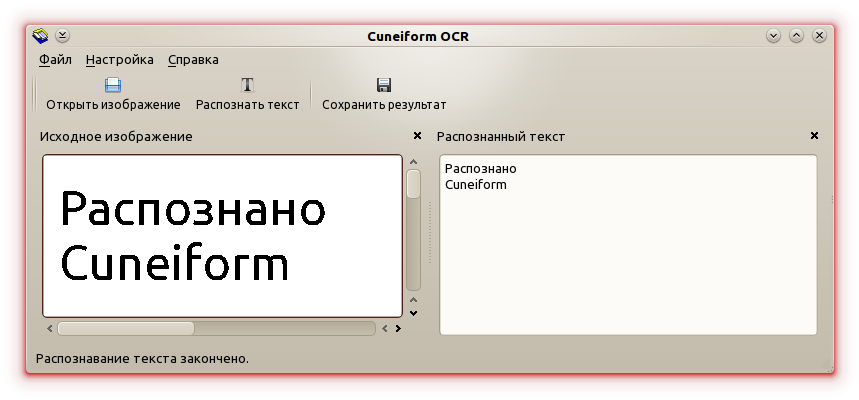
It was decided to use YAGF. It is also written in
So installation. In Ubunt, by the way, version 0.7 is available from the repositories. Version 0.9 is the latest at the moment. The optional argument "-DCMAKE_INSTALL_PREFIX = / your / dir" will install cuneiform in the correct directory. You can run it with the following arguments: Specifies the language of the document. Of the possible ones: eng (default) ger fra rus swe spa ita ruseng ukr srp hrv pol dan por dut cze rum hun bul slo lav lit est tur.
 wget http://launchpad.net/cuneiform-linux/0.9/cuneiform-linux-0.9/+download/cuneiform-linux-0.9.0.tar.bz2
 tar xvjf cuneiform-linux-0.9.0.tar.bz2
 cd cuneiform-linux-0.9.0
 mkdir builddir
 cd builddir
 cmake -DCMAKE_BUILD_TYPE=debug ..
 make
 make install
-l-oSaves to a file.
-fThe format of the received text. Of the supported: text (default), html, rtf, smarttext (plain text with TeX paragraphs), hocr (hOCR HTML format), native (Cuneiform 2000 format)
--dotmatrixOptimization of the script for an image printed using a matrix printer.
--faxOptimization of the script for the image printed using fax.
--singlecolumnDisables page analysis and implies that our image consists of one column of text.
Usage example:
cuneiform -l ruseng -o /our/dir/text.txt /our/dir/book_1.tifGUI
Then I wanted a graphical interface for everyday needs. There are 2 pieces to choose from - these are YAGF and Cuneiform-Qt :
It was decided to use YAGF. It is also written in
qtand requires another spellchecker package aspell. Download, install: wget http://symmetrica.net/cuneiform-linux/yagf-0.8.1.tar.gz
tar xvfz yagf-0.8.1.tar.gz
cd yagf-0.8.1/
cmake ./
make
make install