 May 30, 2010 at 17:35
Enable IPv6 on dd-wrt
If you believe the statistics on tunnelbroker.net, then a year and a half is left until the pool of IPv4 addresses is exhausted. And I decided to tell how to transfer my router running dd-wrt to the new protocol. Tested on Dir-320, but should work on any other Auchan router that is supported by dd-wrt .
Unfortunately, the latest versions (24 r13064) do not support IPv6. Therefore, we take this homemade product and flash it. Personally, I downgraded (is there a normal Russian analogue to this word? :)) from 13064 to 10070 and did not reset the settings.
Next, go to the Hurricane Electric website, where we register, drive in our real IPv4 address (Create a Regular tunnel), get the list of settings and our new IPv6 address. From the whole list, we will be interested in three lines: Server IPv4 address, Server IPv6 address and Routed / 64.
Now we proceed to the settings directly inside dd-wrt.
We go to the web-interface using the links:
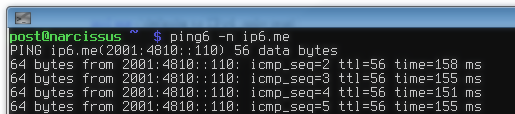
This completes the dd-wrt configuration. On customers, if you have a boxed product, you do not need to do anything. It remains only to reboot the router and check the operability by ping (for example, as in the first picture) or by going to the kame.net website . If the turtle moves, then everything is in order.
For a more thoughtful analysis, there is a bit of a messy but useful document on the dd-wrt website
Unfortunately, the latest versions (24 r13064) do not support IPv6. Therefore, we take this homemade product and flash it. Personally, I downgraded (is there a normal Russian analogue to this word? :)) from 13064 to 10070 and did not reset the settings.
Next, go to the Hurricane Electric website, where we register, drive in our real IPv4 address (Create a Regular tunnel), get the list of settings and our new IPv6 address. From the whole list, we will be interested in three lines: Server IPv4 address, Server IPv6 address and Routed / 64.
Now we proceed to the settings directly inside dd-wrt.
We go to the web-interface using the links:
- Security / Firewall : remove the daw from Block anonymous WAN requests (ping) so that our broker sees us.
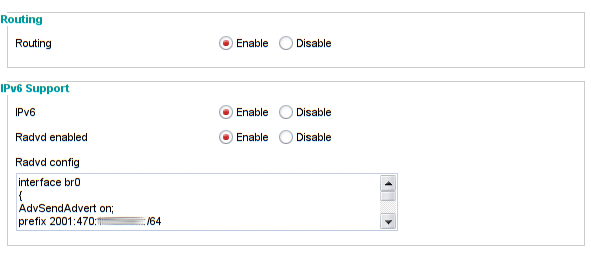
- Administration / Management : enable IPv6 and Radvd
- In the radvd config field, insert the following passage:
replace your_Routed_64 with what you have in the line Routed / 64
interface br0

{

AdvSendAdvert on;

prefix ваш_Routed_64

{

AdvOnLink on;

AdvAutonomous on;

};

}; 
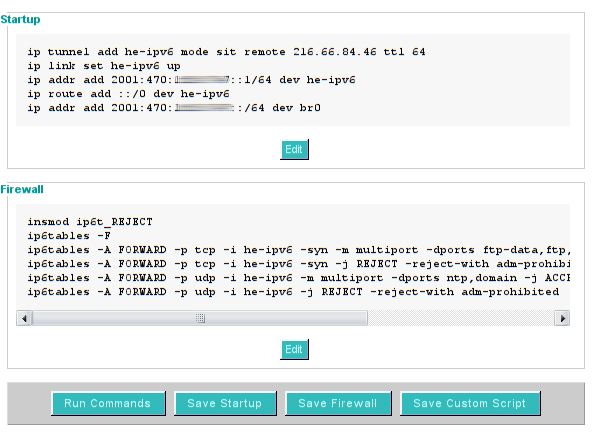
- Administration / Commands : click on Save Startup
- We drive into the upper field:
Replacing accordingly:
your_Server_IPv4_address - Server IPv4 address
your_Server_IPv6_address - Server IPv6 address
your_Routed_64 - Routed / 64
ip tunnel add he-ipv6 mode sit remote ваш_Server_IPv4_address ttl 64

ip link set he-ipv6 up

ip addr add ваш_Server_IPv6_address dev he-ipv6

ip route add ::/0 dev he-ipv6

ip addr add ваш_Routed_64 dev br0 - Administration / Commands : click on Save Firewall
- We drive in the upper field:
insmod ip6t_REJECT

ip6tables -F

ip6tables -A FORWARD -p tcp -i he-ipv6 -syn -m multiport –dports ftp-data,ftp,ssh,smtp,http,https,ntp,domain -j ACCEPT

ip6tables -A FORWARD -p tcp -i he-ipv6 -syn -j REJECT -reject-with adm-prohibited

ip6tables -A FORWARD -p udp -i he-ipv6 -m multiport -dports ntp,domain -j ACCEPT

ip6tables -A FORWARD -p udp -i he-ipv6 -j REJECT -reject-with adm-prohibited - The result should be like this:
This completes the dd-wrt configuration. On customers, if you have a boxed product, you do not need to do anything. It remains only to reboot the router and check the operability by ping (for example, as in the first picture) or by going to the kame.net website . If the turtle moves, then everything is in order.
For a more thoughtful analysis, there is a bit of a messy but useful document on the dd-wrt website









