 April 11, 2010 at 18:09
A small life hack for uTorrent that helps to clear garbage in the download folder
Surely many of us on our computer have a folder called “Downloads” (or “Unsorted”, or some other), where we save the files downloaded by the torrent. Usually in this folder I have a hell and a mess, because I haven’t listened to something yet, I haven’t looked at something, and I simply forgot to delete something or left it to be heard, because I was too lazy to rehash it. In this small topic, I propose a simple way (for Windows) to use tags in uTorrent to automate the process of scattering files into categories.
Of course, you can immediately save it where you want to add a file, but often you think about it already when you set the torrent to download. So here I came up with a way the following way to sort files:
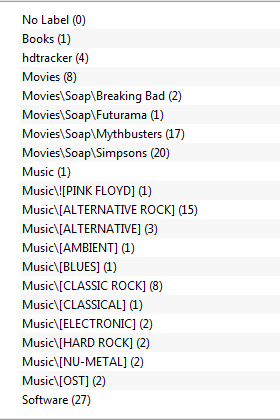
. At the same time, backslashes in the title of the label successfully scatter music by style, series by name, everything else - in their folders. Now there will be no garbage in the download folder and files may continue to be distributed.
This method is better than saving the download directly to the desired folder in that you can add a tag after the download starts, if you forgot to do it when you open the torrent file. There are still minuses - adding a tag to the completed download will not transfer it to the desired folder.
Under MacOS and Linux (depending on the skills of the torrent client), the same method should work, but using direct slashes.
Of course, you can immediately save it where you want to add a file, but often you think about it already when you set the torrent to download. So here I came up with a way the following way to sort files:
- We configure folders for saving files in the client. At the same time, do not forget to tick “Append the torrent's label” (the torrent label will be assigned to the name of the file / folder):
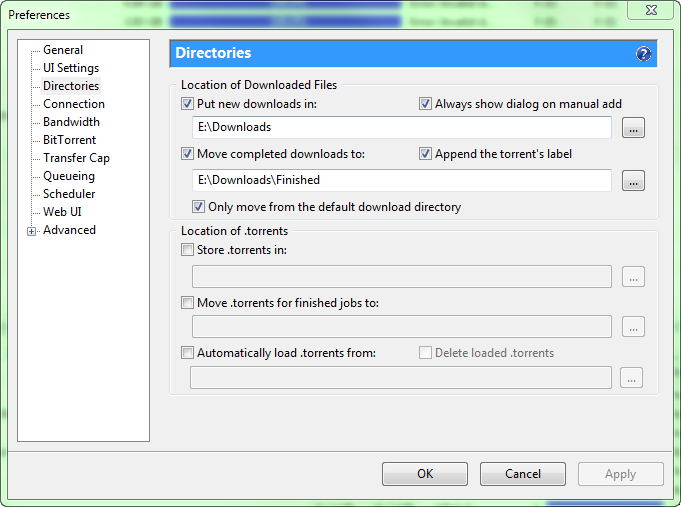
- And now the magic - the trick of writing labels in which we will use backslashes to indicate folders to which files will be moved when the download is completed will help us. It will look something like this:


This method is better than saving the download directly to the desired folder in that you can add a tag after the download starts, if you forgot to do it when you open the torrent file. There are still minuses - adding a tag to the completed download will not transfer it to the desired folder.
Under MacOS and Linux (depending on the skills of the torrent client), the same method should work, but using direct slashes.









