Open source PayPal utility suite for cross domain interaction
- Transfer
The author of the material, the developer of PayPal, describes a set of tools for cross-domain interaction.

We at PayPal write a lot of javascript code that ultimately starts working on other websites and other domains. A vivid example is checkout.js , an integration script that completely covers the process of ordering and paying for an order using our service, which allows merchants to easily and easily integrate our button and ordering mechanism into their sites.
Running our code on third-party sites is fraught with a huge amount of risk and pitfalls, but there are some key points:
Last year, we decided to focus on bringing together a truly powerful set of tools that helps to avoid these pitfalls and create a great user experience without having to constantly worry about whether messages get through and all windows are drawn.
We have opened the entire source code set. If you want to create interactions that work with your system from other sites or simply between different domains within your organization, then the search ends here.
First, the main thing. We wanted to create an intelligent procurement on the basis of which all the tools we planned would work. We have a formal list of technologies that we like, but combining them into some kind of qualitative whole task is not an easy one. We decided to maximally simplify our work in the future and therefore whenever we want to publish a new cross domain library or tool, we fork grumbler and start coding without worrying about pre-setting any environment or tools.
→ Read more by reference

The first real technical problem we wanted to solve was the message exchange between windows and i-frames. Do you think you can just take
Post-robot is designed to solve all these problems in one fell swoop, providing a stable and reliable way to send messages and receive responses.
→ Read more by reference

We love using React, and we like the idea of components that work according to the “data down, action up” principle, which is great in its simplicity. At the same time, the concept of React is aimed at rendering the user interface directly on your page, without any frames or cross-domain restrictions. But there is one significant "but": we would never even try to download React on a site that does not belong to us.
We asked ourselves: what if we include iiframes and pop-up windows in React-like components to which we could directly pass properties and callbacks and allow child windows to directly call functions passed by the parent?
Iframes are usually not suitable for this. That is, in normal situations using
In addition, it automatically adjusts bindings to popular frameworks, such as React, Angular, Vue, and others, which allows you to draw the iFrames in your application in the native way without any need to worry about how badly the iFrames usually behave.
→ Read more via link
→ And this is how we use xcomponent at PayPal
Guided by the same considerations as in the case of grumbler, we wanted to simplify the work on the xcomponent components as much as possible, making it so that setting up the environment and the tools does not slow down the work. Everyone loves when you can just start coding.
Therefore, we have released xcomponent-demo - a template that you can fork and start working on. It has everything you need for building, testing, publishing, and even static typing your code and publishing x-components for general use.
Working with interdomain windows is a tricky thing. There are many questions. For example, how to find out for sure that the window of another domain is closed? What is his domain is yours? What are its children? Browsers provide simple APIs for some of these tasks, but in each browser everything turns out differently.
With cross-domain-utils, we tried to create a library of helper methods designed to help with common cases that simplify working with cross-domain windows and save you from having to constantly worry about getting errors or warnings in the console. The tool, among other things, allows us to avoid really strange extreme cases, like this:
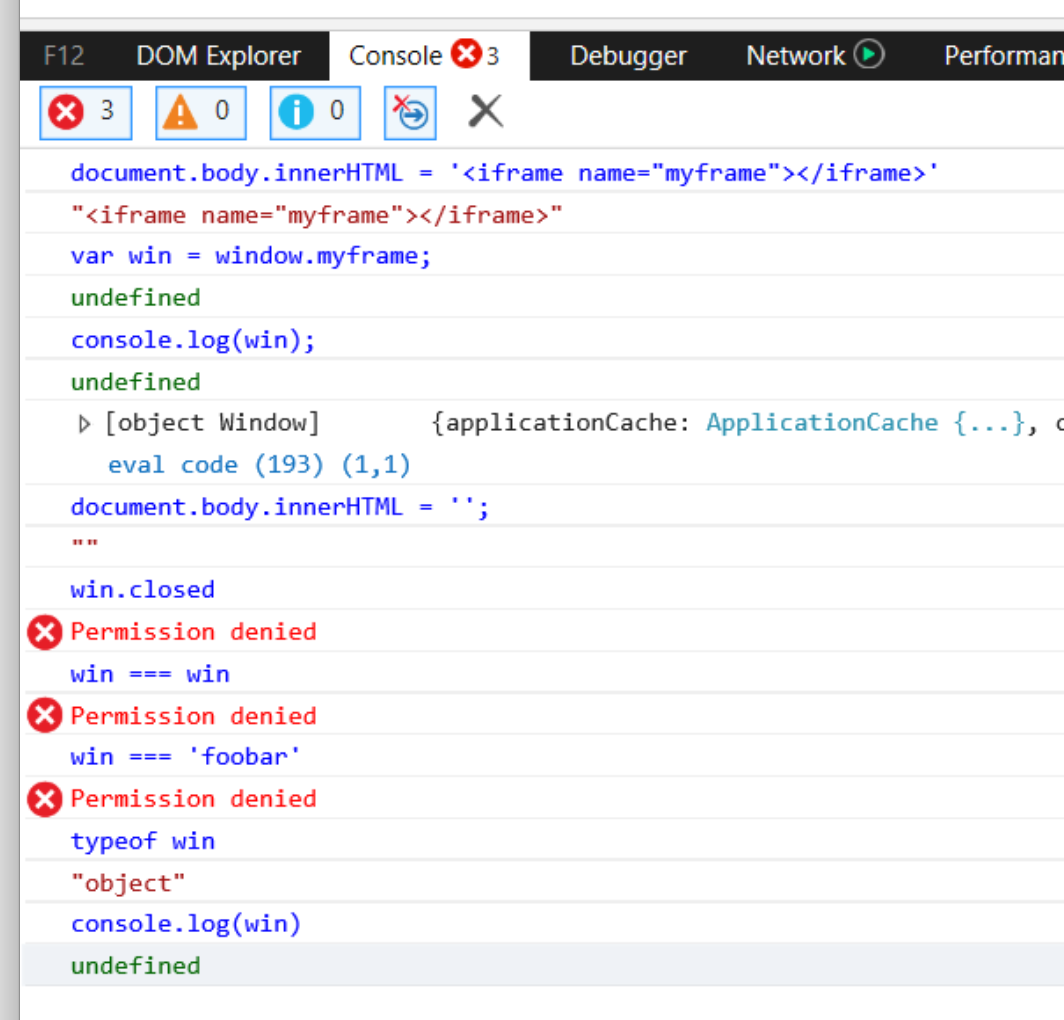
Edge, as always, in its repertoire.
Storing window objects is a costly process in terms of RAM, even if the window whose reference you are storing is closed.
WeakMaps is ideal for storing window data because:
The only problem is that many existing WeakMap pads are trying to be keyed
Cross-domain-safe-weakmap, by contrast, is designed to make working with cross-domain windows using their keys and the WeakMap native implementation (if available) to be as predictable and reliable as possible.
Many browsers simply de-prioritize everything that is sent to
Therefore, the solution is simple: we refuse
The problem is that many of the existing intermediate promis shells, in the absence of helpers, seem
zalgo-promise tries to solve this problem by putting all promises in synchronous mode by default. This means that if they are enabled synchronously, the transferred
→ Read more by reference
One of the important points about running code on other domains is that you need to know what is happening and how people use your products. And at least you need to know about those cases when the code causes any erroneous scenarios or breaks someone’s site.
On the other hand, there is no need to send one signal after another or write to the log a hundred requests in a row for each event for which you wanted to record.
beaver-logger tries to solve this problem by selecting and compiling logs and periodically dropping them to your server. It even includes the server component of the node to receive logs, but you can freely adapt it as you wish for any favorite platform.
CORS - headache. Getting the correct headers requires setting up each individual endpoint on the server. And if we are not talking about a GET request, then CORS forces us to make additional exchange operations in order to determine whether it is safe to make one or another final request.
fetch-robot is a new experimental module aimed at solving this problem. It allows you to publish in one place a manifest that defines URLs that can be called, as well as by whom they can be called and which headers and other fields can be used.
It shows the contents of URLs with a different domain through the i-frame. With the help of post-robot, this same iframe conducts all messages through itself, thus avoiding the problem of additional interactions (since all checks are performed on the client side, inside a trusted frame).
→ Read more at the link
Thank you all for reading, and if you have any ideas about what tools are missing in the set for cross-domain interaction or what can be improved in them, please write to the author!
- Daniel, PayPal Checkout Development Team

We at PayPal write a lot of javascript code that ultimately starts working on other websites and other domains. A vivid example is checkout.js , an integration script that completely covers the process of ordering and paying for an order using our service, which allows merchants to easily and easily integrate our button and ordering mechanism into their sites.
Running our code on third-party sites is fraught with a huge amount of risk and pitfalls, but there are some key points:
- We definitely can not break any sites. This means that we do not modify in any way global variables that we did not create, including polyfills for browser APIs. We do not do this, since this approach almost always makes tracking bugs almost impossible.
- But sites can even break us, which they do quite often. One of recent examples: the site re-recorded
Array.prototype.toJSONthat led to a breakdownJSON.stringify. Many websites include polycompleteWeakMap, which, unlike its native version, does not work on cross-domain window objects. Therefore, without additional preliminary checks, we can only trust our own code. - Cross-domain restrictions (describing what can and cannot be done with an iframe or pop-up window containing content from another domain inside) are not completely clear, and the rules often change depending on which browser you are in. For example, in IE and Edge, you literally cannot send a message between the pop-up window and the parent window if they have different domains. This can be done only by resorting to degrading hacks.
- Some browsers give out really weird stuff. For example, the only effective method of checking the domain of a window is to execute
try/catchin order to gain access or set a property of a window object. But even with this in mind, Safari insists that the corresponding origin error be displayed on the console for this action. This problem turned into a confusion generator: our merchants wrote a bug report, and we told them that this error should be ignored. - Constraints conceived as a means to combat intrusive advertising often interfere with the normal operation of our code on other sites. For example, it is possible to open a pop-up window only at the very moment when the user clicks on our button. Try us to do some asynchronous interaction, we are finished: the browser will block the pop-up window, even though its appearance was formally the result of the user’s actions. In addition to this, restrictions on third-party cookies, conceived to prevent the collection of information on advertising, almost always impede our attempts to track user sessions in iFrames.
Last year, we decided to focus on bringing together a truly powerful set of tools that helps to avoid these pitfalls and create a great user experience without having to constantly worry about whether messages get through and all windows are drawn.
We have opened the entire source code set. If you want to create interactions that work with your system from other sites or simply between different domains within your organization, then the search ends here.
grumbler
First, the main thing. We wanted to create an intelligent procurement on the basis of which all the tools we planned would work. We have a formal list of technologies that we like, but combining them into some kind of qualitative whole task is not an easy one. We decided to maximally simplify our work in the future and therefore whenever we want to publish a new cross domain library or tool, we fork grumbler and start coding without worrying about pre-setting any environment or tools.
→ Read more by reference
post-robot
The first real technical problem we wanted to solve was the message exchange between windows and i-frames. Do you think you can just take
window.postMessageand start messing messages right and left? Think again:- There are no answers or callbacks, which makes querying data from another window or getting data from it in response to a very tricky business.
- IE / Edge does not allow you to use postMessage between the pop-up and parent window if their domains are different.
- There is almost no error handling. As, however, and the way to determine that another window generally received your message.
- You cannot send more interesting data types, such as functions, promises, error objects, and others.
Post-robot is designed to solve all these problems in one fell swoop, providing a stable and reliable way to send messages and receive responses.
→ Read more by reference
xcomponent
We love using React, and we like the idea of components that work according to the “data down, action up” principle, which is great in its simplicity. At the same time, the concept of React is aimed at rendering the user interface directly on your page, without any frames or cross-domain restrictions. But there is one significant "but": we would never even try to download React on a site that does not belong to us.
We asked ourselves: what if we include iiframes and pop-up windows in React-like components to which we could directly pass properties and callbacks and allow child windows to directly call functions passed by the parent?
Iframes are usually not suitable for this. That is, in normal situations using
window.postMessageyou can only send simple objects and lines down to the iframe and back up to its parent. But with xcomponent, you have the ability to render an iframe without any need to set up any message handlers: you will simply transfer data and functions directly to the iframe, and it will directly receive any properties that you pass to it in the object window.xprops. In addition, it automatically adjusts bindings to popular frameworks, such as React, Angular, Vue, and others, which allows you to draw the iFrames in your application in the native way without any need to worry about how badly the iFrames usually behave.
→ Read more via link
→ And this is how we use xcomponent at PayPal
xcomponent-demo
Guided by the same considerations as in the case of grumbler, we wanted to simplify the work on the xcomponent components as much as possible, making it so that setting up the environment and the tools does not slow down the work. Everyone loves when you can just start coding.
Therefore, we have released xcomponent-demo - a template that you can fork and start working on. It has everything you need for building, testing, publishing, and even static typing your code and publishing x-components for general use.
cross-domain-utils
Working with interdomain windows is a tricky thing. There are many questions. For example, how to find out for sure that the window of another domain is closed? What is his domain is yours? What are its children? Browsers provide simple APIs for some of these tasks, but in each browser everything turns out differently.
With cross-domain-utils, we tried to create a library of helper methods designed to help with common cases that simplify working with cross-domain windows and save you from having to constantly worry about getting errors or warnings in the console. The tool, among other things, allows us to avoid really strange extreme cases, like this:
Edge, as always, in its repertoire.
cross-domain-safe-weakmap
Storing window objects is a costly process in terms of RAM, even if the window whose reference you are storing is closed.
WeakMaps is ideal for storing window data because:
- They do not store the reference window object when it is no longer used elsewhere.
- It is impossible to directly set the properties of an interdomain window, therefore the data association with the window (for example, a callback that needs to be called when the window is closed) is difficult to implement. Using WeakMap simplifies this process. To do this, simply use the window as a weakmap-key, and then you can store any data you want.
The only problem is that many existing WeakMap pads are trying to be keyed
Object.defineProperty, which immediately leads to failure in cases where the key is a cross-domain window with restricted access. Cross-domain-safe-weakmap, by contrast, is designed to make working with cross-domain windows using their keys and the WeakMap native implementation (if available) to be as predictable and reliable as possible.
zalgo-promise
Many browsers simply de-prioritize everything that is sent to
setTimeout, if the browser tab in which your code is working is not in focus. Therefore, when you are working on something that should work in a pop-up window, and at the same time you need to send a message to the parent and ask him to do something ... In this case, any setTimeoutparticular will slow down the work of the parent. Therefore, the solution is simple: we refuse
setTimeoutfor any critical ways to execute the code, right? The problem is that many of the existing intermediate promis shells, in the absence of helpers, seem
setImmediateto use setTimeoutto ensure that the transferred.thenThe function is called asynchronously. Therefore, if you want to use promises in various browsers and at the same time do so that the code runs in windows without focus, then you are a little unlucky. zalgo-promise tries to solve this problem by putting all promises in synchronous mode by default. This means that if they are enabled synchronously, the transferred
.then()function will also be called synchronously. It is called zalgo-promise because we literally decided to release zalgo (after careful consideration of all the pros and cons). → Read more by reference
beaver-logger
One of the important points about running code on other domains is that you need to know what is happening and how people use your products. And at least you need to know about those cases when the code causes any erroneous scenarios or breaks someone’s site.
On the other hand, there is no need to send one signal after another or write to the log a hundred requests in a row for each event for which you wanted to record.
beaver-logger tries to solve this problem by selecting and compiling logs and periodically dropping them to your server. It even includes the server component of the node to receive logs, but you can freely adapt it as you wish for any favorite platform.
fetch-robot
CORS - headache. Getting the correct headers requires setting up each individual endpoint on the server. And if we are not talking about a GET request, then CORS forces us to make additional exchange operations in order to determine whether it is safe to make one or another final request.
fetch-robot is a new experimental module aimed at solving this problem. It allows you to publish in one place a manifest that defines URLs that can be called, as well as by whom they can be called and which headers and other fields can be used.
It shows the contents of URLs with a different domain through the i-frame. With the help of post-robot, this same iframe conducts all messages through itself, thus avoiding the problem of additional interactions (since all checks are performed on the client side, inside a trusted frame).
→ Read more at the link
Thank you all for reading, and if you have any ideas about what tools are missing in the set for cross-domain interaction or what can be improved in them, please write to the author!
- Daniel, PayPal Checkout Development Team









