January 28, 2010 at 22:12
Add error box to ExtJS windows
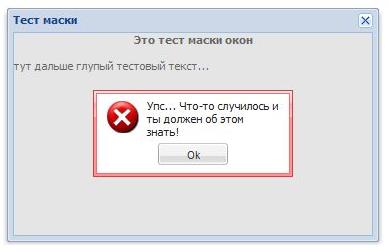 Hello, Habrachelovek! Now I’ll tell you about the small Ext.Window extension from ExtJS, which is popular in some circles of the JavaScript Framework. This extension is designed to block a separate window and display an error message.
 I hope that you know what ExtJS is, but not much better than me, otherwise you will not be interested ...
There is a component in ExtJS - Ext.Window , which is a window. And he has a body (property) - body , which has a mask () method , because it is Ext.Element . This method covers the window with a veil, hinting to the user that it is necessary to wait for something. You can also display a text explaining what actually has to wait. To do this, pass a message string to the method.
So, I needed such a method that would report an error specifically for this window, without acting on other parts of the interface. But at the same time it required a user response, i.e. so that the user had no suspicion “something is not working,” and he knew “yeah, this does not work and that’s why!” This method should be easy to call and quickly execute, and at the same time be part of the window class. Because there can be many windows at the same time, the standard error reporting tools ( Ext.MessageBox ), due to their modal operation, did not even come close to me.
Having rummaged in the bowels of mask () and the reverse unmask () , it was decided to expand the window class with its own method based on these two. Seeing how mask ( str ) worksI realized that it does not suit me very well, because does not provide ready-made containers. But thanks to the trepanation of this method, I figured out CSS dies.
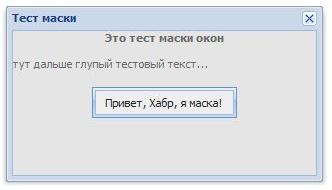
Without hesitation, I threw a socket in which I comfortably placed a message line, an error icon, and an “Ok” button:
new Ext.Panel({

          renderTo: SomeDom,

          width: 200,

          height: 80,

          border: false,

          cls: 'win-error-mask',

          bodyCfg: {cls: 'win-error-mask-icon'},

          html:'Тут сообщение об ошибке. Оно может быть длинным...',

          buttonAlign: 'center',

          buttons: [new Ext.Button({

              text: 'Ok',

              width: 70,

              handler: function (){

              }

            })]

          }

          );
Having experimented with the panel, I achieved the display I needed, after which I started writing CSS for it based on what I saw in mask. In fact, everything was already ready, you just had to pull it on the panel and change the colors. There were 4 such modified clones:
.win-error-mask {

  z-index: 20001;

  position: absolute;

  top: 0;

  left: 0;

  border: 1px solid;

  background: repeat-x 0 -16px;

  padding: 2px;

  border-color: #e03939;

  background-color: #fe9295;

  background-image: url(resources/tb-red.gif);

}


.win-error-mask div.x-panel-bwrap {

  padding: 5px 10px 0px 10px;

  border: 1px solid;

  border-color: #f86c6c;

  background-color: #fff;

}


.win-error-mask div {

  background-color: #fff;

  color: #222;

  font: normal 11px tahoma, arial, helvetica, sans-serif;

}


.win-error-mask-icon {

  background: transparent no-repeat center left;

  background-image: url(resources/icon-error.gif);

  padding-left: 40px;

  padding-bottom: 36px;

}
I note that I started screwing these CSS on a simple panel, while it was not yet part of the Ext.Window class extension , because ExtJS is especially relevant for the upstream development model when implementing logic blocks.
Next, it was a small matter - to wrap all this in a function and stick to the window class. ExtJS has tons of documentation on working with classes and OOP in ExtJS, so if something is not clear, RTFM . And here is my result with a couple of comments:
Ext.ux.Window = Ext.extend(Ext.Window, {

  errorMaskPanel: null, // панель тут для удобства обращения

  errorMask: function(errorMsg){

    this.body.mask(); // Накрываем окно маской

    this.errorMaskPanel = new Ext.Panel({ // Создаем панель...

      renderTo: this.body.dom, // По аналогии с mask(str) рисуем в тело окна

      width: 200,

      height: 80,

      border: false,

      cls: 'win-error-mask',

      bodyCfg: {

        cls: 'win-error-mask-icon'

      },

      html: errorMsg,

      buttonAlign: 'center',

      buttons: [new Ext.Button({

        text: 'Ok',

        width: 70,

        handler: function(){ // Ну и по нажатию Ok все убираем

          this.body.unmask();

          this.errorMaskPanel.destroy();

        },

        scope: this // Функция работает в контексте окна

      })]

    });


    this.errorMaskPanel.el.center(this.body.dom); // Центрируем...

  }

});
* yes, I packed everything into my Window class in ux space, and did not replace the standard Ext.Window
This is how easy and simple (maybe somewhere else crookedly) extend the ExtJS base classes.