 January 27, 2010 at 01:14
ModX and Drupal: Different Stories
 Before acquaintance with CMS ModX , an article was planned to compare these two systems, especially after the topic “Comparison of Drupal, MODx (and other systems) in a working project” appeared on drupal.ru where it was suggested that competitions would figure out which system is better.
 After a short acquaintance with ModX, all questions disappear by themselves and there can be no question of any comparison.
To begin with, these two CMS are used for different purposes and they are not interchangeable. Drupal is designed for mini-portal sites and above, while I classify ModX as a good designer of business card sites. The scope of ModX ends on sites with articles and news at the same time. And to start a debate that from ModX you can create larger websites and even a large portal is also true, but with comparable time costs you can create this large portal from scratch.
But ModX does great business card sites, has its own file download manager, has a built-in TinyMCE editor, a multilingual administrator interface, an intuitive installation wizard, and much more. And at the same time, making business card sites on Drupal is a bit wrong, the fact of allocating 64MB of RAM for a business card site of 20 pages and hosting for this “project” can cause hysterical laughter among many web developers.
In general, as I said above, I’m not going to make any comparison, but ModX is worth writing about it.
Introduction and first approach to the system
ModX is aimed at small sites, has: API, Ajax, CNC, meta tags, user groups. The presence of some technologies is even surprising, for example, the built-in analogue of CCK, only under the name "template variables".
We will omit the system requirements, they do not differ from most systems: PHP, MySQL, Apache / IIS, since the system is designed for business card sites, resource consumption is significantly lower than Drupal / Jumla.
Documentation and Community
I think it’s already clear that the system is more than simple business cards, but novice developers in the development of the system run into a lack of documentation. The number of printed books under Drupal, Joomla, Wordpress is measured in dozens, and even more under ModX there are no sensible books.
The documentation is scarce and mostly in English, in Russian I did not find a single site that would have all the information for creating a site, a Google search can find a couple of dozen sites that have 5-7 small articles.
There is a support forum, but I did not like to read it, you can count knowledgeable people on the fingers of the hand, and those who respond even less. I can give my question and the answer to it to clarify the situation. To my question “How to implement the terms and categories of materials?” I received the answer “Is this a question for telepaths?” True, a little later they gave me a link in which direction to dig to get an answer, and the discussion ended that I myself found a ready-made solution in the documentation ( using tags using Ditto ). In the course of studying sludge, pitfalls will still pop up, but no more than in other systems, so let's move on to the good.
Website template through the eyes of ModX
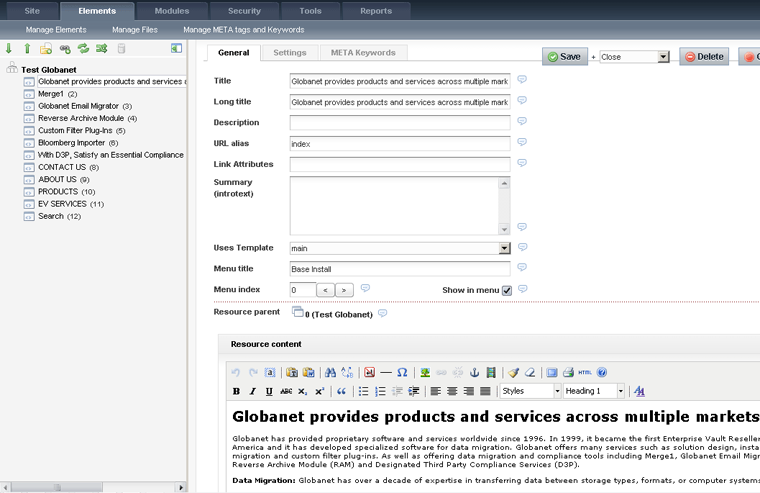
The layout designer under ModX was much more fortunate than the drupalers. The implementation of the design is simplified, but the functionality does not suffer. For layout of the template, only an installed site is needed, the template and its parts are stored in the database, therefore creating template editing is done right in the admin panel, which speeds up the layout process, although the advantage of an external editor is undeniable (backlit is easier to write).
The next useful simplification is the number of templates - there can be many for one site. For each template, we come up with a name and when creating a page from the list, select the appropriate template, everything is simple.
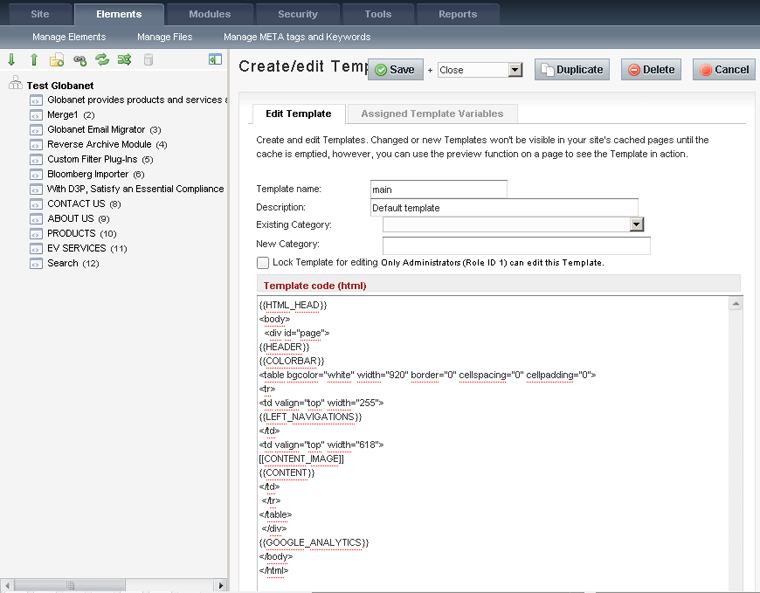
The template itself can consist of blocks and there are several types of these blocks:
{{Имя_чанка}}
chunk - a fragment of HTML-code (possibly using JavaScript-code). which can be used in the template.[[Имя_сниппета]]or[!Имя_сниппет!]
snippet - snippet of the PHP code. The difference between these options is that the first option is cached, the second is not.[*имя_элемента*]
is replaced with the corresponding element of the MODx document.[(Имя_переменной)]
replaced by the MODx system variable.[~ИД~]
replaced by a link to the document with the corresponding id.[+Имя_подстановщика+]
is replaced by a substitute.
Chunks and snippets can have multiple attachments.
Now we look at our main template:
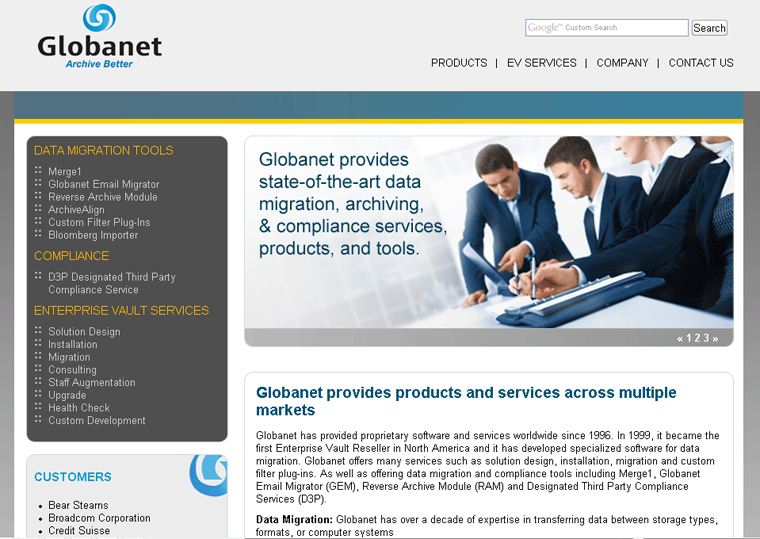
and the result:
the same page in the editor:
A bit about the insides
More screenshots can be seen here http://wiki.modxcms.com/index.php/MODx_0.9.5_in_screen_captures The
admin panel is made using Ajax and copes with its responsibilities perfectly. The system consumes less resources than Drupal, in addition to any modern CMS has a cache system. The cache is saved to files, while the cache file is a serialized array.
We will consider the IPA in detail and make an article on the creation of the site until we will, but only touch on the process of expanding the site (adding articles, news).
When creating content, we can create a tree structure with multiple page nesting. We call one of the pages of the root folder “news” and save all the news in this folder. The first part of adding news on this is finished, now we need to conclude. Here, we simply create the SQL query ourselves, we ourselves monitor the correctness of the transmitted data and ourselves process the result of the query.
We also do the navigation of the pages with the handles of the old "old-fashioned" method, we check that we are passing the user to us in the Get query and passing this to the SQL query. If the programmer forgets to check, and the user passes “-1” as a page, we get an error from the muscle with the completion of the script, in this simple way you can create news, blogs, a forum and other portal functionality.
Functionality Extension
You can add functionality in several ways, this is installing plugins or snippets. How they are arranged inside is understandable and so (see above on adding news).
Most popular:
- eForm - creating and processing forms
- Ditto - a snippet for organizing information (blogs, news, articles, directories)
- Breadcrumbs - breadcrumbs current page path
- AjaxSearch - snippet for organizing site searches using Ajax
- Jot - commenting on materials
Total
This system makes clear its scope and copes well with all the tasks that a developer may face. The system allows you to create both simple and corporate business card sites. At the same time, the information output system is well thought out, it is possible to use several templates on the same site at the same time.
The system allows the developer to manipulate blocks and elements of the site. I am not attached to 2, 3-column templates. After starting the site on the server, all changes can be done through the admin panel. I would like to highlight content management separately, at the first steps it was unusual for me as a drupaler to use the admin panel and everything seemed not logical, but after an hour of mastering I would rate the admin panel at 9 points on a ten-point scale (I remove one point for lack of highlighting HTML / PHP code, though that editing it is embedded in the functionality).
Nothing extra and at the same time, you can easily edit any part of the site. The file manager is also well thought out, so downloading prices or media files is easily done through the admin panel.
Conclusion: ModX is an excellent system for creating business card sites. Drupal is a great system for bigger sites.
- via ShvetsGroup Author: Oleg Sidorenko










