December 10, 2009 at 15:22
Kodak Zi8 Camcorder - First Impressions
 This year, going on a trip to the New World, I decided to borrow a camcorder from a friend. In addition to publishing podcasts, text notes and photos, I was also going to share moving pictures with the world, accompanied by my “brilliant” comments. Despite the fact that I had never done video shooting before, the result of this experiment was several short video sketchesthat were favorably received by my online audience (mostly listeners to my podcasts, and my “followers” on Twitter). However, for myself, I noted that the camera that I used was definitely not suitable for me. Why? Because it, like most cameras of this line, is imprisoned for very patient people who have free time to process and edit the captured video material. Empirically, I found that such cameras are completely not “sharpened” for online video publishing “on the go”. My dilemma is this: Internet publishing, in my case primarily audio and video podcasts, is a hobby that should not take me too much time. However, at the same time, the quality of publications should be acceptable (in the case of audio, no worse than the Echo podcasts, in the case of video - no worse than the video podcasts of Dmitry Anatolyevich or Barak Huseynovich). That is, I need a reasonable compromise. On this path, I went picking up recording techniques for my podcasts. I decided to go the same way choosing a video camera. that is, thinking, I was able to articulate for myself several criteria that I should focus on when choosing a camera. So I need a camera:
1) compact
2) easy to use
3) internet-friendly
4) not very expensive (no more than $ 200)
Quite quickly I formed a list of competing models that more or less met these criteria. Here is the list:
Sony Webbie-HD
Vado HD
Kodak Zi8 (not to be confused with Kodak Zi6 )
Flip Ultra-HD
Samsung SC-MX20 (unlike other models on this list, has good optical zoom, but does not have the ability to shoot video in high definition High definition)
I will not torment the reader with the details of the struggle that unfolded in my head between these devices for the right to become the one on which I will stop my choice. Immediately I will give out the result: the camera from Kodak Zi8, which is called the Flip Ultra-HD killer, won (before the advent of Kodak Zip8, Flip Ultra-HD was the undoubted leader among the cameras of this line).
What distinguished her from this number of competitors and made her the killer of another popular model in this line? Like Vado, Sony Webbie, and Flip Ultra, this Zi8 camera is capable of shooting in HD mode, but the following moments are distinguished: the
presence of an image stabilizer,
in addition to the built-in microphone, the presence of a separate microphone input, the
ability to switch the camera to macro mode, the
presence of an HDMI input
For me personally, the biggest advantage seemed to be a separate microphone input. Very often, the built-in microphone picks up any sound “garbage” (especially if you shoot on the streets of a big city) and even small gusts of wind can make your recording unsuitable for publication.
The choice is made, the camera is bought. Now conclusions about the pros and cons can be done already on the basis of empirical experience. Since the camera fell into my hands not long ago, these notes are preliminary. that is, here I share my first impressions.
Appearance, design, housing, solutions:
pleases:
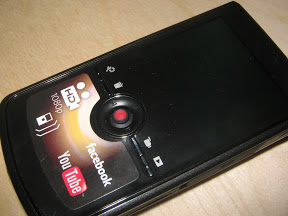 The camera is pleasant in appearance (there are several conservatively restrained color solutions),
minimalism of the control panel (under the viewfinder / viewer screen there is a joystick and 4 miniature buttons. The buttons are used to switch between camera modes: settings, deleting files, shooting, viewing. Using the joystick, you can choose between available options. As well as direct competitor (Flip Ultra -HD) Kodak Zi8 allows you to directly connect to a computer via a USB port.Inside the camera there is a very short, but quite flexible USB cable that, when you open a small lock, comes out of the slot on the side of the camera in which it is hidden Gen. It should be noted that despite the fact that this is the moving part of the camera, it is very high quality hidden and its presence is completely invisible.The same can be said for the two valve covers that close the HDMI and AV outputs on one side of the camera, and on the other - an SD card slot,
Large enough screen.
Upset: the case is too glossy and shiny, it is instantly smeared with fingers and loses its presentability.
The camera clearly does not have enough matte-rubberized parts-blotches in order to hold it securely in my hand (I recommend that you immediately attach the attached strap to it and remove it exclusively with the strap on your hand).
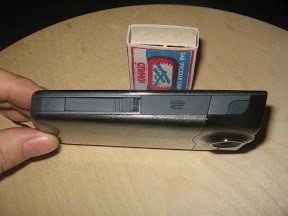 Unlike the classic camera shape or the solution proposed by Sony in one of the modifications of its Webbie, it is impossible to monitor shooting on the Kodak Zi8 if you are shooting without assistance (relevant for video bloggers). that is, if you shoot yourself, then you don’t see how it looks on the screen.
 Decision:experiment with a small mirror, find and remember a suitable position for this kind of shooting. Then shoot “from memory”.
Unlike the classic camera shape, the Kodak Zi8 cannot simply be placed on any surface to shoot from a stable position. The design of the camera absolutely does not allow this.
Solution: The most correct solution is to buy a simple desktop or full-fledged tripod. The weight of the camera is not large, and therefore relatively inexpensive tripod models are quite suitable for you.
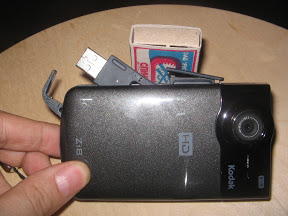 If you become the proud owner of this camera, first look in the settings and see which version of the firmware is installed there. Then check out the Kodak official website and update the firmware if necessary. This is important, since a number of bugs are eliminated in this way.
 Now in more detail about some features of this camera.
High Definition mode
First of all, a few words should be said about the notorious option for shooting in HD 1080p (high definition - high resolution) mode.
It is as if it is and it is as if it is not. I understood this before the purchase and therefore I was not at all disappointed. What I mean? The fact that switching the camera to this mode, you can really achieve an impressive picture, but only if shooting is done with a tripod, with perfect and constant lightening and you will shoot objects that do not move very fast and not very sharply, i.e. to shoot swans floating on a lake on a fine summer day - that's it! :)
This, in principle, applies to all similar models, so it is better for you to put up with this. Well, what do you want from a camera of this size and for the money? :)
Solution:In this mode, shoot only from a tripod, and only on fine days, and only swans floating on the lake, grandfathers playing chess, etc. (gopniks, husking seeds should not be removed). For shooting fast-moving objects, manufacturers recommend using a special 720p / 60fps mode. I bought a tripod from ERA (ECSA-3512) for 650 rubles and am quite happy with it. Upset: The image stabilization announced by the manufacturer is no good. At least she did not impress me at all. Decision:
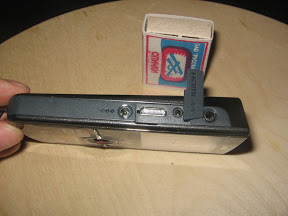
If you are shooting with your hands, try not to make sudden movements. It’s better to shoot while standing still. It is not advisable to shoot literally on the go, that is, to step and shoot at the same time. If this kind of shooting is inevitable, remember this and soften your movements. If you are going to shoot a “talking head” that stays in one place, but know that it will be a long time to speak, use a tripod. Do not overestimate yourself, your hand will get tired and this will affect the shooting. As far as I understand, post-processing software can significantly mitigate this defect, but this already goes against the concept of shooting and publishing video “on the go”. So I will resort to this tool only in exceptional cases.
Long-term and more serious solutions to the problem include: enrolling in yoga courses (we develop the ability to remain motionless), enrolling in ninja courses (learning to move feline softly and without jerking). Waiting and buying a new camera from this series with a real tangible presence of image stabilization.
Battery:
Pleased: There is no need to turn off the camera to charge the battery from the mains. i.e. shooting indoors can be done while charging the battery.
Upset:The camera does not work on standard finger batteries (AA, AAA), but on its own Kodak batteries. I haven’t done exact measurements myself yet, but the general impression is this: A camera with a fully charged battery and all the functions turned on, with a maximum brightness of the LCD screen, works for about an hour in 720p 60fps shooting mode. It really is unforgivably small.
Decision:we buy several batteries at once. I bought a couple and until I got into the situation, so I spent both in one shooting session. It noticeably increases the battery life by disabling the aforementioned image stabilization function (I read it on the English Internet that when disabling stabilization in 720p 60fps shooting mode, the battery life increases to 1 hour 41 minutes). I don’t know if I think in the right direction, but I think that the face recognition function can also be turned off for the sake of saving energy.
You can shoot indoors while charging the battery from the mains. Fortunately, the camera does not turn off in battery charging mode.
Recording and storing files:Kodak, trying to squeeze out its direct competitor with this model (Flip Ultra HD) chose a different method of data storage. In the case of Flip Ultra, the camera has a built-in carrier of a certain capacity, which cannot be increased. Kodak Zi8 has a very small built-in memory, which is only enough for a few minutes of shooting,
Sorry: The camera is sold without a card and therefore, having bought this camera, you will not be able to start shooting until you buy the SD card medium on which your files will be recorded .
Pleases:I can use several cards of different capacities. With intensive shooting, there is no need to constantly drop files on the computer to free up space. I bought a 32Gb card (San Disk Ultra # 4 15Mb / s) after formatting the card, the camera gave the following possible shooting duration:
HD mode -1080 p - duration 04:30:00
mode 720p / 60fts - duration 04:13:00
mode 720 p - duration 05:11:00
WVGA mode - duration 08:26:00
As you know, SD cards have different recording speeds. When buying, pay attention to this. It is not advisable to buy cards whose write speed is lower than 9Mb / s.
Microphone:
Pleased:. Having a separate microphone input is a huge plus, especially if you accompany the video series with your audio comments, or if you interview in a noisy place. There are a lot of options for its use (a narrowly focused microphone, a buttonhole microphone, a wireless radio microphone, the use of wind protection, etc.). I immediately ordered such a miniature Sony stereo microphone on Ebay in order to significantly improve the sound quality (I hope and wait).
The ability to adjust the sensitivity of the built-in microphone.
Upset: the sound quality of the built-in microphone is poor.
Additional options:
Pleased:The presence of macro mode. While I don’t particularly need him much, but for people who want to capture some small details and details (for example, for those who are constantly engaged in gadget reviews), this option is “golden”. So far, as far as I know, it is absent from all the above competing models.
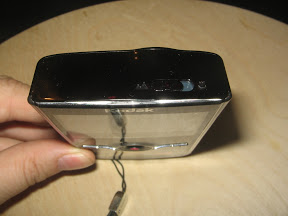
Upset: macro mode is activated by a mechanical switch located on top of the camera body. When switching, a click occurs and the lens twitches. It’s almost impossible to switch to another mode gently and imperceptibly during shooting.
That's all for now.
Summary:The most important thing is that the camera fully complies with the requirements that I presented to it: that is, it is completely imprisoned for fast Internet video publishing “on the go”. Compact, lightweight, always at hand, any footage can be published almost instantly on the Internet. This is a general remark, which so far outweighs all the discovered shortcomings and disadvantages of this model.
PS You won’t believe it, but by the time this article was written, the sun has not been seen in St. Petersburg for the fourth week. So the only thing there is is this stupid video from me and a bunch of videos from different people.
When I shot my stupid video, I was not aware that the stabilization is so terrible, so if you feel nauseous, I’m complaining about Kodak :)